当前位置:网站首页>登录 页面 + 总结心得
登录 页面 + 总结心得
2022-07-24 05:17:00 【ps笔记】
学习了一段时间,今天用 js+css+html 三个文件,从排版到写代码到三者相互引入嵌套完成。
第一步:先创建一个html文件,然后在里面写body的代码:如下:
<!DOCTYPE html>
<html lang="en">
<head>
    <meta charset="UTF-8">
    <meta name="viewport" content="width=device-width, initial-scale=1.0">
    <meta http-equiv="X-UA-Compatible" content="ie=edge">
    <title>页面登录</title>
    <link rel="stylesheet" type="text/css" href="index.css">
</head>
<body>
    <div id="login-box">
            <div class="toubu">
                    <a class="zhanghu" href="#">账户密码登录</a>
                    <div></div>
                    <a class="shouji" href="#">手机验证码登录</a>
                </div>
            <h1></h1>
        <div class="input-box">
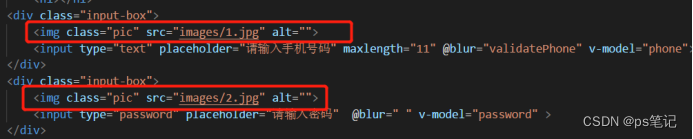
            <img class="pic" src="images/1.jpg" alt="">
            <input type="text" placeholder="请输入手机号码" maxlength="11" @blur="validatePhone" v-model="phone">
        </div>
        <div class="input-box">
            <img class="pic" src="images/2.jpg" alt="">
            <input type="password" placeholder="请输入密码"  @blur=" " v-model="password" >
        </div>
        <button @click="tiaozhuan">登录</button>
        <div class="dibu">
            <a class="wwanjimima" href="#">忘记密码 ? </a>
            <div></div>
            <a class="xinyonhuzc" href="#">新用户注册</a>
        </div>
    </div>
    <script type="text/javascript" src="https://cdn.jsdelivr.net/npm/vue/dist/vue.js"></script>
    <script type="text/javascript" src="fun.js"></script>
    <script type="text/javascript" src="index.js"></script>
</body>
</html>
第二步:在创建一个css文件,然后在里面写style代码:如下:
body{
    background-color:#637FFF;
}
#login-box{
    background-color: white;
    border-radius: 13px;
    text-align: center;
    margin: 0px auto;
    margin-top:100px;
    width: 350px;
    height: 400px;
}

#login-box h1{
    padding-top:60px;
    color: rgb(204, 201, 201);
}
#login-box .toubu{
    padding-top: 20px;
    margin-top: 100px;
}
#login-box .toubu div{
    display: inline-block;
    width: 100px;
}

.pic{
    position: absolute;
    margin: 0px auto;
}

#login-box .input-box {
    margin-top:15px;
}


#login-box .input-box input{
    border:none;
    background: none;
    border-bottom:rgb(202, 199, 199) 2px solid;
    padding: 5px 10px ;
    outline: none;
    color:rgb(156, 153, 153);
    padding-left:30px;
}

#login-box button{
    margin-top: 30px;
    width: 148px;
    height: 37px;
    border-radius: 20px;
    outline: none;
    border: none;
    background-image:linear-gradient(180deg, #637aFF 0% , #334AC8 100%);
    color: #ffff


}

.dibu{
    margin-top: 60px;
}
.dibu div{
    display: inline-block;
    width: 128px;
}

#login-box a{
    text-decoration: none;
    color: rgb(131, 128, 128)
}

#login-box a:hover{


    border-bottom: 3px solid rgb(105, 140, 236);
    padding-bottom: 8px;


}
第三步:在创建一个js文件,然后在里面写 script 代码:如下:
var app = new Vue({
    el: "#login-box",
    data: {
        phone: "",
        password:"",
    },
    methods: {
        validatePhone: function(){
            if(this.phone.length!=11 || this.phone.substring(0,3)!='138'){
                alert("请输入138开头的号码");
            }
        },
        validatePassword: function(){
            if(this.password.length < 6
            || this.password.search("[A-Z]") == -1
            || this.password.search("[a-z]")==-1
            || this.password.search("\\.")==-1){
                alert("必须要有1个大写,1个特殊符号:”.“,密码含数字和字母,长度需要大于6位");
            }
        },
        tiaozhuan: function(){
            window.location.href='http://baidu.com';
        }
    }
})
最终效果页面展示如下:


登录页面案例总结:
- 不懂超链接隐藏 <a>标签下的下划线保持距离用法:
#login-box a{
text-decoration: none; 先将<a>标签里面的下划线去掉
color: rgb(131, 128, 128) ;在设置字体颜色
}
#login-box a:hover{
border-bottom: 3px solid rgb(105, 140, 236); 设置下划线和下划线颜色
padding-bottom: 8px; 由于下划线是在内边距与字体的距离,直接设置padding底部即可拉开距离大小

2,当遇到两张图片置入,如果要其中指定一个pic时,在样式不知道有没有其他跟父子级方式来写,我是直接.pic{
position: absolute; 绝对定位
margin: 0px auto; 外边距自适应
}来写,目前还没找到方案。
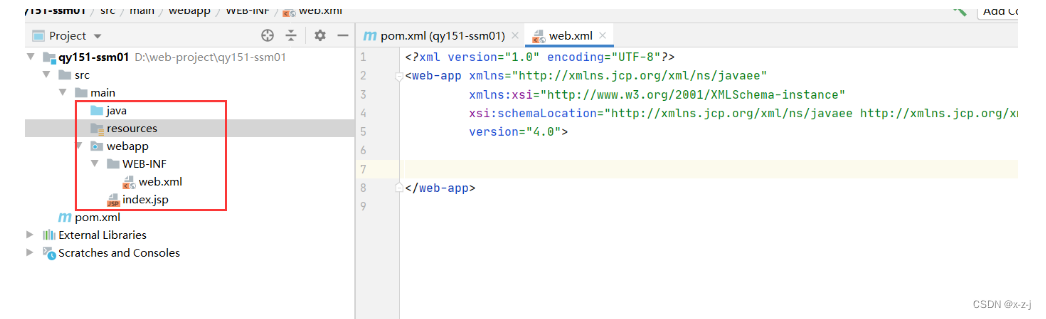
3,开始不懂在html引入js和css的文件,后面是通过查询得知。但这里遇到一个很重要的问题,就是当引入js文件时,一定一定要把<script>标签放在<body>的最后面,不可以放在前面,这样会导致引入不成功,出现报错。 
4,同时,如果您可以在js文件中在创建一个fun.js文件,用来存放js方法的,这样方便后面代码,代码执行时先走fun.js,后在到js文件,这样不会乱,因为后面做项目方法会很多,这样会更好提高效率和管理。

5,这个案例中出现的所有英文用法意思:
body:身体
background-color:#637FFF; 背景颜色
}
#login-box{ 白色盒子
background-color: white; 白色背景色
border-radius: 13px; 圆角
text-align: center; HTML元素中的文本排列到中间的意思
margin: 0px auto; 外边距自适应
margin-top:100px; 外边距头顶部设置100px
width: 350px; 宽
height: 400px; 高
}
#login-box h1{
padding-top:60px; 内边距头顶
color: rgb(204, 201, 201); 颜色
}
#login-box .toubu{
padding-top: 20px; 内边距头部
margin-top: 100px; 外边距头部
}
#login-box .toubu div{
display: inline-block; 行内块级元素
width: 100px; 高
}
#login-box .input-box {
margin-top:15px; 外边距
}
#login-box .input-box input{
border:none; 没有边框
background: none; 没有背景色
border-bottom:rgb(202, 199, 199) 2px solid; 边框底部颜色
padding: 5px 10px ; 内边距上下5px,左右10px
outline: none; 去除外轮廓
color:rgb(156, 153, 153); 颜色是浅灰
padding-left:30px; 内边距左边30px
}
#login-box button{
margin-top: 30px; 外边距头部
width: 148px; 宽
height: 37px; 高
border-radius: 20px; 圆角
outline: none; 去除外轮廓
border: none; 没有边框
background-image:linear-gradient(180deg, #637aFF 0% , #334AC8 100%); 渐变色
color: #ffff
}
.dibu{
margin-top: 60px; 外边框头部
}
.dibu div{
display: inline-block; 行内块元素
width: 128px; 宽
}
#login-box a{
text-decoration: none; 去除下划线
color: rgb(131, 128, 128)
}
#login-box a:hover{ 鼠标移动
border-bottom: 3px solid rgb(105, 140, 236); 边框底部
padding-bottom: 8px; 内边距底部
边栏推荐
- special effects - 星空宇宙背景特效
- 收藏==学废
- 在屏幕上绘制一个运动的茶壶,茶壶先慢慢向屏幕里面移动,越变越小,越变越模糊;然后慢慢变大,越变越清晰,一直往返重复。为场景添加光照,材质和雾效果。通过键盘’a’’s’’d’来选择不同的雾效模式
- libevent多线程服务端+客户端源码
- 关键字_02break与continue
- 7. 在屏幕上绘制一条贝塞尔曲线,并用反走样技术对曲线进行平滑处理。
- Geoserver REST API功能解析
- Generator generator, which generates only two methods
- 9.使用网格技术,在屏幕上绘制一个五角形。
- 数组_01forEach中的return
猜你喜欢





随机推荐
JS输出字符串中出现最多次数的字符
还原ui设计稿
一步一步带你学C(其一)
T 6-10
Constructor_ Map constructor
Some thoughts on being a professional
C语言进阶篇 二. 指针
牛客网刷题
构造函数_Map构造函数
面向 对象
MySQL 远程连接错误解决方法
Geoserver REST API功能解析
用C语言写出三子棋
数据类型概括
C#进程运行权限
special effects - 鼠标移动,出现自定义的表情拖尾
根据数组中对象的某个属性值进行排序
canvas - 圆形
Scikit learn notes
JS - 鼠标键盘配置 及 浏览器禁止操作