当前位置:网站首页>In depth understanding of line height and vertical align
In depth understanding of line height and vertical align
2022-06-25 04:59:00 【MomentYY】
In depth understanding of line-height and vertical-align
1. What is row height (line-height)?
line-height Used to set the minimum line height of text , It can be simply understood as the height occupied by one line of text . But the strict definition of row height is : Two line text baseline (baseline) Distance between .
So what is a baseline (baseline) Well ?
- Baseline is the same as Lowercase letters x The bottom aligned line , Refer to the following figure for details .

Pay attention to distinguish between height and line-height The difference between :
- height: The overall height of the element ;
- line-height: The height of a line of text in an element ;
- If you want the text to center vertically inside the element , Give Way line-height Equal to the element height that will do ;
2.vertical-align attribute
Refer to the official document for explanation ,vertical-align It will affect In line elements In a ** Row box (line boxes)** The vertical position in the . Simply speaking vertical-align You can set the alignment of inline elements on a line .
2.1. What is a line box (line boxes)?
Learn more about line boxes through these questions .
First think about , One div When the height is not set , Will there be height ?
- If div There's nothing in , There is no height ;
- If div There's something in , The content can hold up div Height ;
The content can hold up div What is the essence of height ?
- According to the explanation of line height above , Content has row height (line-height), The essence is that the height of the line is raised div Height ;
Here is another question , Why can row height hold up div Height ?
- This is because there is a row box , And the line box has a feature , It wraps the inline elements of each row ;
- And the text is a line high , The row box must cover the whole row height , The height of multiple row boxes is added together to form div Height ;

If this div There are pictures in 、 written words 、inline-block And so on , How do they align ?
- The default is baseline alignment ;
2.2. Learn more about baseline alignment
Inline level element baseline alignment , The following situations may occur :
(1) Situation 1 : Only words .
- The line height of the whole text wrapped in the line box ;

(2) Situation two : Existing words , And there are pictures .
- Align the bottom of the picture with the baseline of the text , That's why a few pixels are left at the bottom of the picture ;
- The row box wraps the entire row level element , Larger pictures will also be wrapped ;

(3) Situation three : Existing words , And there are pictures , also inline-block.
- inline-block And the bottom of the picture are aligned with the baseline of the text ;
- The row box wraps the entire row level element , The height is determined by the higher one ;

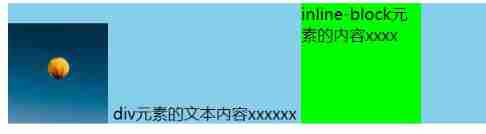
(4) Situation four : Existing words , And there are pictures , also inline-block, And give inline-block Set bottom margin .
- The row box will wrap the set bottom margin together ;

(5) Situation five : Existing words , And there are pictures , also inline-block, And give inline-block Add text inside .
- At this time inline-block Not bottom aligned , Instead, use the baseline of the last line of text inside to align ;
- although inline-block The box moves down as a whole , But the box must be wrapped in , So the height of the row box naturally becomes larger ;

summary :
The line box must contain all the contents of the current line ;
For the usual strange alignment , The principle is baseline (baseline) alignment ;
vertical-align The default value of is baseline;

Of different inline level elements baseline Where exactly ?
- Textual baseline It's the letters x The bottom of ;
- inline-block default baseline yes margin-bottom The bottom of ( If there is no bottom margin , It's the bottom of the box );
- When inline-block When it contains text ,baseline Is the last line of text letters x Bottom ;
- The image baseline It's the bottom ;
2.3.vertical-align The attribute value
baseline: The default value is 、 Baseline alignment ;
top: Align the top of the inner row box with the top of the row box ;

middle: The center point of the inner level box and the lower case letters in the parent box x Line alignment of the center point of ;

bottom: The bottom of the bar inner level box is aligned with the bottom of the line box ;
3. Realize the vertical centering of inline elements
3.1. Use vertical-align: middle
Set the height of the parent element to 300px, And the child element's line-height It's also set to 300px.
Sample code :
.box { background-color: skyblue; height: 300px; line-height: 300px; } img { vertical-align: middle; }<div class="box"> <img src="../img/eqq.webp" width="200" alt=""> div The text content of the element xxxxxx </div>Running results : You can find the picture setting
vertical-align: middle;after , Not vertically centered in the parent box , It is obvious that the distance from the upper edge is greater than that from the lower edge ;
Why is it that the upper part cannot be aligned vertically and centrally ?
- The reason is that most words will sink , therefore x The center point of is not on the centerline of the height of the parent element , The position should be slightly lower , So it leads to the phenomenon that the picture is aligned to the bottom ;
How to solve the above problems ?
- The reason is that the picture is set
vertical-align: middle;after , Must be written in small letters with the text x Align the center point of , So set the text size to 0 that will do ; - No font size , The words will not sink naturally , And no more text can appear in the line box , Once there is text, it will be found x Align with center point ;

- The reason is that the picture is set
3.2. Use relative+transform
Use vertical-align: middle Setting the vertical center is obviously troublesome , Therefore, this attribute is generally not used to set the vertical center of the element . In general use relative+transform.
Sample code :
.box {
background-color: skyblue;
height: 300px;
font-size: 80px;
}
img {
position: relative;
top: 50%; /* First move the height of the parent element down by half */
transform: translateY(-50%); /* Move up half your height */
}
<div class="box">
  <img src="../img/eqq.webp" width="200" alt="">
  div The text content of the element xxxxxx
</div>
Running results : Perfectly centered .

边栏推荐
- ORA-00800: soft external error
- Upgrade PHP to php7 The impact of X (I). The problem of session retention. Keep login
- Get to know the drawing component of flutter - custompaint
- Web3 DAPP user experience best practices
- Student achievement management system based on SSH
- Two hours to take you into the software testing industry (with a full set of software testing learning routes)
- 高效的NoSQL数据库服务Amozon DynamoDB体验分享
- The print area becomes smaller after epplus copies the template
- Why is the TCP handshake just 3 times?
- 渗透测试-目录遍历漏洞
猜你喜欢

两小时带你进入软件测试行业风口(附全套软件测试学习路线)

API interface management setup -eolinker4.0

《QDebug 2022年6月》

Summary of SQL injection (I)

Introduction to the hardest core PWN in the whole network_ Graphic analysis

Kotlin compose listens to the soft keyboard and clicks enter to submit the event

How to open the DWG file of the computer

At the age of 30, I began to learn programming by myself. Is it still time for me to have difficulties at home?

My IC journey - the growth of senior chip design verification engineers - "Hu" said that IC engineers are perfect and advanced

dotnet-exec 0.4.0 released
随机推荐
Activereportsjs V3.0 comes on stage
The construction and usage of wampserver framework
【FLink】access closed classloader classloader.check-leaked-classloader
The SQL response is slow. What are your troubleshooting ideas?
Web3 DAPP user experience best practices
小白一键重装官网下载使用方法
After the newly assigned variable of the applet is modified, the original variable will also be modified
Region of Halcon: generation of multiple regions (3)
Abuse unlimited authorization -- is your address safe?
There is 404 in the laravel visit, except the home page is redirected; Index php
dotnet-exec 0.4.0 released
Why is the TCP handshake just 3 times?
ORA-00800: soft external error
cannot import name ‘escape’ from ‘jinja2’【成功解决】
ORA-00800: soft external error
Filter & listener (XIV)
Eyeshot Ultimate 2022 Crack By Xacker
融合CDN,为客户打造极致服务体验!
【Keil】ADuCM4050官方库的GPIO输出宏定义
The consciousness of a programmer