当前位置:网站首页>Server journey from scratch - Yu Zhongxian integrated version (IP access server, LNMP compilation and installation, Lua environment and socket expansion)
Server journey from scratch - Yu Zhongxian integrated version (IP access server, LNMP compilation and installation, Lua environment and socket expansion)
2022-06-25 19:06:00 【Fairy in feather】
Purpose and need to know before looking
Purpose :
The first step is to establish the most basic connection between the host and the virtual machine server .
The most basic thing is not to create a new virtual machine installation linux System . Want to connect to each other , You have to set up the network configuration from the beginning .
This article says to start from scratch , In fact, we have to start from scratch .
PS: The test system environment in this article is Win10+VWMware Under the Linux CentOS 7
YourCollectionandgive the thumbs-upIs the biggest support for bloggers
Look ahead and know :
We need to reach one word “ steady ”, as well as " Patience, ".
Conscious “ Diligence ” Baidu Learn to find resources It is also a powerful skill .
This article is about purity linux centos 7 Take compile install . It is not recommended that Mengxin take “ One click installation package ” Type of quick installation .
Slow compilation and installation , But it's safe .
Where is the safety ?
1. Know what you use liunx Installed in the system Callable commands .( Know which commands can be used directly , What needs to be installed separately )
2. During compilation and installation Errors reported in a certain step can be found in time And in this process, we can quickly practice and accumulate the foundation from scratch .
3, Know what you are accomplishing What architecture should be needed Instead of blindly installing .( Steer a ship , Don't keep paddling )
4. I haven't thought of .
PS: Some tough guys who get started and get started with ECS directly .
Documents to be prepared
1.VMware ( virtual machine ) —— VM12 From now on Suggest VM15 Register machine ( Crack ) Easy to find
2.Xshell6—— It is used to connect the server in the virtual machine
3.CentOS 7.iso——iso Is the suffix of the image file (4 individual GB about )
4. And installation packages for several environments Later, I will explain it slowly according to my own needs First gather all the above 3 individual
The first step is to start from scratch :Linux Creation of virtual machine & install CentOS 7
1. install Vmware( virtual machine ) success And download it CentOS 7 Image file
2. Running virtual machines choice file -> New virtual machine
Let's start Click with the picture
thus , We have taken the first step from scratch . Our virtual machine is created and installed CentOS 7 Pure system
Carry out our “ steady ” The attitude of : The new virtual machine we created is “ snapshot ”
PS: snapshot —— A snapshot is similar to a snapshot of a system “ Backup ”. however “ Backup ” It's a complete copy , and “ snapshot ” It is the system return according to the operation record time point , Be similar to “ Undo until you mark the undo point ”. Can be interpreted as photoshop History in .


The first step is to start from scratch complete !!!!
The second step is to start from scratch : The host connects to the virtual machine server remotely & browser ip Web access
One 、 The host connects to the virtual machine server remotely
1. Install well Xshell 6 as well as Get ready nginx.tar.gz 、pcre.tar.gz 、zlib.tar.gz Installation package (apache It's OK , Here I'm going to demonstrate nginx web Service Framework ).—— Yes, Baidu.
lnmpEnvironment installation package to download resources .
2. a key : Get ready for you —— Take notes —— Text .
3. With —— As Administrator —— start-up VMware virtual machine .
4. Configure the virtual machine network . Start following the diagram :
5. Run on the host Xshell 6. Start following the diagram :!


Two 、 browser ip Web access
1. Start in Xshell 6 Start compiling and installing on our server .( I'll use nginx Installation package Resources prepare themselves , Don't ask why I don't link to resources ? Because after a period of time, the link will fail )
2. Start Input Code + Note taking :
PS:Xshell 6 in The shortcut keys for pasting areShift + insert
install nginx
yum Commands are front-end software management commands It can be understood as yum It is just for installation yum install It means to install all
install nginx rely on :
yum install gcc gcc-c++ openssl openssl-devel cyrus-sasl-md5
In the future ——》choice
ythat will do
Come here nginx Depend on installation to complete .


stay root Under the directory, we create a folder
soft. And upload our software installation package to this folder .
mkdir soft
cd soft

Install upload command
yum install lrzsz

Input rz Upload
rz
uselsLists the files


Unzip the installation package
tar -zxf nginx-1.10.1.tar.gz
tar -zxf pcre-8.42.tar.gz
tar -zxf zlib-1.2.8.tar.gz

Enter the nginx Folder , And install and configure ( Encountered configuration related information before installing the software )
cd nginx-1.10.1
./configure --prefix=/usr/local/nginx --with-http_ssl_module --with-pcre=../pcre-8.42 --with-zlib=../zlib-1.2.8
configured . Then install


make && make install
thus ,nginx Installation completed .


Then we need to modify the firewall . take CentOS7 Default firewall As firewall, change to iptables A firewall .
close firewall also prohibit firewall Boot up :
systemctl stop firewalld.service
systemctl disable firewalld.service

install iptables A firewall :
yum install iptables-services


Modify firewall profile add to 80 Port allow access settings .
vi /etc/sysconfig/iptables
stay -A INPUT -p tcp -m state --state NEW -m tcp --dport 22 -j ACCEPT Add next line of
-A INPUT -m state –state NEW -m tcp -p tcp –dport 80 -j ACCEPT


Restart the firewall for the configuration to take effect & Set the firewall to power on
systemctl restart iptables.service
systemctl enable iptables.service

start-up ngxin service & And see if nginx Successful startup
cd /usr/local/nginx/sbin/
./nginx
ps aux|grep nginx

Back to host Open the browser to access the virtual machine IP Address

Home page file storage path :
cd /usr/local/nginx/html/
ls

.......... Update slowly , Thank you for your support . The comments section raises questions and suggestions .
Because school + Internship Update from time to time and from time to time .
边栏推荐
- 请问同花顺开户安全吗?
- solidity获取季度时间
- R语言plotly可视化:plotly可视化二维直方图等高线图(Basic 2D Histogram Contour)
- Tcp/ip test questions (V)
- TCP/IP 测试题(四)
- solidity 合约地址转钱包、钱包地址转合约
- Apifox simple understanding -- the integrator of web side testing
- Gbpnzd firm offer for 14 months, simulation for 19 months, test stable
- Overview and trend analysis of China's foreign direct investment industry in 2020 [figure]
- 焕新出发,利尔智达天下
猜你喜欢

Why are life science enterprises on the cloud in succession?

One night I worked as an XPath Terminator: XPath Helper Plus
![Current situation of China's hydraulic cylinder industry in 2020 (with application fields, policies and regulations, supply and demand status and enterprise pattern) [figure]](/img/2e/439b5dce9634d4015430c9cf06c5de.jpg)
Current situation of China's hydraulic cylinder industry in 2020 (with application fields, policies and regulations, supply and demand status and enterprise pattern) [figure]

What is an operator?

Apifox简单了解——WEB端测试的集大成者
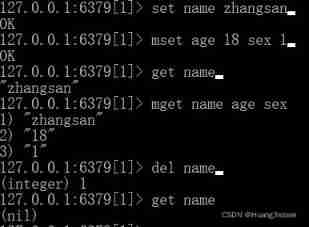
Command records of common data types for redis cli operations

On location and scale in CNN
![[elt.zip] openharmony paper Club - witness file compression system erofs](/img/db/2f1c85ebd4ce9b84d9fd5406a8de4b.png)
[elt.zip] openharmony paper Club - witness file compression system erofs
![In 2021, China's private equity market is growing, and the scale of private equity fund management reaches 19.78 trillion yuan [figure]](/img/e9/ffc5303cb6f0f8e05e93b3342a49b2.jpg)
In 2021, China's private equity market is growing, and the scale of private equity fund management reaches 19.78 trillion yuan [figure]

Elastic high-performance computing on the cloud supports the rapid development of the life science industry, reducing costs and increasing efficiency
随机推荐
Android Development Notes - Quick Start (from sqllite to room licentiousness) 2
Solidity contract address to wallet, wallet address to contract
【C语言练习——打印上三角及其变形(带空格版)】
JS some small problems about adding and accessing values to arrays
Current situation and trend analysis of China's glass packaging containers in 2021: the revenue of glass packaging containers increases year by year [figure]
Training of long and difficult sentences in postgraduate entrance examination day88
Is it safe for tongdaxin to open an account?
Some recursive and iterative problem solving ideas of binary tree (clear and easy to understand)
Guangzhou Sinovel interactive VR panorama brings development to all walks of life
Analysis on development scale and development trend of China's night economy industry in 2021 [figure]
TCP/IP 测试题(四)
Overview and trend analysis of China's CT examination equipment industry in 2021 [figure]
Regular expression summary
Tiger Dao VC products are officially launched, a powerful supplement to seektiger ecology
QQ机器人闪照转发/撤回消息转发【最新beta2版本】
Training of long and difficult sentences in postgraduate entrance examination day85
TCP/IP 测试题(二)
Electronic basic project construction & communication between main thread and rendering thread
R language plot visualization: plot visualization of two-dimensional histogram contour (basic 2D histogram contour)
SVN介绍及使用总结