当前位置:网站首页>【Django中运行scrapy框架,并将数据存入数据库】
【Django中运行scrapy框架,并将数据存入数据库】
2022-06-24 06:44:00 【浪荡子爱自由】
【解决的问题】
1、django和scrapy如何结合
2、通过django启动scrapy爬虫
此文仅介绍Django和scrapy的简单实现,适合想要快速上手的朋友。
任务一、单独使用django框架创建web项目
Django项目可以用命令创建,也可以用pycharm手动创建。此文用pycharm手动创建。
1、使用pycharm创建Django项目:菜单栏File-->New project-->Django-->填写项目名称pro,app名称为app01-->create.

此时项目的目录结构为如下,app01为项目pro的子应用。

2、创建首页,首页内容为"这是一个测试页面"。


3、运行程序,在浏览器中输入http://127.0.0.1:8000/index/。出现【这是一个测试页面!】则成功。
任务二、单独使用scrapy实现简单爬虫
一、准备工作
scrapy安装:确保已经安装了scrapy,如未安装,则打开cmd,输入pip install scrapy.

常用命令:
scrapy startproject 项目名      # 创建scrapy项目

scrapy genspider 爬虫名 域名

scrapy crawl 爬虫名
任务描述:
1、爬取凤凰网,网址是:http://app.finance.ifeng.com/list/stock.php?t=ha,爬取此网页中沪市A股的代码、名称、最新价等信息。
2、将文件保存在H:\2022年学习资料中。
3、项目名为ifengNews
二、实现步骤
1、使用cmd进入要创建项目的目录【2022学习资料】,使用命令【scrapy startproject ifengNews】创建scrapy项目。
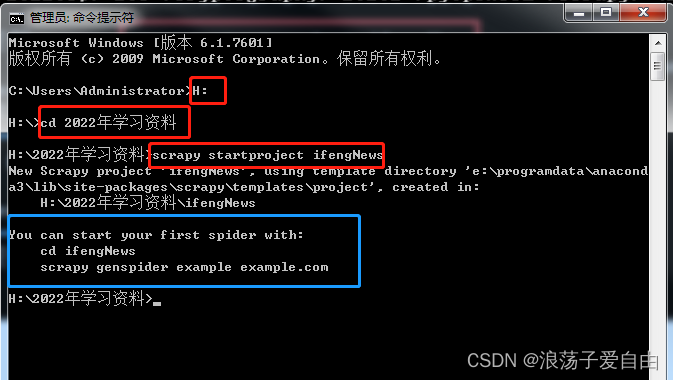
效果:出现【蓝框】内容,【ifengNews】项目已经创建成功。

2、使用pycharm打开文件夹【ifengNews】。文件目录如下:
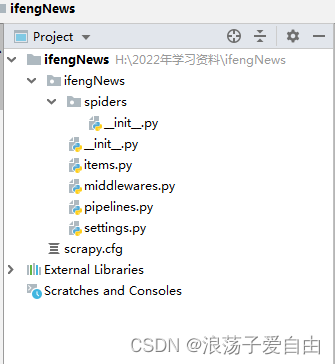
items.py:定义爬虫程序的数据模型
middlewares.py:定义数据模型中的中间件
pipelines.py:管道文件,负责对爬虫返回数据的处理
settings.py:爬虫程序设置,主要是一些优先级设置(将ROBOTSTXT_OBEY=True 改为 False,这行代码表示是否遵循爬虫协议,如果是Ture的可能有些内容无法爬取)
scrapy.cfg:内容为scrapy的基础配置
spiders目录:放置spider代码的目录
3、在pycharm终端中输入【scrapy genspider ifeng_spider ifeng.com】 其中:ifeng_spider 是文件名,可以自定义,但是不能与项目名一样;ifeng.com为域名。

效果:spiders文件夹下创建一个ifeng_spider.py文件,爬虫代码都写在此文件的def parse中。

3.1此步骤也可在cmd中完成。

4、修改setting
第一个是不遵循机器人协议
# Obey robots.txt rules
ROBOTSTXT_OBEY = False # 是否遵循机器人协议,默认是true,需要改为false,否则很多东西爬不了第二个是请求头,添加一个User-Agent
DEFAULT_REQUEST_HEADERS = {
  'Accept': 'text/html,application/xhtml+xml,application/xml;q=0.9,*/*;q=0.8',
  'Accept-Language': 'en',
  'USER_AGENT': 'Mozilla/5.0 (Windows NT 10.0; WOW64) AppleWebKit/537.36 (KHTML, like Gecko) Chrome/86.0.4240.198 Safari/537.36',
   'Cookie':'adb_isBlock=0; userid=1652710683278_ihrfq92084; prov=cn0731; city=0732; weather_city=hn_xt; region_ip=110.53.149.x; region_ver=1.2; wxIsclose=false; ifengRotator_iis3=6; ifengWindowCookieName_919=1'
# 默认是注释的,这个东西非常重要,如果不写很容易被判断为电脑,简单点洗一个Mozilla/5.0即可

}第三个是打开一个管道
# ITEM_PIPELINES:项目管道,300为优先级,越低越爬取的优先度越高
ITEM_PIPELINES = {
    'ifengNews.pipelines.IfengnewsPipeline': 300,
    # 'subeiNews.pipelines.SubeinewsMysqlPipeline': 200,  # 存数据的管道
}
5、页面爬取。首先在ifeng_spider.py中写自己的爬虫文件:
import scrapy
from ifengNews.items import IfengnewsItem

class IfengSpiderSpider(scrapy.Spider):
    name = 'ifeng_spider'
    allowed_domains = ['ifeng.com']
    start_urls = ['http://app.finance.ifeng.com/list/stock.php?t=ha']  # 爬取地址

    def parse(self, response):
        # 爬取股票具体的信息
        for con in response.xpath('//*[@class="tab01"]/table/tr'):
            items = IfengnewsItem()
            flag = con.xpath('./td[3]//text()').get()  # 最新价

            if flag:
                items['title'] = response.xpath('//div[@class="block"]/h1/text()').get()
                items['code'] = con.xpath('./td[1]//text()').get()  # 代码
                items['name'] = con.xpath('./td[2]//text()').get()  # 名称
                items['latest_price'] = con.xpath('./td[3]//text()').get()  # 最新价
                items['quote_change'] = con.xpath('./td[4]//text()').get()  # 涨跌幅
                items['quote_num'] = con.xpath('./td[5]//text()').get()  # 涨跌额
                items['volume'] = con.xpath('./td[6]//text()').get()  # 成交量
                items['turnover'] = con.xpath('./td[7]//text()').get()  # 成交额
                items['open_today'] = con.xpath('./td[8]//text()').get()  # 今开盘
                items['closed_yesterday'] = con.xpath('./td[9]//text()').get()  # 昨收盘
                items['lowest_price'] = con.xpath('./td[10]//text()').get()  # 最低价
                items['highest_price'] = con.xpath('./td[11]//text()').get()  # 最高价
                print(items['title'], items['name'])
                yield items
打开items.py,更改items.py用于存储数据:
import scrapy


class IfengnewsItem(scrapy.Item):
    # define the fields for your item here like:
    # name = scrapy.Field()
    title = scrapy.Field()
    code = scrapy.Field()
    name = scrapy.Field()
    latest_price = scrapy.Field()
    quote_change = scrapy.Field()
    quote_num = scrapy.Field()
    volume = scrapy.Field()
    turnover = scrapy.Field()
    open_today = scrapy.Field()
    closed_yesterday = scrapy.Field()
    lowest_price = scrapy.Field()
    highest_price = scrapy.Field()
如要实现二级页面、翻页等操作,需自行学习。
6、运行爬虫:在终端中输入【scrapy crawl ifeng_spider】.

6.1 也可以写一个run.py文件来运行程序,将数据存储在infos.csv中。

任务三、django+scrapy结合
任务描述:将Django和scrapy结合,实现通过Django控制scrapy的运行,并将爬取的数据存入数据库。
1、在Django项目的根目录中创建一个子应用warehouse,单独存放scrapy的数据库等信息。使用命令行创建app,在终端输入执行命令:python manage.py startapp warehouse.

此时的目录结构:

并在pro-settings.py中注册warehouse这个应用,如下图。

2、在Django项目中创建scrapy项目,并修改项目的setting.py,与任务二中的步骤4一致.


并调整目录结构,与下图一致:

3、在scrapy的setting.py中加入以下代码:
import os
import sys
import django

sys.path.append(os.path.dirname(os.path.abspath('.')))
os.environ['DJANGO_SETTINGS_MODULE'] = 'pro.settings'    # 项目名.settings
django.setup()
4、warehouse下的model.py中创建数据库,用来存储爬到的数据。并在终端执行命令python manage.py makemigrations和 python manage.py migrate,生成数据库表。
from django.db import models


class StockInfo(models.Model):
    """
    股票信息
    """

    title = models.TextField(verbose_name="股票类型" )
    code = models.TextField(verbose_name="代码" )
    name = models.TextField(verbose_name="名称" )
    latest_price = models.TextField(verbose_name="最新价" )
    quote_change = models.TextField(verbose_name="涨跌幅" )
    quote_num = models.TextField(verbose_name="涨跌额" )
    volume = models.TextField(verbose_name="成交量" )
    turnover = models.TextField(verbose_name="成交额" )
    open_today = models.TextField(verbose_name="今开盘" )
    closed_yesterday = models.TextField(verbose_name="昨收盘" )
    lowest_price = models.TextField(verbose_name="最低价" )
    highest_price = models.TextField(verbose_name="最高价" )
5、修改pipelines.py 、 items.py 、 ifeng_spider.py。
ifeng_spider.py:
import scrapy
from ifengNews.items import IfengnewsItem

class IfengSpiderSpider(scrapy.Spider):
    name = 'ifeng_spider'
    allowed_domains = ['ifeng.com']
    start_urls = ['http://app.finance.ifeng.com/list/stock.php?t=ha']

    def parse(self, response):
        # 爬取股票具体的信息
        for con in response.xpath('//*[@class="tab01"]/table/tr'):
            items = IfengnewsItem()
            flag = con.xpath('./td[3]//text()').get()  # 最新价

            if flag:
                items['title'] = response.xpath('//div[@class="block"]/h1/text()').get()
                items['code'] = con.xpath('./td[1]//text()').get()  # 代码
                items['name'] = con.xpath('./td[2]//text()').get()  # 名称
                items['latest_price'] = con.xpath('./td[3]//text()').get()  # 最新价
                items['quote_change'] = con.xpath('./td[4]//text()').get()  # 涨跌幅
                items['quote_num'] = con.xpath('./td[5]//text()').get()  # 涨跌额
                items['volume'] = con.xpath('./td[6]//text()').get()  # 成交量
                items['turnover'] = con.xpath('./td[7]//text()').get()  # 成交额
                items['open_today'] = con.xpath('./td[8]//text()').get()  # 今开盘
                items['closed_yesterday'] = con.xpath('./td[9]//text()').get()  # 昨收盘
                items['lowest_price'] = con.xpath('./td[10]//text()').get()  # 最低价
                items['highest_price'] = con.xpath('./td[11]//text()').get()  # 最高价
                print(items['title'], items['name'])
                yield items
pipelines.py:
class IfengnewsPipeline(object):
    def process_item(self, item, spider):
        print('打开了数据库')
        item.save()
        print('关闭了数据库')
        return item
items.py中, 导入DjangoItem,与数据库进行连接。
from warehouse.models import StockInfo
from scrapy_djangoitem import DjangoItem


class  IfengnewsItem(DjangoItem):
    django_model = StockInfo
如下图安装scrapy_djangoitem: 5、
5、
6、修改url.py 、views.py


7、 运行程序,在浏览器中输入http://127.0.0.1:8000/stocks/update/.页面返回ok,则可以在数据库中查看到爬取的数据。
demo下载:
边栏推荐
- 湖北专升本-湖师计科
- 选择器(>,~,+,[])
- Extend ado Net to realize object-oriented CRUD (.Net core/framework)
- [signal recognition] signal modulation classification based on deep learning CNN with matlab code
- Selector (>, ~, +, [])
- How to realize high stability and high concurrency of live video streaming transmission and viewing?
- Global and Chinese market of inline drip irrigation 2022-2028: Research Report on technology, participants, trends, market size and share
- Prefix and topic training
- C code writing specification
- Spark stage and shuffle for daily data processing
猜你喜欢
![[image fusion] image fusion based on NSST and PCNN with matlab code](/img/b4/61a5adde0d0bfc5a339ef8ab948d43.png)
[image fusion] image fusion based on NSST and PCNN with matlab code

What is the mentality of spot gold worth learning from

Software performance test analysis and tuning practice path - JMeter's performance pressure test analysis and tuning of RPC Services - manuscript excerpts
![buuctf misc [UTCTF2020]docx](/img/e4/e160f704d6aa754e85056840e14bd2.png)
buuctf misc [UTCTF2020]docx

What are the dazzling skills of spot gold?

Learning to use BACnet gateway of building control system is not so difficult
![[OGeek2019]babyrop](/img/74/5f93dcee9ea5a562a7fba5c17aab76.png)
[OGeek2019]babyrop

Dichotomous special training

RDD basic knowledge points

Win11 points how to divide disks? How to divide disks in win11 system?
随机推荐
More than 60 million shovel excrement officials, can they hold a spring of domestic staple food?
Global and Chinese market of bed former 2022-2028: Research Report on technology, participants, trends, market size and share
Alibaba cloud full link data governance
RDD基础知识点
Selector (>, ~, +, [])
[从零开始学习FPGA编程-42]:视野篇 - 后摩尔时代”芯片设计的技术演进-1-现状
Win10 build webservice
Counter attack from outsourcing to big factories! Android has been developed for 5 years, and after a year of dormancy, it has tried to become an offer harvester. Tencent has a fixed salary of 20*15
[image fusion] multi focus and multi spectral image fusion based on pixel saliency and wavelet transform with matlab code
2.1.1 QML grammar foundation I
光照使用的简单总结
Tencent cloud security and privacy computing has passed the evaluation of the ICT Institute and obtained national recognition
What is a CC attack? How to judge whether a website is attacked by CC? How to defend against CC attacks?
Accessing user interface settings using systemparametersinfo
使用SystemParametersInfo访问用户界面设置
图形技术之管线概念
jarvisoj_ level2
Pyhton crawls to Adu (Li Yifeng) Weibo comments
buuctf misc [UTCTF2020]docx
MySQL case: analysis of full-text indexing