当前位置:网站首页>Redis related-02
Redis related-02
2022-06-25 03:44:00 【legend_ go】
Redis relevant -02
One 、Redis Implement basic transaction operations
1、 What is business ?
Baidu Encyclopedia :
Business (Transaction), Generally speaking, it refers to the things to be done or done .
In computer terminology, a program execution unit that accesses and may update various data items in a database (unit)
for example : In a relational database , perform One SQL A command or set of SQL command 、 The whole program can be called a transaction
2、 Characteristics of the transaction ?
Transactions are the basic unit of recovery and concurrency control .
The transaction should have 4 Attributes : Atomicity 、 Uniformity 、 Isolation, 、 persistence . These four attributes are often called ACID characteristic .
- Atomicity : Operations in transactions , Or make it together , Or fail together
- Uniformity : The transaction must be to change the database from one consistency state to another , Closely linked to the atomicity above
- Isolation, : The execution of one transaction cannot be interfered by other transactions
- persistence : Once a transaction is committed , Its changes to the data in the database should be permanent . Subsequent operations or failures should not have any impact on it
3、Redis Business
stay Redis in , A transaction is a collection of commands
Redis A single command guarantees atomicity , But the business ( A set of commands ) There is no guarantee of atomicity !
That is, if there is a syntax error in the execution of a single command , Then the transaction will not execute , That ensures atomicity
127.0.0.1:6379> set k1 v1 ee
(error) ERR syntax error
Redis There is no concept of transaction isolation
4、Redis The transaction operations :
- The transaction open (multi)
- Order to join the team (set,get Wait for a series of orders )
- Cancel / Terminate the transaction (discard)
- Transaction execution (exec)
A normal Redis Business :
127.0.0.1:6379> multi	# Open transaction
OK
127.0.0.1:6379(TX)> set key1 v1
QUEUED
127.0.0.1:6379(TX)> set key2 v2
QUEUED
127.0.0.1:6379(TX)> set key3 v3
QUEUED
127.0.0.1:6379(TX)> EXEC	# Transaction execution
1) OK
2) OK
3) OK
127.0.0.1:6379> keys *
1) "key1"
2) "key3"
3) "key2"
Cancel the transaction after the transaction is started :
127.0.0.1:6379> multi	# Open transaction
OK
127.0.0.1:6379(TX)> set k1 v1
QUEUED
127.0.0.1:6379(TX)> set k2 v2
QUEUED
127.0.0.1:6379(TX)> get k2
QUEUED
127.0.0.1:6379(TX)> DISCARD	# Transaction cancelled / End
OK
127.0.0.1:6379> keys *
(empty array)
If there is a command exception in the transaction , Then the whole transaction will not be executed ( Compiler exception )
127.0.0.1:6379> multi	# Open transaction
OK
127.0.0.1:6379(TX)> set k1 v1
QUEUED
127.0.0.1:6379(TX)> set k2 v2
QUEUED
127.0.0.1:6379(TX)> lpush k3 1 2 3 4 5
QUEUED
127.0.0.1:6379(TX)> ladd k4 23
(error) ERR unknown command `ladd`, with args beginning with: `k4`, `23`,
127.0.0.1:6379(TX)> lrange k3 0 -1
QUEUED
127.0.0.1:6379(TX)> get k2
QUEUED
127.0.0.1:6379(TX)> exec	# Transaction execution
(error) EXECABORT Transaction discarded because of previous errors.	# Other command execution failed
127.0.0.1:6379> keys *
(empty array)
If the syntax of a command in a transaction is normal , But there are such things as 1/0 Such a mistake , Exception only occurs when the transaction is executed , But it does not affect the execution of other commands :( Runtime exception )
127.0.0.1:6379> multi	# Open transaction
OK
127.0.0.1:6379(TX)> set k1 v1
QUEUED
127.0.0.1:6379(TX)> set v2 v2
QUEUED
127.0.0.1:6379(TX)> getset k1 v3
QUEUED
127.0.0.1:6379(TX)> incr k1	# Adding one to a string will fail
QUEUED
127.0.0.1:6379(TX)> get k1
QUEUED
127.0.0.1:6379(TX)> exec	# Transaction execution
1) OK
2) OK
3) "v1"
4) (error) ERR value is not an integer or out of range
5) "v3"
Two 、Redis Achieve optimistic lock
1、 Optimism lock ? Pessimistic locking ?
- Pessimistic locking : It refers to the conservative attitude when the data is modified by the outside world
- For example, there is a public toilet here ( database ), A man in front ( Operator ) When I got in, I locked the door ( Data locking ), No one else can get in ( One person monopolizes the whole toilet !), Until the person in front unlocks ( Release the lock ), Only others can enter . Therefore, although pessimistic locking ensures the correctness and exclusivity of data , But each request will lock the data first , And then data operations , Finally unlock , The process of locking and releasing the lock will cause consumption , So the performance is not high , It is not suitable for multiple transactions in parallel .
- characteristic : It can completely ensure the exclusivity and correctness of data , Because every request will lock the data first , And then data operations , Finally unlock , The process of locking and releasing the lock will cause consumption , So the performance is not high ;
- Optimism lock : Optimistic lock is to maintain an optimistic attitude towards data conflict , When operating data, the operated data will not be locked ( This allows multiple tasks to operate on data in parallel ), Only when the data is submitted, a mechanism is used to verify whether there is a conflict in the data ( The general implementation method is to add the version number and then compare the version number ).
- For example, bank staff A The account balance of a user is read first , When reading, the version number (version Assuming that 1) Read the balance together , At this time , Bank staff B The account balance of the same user is also read , Same as version number (version It's still for 1) Read them together , Then the bank staff A Completed the modification of the account balance , He referred the matter to , Because it is submitted at this time version It's the same as... In the database version identical , Therefore, the database has accepted this modification and will version Turn into 2, At this time , Bank staff B It also completes the operation of user balance , Submit it to , After comparison, it is found that version Not right , Therefore, this modification was rejected .
- characteristic : Optimistic lock is a concurrent type of lock , It does not lock the data, but realizes the function of locking through business , Not locking data means allowing multiple requests to access data at the same time , At the same time, it also eliminates the process of locking and unlocking data , This method saves the operation of pessimistic locking , Therefore, the operation performance can be improved to a certain extent , However, in the case of very high concurrency , It will lead to a large number of request conflicts , The conflict leads to the failure of most operations and waste of resources , So in a high concurrency scenario , The performance of optimistic lock is not as good as pessimistic lock .
2、 Use watch Can achieve Redis Optimistic lock operation of
127.0.0.1:6379> set balance 100
OK
127.0.0.1:6379> watch balance	# monitor money
OK
127.0.0.1:6379> multi	# Open transaction
OK
127.0.0.1:6379(TX)> decrby balance 30	# reduce 30 Yuan
QUEUED
127.0.0.1:6379(TX)>
Now let's open another one redis-cli service , Direct will money Set to 300 Yuan :
[email protected]:~# redis-cli
127.0.0.1:6379> get balance
"100"
127.0.0.1:6379> set balance 300
OK
127.0.0.1:6379>
At this point, we will fail to execute the transaction :
127.0.0.1:6379> set balance 100
OK
127.0.0.1:6379> watch balance	# monitor money
OK
127.0.0.1:6379> multi	# Open transaction
OK
127.0.0.1:6379(TX)> decrby balance 30	# reduce 30 Yuan
QUEUED
127.0.0.1:6379(TX)> exec	# Perform transactions
(nil)	# Execution failure
127.0.0.1:6379>
Now we can unwatch Cancel surveillance , Back to the balance Monitor to obtain the latest value and then modify it
127.0.0.1:6379> get balance
"300"
127.0.0.1:6379> unwatch	# Cancel surveillance
OK
127.0.0.1:6379> watch balance	# Re monitor
OK
127.0.0.1:6379> multi	# Open transaction
OK
127.0.0.1:6379(TX)> INCRBY balance 40
QUEUED
127.0.0.1:6379(TX)> exec	# Perform transactions
1) (integer) 340	# Successful implementation
127.0.0.1:6379>
3、 ... and 、 adopt Jedis operation Redis
Import correlation dependency :
<!-- https://mvnrepository.com/artifact/redis.clients/jedis -->
<!--Jedis rely on -->
<dependency>
    <groupId>redis.clients</groupId>
    <artifactId>jedis</artifactId>
    <version>4.1.1</version>
</dependency>
<!--FastJson  Can be  Java  Object to  JSON  Format , Of course, it can also make  JSON  String conversion to  Java  object .-->
<dependency>
    <groupId>com.alibaba</groupId>
    <artifactId>fastjson</artifactId>
    <version>1.2.79</version>
</dependency>
Turn on Redis:
1、Windows Lower open :

In this way, it will be successful :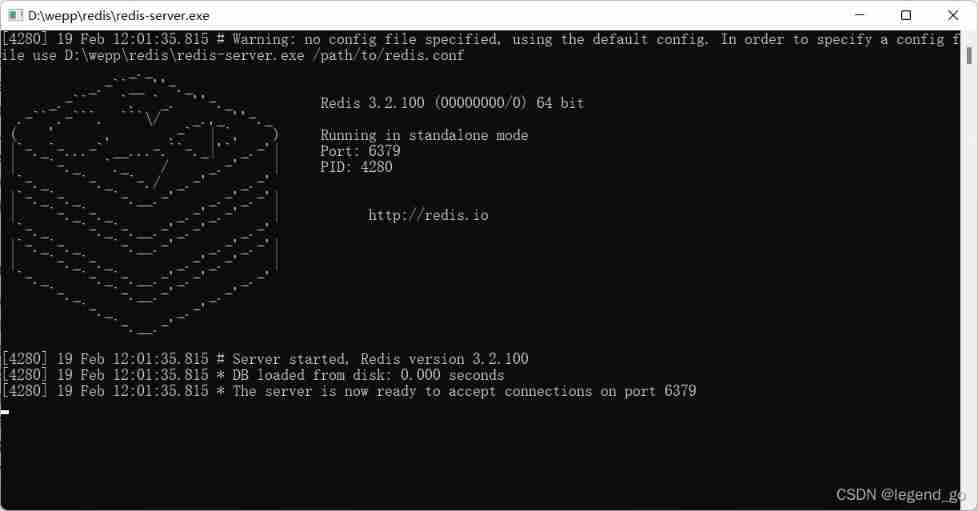
2、Linux It is required to support remote connection :
find redis.conf file , Make the following changes :
- take bind 127.0.0.1 Comment out
- find daemonize Set to yes
When finished, execute the following command , restart redis service :
redis-server ./redis.conf
Then open it in your ECS security group firewall 6379 Port can
3、Jedis attempt to connect :
public class TestJedis {

    public static void main(String[] args) {

        //Windows Lower connection Redis
        //Jedis jedis_windows = new Jedis("localhost",6379);

        //Linux Lower connection Redis
        Jedis jedis_linux = new Jedis("xxx.xxx.xxx.xxx", 6379);
        System.out.println(jedis_linux.ping());
        jedis_linux.set("k1","v1");
        System.out.println(jedis_linux.get("k1"));
    }
}
Output :

Jedis operation :
Basically and in Linux The operation under the command line is no different :
public class TestJedis {

    public static void main(String[] args) {

        Jedis jedis_linux = new Jedis("xxx.xxx.xxx.xxx", 6379);
        System.out.println(" Connection status :"+(jedis_linux.ping().equals("PONG")?" Successful connection ":" The connection fails "));

        jedis_linux.set("k1","v1");
        System.out.println("k1 Value :"+ jedis_linux.get("k1"));

        jedis_linux.mset("k2","v2","k3","v3","k4","v4");
        System.out.println("k1,k2,k3,k4 Value :"+jedis_linux.mget("k1", "k2", "k3", "k4"));

        jedis_linux.expire("k3", Long.parseLong("3"));

        try {

            Thread.sleep(3000);
        } catch (InterruptedException e) {

            e.printStackTrace();
        }

        System.out.println("k3 Value :"+jedis_linux.get("k3"));

        System.out.println(" be-all key:"+jedis_linux.keys("*"));

        System.out.println("k1 The type of :"+jedis_linux.type("k1"));

        jedis_linux.setbit("keykey", 1L, true);

        System.out.println(jedis_linux.getbit("keykey", 1L));

        jedis_linux.close();
    }
}
Output :

adopt Jedis Understand the business
public class TestJedisByTX {

    public static void main(String[] args) {

        Jedis jedis_linux = new Jedis("xxx.xxx.xxx.xxx", 6379);
        System.out.println(" Connection status :"+(jedis_linux.ping().equals("PONG")?" Successful connection ":" The connection fails "));

        JSONObject jsonObject = new JSONObject();
        jsonObject.put("name","zhangsan");
        jsonObject.put("age",12);
        jsonObject.put("sex","female");

        Transaction multi = jedis_linux.multi();
        String res = jsonObject.toJSONString();

        multi.set("user1",res);
        multi.set("user2",res);
        multi.get("user1");

        multi.exec();

        System.out.println(jedis_linux.get("user1"));
        jedis_linux.close();
    }
}
Output :

Four 、 SpringBoot Integrate Redis
Create a new one SpringBoot Project and check the required dependencies :

Find the relevant package and click to expand

Get into RedisAutoConfiguration class :
![[ Failed to transfer the external chain picture , The origin station may have anti-theft chain mechanism , It is suggested to save the pictures and upload them directly (img-uFSXOdTJ-1645279711268)(C:\Users\Lenovo\AppData\Roaming\Typora\typora-user-images\image-20220219133846705.png)]](/img/66/bbabfb1db896c58efff260f71e271b.jpg)
Get into RedisProperties Class to see what we can configure :

We can see that we can spring.redis As a prefix in application.properties Configuration in profile Redis Information about
In the test environment, only the following two configurations are required :
spring.redis.host = xxx.xxx.xxx.xxx ( Your public network IP perhaps localhost)
spring.redis.port= 6379
Look again RedisAutoConfiguration class :

You can see that there is a RedisTemplate Template class , We can write a template class to replace the default template class , All of them are about Redis Operations can be implemented through this template class .
redis After the configuration is completed, let's conduct unit tests :

redisTemplate With ops Distinguish the objects to be operated for the prefix , We can see that there are data types we are familiar with :
- opsForGeo:Geospatial
- opsForHash:Hash
- opsForHyperLogLog:HyperLogLog
- opsForList:List
- opsForSet:Set
- opsForValue:String
- opsForZSet:ZSet
- …
If the top ops If prefix operation is uncomfortable , We can get one redis Connection object , By connecting objects, we can do the same :

unit testing :
class Redis02ApplicationTests {


    @Autowired
    private RedisTemplate redisTemplate;

    @Test
    void contextLoads() {


        // obtain Redis Connection object
        // RedisConnection connection = redisTemplate.getConnectionFactory().getConnection();
        // connection.flushDb();
        // connection.close();

        redisTemplate.opsForList().leftPush("k1","v1");
        System.out.println(redisTemplate.opsForList().leftPop("k1"));
    }
}
Output :
![[ Failed to transfer the external chain picture , The origin station may have anti-theft chain mechanism , It is suggested to save the pictures and upload them directly (img-0kr8A7GL-1645279711272)(C:\Users\Lenovo\AppData\Roaming\Typora\typora-user-images\image-20220219140159120.png)]](/img/98/7550078700248c8618bec91652d39e.jpg)
Integration finished , But you need to customize Template Template class
5、 ... and 、 Customize RedisTemplate
Why should we customize RedisTemplate?
Because the default template class does not meet our requirements , Generally we need to use <String,Object> To transfer data , The default is <Object,Object>, At the same time, we usually use it to store POJO Objects need to be serialized , So you need to customize Template Template classes to meet our real needs
1、 Create a new package config Let's create our RedisConfig Class to customize RedisTemplate class
@Configuration
public class RedisConfig {


    @Bean
    @SuppressWarnings("all")
    public RedisTemplate<String,Object> redisTemplate(RedisConnectionFactory redisConnectionFactory){

        RedisTemplate<String, Object> template = new RedisTemplate<>();
        template.setConnectionFactory(redisConnectionFactory);

        //Json Serialization configuration
        Jackson2JsonRedisSerializer jackson2JsonRedisSerializer = new Jackson2JsonRedisSerializer(Object.class);
        ObjectMapper om = new ObjectMapper();
        om.setVisibility(PropertyAccessor.ALL, JsonAutoDetect.Visibility.ANY);
        om.activateDefaultTyping(LaissezFaireSubTypeValidator.instance,ObjectMapper.DefaultTyping.NON_FINAL);
        jackson2JsonRedisSerializer.setObjectMapper(om);

        //String Serialization
        StringRedisSerializer stringRedisSerializer = new StringRedisSerializer();

        //key use String Serialization mode
        template.setKeySerializer(stringRedisSerializer);
        //value Also used String Serialization mode
        template.setValueSerializer(jackson2JsonRedisSerializer);
        //hash Of key use String How to serialize
        template.setHashKeySerializer(stringRedisSerializer);
        //hash Of value use Jackson How to serialize
        template.setHashValueSerializer(jackson2JsonRedisSerializer);
        template.afterPropertiesSet();;
        return template;
    }
}
2、POJO Realize serialization of entity classes under
@Data
@AllArgsConstructor
@NoArgsConstructor
public class User implements Serializable {

    private String name;
    private int age;
}
3、 unit testing :
@Test
public void testRedis(){

    User user = new User("jack", 788);

    redisTemplate.opsForValue().set("user",user);
    System.out.println(redisTemplate.opsForValue().get("user"));
}
Output :

4、 Wrapper utility class ( Simplify the development )
RedisUtil:
package com.jack.redis02.utils;

import org.springframework.beans.factory.annotation.Autowired;
import org.springframework.data.redis.core.RedisTemplate;
import org.springframework.stereotype.Component;
import org.springframework.util.CollectionUtils;

import java.util.Collection;
import java.util.List;
import java.util.Map;
import java.util.Set;
import java.util.concurrent.TimeUnit;

@Component
@SuppressWarnings("all")
public class RedisUtil {


    @Autowired
    private RedisTemplate<String, Object> redisTemplate;

    public boolean expire(String key, long time) {

        try {

            if (time > 0) {

                redisTemplate.expire(key, time, TimeUnit.SECONDS);
            }
            return true;
        } catch (Exception e) {

            e.printStackTrace();
            return false;
        }
    }

    /** *  according to key  Get expiration time  * * @param key  key   Not for null * @return  Time ( second )  return 0 Stands for permanent validity  */
    public long getExpire(String key) {

        return redisTemplate.getExpire(key, TimeUnit.SECONDS);
    }


    /** *  Judge key Whether there is  * * @param key  key  * @return true  There is  false non-existent  */
    public boolean hasKey(String key) {

        try {

            return redisTemplate.hasKey(key);
        } catch (Exception e) {

            e.printStackTrace();
            return false;
        }
    }


    /** *  Delete cache  * * @param key  You can pass a value   Or more  */
    @SuppressWarnings("unchecked")
    public void del(String... key) {

        if (key != null && key.length > 0) {

            if (key.length == 1) {

                redisTemplate.delete(key[0]);
            } else {

                redisTemplate.delete((Collection<String>) CollectionUtils.arrayToList(key));
            }
        }
    }


    // ============================String=============================

    /** *  Normal cache fetch  * * @param key  key  * @return  value  */
    public Object get(String key) {

        return key == null ? null : redisTemplate.opsForValue().get(key);
    }

    /** *  Normal cache put in  * * @param key  key  * @param value  value  * @return true success  false Failure  */

    public boolean set(String key, Object value) {

        try {

            redisTemplate.opsForValue().set(key, value);
            return true;
        } catch (Exception e) {

            e.printStackTrace();
            return false;
        }
    }


    /** *  The normal cache is put in and set the time  * * @param key  key  * @param value  value  * @param time  Time ( second ) time Be greater than 0  If time Less than or equal to 0  Will be set indefinitely  * @return true success  false  Failure  */

    public boolean set(String key, Object value, long time) {

        try {

            if (time > 0) {

                redisTemplate.opsForValue().set(key, value, time, TimeUnit.SECONDS);
            } else {

                set(key, value);
            }
            return true;
        } catch (Exception e) {

            e.printStackTrace();
            return false;
        }
    }


    /** *  Increasing  * * @param key  key  * @param delta  How much more should I add ( Greater than 0) */
    public long incr(String key, long delta) {

        if (delta < 0) {

            throw new RuntimeException(" The increment factor must be greater than 0");
        }
        return redisTemplate.opsForValue().increment(key, delta);
    }


    /** *  Decline  * * @param key  key  * @param delta  To cut it down a few ( Less than 0) */
    public long decr(String key, long delta) {

        if (delta < 0) {

            throw new RuntimeException(" The decline factor must be greater than 0");
        }
        return redisTemplate.opsForValue().increment(key, -delta);
    }


    // ================================Map=================================

    /** * HashGet * * @param key  key   Not for null * @param item  term   Not for null */
    public Object hget(String key, String item) {

        return redisTemplate.opsForHash().get(key, item);
    }

    /** *  obtain hashKey All the corresponding key values  * * @param key  key  * @return  Corresponding multiple key values  */
    public Map<Object, Object> hmget(String key) {

        return redisTemplate.opsForHash().entries(key);
    }

    /** * HashSet * * @param key  key  * @param map  Corresponding to multiple key values  */
    public boolean hmset(String key, Map<String, Object> map) {

        try {

            redisTemplate.opsForHash().putAll(key, map);
            return true;
        } catch (Exception e) {

            e.printStackTrace();
            return false;
        }
    }


    /** * HashSet  And set the time  * * @param key  key  * @param map  Corresponding to multiple key values  * @param time  Time ( second ) * @return true success  false Failure  */
    public boolean hmset(String key, Map<String, Object> map, long time) {

        try {

            redisTemplate.opsForHash().putAll(key, map);
            if (time > 0) {

                expire(key, time);
            }
            return true;
        } catch (Exception e) {

            e.printStackTrace();
            return false;
        }
    }


    /** *  To a piece of hash Put data in the table , If it doesn't exist, it will create  * * @param key  key  * @param item  term  * @param value  value  * @return true  success  false Failure  */
    public boolean hset(String key, String item, Object value) {

        try {

            redisTemplate.opsForHash().put(key, item, value);
            return true;
        } catch (Exception e) {

            e.printStackTrace();
            return false;
        }
    }

    /** *  To a piece of hash Put data in the table , If it doesn't exist, it will create  * * @param key  key  * @param item  term  * @param value  value  * @param time  Time ( second )  Be careful : If there is already hash Watch has time , This will replace the original time  * @return true  success  false Failure  */
    public boolean hset(String key, String item, Object value, long time) {

        try {

            redisTemplate.opsForHash().put(key, item, value);
            if (time > 0) {

                expire(key, time);
            }
            return true;
        } catch (Exception e) {

            e.printStackTrace();
            return false;
        }
    }


    /** *  Delete hash The values in the table  * * @param key  key   Not for null * @param item  term   Can make multiple   Not for null */
    public void hdel(String key, Object... item) {

        redisTemplate.opsForHash().delete(key, item);
    }


    /** *  Judge hash Whether there is a value of this item in the table  * * @param key  key   Not for null * @param item  term   Not for null * @return true  There is  false non-existent  */
    public boolean hHasKey(String key, String item) {

        return redisTemplate.opsForHash().hasKey(key, item);
    }


    /** * hash Increasing   If it doesn't exist , It creates a   And return the added value to  * * @param key  key  * @param item  term  * @param by  How much more should I add ( Greater than 0) */
    public double hincr(String key, String item, double by) {

        return redisTemplate.opsForHash().increment(key, item, by);
    }


    /** * hash Decline  * * @param key  key  * @param item  term  * @param by  Remember less ( Less than 0) */
    public double hdecr(String key, String item, double by) {

        return redisTemplate.opsForHash().increment(key, item, -by);
    }


    // ============================set=============================

    /** *  according to key obtain Set All the values in  * * @param key  key  */
    public Set<Object> sGet(String key) {

        try {

            return redisTemplate.opsForSet().members(key);
        } catch (Exception e) {

            e.printStackTrace();
            return null;
        }
    }


    /** *  according to value From a set Query in , Whether there is  * * @param key  key  * @param value  value  * @return true  There is  false non-existent  */
    public boolean sHasKey(String key, Object value) {

        try {

            return redisTemplate.opsForSet().isMember(key, value);
        } catch (Exception e) {

            e.printStackTrace();
            return false;
        }
    }


    /** *  Put data into set cache  * * @param key  key  * @param values  value   It can be more than one  * @return  The number of successes  */
    public long sSet(String key, Object... values) {

        try {

            return redisTemplate.opsForSet().add(key, values);
        } catch (Exception e) {

            e.printStackTrace();
            return 0;
        }
    }


    /** *  take set Data is put into the cache  * * @param key  key  * @param time  Time ( second ) * @param values  value   It can be more than one  * @return  The number of successes  */
    public long sSetAndTime(String key, long time, Object... values) {

        try {

            Long count = redisTemplate.opsForSet().add(key, values);
            if (time > 0)
                expire(key, time);
            return count;
        } catch (Exception e) {

            e.printStackTrace();
            return 0;
        }
    }


    /** *  obtain set The length of the cache  * * @param key  key  */
    public long sGetSetSize(String key) {

        try {

            return redisTemplate.opsForSet().size(key);
        } catch (Exception e) {

            e.printStackTrace();
            return 0;
        }
    }


    /** *  The removal value is value Of  * * @param key  key  * @param values  value   It can be more than one  * @return  Number of removed  */

    public long setRemove(String key, Object... values) {

        try {

            Long count = redisTemplate.opsForSet().remove(key, values);
            return count;
        } catch (Exception e) {

            e.printStackTrace();
            return 0;
        }
    }

    // ===============================list=================================

    /** *  obtain list The contents of the cache  * * @param key  key  * @param start  Start  * @param end  end  0  To  -1 For all values  */
    public List<Object> lGet(String key, long start, long end) {

        try {

            return redisTemplate.opsForList().range(key, start, end);
        } catch (Exception e) {

            e.printStackTrace();
            return null;
        }
    }


    /** *  obtain list The length of the cache  * * @param key  key  */
    public long lGetListSize(String key) {

        try {

            return redisTemplate.opsForList().size(key);
        } catch (Exception e) {

            e.printStackTrace();
            return 0;
        }
    }


    /** *  Through the index   obtain list The value in  * * @param key  key  * @param index  Indexes  index>=0 when , 0  Header ,1  The second element , By analogy ;index<0 when ,-1, Tail ,-2 The next to last element , By analogy  */
    public Object lGetIndex(String key, long index) {

        try {

            return redisTemplate.opsForList().index(key, index);
        } catch (Exception e) {

            e.printStackTrace();
            return null;
        }
    }


    /** *  take list Put into cache  * * @param key  key  * @param value  value  */
    public boolean lSet(String key, Object value) {

        try {

            redisTemplate.opsForList().rightPush(key, value);
            return true;
        } catch (Exception e) {

            e.printStackTrace();
            return false;
        }
    }


    /** *  take list Put into cache  * * @param key  key  * @param value  value  * @param time  Time ( second ) */
    public boolean lSet(String key, Object value, long time) {

        try {

            redisTemplate.opsForList().rightPush(key, value);
            if (time > 0)
                expire(key, time);
            return true;
        } catch (Exception e) {

            e.printStackTrace();
            return false;
        }

    }


    /** *  take list Put into cache  * * @param key  key  * @param value  value  * @return */
    public boolean lSet(String key, List<Object> value) {

        try {

            redisTemplate.opsForList().rightPushAll(key, value);
            return true;
        } catch (Exception e) {

            e.printStackTrace();
            return false;
        }

    }


    /** *  take list Put into cache  * * @param key  key  * @param value  value  * @param time  Time ( second ) * @return */
    public boolean lSet(String key, List<Object> value, long time) {

        try {

            redisTemplate.opsForList().rightPushAll(key, value);
            if (time > 0)
                expire(key, time);
            return true;
        } catch (Exception e) {

            e.printStackTrace();
            return false;
        }
    }


    /** *  Modify according to the index list A piece of data in  * * @param key  key  * @param index  Indexes  * @param value  value  * @return */

    public boolean lUpdateIndex(String key, long index, Object value) {

        try {

            redisTemplate.opsForList().set(key, index, value);
            return true;
        } catch (Exception e) {

            e.printStackTrace();
            return false;
        }
    }


    /** *  remove N The values are value * * @param key  key  * @param count  How many removed  * @param value  value  * @return  Number of removed  */

    public long lRemove(String key, long count, Object value) {

        try {

            Long remove = redisTemplate.opsForList().remove(key, count, value);
            return remove;
        } catch (Exception e) {

            e.printStackTrace();
            return 0;
        }

    }

}
Summary of common methods of tool class :
expire(String key, long time)    // Specify cache expiration time
getExpire(String key)            // according to key  Get expiration time
hasKey(String key)               // Judge key Whether there is
del(String... key)               // Delete cache
get(String key)                  // Get value
set(String key, Object value)    // Set the value
set(String key, Object value, long time)  // Put in the value and set the expiration time
incr(String key, long delta)     // Increasing   Parameters :delta  Add a few more
decr(String key, long delta)     // Decline
unit testing :
@Autowired
private RedisUtil redisUtil;
@Test
public void testRedis(){

    User user = new User("mary", 999);
    redisUtil.set("user1",user);
    System.out.println(redisUtil.get("user1"));
}
Output :
![[ Failed to transfer the external chain picture , The origin station may have anti-theft chain mechanism , It is suggested to save the pictures and upload them directly (img-h5jGi9sT-1645279711273)(C:\Users\Lenovo\AppData\Roaming\Typora\typora-user-images\image-20220219150519525.png)]](/img/32/baa4855c7c8653a294d423d65701e3.jpg)
Related articles :
- Redis-01
- What is? Redis
- stay Linux Lower installation Redis
- Redis Common commands and basic data types
- Three special types
- Redis-02
- Redis Implement basic transaction operations
- Redis Achieve optimistic lock
- adopt Jedis operation Redis
- adopt Jedis Understand the business
- SpringBoot Integrate Redis
- Customize RedisTemplate
- Redis-03
- Redis Configuration file details
- Persistence ——RDB operation
- Persistence ——AOF operation
- Redis Subscription Publishing
- Redis Cluster environment construction
- Master slave copy
- Manually configure the host during downtime
- Sentinel mode
- Cache penetration and avalanche
Reference link :
【 Madness theory Java】Redis The latest super detailed version of the tutorial is easy to understand
边栏推荐
- MySql安装教程
- Please check the list of commonly used software testing tools.
- 用指南针开户如何选择证券公司?哪一个是更安全的
- 浏览器下载的文件属性里都有保护,如何去掉
- Is it safe to open an account on your mobile phone?
- Is it safe for tonghuashun securities to open an account
- 签到功能完成03《ivx低代码签到系统制作》
- 用CPU方案打破内存墙?学PayPal堆傲腾扩容量,漏查欺诈交易量可降至1/30
- TC object structure and abbreviation
- Li Kou daily question - day 26 -506 Relative rank
猜你喜欢

Copilot免费时代结束!正式版67元/月,学生党和热门开源项目维护者可白嫖

Before the age of 36, Amazon transgender hackers were sentenced to 20 years' imprisonment for stealing data from more than 100million people!

MySQL installation tutorial

Tencent's open source project "Yinglong" has become a top-level project of Apache: the former long-term service wechat payment can hold a million billion level of data stream processing

China's SkyEye found suspicious signals of extraterrestrial civilization. Musk said that the Starship began its orbital test flight in July. Netinfo office: app should not force users to agree to proc

Expressing the transformation of two coordinate systems with vectors

Single case of hungry and lazy mode

Amazon's other side in China

X86 CPU, critical! The latest vulnerability has caused heated discussion. Hackers can remotely steal keys. Intel "all processors" are affected
MySql安装教程
随机推荐
騰訊開源項目「應龍」成Apache頂級項目:前身長期服務微信支付,能hold住百萬億級數據流處理...
用CPU方案打破内存墙?学PayPal堆傲腾扩容量,漏查欺诈交易量可降至1/30
How to play well in the PMP Exam?
CVPR大会现场纪念孙剑博士,最佳学生论文授予同济阿里,李飞飞获黄煦涛纪念奖...
Single case of hungry and lazy mode
股票开户,在手机上开户安全吗?
香蕉为什么能做随机数生成器?因为,它是水果界的“辐射之王”
Expressing the transformation of two coordinate systems with vectors
MySQL根据表前缀批量修改、删除表
TCC mode explanation and code implementation of Seata's four modes
Is it safe to open an account in the way of winning 100% of the new bonds
Is it safe to open a stock account with the customer's haircut account link? Tell me what you know
后台页制作01《ivx低代码签到系统制作》
网上开户股票安全吗?怎么开户呢?
When people look at the industrial Internet from the Internet like thinking and perspective, they have actually fallen into a dead end
力扣每日一题-第26天-506.相对名次
在线股票开户安全吗?
Why can banana be a random number generator? Because it is the "king of radiation" in the fruit industry
ICML 2022 | 字节跳动 AI Lab 提出多模态模型:X-VLM,学习视觉和语言的多粒度对齐...
A new generation of cascadable Ethernet Remote i/o data acquisition module