当前位置:网站首页>[example of URDF exercise based on ROS] use of four wheeled robot and camera
[example of URDF exercise based on ROS] use of four wheeled robot and camera
2022-07-24 09:02:00 【Life is like Zhaoxu】
Preface
In the last blog section, we systematically learned about URDF The basic usage syntax of , And from the label 、 attribute 、 I have deeply experienced the structural relationship and other aspects URDF The framework and concept of the document , This article focuses on Actual simulation development , Examples are analyzed from cuboid and four-wheel cylindrical robots with cameras , Finally, some applicable development tools are given , Help you understand URDF How to use files .
One 、 Rotating Cameras
1. Target robot model
demand : The chassis is a cuboid 、 There is one in front that can go along Z Camera with free rotation axis
URDF File code :
<!--  demand :  The chassis is a cuboid 、  There is one in front that can go along Z Camera with free rotation axis   Robot model of  -->
<robot name="mycar">
    <!--  chassis  -->
    <link name="base_link">
        <visual>
            <geometry>
                <box size="0.5 0.2 0.1" />
            </geometry>
            <origin xyz="0 0 0" rpy="0 0 0" />
            <material name="blue">
                <color rgba="0 0 1.0 0.5" />
            </material>
        </visual>
    </link>

    <!--  camera  -->
    <link name="camera">
        <visual>
            <geometry>
                <box size="0.02 0.05 0.05" />
            </geometry>
            <origin xyz="0 0 0" rpy="0 0 0" />
            <material name="red">
                <color rgba="1 0 0 0.5" />
            </material>
        </visual>
    </link>

    <!--  The joints  -->
    <joint name="camera2baselink" type="continuous">
        <parent link="base_link"/>
        <child link="camera" />
        <!--  You need to calculate two  link  The offset between the physical centers of  -->
        <origin xyz="0.2 0 0.075" rpy="0 0 0" />
        <axis xyz="0 0 1" />
    </joint>

</robot>
2. Startup file
- Pay attention to item : A status publishing node must be created , Secondly, joint motion control nodes are used to test joint motion , And generate UI
<launch>

    <param name="robot_description" textfile="$(find urdf_rviz_demo)/urdf/urdf/urdf03_joint.urdf" />
    <node pkg="rviz" type="rviz" name="rviz" args="-d $(find urdf_rviz_demo)/config/helloworld.rviz" />

    <!--  Add joint status publishing node  -->
    <node pkg="joint_state_publisher" type="joint_state_publisher" name="joint_state_publisher" />
    <!--  Add robot status publishing node  -->
    <node pkg="robot_state_publisher" type="robot_state_publisher" name="robot_state_publisher" />
    <!--  Optional : The node used to control joint motion  -->
    <node pkg="joint_state_publisher_gui" type="joint_state_publisher_gui" name="joint_state_publisher_gui" />

</launch>
3. Problems and optimization methods
1) Initial model location
problem : The robot model generated by the above code will Half sunk to the ground
reason : The center of gravity of the chassis is located at the origin of the map
resolvent : Set the initial link Set to a very small size link( For example, the radius is 0.001m The sphere of , Or the side length is 0.001m The cube ), Then at the beginning link Add rigid bodies such as chassis on
Optimize the code :
<!--  Use  base_footprint  Optimize  -->
<robot name="mycar">
    <!--  Set an origin ( Projection of robot Center ) -->
    <link name="base_footprint">
        <visual>
            <geometry>
                <sphere radius="0.001" />
            </geometry>
        </visual>
    </link>

    <!--  Add chassis  -->
    <link name="base_link">
        <visual>
            <geometry>
                <box size="0.5 0.2 0.1" />
            </geometry>
            <origin xyz="0 0 0" rpy="0 0 0" />
            <material name="blue">
                <color rgba="0 0 1.0 0.5" />
            </material>
        </visual>
    </link>

    <!--  The joint between the chassis and the origin  -->
    <joint name="base_link2base_footprint" type="fixed">
        <parent link="base_footprint" />
        <child link="base_link" />
        <origin xyz="0 0 0.05" />
    </joint>

    <!--  Add Cameras  -->
    <link name="camera">
        <visual>
            <geometry>
                <box size="0.02 0.05 0.05" />
            </geometry>
            <origin xyz="0 0 0" rpy="0 0 0" />
            <material name="red">
                <color rgba="1 0 0 0.5" />
            </material>
        </visual>
    </link>
    <!--  The joints  -->
    <joint name="camera2baselink" type="continuous">
        <parent link="base_link"/>
        <child link="camera" />
        <origin xyz="0.2 0 0.075" rpy="0 0 0" />
        <axis xyz="0 0 1" />
    </joint>

</robot>
2) Command line error
- The error message is as follows :
UnicodeEncodeError: 'ascii' codec can't encode characters in position 463-464: ordinal not in range(128)
[joint_state_publisher-3] process has died [pid 4443, exit code 1, cmd /opt/ros/melodic/lib/joint_state_publisher/joint_state_publisher __name:=joint_state_publisher __log:=/home/rosmelodic/.ros/log/b38967c0-0acb-11eb-aee3-0800278ee10c/joint_state_publisher-3.log].
log file: /home/rosmelodic/.ros/log/b38967c0-0acb-11eb-aee3-0800278ee10c/joint_state_publisher-3*.log
resolvent : Remove Chinese comments , Avoid coding problems
- The error message is as follows :
[ERROR] [1584370263.037038]: Could not find the GUI, install the ‘joint_state_publisher_gui’ packageresolvent :
sudo apt install ros-noetic-joint-state-publisher-gui
Two 、 Four wheeled cylindrical robot
1. Target robot model
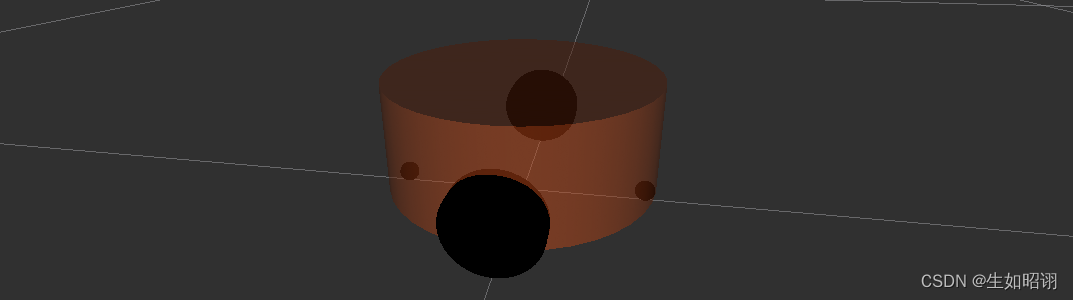
- demand : The chassis is a cylinder , The four wheels are two driving wheels , Two supporting wheels
- Specific data and diagram :
1. chassis : radius 10cm、 high 8cm, Distance from the ground 1.5cm
2. wheel : Driving wheel : radius 3.25cm、 wide 1.5cm; Supporting wheel : spherical , radius 0.75cm
- URDF File code :
<robot name="mycar">
    <!--  Set up  base_footprint -->
	    <link name="base_footprint">
	        <visual>
	            <geometry>
	                <sphere radius="0.001" />
	            </geometry>
	        </visual>
	    </link>

    <!--  Add chassis  -->
		<!--  Parameters   shape : Cylinder   radius :10 cm  Height :8 cm  Off the ground :1.5 cm -->
	    <link name="base_link">
	        <visual>
	            <geometry>
	                <cylinder radius="0.1" length="0.08" />
	            </geometry>
	            <origin xyz="0 0 0" rpy="0 0 0" />
	            <material name="yellow">
	                <color rgba="0.8 0.3 0.1 0.5" />
	            </material>
	        </visual>
	    </link>

	    <joint name="base_link2base_footprint" type="fixed">
	        <parent link="base_footprint" />
	        <child link="base_link"/>
	        <origin xyz="0 0 0.055" />
	    </joint>


    <!--  Add drive wheels  -->
	    <!--  The driving wheel is a overturned cylinder   Parameters   radius : 3.25 cm  Width : 1.5 cm  Color :  black   Joint settings : x = 0 y =  The radius of the chassis  +  Tire width  / 2 z =  Distance from the ground  +  Chassis length  / 2 -  Tire radius  = 1.5 + 4 - 3.25 = 2.25(cm) axis = 0 1 0 -->
	    <link name="left_wheel">
	        <visual>
	            <geometry>
	                <cylinder radius="0.0325" length="0.015" />
	            </geometry>
	            <origin xyz="0 0 0" rpy="1.5705 0 0" />
	            <material name="black">
	                <color rgba="0.0 0.0 0.0 1.0" />
	            </material>
	        </visual>

	    </link>

	    <joint name="left_wheel2base_link" type="continuous">
	        <parent link="base_link" />
	        <child link="left_wheel" />
	        <origin xyz="0 0.1 -0.0225" />
	        <axis xyz="0 1 0" />
	    </joint>


	    <link name="right_wheel">
	        <visual>
	            <geometry>
	                <cylinder radius="0.0325" length="0.015" />
	            </geometry>
	            <origin xyz="0 0 0" rpy="1.5705 0 0" />
	            <material name="black">
	                <color rgba="0.0 0.0 0.0 1.0" />
	            </material>
	        </visual>

	    </link>

	    <joint name="right_wheel2base_link" type="continuous">
	        <parent link="base_link" />
	        <child link="right_wheel" />
	        <origin xyz="0 -0.1 -0.0225" />
	        <axis xyz="0 1 0" />
	    </joint>


    <!--  Add Cardan wheel ( Supporting wheel ) -->
	    <!--  Parameters   shape :  sphere   radius : 0.75 cm  Color :  black   Joint settings : x =  Customize ( Chassis radius  -  Radius of universal wheel ) = 0.1 - 0.0075 = 0.0925(cm) y = 0 z =  Chassis length  / 2 +  Distance from the ground  / 2 = 0.08 / 2 + 0.015 / 2 = 0.0475 axis= 1 1 1 -->
	    <link name="front_wheel">
	        <visual>
	            <geometry>
	                <sphere radius="0.0075" />
	            </geometry>
	            <origin xyz="0 0 0" rpy="0 0 0" />
	            <material name="black">
	                <color rgba="0.0 0.0 0.0 1.0" />
	            </material>
	        </visual>
	    </link>

	    <joint name="front_wheel2base_link" type="continuous">
	        <parent link="base_link" />
	        <child link="front_wheel" />
	        <origin xyz="0.0925 0 -0.0475" />
	        <axis xyz="1 1 1" />
	    </joint>

	    <link name="back_wheel">
	        <visual>
	            <geometry>
	                <sphere radius="0.0075" />
	            </geometry>
	            <origin xyz="0 0 0" rpy="0 0 0" />
	            <material name="black">
	                <color rgba="0.0 0.0 0.0 1.0" />
	            </material>
	        </visual>
	    </link>

	    <joint name="back_wheel2base_link" type="continuous">
	        <parent link="base_link" />
	        <child link="back_wheel" />
	        <origin xyz="-0.0925 0 -0.0475" />
	        <axis xyz="1 1 1" />
	    </joint>
</robot>
2. Startup file
- launch File code :
<launch>
    <!--  take  urdf  The file content is set into the parameter server  -->
    <param name="robot_description" textfile="$(find demo01_urdf_helloworld)/urdf/urdf/test.urdf" />

    <!--  start-up  rivz -->
    <node pkg="rviz" type="rviz" name="rviz_test" args="-d $(find demo01_urdf_helloworld)/config/helloworld.rviz" />

    <!--  Start the robot state and joint state publishing node  -->
    <node pkg="robot_state_publisher" type="robot_state_publisher" name="robot_state_publisher" />
    <node pkg="joint_state_publisher" type="joint_state_publisher" name="joint_state_publisher" />

    <!--  Start the graphical control joint motion node  -->
    <node pkg="joint_state_publisher_gui" type="joint_state_publisher_gui" name="joint_state_publisher_gui" />
</launch>
- Implementation process : This robot can first create a basic URDF file , After integrating the startup file, gradually add components such as chassis and wheels
3、 ... and 、URDF Authoring tool
1. Syntax check check_urdf
- Tool installation :
sudo apt install liburdfdom-tools
Specific tools :check_urdf, Check for complex urdf Whether there are syntax problems in the file
Usage method : Enter the corresponding directory , Use command
check_urdf Corresponding urdf fileEffect indication :

2. Look at the structure urdf_to_graphiz
Tool installation : ditto
Specific tools :urdf_to_graphiz, see urdf Model structure , Show different link The hierarchy of
Usage method : Enter the corresponding directory , Use command
urdf_to_graphiz Corresponding urdf file, View... In the current directory PDF File canEffect indication :

summary
- Statement : The blog section of this section refers to CSDN User zhaoxuzuo ROS course , This blog mainly introduces two uses URDF Specific examples of robot modeling , One is the free rotation camera , The other is a four wheeled robot , Finally, it gives URDF Some of the basics of ROS Tools , Contains syntax error checking and link Structure display, etc , The next blog will introduce how to use Xacro Yes URDF Program optimization , Coming soon .

边栏推荐
- From single architecture to distributed architecture, there are many pits and bugs!
- Typora提示【This beta version of Typora is expired, please download and install a newer version】的解决方案
- C language - the difference between sizeof and strlen
- 面试官:哥们Go语言的读写锁了解多少?
- Unity C tool class arrayhelper
- TiFlash 源码阅读(五) DeltaTree 存储引擎设计及实现分析 - Part 2
- 0 threshold takes you to know two-point search
- 5、 Use of environment variables in midway
- [Sheung Shui Shuo series] EE feedback details
- C语言练习题目+答案:
猜你喜欢

Publish your own library on NPM

JS string interception

How to configure env.js in multiple environments in uni app

TCP triple handshake connection combing

基于FPGA的VGA字符显示

我们说的组件自定义事件到底是什么?

Why is TCP a triple handshake

How to integrate and use log4net logging plug-in in vs2019 class library

1、 Midwey addition, deletion, modification and query

Opencv Chinese document 4.0.0 learning notes (updating...)
随机推荐
【一起上水硕系列】Final RAD-new literacies
What is tiktok creator fund and how to withdraw it?
Tiktok 16 popular categories, tiktok popular products to see which one you are suitable for?
How to import CAD files into the map new earth and accurately stack them with the image terrain tilt model
0 threshold takes you to know two-point search
读写锁、共享锁、独占锁
Scatter chart - date
Xtrabackup realizes full backup and incremental backup of MySQL
Configuration of uni app page.json title bar
PIP3 installation complete with source
Leetcode94-二叉树的中序遍历详解
Cyclic multiple scatter
Protocol buffers 的问题和滥用
SQL learning
Wildcards in MySQL like statements: percent, underscore, and escape
Meta tags let search engines search your website
On express framework
Tiktok shop platform will take disciplinary measures against sellers who violate rules and policies
【我的创作一周年纪念日】爱情是需要被纪念的,创作也是
Office fallback version, from 2021 to 2019