当前位置:网站首页>C # make a simple browser
C # make a simple browser
2022-07-23 13:42:00 【Walk in loosing】
Do you want to have your own browser ? Do you want to realize browser customization ?
Isn't it so difficult ?
Is it right to learn c++ All kinds of bottom drawings ?
NO, It's not that complicated , With Google open source chromium It's much easier for the kernel to package a browser .
But that's c++ The kernel of , Don't you want to learn c++, Look at the kernel documentation ?
NO, It's not that complicated . There are open source C# project , packing chromium The kernel is C# Dynamic library , Yes C# Just quote dll Then there is a common control that can be used by dragging .
effect :
The downloaded package only needs C#winfrom Engineering citation cwber.dll You can use browser controls 

Then you can do the most stupid winform operation , Drag the control to the page to realize a browser .
The code sets its URL You can use it 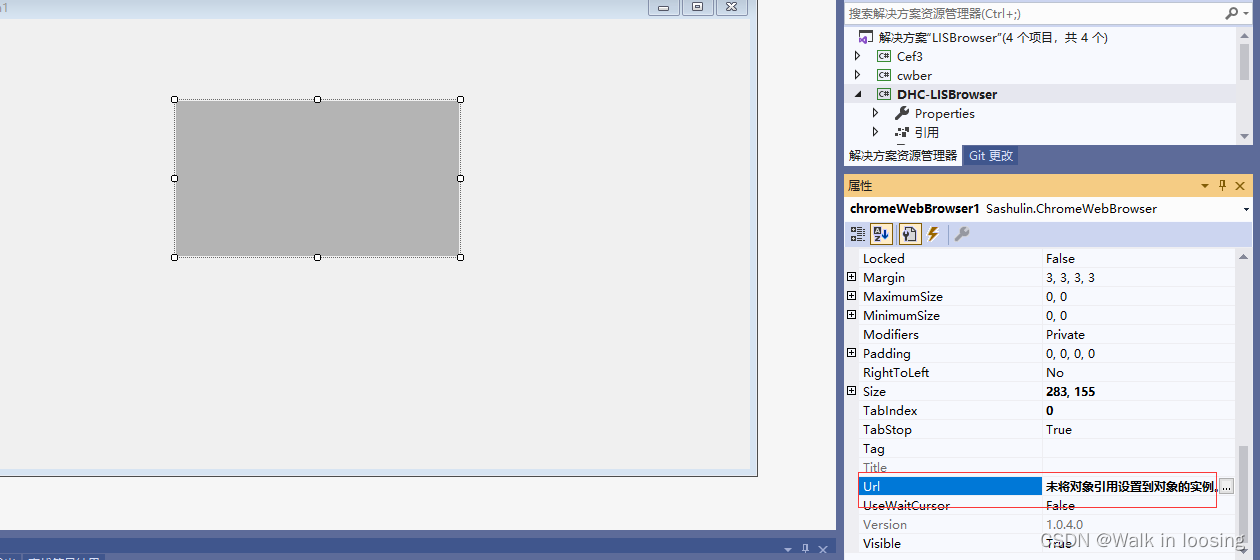
The above is the traditional way , Download dynamic libraries and dependent packages on your official website . This time nuget Make a new browser example by referencing packages .
1. So let's create one .net4.6 engineering , Right click - Reference addition buget Search in the bag cefsharp install 
2. Give the window Load Event plus the following code test , So you get a no url Input browser 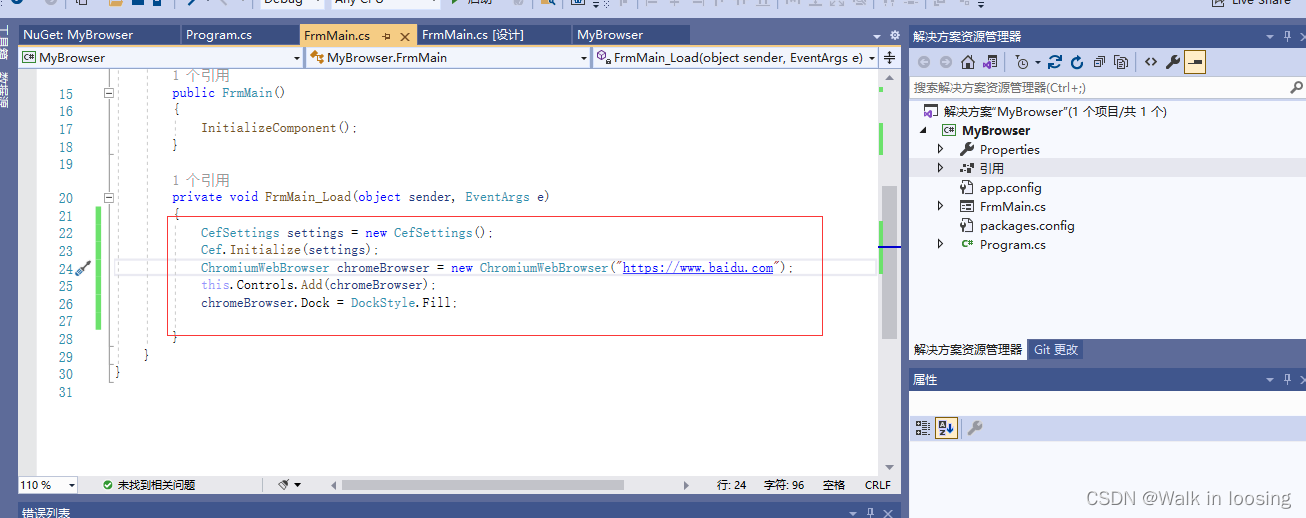

3. Then drag two panels and one... To the page url Input text box 
4. Then change the code to realize the carriage return event in the text box , In this way, I customized a simple browser for myself
using System;
using System.Collections.Generic;
using System.ComponentModel;
using System.Data;
using System.Drawing;
using System.Text;
using System.Windows.Forms;
using CefSharp;
using CefSharp.WinForms;

namespace MyBrowser
{

    public partial class FrmMain : Form
    {

        /// <summary>
        ///  Browser object
        /// </summary>
        ChromiumWebBrowser chromeBrowser = null;

        public FrmMain()
        {

            InitializeComponent();
        }

        private void FrmMain_Load(object sender, EventArgs e)
        {

            txtPath.Text = "https://www.baidu.com";
            CefSettings settings = new CefSettings();
            Cef.Initialize(settings);
            chromeBrowser = new ChromiumWebBrowser(txtPath.Text);
            panel2.Controls.Add(chromeBrowser);
            chromeBrowser.Dock = DockStyle.Fill;


        }


        /// <summary>
        ///  Input box key
        /// </summary>
        /// <param name="sender"></param>
        /// <param name="e"></param>
        private void textBox1_KeyDown(object sender, KeyEventArgs e)
        {

            if(e.KeyCode==Keys.Enter&& txtPath.Text!="")
            {

                chromeBrowser.LoadUrl(txtPath.Text);
            }
        }
    }
}
5. effect 

enough easy Well , There are no comments 50 That's ok C# Just customize a browser . You can also pack webkit Kernel .
Play with other customization
using System;
using System.Collections.Generic;
using System.ComponentModel;
using System.Data;
using System.Drawing;
using System.Text;
using System.Windows.Forms;
using System.Configuration;
using Sashulin;
using Sashulin.Core;
using Sashulin.common;
using System.IO;
using System.Net;
using System.Net.Sockets;

namespace LISBrowser
{

    /// <summary>
    ///  Execute command delegation
    /// </summary>
    /// <param name="result"></param>
    public delegate void ExcCodeDelegate(string code);

    ///<summary NoteObject="Class">
    /// [ Function description :LIS Browser home page ] <para/>
    /// [ The creator :zlz] <para/>
    /// [ Creation time :2015 year 5 month 24 Japan ] <para/>
    ///< explain >
    /// [ explain :LIS Browser home page ]<para/>
    ///</ explain >
    ///< Modify the record >
    /// [ Modification time : Time of this modification ]<para/>
    /// [ Modify the content : The content of this revision ]<para/>
    ///</ Modify the record >
    ///< Modify the record >
    /// [ Modification time : Time of this modification ]<para/>
    /// [ Modify the content : The content of this revision ]<para/>
    ///</ Modify the record >
    ///</summary>
    public partial class LBMainForm : Form
    {

        /// <summary>
        /// IP Information
        /// </summary>
        private string IPStr = "";

        /// <summary>
        ///  Heading information
        /// </summary>
        private string TitleStr = "";

        // Is it full screen
        private string FullScreen = ConfigurationManager.AppSettings["FullScreen"];

        // Display hardware information
        private string ShowHardware = ConfigurationManager.AppSettings["ShowHardware"];

        /// <summary>
        ///  Constructors
        /// </summary>
        public LBMainForm()
        {

            InitializeComponent();
            // Get configured url
            string url = ConfigurationManager.AppSettings["StartUrl"];
            if (FullScreen == "1")
            {

                this.FormBorderStyle = FormBorderStyle.None;
            }
            if (FullScreen == "2")
            {

                this.ControlBox = false;
                this.MinimizeBox = false;
                this.MaximizeBox = false;
            }

            if (ShowHardware == "1" || ShowHardware == "2" || ShowHardware == "3")
            {

                IPStr = "  Current equipment number :" + GetIpv4Str();
                this.Text = "  Current equipment number :" + GetIpv4Str() + ", Starting time :" + DateTime.Now.ToString("yyyy-MM-dd hh:mm:ss");
                timerMian.Enabled = true;
            }
            // Check whether the is configured
            if (url == null || url == "")
            {

                MessageBox.Show(" Please use the program with the same name config File configuration LIS The startup path of the system !");
                return;
            }
            // Open the start page
            OpenPage(url, null, false);
            // Set thread
            System.Windows.Forms.Control.CheckForIllegalCrossThreadCalls = false;
        }

        /// <summary>
        ///  Get the current machine's ip4 strand
        /// </summary>
        /// <returns></returns>
        private string GetIpv4Str()
        {

            IPAddress[] arrIPAddresses = Dns.GetHostAddresses(Dns.GetHostName());
            foreach (IPAddress ip in arrIPAddresses)
            {

                if (ip.AddressFamily.Equals(AddressFamily.InterNetwork))
                {

                    return ip.ToString();
                }
            }
            return string.Empty;
        }

        /// <summary>
        ///  Change Icon
        /// </summary>
        private void ChangeIconByName(string name)
        {

            this.Icon = new Icon(Application.StartupPath + "\\" + name + ".ico");
        }

        /// <summary>
        ///  Title Change Event
        /// </summary>
        /// <param name="sender"> Event trigger </param>
        /// <param name="e"> Parameters </param>
        private void chromeWebBrowser_BrowserTitleChange(object sender, TitleEventArgs e)
        {

            // Display hardware information
            string ShowHardware = ConfigurationManager.AppSettings["ShowHardware"];
            if (ShowHardware == "1")
            {

                return;
            }
            if (ShowHardware == "2" || ShowHardware == "3")
            {

                TitleStr = e.Title;
                return;
            }
            if (e.Title != "about:blank")
            {

                this.Text = e.Title;
            }
        }

        /// <summary>
        ///  entrust
        /// </summary>
        /// <param name="url">url</param>
        /// <param name="request"> Request object , Not empty </param>
        /// <param name="isNewPage"> Whether to open a new page </param>
        delegate void NewPageListener(string url, object request, bool isNewPage);

        /// <summary>
        ///  Pop up new window event
        /// </summary>
        /// <param name="sender"> Event trigger </param>
        /// <param name="e"> Parameters </param>
        private void chromeWebBrowser_BrowserNewWindow(object sender, NewWindowEventArgs e)
        {

            if (this.InvokeRequired)
            {

                NewPageListener a = new NewPageListener(OpenPage);
                this.Invoke(a, new object[] {
     e.NewUrl, e.Request, true });
            }
            else
            {

                OpenPage(e.NewUrl, e.Request, true);
            }
        }

        /// <summary>
        ///  Open page
        /// </summary>
        /// <param name="url">url</param>
        /// <param name="req"> Request object , If not, it is empty </param>
        /// <param name="isNewPage"> Whether to create a new page </param>
        private void OpenPage(string url, object req, bool isNewPage)
        {

            // Set the object
            CSharpBrowserSettings settings = new CSharpBrowserSettings();
            settings.Locale = "zh-CN";
            // edition
            settings.UserAgent = "Mozilla/5.0 (Windows; 7 4.2.1; en-us; Nexus 4 Build/JOP40D) AppleWebKit/535.19 (KHTML, like Gecko) Chrome/18.0.1025.166 Mobile Safari/535.19";
            // Cache path
            settings.CachePath = @"C:\temp\caches";
            // Create a browser object
            ChromeWebBrowser browser = new ChromeWebBrowser();
            // The binding event
            browser.BrowserNewWindow += new NewWindowEventHandler(chromeWebBrowser_BrowserNewWindow);
            // Bind title change event
            browser.BrowserTitleChange += new TitleChangeEventHandler(chromeWebBrowser_BrowserTitleChange);
            // Initialize settings
            browser.Initialize(settings);
            // If it's not a new page
            if (isNewPage == false)
            {

                this.Controls.Clear();
                this.Controls.Add(browser);
                // verification
                browser.Validate();
                // Set fill
                browser.Dock = DockStyle.Fill;
                if (!url.Contains("&"))
                {

                    browser.OpenUrl(url);
                }
                else
                {

                    browser.OpenUrl(req);
                }
                // Set up Cookie route
                browser.SetCookiePath("c:\\temp");
            }
            // Create and pop up a new page
            else
            {

                LBDialogForm form = new LBDialogForm();
                form.OpenPage(url, req, false);
                form.Show();
            }

        }

        /// <summary>
        ///  replica catalog
        /// </summary>
        /// <param name="srcPath"> The source path </param>
        /// <param name="aimPath"> The target path </param>
        private void CopyDir(string srcPath, string aimPath)
        {

            try
            {

                //  Check whether the target directory ends with the directory split character. If not, add
                if (aimPath[aimPath.Length - 1] != System.IO.Path.DirectorySeparatorChar)
                {

                    aimPath += System.IO.Path.DirectorySeparatorChar;
                }
                //  Judge whether the target directory exists. If it does not exist, create a new directory
                if (!System.IO.Directory.Exists(aimPath))
                {

                    System.IO.Directory.CreateDirectory(aimPath);
                }
                //  Get the file list of the source directory , It contains an array of files and directory paths
                //  If you point to copy The file below the target file does not contain the directory. Please use the following method
                // string[] fileList = Directory.GetFiles(srcPath);
                string[] fileList = System.IO.Directory.GetFileSystemEntries(srcPath);
                //  Traverse all files and directories
                foreach (string file in fileList)
                {

                    //  First, treat it as a directory. If there is a directory, it will be recursive Copy Files under this directory
                    if (System.IO.Directory.Exists(file))
                    {

                        CopyDir(file, aimPath + System.IO.Path.GetFileName(file));
                    }
                    //  Otherwise directly Copy file
                    else
                    {

                        System.IO.File.Copy(file, aimPath + System.IO.Path.GetFileName(file), true);
                    }
                }
            }
            catch (Exception e)
            {

                throw;
            }
        }

        /// <summary>
        ///  Timer Functions
        /// </summary>
        /// <param name="sender"></param>
        /// <param name="e"></param>
        private void timerMian_Tick(object sender, EventArgs e)
        {

            if (ShowHardware == "2")
            {

                this.Text = TitleStr + IPStr + ", current time :" + DateTime.Now.ToString("yyyy-MM-dd hh:mm:ss");
            }
            else if (ShowHardware == "3")
            {

                this.Text = IPStr + ", current time :" + DateTime.Now.ToString("yyyy-MM-dd hh:mm:ss") + TitleStr;
            }
            else
            {

                this.Text = IPStr + ", current time :" + DateTime.Now.ToString("yyyy-MM-dd hh:mm:ss");
            }
        }

        /// <summary>
        ///  Prohibit double clicking the title bar event
        /// </summary>
        /// <param name="m"></param>
        protected override void WndProc(ref Message m)
        {

            if (FullScreen == "2")
            {

                // Double click on the title bar 、 System messages for mobile forms
                if (m.Msg != 0xA3 && m.Msg != 0x0003 && m.WParam != (IntPtr)0xF012)
                {

                    base.WndProc(ref m);
                }
            }
            else
            {

                base.WndProc(ref m);
            }
        }
    }
}
The advantage is that it's simple 、 Customizable . The disadvantage is that it is not easy to use the latest browser , The debugging function is weak . Then the kernel rendering is slow in some operating systems . Can't keep up with the latest w3c standard .
边栏推荐
- Chapter II relational database after class exercises
- [图形学]ASTC纹理压缩格式
- Ros2 self study notes: gazebo physical simulation platform
- The current situation of the industry is disappointing. After working, I returned to UC Berkeley to study for a doctoral degree
- Shell运算符、$((运算式))” 或 “$[运算式]、expr方法、条件判断、test condition、[ condition ]、两个整数之间比较、按照文件权限进行判断、按照文件类型进行判断
- Remote editing and debugging with vscode
- Deep understanding of the underlying framework of wechat applet (I)
- Google play app store may delete the overview of APP permissions and use a new combination of data security information
- Typora modify table width
- 数据库-视图详探
猜你喜欢

docker redis

Running matlab program on GPU

0722~ thread pool extension

The principle of Google interview questions is to analyze 12 table tennis balls, one of which is defective. Weigh it with a balance for 3 times to find it
中国在又一个新兴科技领域领先美国,站在科技创新制高点

高性能JVM的参数

Qt Creator .pro文件根据kit添加对应库

SparkSQL设计及入门,220722,
Smart canteen data analysis system
![[jzof] 07 rebuild binary tree](/img/c8/5b67a3921afda5323b0d1eea6a78bc.png)
[jzof] 07 rebuild binary tree

随机推荐
In depth interpretation of EVM's ecological Empire
[jzof] 09 realize queue with two stacks
C#做一个简单浏览器
轻重链剖分/树链剖分
The principle of Google interview questions is to analyze 12 table tennis balls, one of which is defective. Weigh it with a balance for 3 times to find it
Debug No5 basic lighting
docker mysql
图形管线(一)后处理阶段 alpha测试 模版测试 深度测试 混合
MySQL的索引事务&&JDBC编程
Day 11 notes
概率沉思錄:2.The quantitative rules
4D antenna array layout design
Why choose AMD epyc for cloud solutions?
MetaApp开发面试题目
GOM引擎版本为什么玩家会自动掉线或闪退?
QNX修改系统时间
Hardware system architecture of 4D millimeter wave radar
php连接sql server
Knowledge map: basic concepts
Typora 修改表格宽度