当前位置:网站首页>粗柳簸箕细柳斗,谁嫌爬虫男人丑 之 异步协程半秒扒光一本小说
粗柳簸箕细柳斗,谁嫌爬虫男人丑 之 异步协程半秒扒光一本小说
2022-07-25 09:19:00 【骑着哈哥去旅行】
前阵子,偶然闻同学道,想从某某网站爬取几十万条数据来做数据分析,可是速度实在太慢,为此甚是发愁。。。其实可以提速爬虫的方法常见有多线程,多进程,异步协程等,而小编要说的就是异步协程为爬虫提速!
爬虫之所以慢,往往是因为程序等待IO而被阻塞,比如爬虫中常见的阻塞有:网络阻塞,磁盘阻塞等;细点再来讲网络阻塞,假如用requests来进行请求,如果网站的响应速度过慢,程序一直等待在网络响应,最后就导致爬虫效率极其低下!
那么何为异步爬虫呢?
通俗来讲就是:当程序检测到IO阻塞,就会自动切换到程序的其他任务,这样把程序的IO降到最低,程序处于就绪状态的任务就会增多,以此对操作系统瞒天过海,操作系统便以为程序IO较少,从而尽可能多的分配CPU,达到提升程序执行效率的目的。
一,协程
import asyncio
import time

async def func1():  # asnyc 定义一个协程
    print('隔壁老王!')
    await asyncio.sleep(3)  # 模拟阻塞 异步操作 await 将其异步等待
    print('隔壁老王')


async def func2():  # asnyc 定义一个协程
    print('哈士奇')
    await asyncio.sleep(2)  # 模拟阻塞 异步操作 await 将其异步等待
    print('哈士奇')


async def func3():  # asnyc 定义一个协程
    print('阿拉斯加')
    await asyncio.sleep(1)  # 模拟阻塞 异步操作 await 将其异步等待
    print('阿拉斯加')


async def main():
    tasks = [  # tasks:任务,它是对协程对象的进一步封装,包含了任务的各个状态
        asyncio.create_task(func1()),
        asyncio.create_task(func2()),
        asyncio.create_task(func3()),
    ]
    await asyncio.wait(tasks)

if __name__ == '__main__':
    start_time = time.time()
    asyncio.run(main())  # 一次性启动多个任务(协程)
    print('程序总耗时\033[31;1m%s\033[0ms' % (time.time() - start_time))

二,异步请求aiohttp及异步写入aiofiles
随便在网上拿几张图片链接地址作为练习
import aiohttp
import aiofiles
import asyncio
import os

if not os.path.exists('./Bantu'):
    os.mkdir('./Bantu')


async def umei_picture_download(url):
    name = url.split('/')[-1]
    picture_path = './Bantu/' + name
    async with aiohttp.ClientSession() as session:  # aiohttp.ClientSession() 相当于 requests
        async with session.get(url) as resp:  # 或session.post()异步发送
            # resp.content.read()读二进制(视频,图片等),resp.text()读文本,resp.json()读json
            down_pict = await resp.content.read()  # resp.content.read()相当于requests(xxx).content
            async with aiofiles.open(picture_path, 'wb') as f:  # aiofiles.open() 异步打开文件
                await f.write(down_pict)  # 写入内容也是异步的,需要挂起
    print('爬取图片完成!!!')


async def main():
    tasks = []
    for url in urls:
        tasks.append(asyncio.create_task(umei_picture_download(url)))

    await asyncio.wait(tasks)


if __name__ == '__main__':

    urls = [
        'https://tenfei02.cfp.cn/creative/vcg/veer/1600water/veer-158109176.jpg',
        'https://alifei03.cfp.cn/creative/vcg/veer/1600water/veer-151526132.jpg',
        'https://tenfei05.cfp.cn/creative/vcg/veer/1600water/veer-141027139.jpg',
        'https://tenfei03.cfp.cn/creative/vcg/veer/1600water/veer-132395407.jpg'
    ]

    # asyncio.run(main())
    loop = asyncio.get_event_loop()  # get_event_loop()方法创建了一个事件循环loop
    loop.run_until_complete(main())  # 调用了loop对象的run_until_complete()方法将协程注册到事件循环loop中,然后启动

三,异步协程半秒扒光一本小说
本次对象是某度上的一本小说,url地址为:http://dushu.baidu.com/pc/detail?gid=4308271440
1,简单地分析
复制URL地址并在浏览器上打开如上图页面,可以看到只显示了为数不多的几个章节标题,当点击查看全部时,网址并没有改变而加载出了全部的章节标题。
所以第一反应就是,小说的章节标题很可能是通过AJAX局部加载的!
f12打开开发者工具,点到Network下的XHR上,并点击网页上的 查看全部 按钮,如下图:

捕捉到一个包,打开看看,如下图: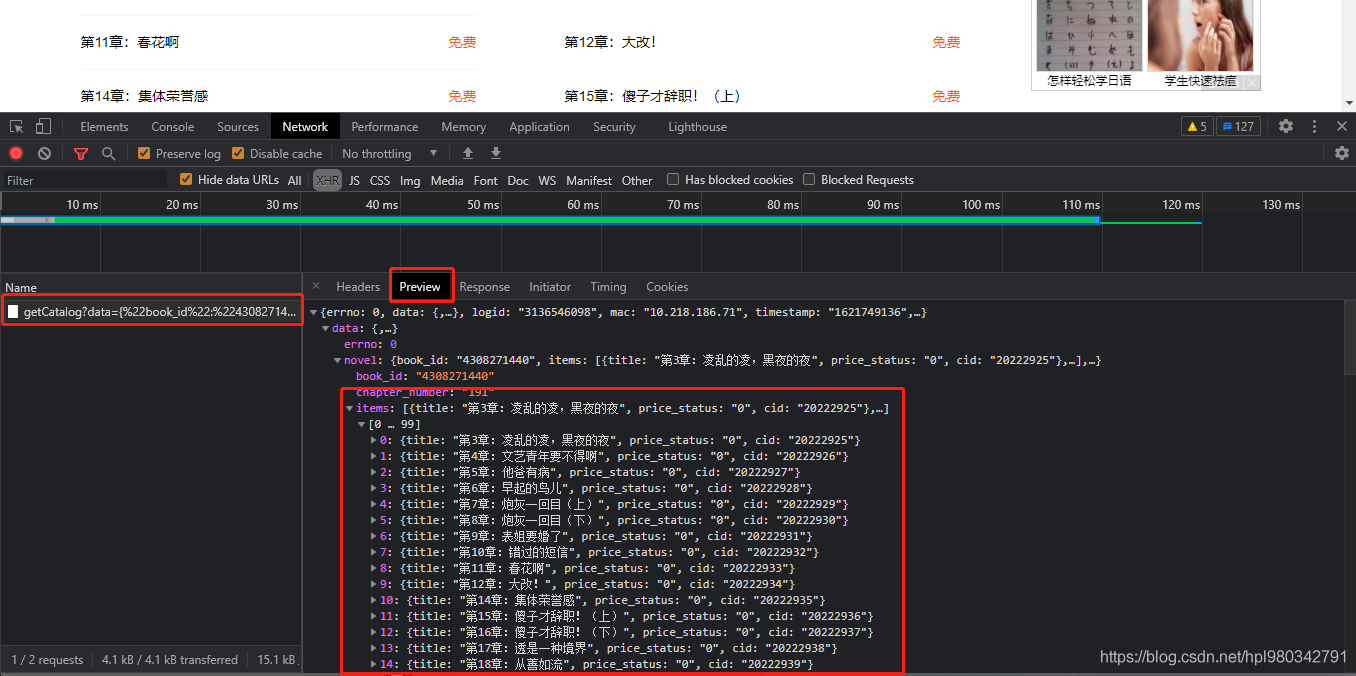
OK,找到标题!再继续每章的详细内容
随便点击一个章节名,进入详细内容页面,看浏览器捕捉到的包,如下图:
除了刚才的第一个包,在其他的三个包仔细看,有没有蛛丝马迹,如下图
章节详情已找到!!!
2,着手撸代码
开始之前先把刚才的章节标题对应的url地址和章节详情页对应的url地址拿过来瞅瞅
章节标题对应的url地址:
# http://dushu.baidu.com/api/pc/getCatalog?data={%22book_id%22:%224308271440%22}
章节详情页对应的url地址:
# http://dushu.baidu.com/api/pc/getChapterContent?data={%22book_id%22:%224308271440%22,%22cid%22:%224308271440|20222925%22,%22need_bookinfo%22:1}
额,这个某度呀!url尽管稍微凌乱了那么一丢丢,但依然不能摆脱被扒的命运,如下图: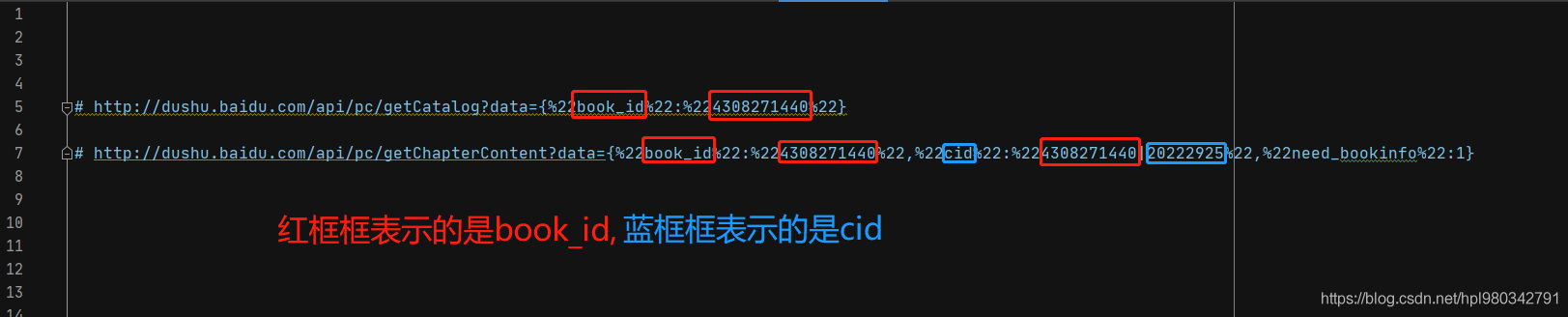
可以看到,两个url都会用到book_id,所以将book_id单另提取出来
①先上个基本的框框
import aiohttp
import asyncio
import requests
import aiofiles
import pprint
import os
import time


def get_chapter_content(url, headers):
    pass


if __name__ == '__main__':
    book_id = '4308271440'
    url = 'http://dushu.baidu.com/api/pc/getCatalog?data={%22book_id%22:%22' + book_id + '%22}'
    headers = {

        'User-Agent': 'Mozilla/5.0 (Windows NT 10.0; Win64; x64) AppleWebKit/537.36 (KHTML, like Gecko) Chrome/90.0.4430.212 Safari/537.36'
    }

    get_chapter_content(url, headers)
②拿到章节名和对应的cid
读出对应的json文件
def get_chapter_content(url, headers):
    response = requests.get(url=url, headers=headers).json()
    pprint.pprint(response)
运行如下图: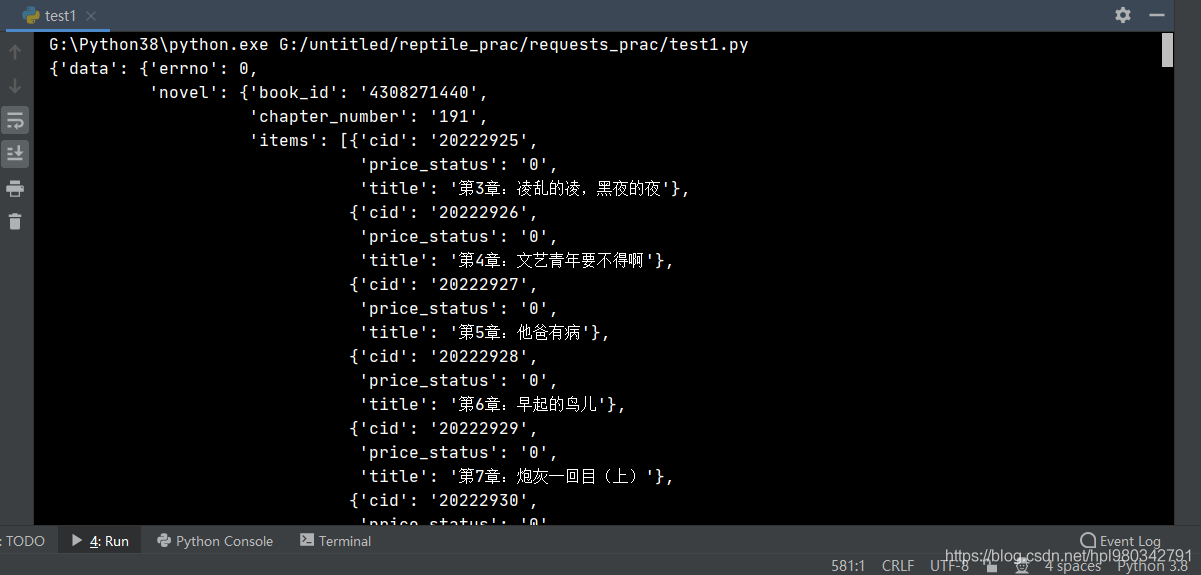
取出cid和title
def get_chapter_content(url, headers):
    response = requests.get(url=url, headers=headers).json()
    # pprint.pprint(response)
    chapter_details = response['data']['novel']['items']  # 拿到包含了每章cid和章节名的内容
    for chapter in chapter_details:
        chapter_cid = chapter['cid']  # 拿到每章对应的cid
        chapter_title = chapter['title']  # 拿到每章对应的标题名
        print(chapter_cid, chapter_title)

③上异步
async def get_chapter_content(url, headers):
    response = requests.get(url=url, headers=headers).json()
    # pprint.pprint(response)
    tasks = []
    chapter_details = response['data']['novel']['items']  # 拿到包含了每章cid和章节名的内容
    for chapter in chapter_details:
        chapter_cid = chapter['cid']  # 拿到每章对应的cid
        chapter_title = chapter['title']  # 拿到每章对应的标题名
        # print(chapter_cid, chapter_title)
        tasks.append(asyncio.create_task(aio_download_novel(headers, chapter_cid, chapter_title, book_id)))

    await asyncio.wait(tasks)


async def aio_download_novel(headers, chapter_cid, chapter_title, book_id):
    pass


if __name__ == '__main__':
    book_id = '4308271440'
    url = 'http://dushu.baidu.com/api/pc/getCatalog?data={%22book_id%22:%22' + book_id + '%22}'
    headers = {

        'User-Agent': 'Mozilla/5.0 (Windows NT 10.0; Win64; x64) AppleWebKit/537.36 (KHTML, like Gecko) Chrome/90.0.4430.212 Safari/537.36'
    }

    asyncio.run(get_chapter_content(url, headers))
④拿出详细内容
async def aio_download_novel(headers, chapter_cid, chapter_title, book_id):
    details_url = 'http://dushu.baidu.com/api/pc/getChapterContent?data={%22book_id%22:%22' + book_id + '%22,%22cid%22:%22' + book_id + '|' + chapter_cid + '%22,%22need_bookinfo%22:1}'
    # print(details_url)
    async with aiohttp.ClientSession() as session:
        async with session.get(url=details_url, headers=headers) as response:
            content = await response.json()
            # pprint.pprint(content)
            details_content = content['data']['novel']['content']
            print(details_content)

⑤持久化存储
import aiohttp
import asyncio
import requests
import aiofiles
import pprint
import os
import time

if not os.path.exists('./姐不要做炮灰'):
    os.mkdir('./姐不要做炮灰')


async def get_chapter_content(url, headers):
    response = requests.get(url=url, headers=headers).json()
    # pprint.pprint(response)
    tasks = []
    chapter_details = response['data']['novel']['items']  # 拿到包含了每章cid和章节名的内容
    for chapter in chapter_details:
        chapter_cid = chapter['cid']  # 拿到每章对应的cid
        chapter_title = chapter['title']  # 拿到每章对应的标题名
        # print(chapter_cid, chapter_title)
        tasks.append(asyncio.create_task(aio_download_novel(headers, chapter_cid, chapter_title, book_id)))

    await asyncio.wait(tasks)


async def aio_download_novel(headers, chapter_cid, chapter_title, book_id):
    details_url = 'http://dushu.baidu.com/api/pc/getChapterContent?data={%22book_id%22:%22' + book_id + '%22,%22cid%22:%22' + book_id + '|' + chapter_cid + '%22,%22need_bookinfo%22:1}'
    # print(details_url)
    novel_path = './姐不要做炮灰/' + chapter_title
    async with aiohttp.ClientSession() as session:
        async with session.get(url=details_url, headers=headers) as response:
            content = await response.json()
            # pprint.pprint(content)
            details_content = content['data']['novel']['content']
            # print(details_content)
            async with aiofiles.open(novel_path, mode='w', encoding='utf-8') as f:
                await f.write(details_content)

    print(chapter_title, '\033[31;1m 爬取完成!!!\033[0m')


if __name__ == '__main__':
    book_id = '4308271440'
    url = 'http://dushu.baidu.com/api/pc/getCatalog?data={%22book_id%22:%22' + book_id + '%22}'
    headers = {

        'User-Agent': 'Mozilla/5.0 (Windows NT 10.0; Win64; x64) AppleWebKit/537.36 (KHTML, like Gecko) Chrome/90.0.4430.212 Safari/537.36'
    }
    start_time = time.time()
    asyncio.run(get_chapter_content(url, headers))
    print('\n')
    print('爬虫程序总耗时: \033[31;1m%s\033[0m s' % (time.time() - start_time))


到此结束!
边栏推荐
猜你喜欢

Nacos启动报错Unable to start web server

activemq--消息重试机制

在Ubuntu中安装MySQL并创建新用户

Druid 查询超时配置的探究 → DataSource 和 JdbcTemplate 的 queryTimeout 到底谁生效?
Comparison between symmetric encryption and asymmetric encryption

Composition of the interview must ask items
ActiveMQ -- dead letter queue

SSM框架整合,简单案例

有误差的字符串型时间比较方法String.compareTo

将list集合的某一字段拼接单个String
随机推荐
Six storage types in C language: Auto register static extern const volatile
log4j2基础配置
activemq--可持久化机制之JDBC代码
[common tools] obtain system status information based on psutil and gputil
Redis operation uses cursor instead of keys
Opencv realizes simple face tracking
[SCADA case] myscada helps VIB company realize the modernization and upgrading of production line
Probe into Druid query timeout configuration → who is the querytimeout of datasource and jdbctemplate effective?
Ten thousand words long, one word thoroughly! Finally, someone has made business intelligence (BI) clear
PHP date() function does not support processing numbers greater than 2147483648? "Suggested collection"
ActiveMQ -- persistent mechanism
Ranking of data results in MySQL
Jspdf generates PDF files. There is a problem of incomplete files. Files are downloaded in the background, but not in the foreground
ActiveMQ -- AMQ of persistent mechanism
activemq--延迟投递和定时投递
Arrange the array into the smallest number
mysql中的数据结果排名
Redis sentry, master-slave deployment details
MySQL takes the query result as the data updated by update, and concatenates it after the original field data (Lej)
activemq--可持久化机制之JDBC