当前位置:网站首页>VSCode编写OpenCV
VSCode编写OpenCV
2022-08-05 05:25:00 【ProfSnail】
首先,需要安装MinGW编译器,支持编译C++代码。
安装MinGW编译器
将MinGW解压缩在某个文件夹中。例如:C:\software\mingw64

配置环境变量。
3.1 右键桌面此电脑,选择属性。

3.2 选择高级系统设置。
3.3 打开环境变量。
3.4 设置path,添加一条路径,为刚刚mingw的下bin文件夹的路径。C:\software\mingw64\bin。

测试环境变量。win+r打开运行界面,输入cmd进入命令行,输入gcc -v,敲回车,查看gcc是否正常工作。

配置Vscode环境,支持编译C++
不用怎么配置,新建一个.cpp文件,用vscode打开,右下角提示是否安装推荐的C++扩展,安装之后就可以编译cpp文件了。
安装完成后,发现新增了如下的VSCode扩展。
下载opencv3
进入官网,https://opencv.org/releases/,下载opencv3,选择Windows进行下载。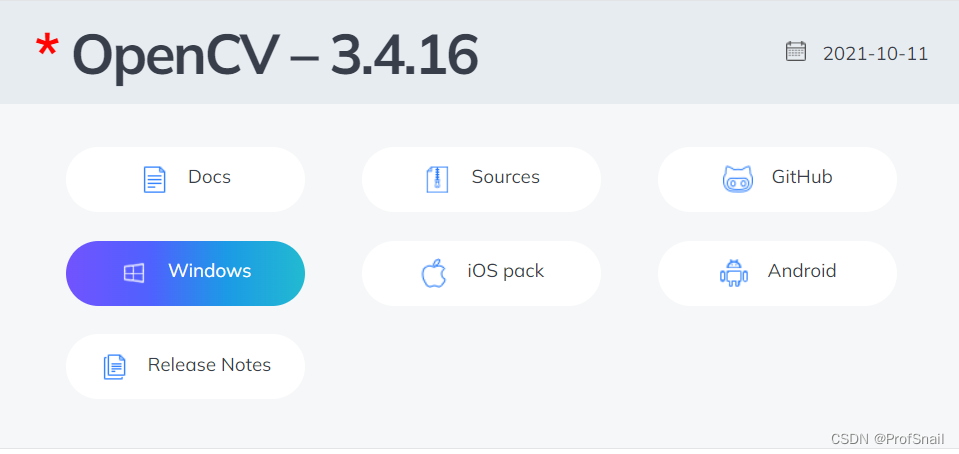
安装到指定目录下即可。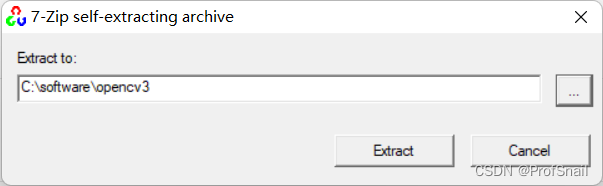
下载Cmake
下载路径是:https://cmake.org/download/

将其解压到自定义目录下,我的路径为:C:\software\cmake\bin
点开cmake-gui.exe。
where is source code,选择C:\software\opencv3\opencv\sources
where is to build the binaries,是自己设置的文件夹,选择C:\software\opencv3\opencv\build\x64\mingw。
点击左下角的Configure,选择MinGW Makefiles,Specify native compiler。
Compiler,选择Mingw文件夹bin下的gcc.exe和g++.exe。路径是C:\software\mingw64\bin。
显示configure done。
一定注意这一步,如果不执行这一步,后面依赖的dll会缺失。
在执行完后,把关于python的都给取消勾选。勾选BUILD_opencv_world,WITH_OPENGL和BUILD_EXAMPLES,不勾选WITH_IPP、WITH_MSMF和ENABLE_PRECOMPILED_HEADERS(如果有的话),CPU_DISPATCH选空。
第二次点击Configure。

再点击Generate,最后Generate Done,就完成了。
make
cmd进入刚刚设置的文件夹C:\software\opencv3\opencv\build\x64\mingw,执行命令: minGW32-make -j 4。
make成功
继续执行minGW32-make install
配置OpenCV的环境变量。
配置Vscode环境,支持OpenCV3
任意创建一个文件夹,放置自己的代码。
最后的文件结构如下:
自己创建.vscode文件夹,自己创建c_cpp_properties.json、launch.json、tasks.json文件。自己创建Debugger文件夹。
c_cpp_properties.json
{

    "configurations": [
        {

            "name": "win",
            "includePath": [
                "${workspaceFolder}/**",
                "C:/software/opencv3/opencv/build/x64/mingw/include",
                "C:/software/opencv3/opencv/build/x64/mingw/install/include/opencv2",
                "C:/software/opencv3/opencv/build/x64/mingw/install/include"
            ],
            "defines": [],
            "compilerPath": "C:/software/mingw64/bin/g++.exe",
            "cStandard": "c11",
            "cppStandard": "c++17",
            "intelliSenseMode": "${default}"
        }
    ],
    "version": 4
}
launch.json
{


    "version": "0.2.0",
    "configurations": [
        {

            "name": "opencv debuge",
            "type": "cppdbg",
            "request": "launch",
            "program": "${workspaceFolder}//Debugger//${fileBasenameNoExtension}.exe",
            //上面这个Debugger是我自己定义的,为了方便放置生成的exe文件
            "args": [],
            "stopAtEntry": false, //这里如果为 false,则说明调试直接运行。(反之则停止)
            "cwd": "${workspaceFolder}",
            "environment": [],
            "externalConsole": true,//是否调用外部cmd
            "MIMode": "gdb",
            "miDebuggerPath": "C:/software/mingw64/bin/gdb.exe",//自己进行设置
            "setupCommands": [
                {

                    "description": "为 gdb 启用整齐打印",
                    "text": "-enable-pretty-printing",
                    "ignoreFailures": false
                }
            ],
            "preLaunchTask": "opencv3.5.2"
        }
    ]
}
tasks.json
{

    "version": "2.0.0",
    "tasks": [
        {

            "type": "shell",
            "label": "opencv3.5.2",
            "command": "C:/software/mingw64/bin/g++.exe",
            "args": [
                "-g",
                "${file}",
                "-o",
                "${workspaceFolder}//Debugger//${fileBasenameNoExtension}.exe",
                //上面这个Debugger是我自己定义的,为了方便放置生成的exe文件
                "C:/software/opencv3/opencv/build/x64/mingw/bin/libopencv_world3416.dll",
                "-I",
                "C:/software/opencv3/opencv/build/x64/mingw/install/include",
                "-I",
                "C:/software/opencv3/opencv/build/x64/mingw/install/include/opencv2",
            ],
            "options": {

                "cwd": "C:/software/mingw64/bin"
            },
            "problemMatcher": [
                "$gcc"
            ],
            "group": {

                "kind": "build",
                "isDefault": true
            }
        }
    ]
}
在C:\software\opencv3\opencv\build\x64\mingw\bin下找到libopencv_world3416.dll,复制到Debugger文件夹下。注意这个后缀3416是OpenCV的版本号,与自己安装的版本有关系。
在C:\software\opencv3\opencv\build\x64\vc15\bin下找到opencv_ffmpeg3416_64.dll,复制到Debugger文件夹下。
生成test.cpp文件,输入测试代码。
#include <opencv2/opencv.hpp>
#include <opencv2/highgui.hpp>
#include <iostream>
using namespace cv;
int main()
{

    Mat img=imread("man.jpg");
    imshow("image",img);
    waitKey();
    return 0;
}
能正常运行即可。
边栏推荐
- js判断文字是否超过区域
- What?CDN cache acceleration only works for accelerating static content?
- 多行文本省略
- What are some things that you only know when you do operation and maintenance?
- DevOps流程demo(实操记录)
- js 使用雪花id生成随机id
- Collection of error records (write down when you encounter them)
- vs2017关于函数命名方面的注意事项
- el-autocomplete使用
- Proprietary host CDH
猜你喜欢

系统基础-学习笔记(一些命令记录)

Successful indie developers deal with failure & imposters
config.js related configuration summary

Unity realizes first-person roaming (nanny-level tutorial)
![[问题已处理]-虚拟机报错contains a file system with errors check forced](/img/07/1222a44dd52b359bf7873e6f3b7ebf.png)
[问题已处理]-虚拟机报错contains a file system with errors check forced

network issue?Service packet loss?This is enough

Mina断线重连

网络层协议介绍

人人AI(吴恩达系列)

Problems encountered in installing Yolo3 target detection module in Autoware
随机推荐
Browser Storage for H5
Seven Ways to Center a Box Horizontally and Vertically
Insight into the general trend of the Internet, after reading this article, you will have a thorough understanding of Chinese domain names
js判断文字是否超过区域
【考研结束第一天,过于空虚,想对自己进行总结一下】
LeetCode中常用语言的一些基本方法记录
带你深入了解Cookie
el-progress implements different colors of the progress bar
disabledDate 日期选择器 datePicker
传输层协议
sql server duplicate values are counted after
多线程之传递参数
markdown editor template
One-arm routing experiment and three-layer switch experiment
What impact does CIPU have on the cloud computing industry?
The cocos interview answers you are looking for are all here!
Quick question and quick answer - FAQ of Tencent Cloud Server
网络层协议介绍
Chengyun Technology was invited to attend the 2022 Alibaba Cloud Partner Conference and won the "Gathering Strength and Going Far" Award
RAID disk array