当前位置:网站首页>Seven Ways to Center a Box Horizontally and Vertically
Seven Ways to Center a Box Horizontally and Vertically
2022-08-05 06:22:00 【MoXinXueWEB】
方法一:定位+ 平移
<!DOCTYPE html>
<html lang="en">
<head>
    <meta charset="UTF-8">
    <meta name="viewport" content="width=device-width, initial-scale=1.0">
    <title>Document</title>
    <style> .parent {
       width: 500px; height: 500px; border: 1px solid #000; position: relative; } .child {
       width: 100px; height: 100px; border: 1px solid #999; position: absolute; top: 50%; left: 50%; transform: translate(-50%, -50%); } </style>
</head>
<body>
    <div class="parent">
    	<div class="child">我是子元素</div>
    </div>
</body>
</html>
方法二:弹性布局
<!DOCTYPE html>
<html lang="en">
<head>
    <meta charset="UTF-8">
    <meta name="viewport" content="width=device-width, initial-scale=1.0">
    <title>Document</title>
    <style> .parent {
       width: 500px; height: 500px; border: 1px solid #000; display: flex; justify-content: center; align-items: center; } .child {
       width: 100px; height: 100px; border: 1px solid #999; } </style>
</head>
<body>
    <div class="parent">
    	<div class="child">我是子元素</div>
    </div>
</body>
</html>
方法三:网格 Grid
<!DOCTYPE html>
<html lang="en">
<head>
    <meta charset="UTF-8">
    <meta name="viewport" content="width=device-width, initial-scale=1.0">
    <title>Document</title>
    <style> .parent {
       width: 500px; height: 500px; border: 1px solid #000; display: grid; place-items: center; } .child {
       width: 100px; height: 100px; border: 1px solid #999; } </style>
</head>
<body>
    <div class="parent">
    	<div class="child">我是子元素</div>
    </div>
</body>
</html>
方法四:margin:auto;
<!DOCTYPE html>
<html lang="en">
<head>
    <meta charset="UTF-8">
    <meta name="viewport" content="width=device-width, initial-scale=1.0">
    <title>Document</title>
    <style> .parent {
       width: 500px; height: 500px; border: 1px solid #000; position: relative; } .child {
       width: 100px; height: 100px; border: 1px solid #999; position: absolute; margin: auto; top: 0; left: 0; right: 0; bottom: 0; } </style>
</head>
<body>
    <div class="parent">
    	<div class="child">我是子元素</div>
    </div>
</body>
</html>
方法五:表格布局
<!DOCTYPE html>
<html lang="en">
<head>
    <meta charset="UTF-8">
    <meta name="viewport" content="width=device-width, initial-scale=1.0">
    <title>Document</title>
    <style> .parent {
       width: 500px; height: 500px; border: 1px solid #000; display: table-cell; vertical-align: middle; text-align: center; } .child {
       width: 100px; height: 100px; border: 1px solid #999; display: inline-block; } </style>
</head>
<body>
    <div class="parent">
    	<div class="child">我是子元素</div>
    </div>
</body>
</html>
方法六:计算父盒子与子盒子的空间距离
<!DOCTYPE html>
<html lang="en">
<head>
    <meta charset="UTF-8">
    <meta name="viewport" content="width=device-width, initial-scale=1.0">
    <title>Document</title>
    <style> .parent {
       width: 500px; height: 500px; border: 1px solid #000; } .child {
       width: 100px; height: 100px; border: 1px solid #999; margin-top: 200px; margin-left: 200px; } </style>
</head>
<body>
    <div class="parent">
    	<div class="child">我是子元素</div>
    </div>
</body>
</html>
方法七:定位+负边距
<!DOCTYPE html>
<html lang="en">
<head>
    <meta charset="UTF-8">
    <meta name="viewport" content="width=device-width, initial-scale=1.0">
    <title>Document</title>
    <style> .parent {
       width: 500px; height: 500px; border: 1px solid #000; position: relative; } .child {
       width: 100px; height: 100px; border: 1px solid #999; position: absolute; top: 50%; left: 50%; margin-top: -50px; margin-left: -50px; } </style>
</head>
<body>
    <div class="parent">
    	<div class="child">我是子元素</div>
    </div>
</body>
</html>
边栏推荐
- The problem come from line screening process
- LeetCode Interview Questions
- Difference between link and @improt
- Four ways to obtain Class objects through reflection
- One-arm routing experiment and three-layer switch experiment
- Insight into the general trend of the Internet, after reading this article, you will have a thorough understanding of Chinese domain names
- Regular expression small example - get number character and repeated the most
- 教您简单几步实现工业树莓派正确安装RS232转USB驱动
- King power volume LinkSLA, realize operations engineer is happy fishing
- From "dual card dual standby" to "dual communication", vivo took the lead in promoting the implementation of the DSDA architecture
猜你喜欢
![[issue resolved] - jenkins pipeline checkout timeout](/img/3d/c14276d2b5ce18fc3d1288abb059c0.png)
[issue resolved] - jenkins pipeline checkout timeout

VLAN is introduced with the experiment
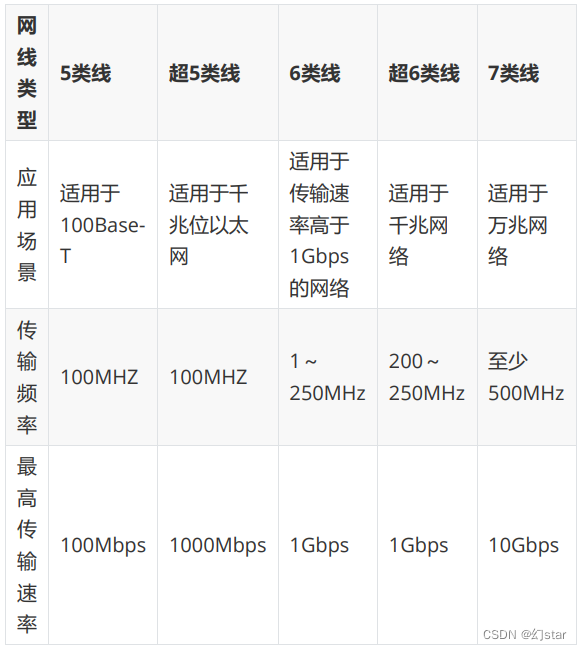
Network wiring and digital-to-system conversion

network issue?Service packet loss?This is enough

el-autocomplete使用
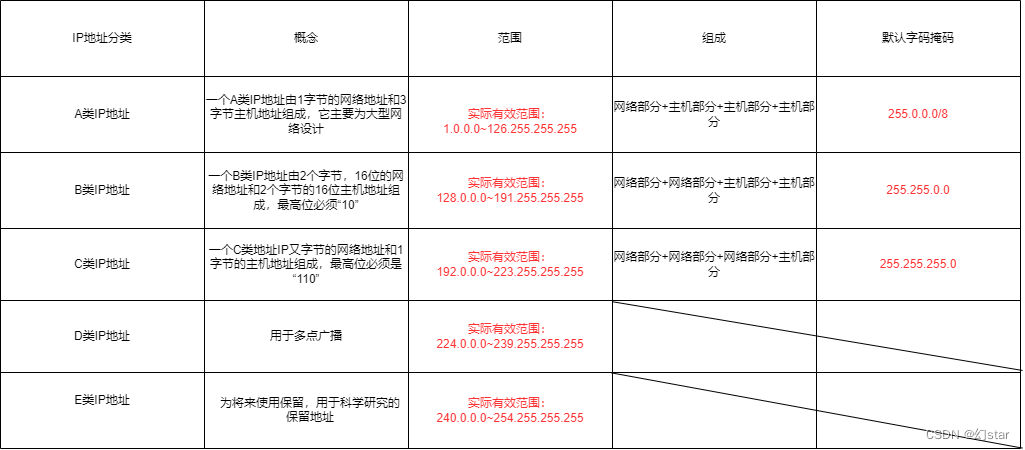
IP address and subnet division
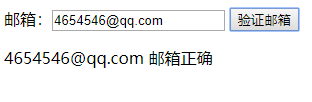
Small example of regular expression--validate email address

selenium学习

LeetCode练习及自己理解记录(1)
[问题已处理]-jenkins流水线checkout超时
随机推荐
spark source code - task submission process - 3-ApplicationMaster
传输层协议
The Servlet to jump to the JSP page, forwarding and redirection
What are some things that you only know when you do operation and maintenance?
el-autocomplete use
LeetCode中常用语言的一些基本方法记录
运维工程师,快来薅羊毛
Does flink cdc currently support Gauss database sources?
Teach you simple steps to achieve industrial raspberries pie properly installed RS232 USB drive
markdown编辑器模板
入职前,没想到他们玩的这么花
Tencent Cloud Message Queue CMQ
大小屏适配
产品学习资料
正则表达式小示例--获取重复最多的字符及其数量
LeetCode练习及自己理解记录(1)
Technology Sharing Miscellaneous Technologies
解决这三大问题,运维效率将超90%的医院
markdown editor template
Quick question and quick answer - FAQ of Tencent Cloud Server