当前位置:网站首页>About flex layout justify content: the last solution to the misalignment of space around and why it is solved like this is a discussion
About flex layout justify content: the last solution to the misalignment of space around and why it is solved like this is a discussion
2022-07-23 14:35:00 【Minor dream】
About flex Layout justify-content:space-around The last solution to misalignment and why it is solved like this are discussed
Reference article
You may have encountered the following situations , In the layout, we have to set
justify-content:space-aroundAnd the effect was originally intended to be the effect on the right of the following figure , But it shows the effect on the left

In fact, the solution is also very simple , Add a pseudo class to the outermost layer
html structure
    <!--  Outer layer  -->
  <div class="root">

    <!--  Traversing data  -->
    <div v-for="(shopItem, index) in shopList" :key="index">
      <img style="width: 200px;" :src="shopItem.url" alt="" />
    </div>

  </div>
css terms of settlement , stay root Add a pseudo class later to solve
.root::after{

    content: "";
    width: 200px;
    /*  Height cannot be provided  */
    /* height: 200px; */
}
So why set ::after Pseudo classes can be solved justify-content What about the layout problem ?
- When the circular list is odd, the filling box will appear, right ?


- But if it is an even number, will this pseudo class appear
::afterFilling box , Let's add another item frame- You can see , There is no red box ( It's not that I didn't get the screenshot , It is true that there is no red frame )


- So why ? It's like knowing that the browser knows that we need this filled content to appear
- Before, I guessed that the box model might calculate the pseudo class
::afterWidth , But I remember that the box model calculates for block level elements - Check the information later and say
- Before, I guessed that the box model might calculate the pseudo class
CSS Pseudo elements ::after Used to create a pseudo element , As the last child of the selected element . Usually will cooperate with content Attribute to add decorative content to the element . This virtual element defaults to an inline element .
- Then it must not be the problem of box model calculation , So why ?( Here is my personal opinion , May be wrong )
- Later, I thought about what happened
- 1. The last line is not filled , When there is a gap , There will be pseudo class filling
- 2. When the container is not empty at last , There will be no pseudo class filling
- Later, I thought about what happened
- See the properties of the elastic box later , Found out
flex-basis
CSS attribute flex-basis It specifies flex The initial size of the element in the principal axis direction . If not used
box-sizingChange the box model , Then this attribute determines flex Content box for elements (content-box) The size of the .flex-basis The default value is
auto
- So I set up pseudo classes
::afterOfflex-basis:0, See what happens ,
.root::after{

    content: "";
    width: 200px;
    /*  Height cannot be provided  */
    /* height: 200px; */
    background: red;
    flex-basis:0;
}
- You can see , pseudo-classes
::afterThere is no height , Unlike the previous line that is not full, there is padding

- We are setting it to
flex-basis:autoSee what happens
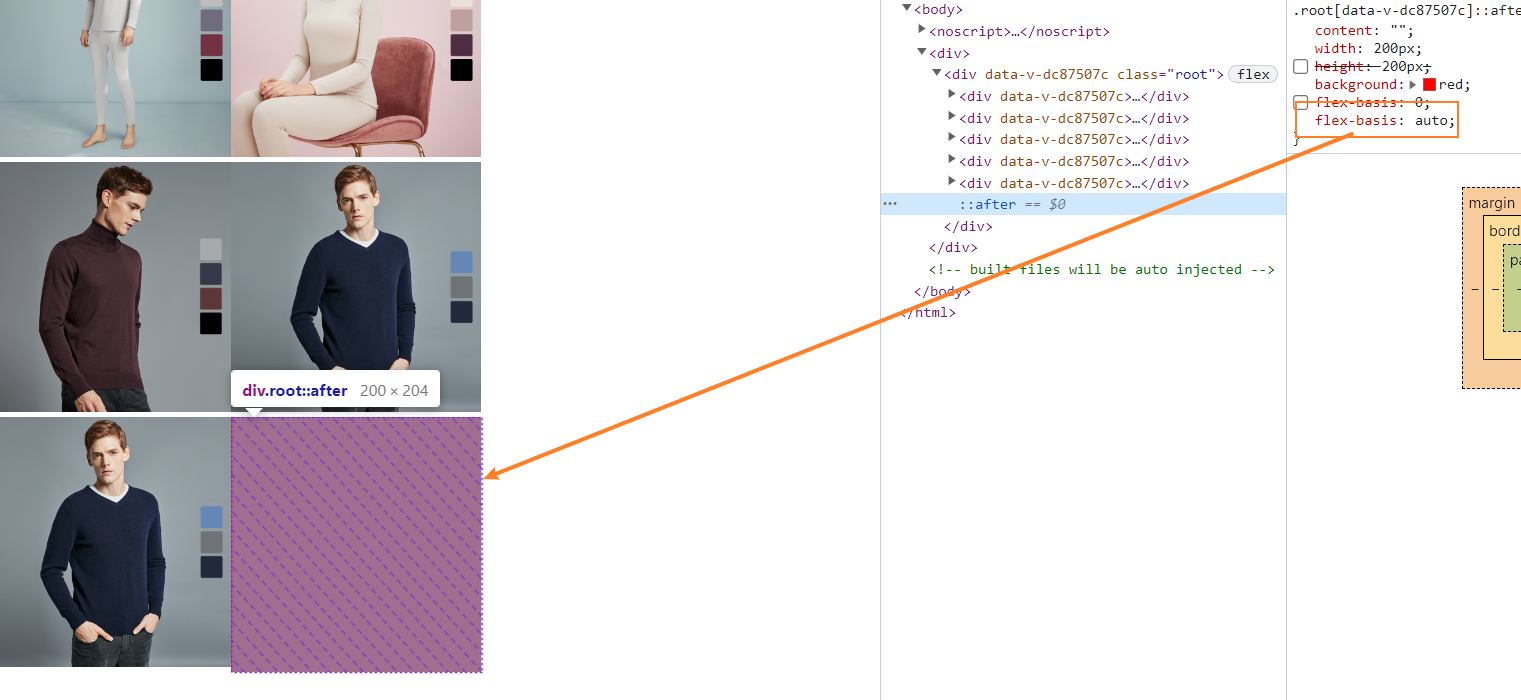
- Of course , Because we didn't set the width of the foundation , So set
flex-basis:contentThe same effect

- Even set up
height:autoIs the same effect
flex-basis Official explanation — Since this value was not included in the original specification , Implemented in some early browsers flex Layout ,content Invalid value , You can use settings (width or height) by auto To achieve the same effect .
summary
- The browser knows that we need this padding because
flex-basisThe default value is auto, The browser calculates and selects a height or width for the element , Of course , If the width and height are set in advance , thatflex-basis:autoIt's no use ( There is no setting here height, So just talk about height The situation of ) - So know more flex Layout ~~~
边栏推荐
- CPU, memory, disk speed comparison
- js软件卸载提示表情跟随鼠标变化js特效
- Several hole filling methods of point cloud (mesh) (1)
- 关于flex布局justify-content:space-around最后一个不对齐的解决方法和为什么这样子解决是讨论
- spotlight灯箱js插件全屏放大图片
- Antd form - reset method does not work - Basic accumulation - importance of prop
- 可以进行2D或3D三角剖分的一些库
- 【附下载】值得收藏的几款渗透测试常用的脚本
- 338. 比特位计数
- 鸡与蛋,产品与策略
猜你喜欢


![webstrom ERROR in [eslint] ESLint is not a constructor](/img/e9/b084512d6aa8c4116d7068fdc8fc05.png)


随机推荐
Question 142 of Li Kou: circular linked list 2
[review of analog electricity - diode]
JS software unloading prompt expression changes with the mouse JS special effect
npm warn config global `--global`, `--local` are deprecated. use `--location=global` instead.
手机股票开户风险性大吗,安全吗?
JS to implement encode64 encryption
4. Find the median of two positive arrays
手工测试如何转向自动化测试?字节5年自动化经验浅谈一下...
【论文笔记】基于分层深度强化学习的移动机器人导航方法
FPGA工程师如何进行复杂系统设计?
js日历样式饼图统计插件
第三章 复杂一点的查询
拖拽----
Aruba学习笔记05-配置架构- WLAN配置架构
Changing the historical length of chart during LabVIEW operation
Looking for peak [Abstract dichotomy exercise]
Is it risky and safe to open an account for stock speculation?
JS texture style pie chart plug-in
[baiqihang] Niuer education helps colleges and universities visit enterprises, expand posts and promote employment
右键新建txt,新建文本文件不见了,通过添加注册表就可以解决,找来找去办法解决不了的终极办法