当前位置:网站首页>Nuxt.js spa与ssr的区别
Nuxt.js spa与ssr的区别
2022-06-23 09:52:00 【黑猫几绛】
一、引言
Nuxt.js 是一个基于 Vue.js 的通用应用框架,一个用于Vue.js 开发SSR应用的一站式解决方案。它的优点是将原来几个配置文件要完成的内容,都整合在了一个nuxt.config.js,封装与扩展性完美的契合。
在接触nuxt.js之前,首先需要明白两个概念:Vue开发的客户端单页面应用程序(SPA)、服务端渲染框架(SSR)
- SPA:单页面应用程序

传统的SPA应用是将bundle.js从服务端获取,然后再客户端解析并挂载到dom身上。
优点:
- 页面之间切换很快
- 减轻服务器的压力
缺点:
- 首屏加载缓慢
- 很明显,不利于SEO(搜索引擎优化),因为爬虫无法爬取到具体的html页面(因为SPA采用的大多是单页面组件,这些都不是html代码形式)
优化:
- 组件 / 路由的懒加载、异步组件
- 对打包后的资源进行压缩,减轻入口压力
- 对打包后的资源进行压缩
- 采用更高层的SSR服务端渲染
SSR:服务端渲染
可以将其理解为:在node服务器中来运行Vue程序,然后在服务器中处理好页面渲染的问题,最后直接将页面html的展示传递给客户端,客户端仅仅只需要进行渲染即可;这样大大的减少了加载的时间,提高了加载的效率
即:网页是通过服务端渲染生成后输出给客户端
在SSR中,前端分成两部分:前端客户端、前端服务端
前端服务端,用于发送ajax,获得数据
前端客户端,用于将ajax数据和页面进行渲染,渲染成html页面,并响应给调用程序(浏览器、爬虫)
![[外链图片转存失败,源站可能有防盗链机制,建议将图片保存下来直接上传(img-BJKLikfk-1655718713231)(../AppData/Roaming/Typora/typora-user-images/image-20220620143009204.png)]](/img/c0/84716ac7a55d551d24f646b0d6014d.png)
如果爬虫获得html页面,就可以启动处理程序,处理页面内容,最终完成SEO操作。
现在理解一下Nuxt.js完整的SSR流程
- Nuxt将代码项目程序封装为
- Server服务端包
- Client客户端包
- Webpack将这两个包进行打包为
- Server bundle.js —— 提供给node服务器使用,在node服务器中负责进行数据处理,然后得到渲染后的页面(不能绑定js事件,只能是html+css)
- Client bundle.js —— 接收服务器的纯静态html代码,然后进行
Hydrate混入。此时客户端的virtual-dom进行预渲染,和服务端返回的静态页面惊醒比对,比对两边渲染的内容是否为一致的。如果不一致将会报错Hydrate.....;如果一致则会对DOM元素的事件进行绑定处理
二、测试服务端渲染
2.1 搭建项目
创建:
npm init nuxt-app <project-name>
然后一步一步选择配置即可
运行:
npm run dev
访问:
http://localhost:3000
项目结构:
| 目录名称 | 描述 |
|---|---|
| assets | 资源目录,用于存放需要编译的静态资源(打包后的资源),引用assets资源时可以使用~或@简写形式,比如<img src=“~assets/13.jpg”/> |
| components | vue组件目录,Nuxt.js 不会增强该目录,即不支持SSR |
| layouts | 布局组件目录 |
| pages | 页面目录,所有的vue视图,nuxt根据目录结构自动生成对应的路由。 |
| plugins | 插件目录 |
| static | 静态文件目录,不需要编译的文件,引用static资源时可以使用 / 简写形式,比如<img src=“/12.jpg”/> |
| server | 服务端代码编写在这个文件夹内 |
| store | vuex目录 |
| nuxt.config.js | nuxt个性化配置文件,内容将覆盖默认 |
| package.json | 项目配置文件 |
2.2 编写服务端接口
在这里我采用express来编写一个接口,这个接口目的是返回所有的学生数据。
接口结构:
// 所有服务端的代码都放在server文件夹下
|server/
// 为某个接口创建具体的模块文件夹
|--| students/
|-----| student_info.js
// index.js位于server的根目录下,负责整合所有的接口处理代码
|--| index.js
student_info.js文件代码:
const express = require('express')
const router = express.Router()

router.get('/info', (req, res)=>{

  return res.status(200).json([
    {

      id: '1902',
      name: 'neko_z'
    },
    {

      id: '1903',
      name: 'neko_k'
    },
    {

      id: '1904',
      name: 'neko_m'
    }
  ])
})

module.exports = router
向index.js文件中挂载student相关的api接口:
// 部分代码
const express = require('express')
const consola = require('consola')
const {
     Nuxt, Builder } = require('nuxt')
const student = require('./students/student_info')
const app = express()

// 挂载路由规则,第一个参数为路径,第二个参数为路由对象或callback函数
app.use('/api/student',student)
现在我们在电脑上面访问一下http://localhost:3000/api/student/info试试,可以发现数据成功的渲染在了页面上:

2.3 编写客户端页面
2.3.1 SPA渲染
// students展示界面
<template>
  <div>
    <div
      v-for="item in infoList"
      :key="item.id"
    >
      <li>{
   {item.id}}</li>
      <span>{
   {item.name}}</span>
    </div>
  </div>
</template>

<script>
import axios from 'axios'
export default {
  // If you don't add a layout property to your page,
  // e.g. layout: 'blog', then the default.vue layout will be used.
  // 在这里需要添加一个 layout 属性表明需要展示的是什么页面,否则会展示默认页面
  layout: 'student',
  data() {
    return {
      infoList: []
    }
  },
  created() {
    this.getStudentsList()
  },
  methods:{
    getStudentsList(){
      axios.get('http://localhost:3000/api/student/info').then(res=>{
        this.infoList = res.data
      })
    }
  }
}
</script>
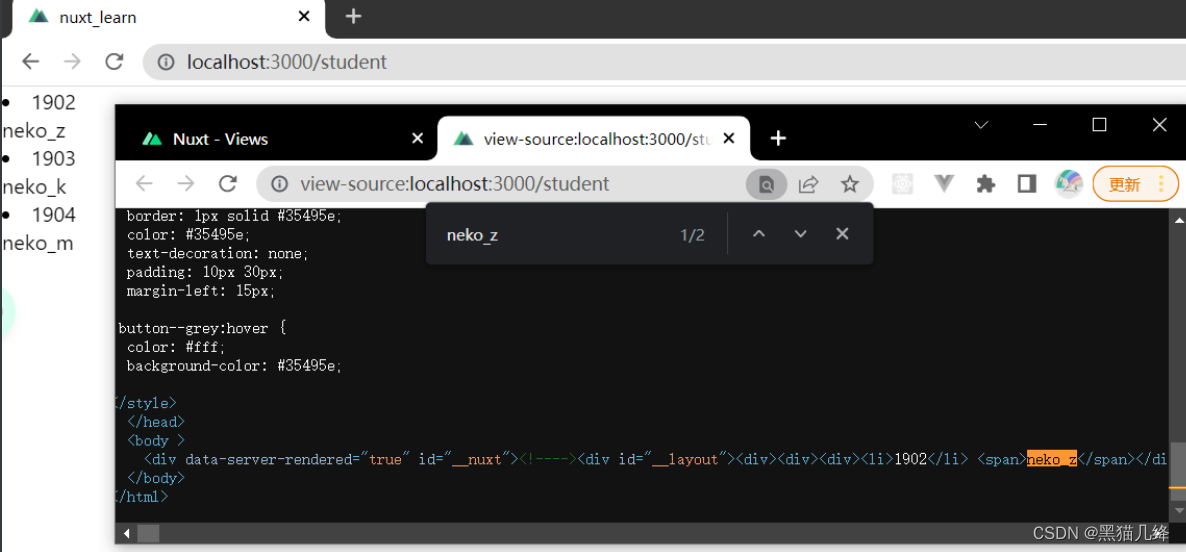
此时我们已经成功的将数据渲染到了页面上,但是,打开页面源代码来看看:页面源代码中并未出现页面上的数据
这是因为单页面应用是从服务端取得数据进行渲染,html文件中并未接触这些数据,这个例子也很好的说明了为何SPA应用难以进行SEO,这是因为爬虫无法爬到页面中的关键数据

2.3.2 SSR渲染
<template>
  <div>
    <div
      v-for="item in infoList"
      :key="item.id"
    >
      <li>{
    {
    item.id}}</li>
      <span>{
    {
    item.name}}</span>
    </div>
  </div>
</template>

<script>
import axios from 'axios'
export default {

  layout: 'student',
  data() {

    return {

      infoList: []
    }
  },
  // Nuxt.js中特有的api,负责数据的异步处理
  // 这个api既可以在客户端,也可以在服务端执行
  // 注意:这个方法仅仅只能在page页面中使用!
  async asyncData() {

    let list = await axios.get('http://localhost:3000/api/student/info')
    // 由于Nuxt的生命周期位于vue之前,所以在这里我们无法通过this.infoList去取到vue中的属性
    // 因此该函数提供一个返回值
    return {

      infoList: list.data
    }
  }
}
</script>
现在再来看看网页源代码,会发现后台数据渲染到了页面上:
参考文章
边栏推荐
- After the uncommitted transactions in the redo log buffer of MySQL InnoDB are persisted to the redo log, what happens if the transaction rollback occurs? How does the redo log handle this transaction
- 谷贱伤农,薪贱伤码农!
- 正则表达式
- Use Base64 to show pictures
- AI system frontier dynamics issue 38: Google has abandoned tensorflow?; Four GPU parallel strategies for training large models; Father of llvm: modular design determines AI future
- Servlet-02 lifecycle
- 2021-04-12 链表第一次实现!!!
- Set the CPU to have 16 address lines and 8 data lines, and use mreq as the access control line number Connection between memory and CPU
- 2022 gdevops global agile operation and maintenance summit - essence playback of Guangzhou station (with PPT download)
- Copilot免费时代结束!正式版67元/月,学生党和热门开源项目维护者可白嫖
猜你喜欢

XML related interview questions

Copilot免费时代结束!正式版67元/月,学生党和热门开源项目维护者可白嫖
Correspondence between three-tier architecture and SSM
![[极客大挑战 2019]HardSQL](/img/73/ebfb410296b8e950c9ac0cf00adc17.png)
[极客大挑战 2019]HardSQL
oracle中遇到的bug
xml相关面试题

Build a security video monitoring platform using Huawei cloud ECS server

漫画 | Code Review快把我逼疯了!

Set the CPU to have 16 address lines and 8 data lines, and use mreq as the access control line number Connection between memory and CPU

Gorm 高级查询
随机推荐
[GXYCTF2019]BabySQli
2021-04-15
基于STM32设计的宠物投喂器
Servlet-02 lifecycle
薄膜干涉数据处理
J. Med. Chem. | Release: a new drug design model for deep learning based on target structure
ICLR 2022 | dynamic convolution tadaconv in video and efficient convolution video understanding model tadaconvnext
mysql乐观锁与悲观锁
STM32F1与STM32CubeIDE编程实例-红外寻迹传感器驱动
web--信息泄漏
Find minimum in rotated sorted array
Cloud native database Amazon RDS
RT-Thread 添加 msh 命令
Use Base64 to show pictures
Copilot免费时代结束!正式版67元/月,学生党和热门开源项目维护者可白嫖
sql根据比较日期新建字段
What is BFC? What problems can BFC solve
RBtree
oracle中遇到的bug
Game of life of leetcode topic analysis