当前位置:网站首页>centos更改mysql数据库目录
centos更改mysql数据库目录
2022-07-25 09:12:00 【你怎么不笑了】
centos更改mysql数据库目录
本教程测试通过MySQL版本:
- centos7
- mysql5.7.32和mysql5.7.27
- 其他数据库版本应该一样,暂未测试
1.停掉mysql服务
systemctl stop msyql
提示:centos的selinux需要设置为disabled,设置完需要重启服务器
vim /etc/selinux/config
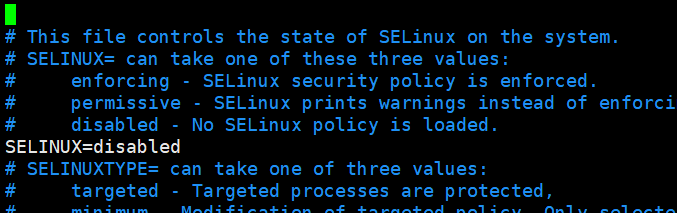
或者执行setenforce 0关闭selinux,临时生效
2.创建新的mysql数据库目录
#具体目录位置可以看自己需求创建
mkdir /opt/mysqldata
后续就是把默认安装的mysql移动到新创建的mysqldata目录下
3.移动mysql到新创建的目录
由于是通过rpm的方式安装的mysql,mysql默认会存放在/var/lib/mysql目录
把/var/lib/msyql整个移动到/opt/mysqldata/
mv /var/lib/mysql /opt/mysqldata/
4.设置mysqldata目录的权限
更改mysqldata目录的用户名和用户组
chown -R mysql:mysql /opt/mysqldata/mysql
修改mysqldata目录的访问权限
chmod 755 /opt/mysqldata/mysql
#直接设置最外层的,只设置一个mysql的可能不够
chmod 755 /opt
5.修改/etc/my.cnf
需要修改下my.cnf文件里面的路径指向为新的目录
#修改datadir为新的目录地址
#datadir=/var/lib/mysql
datadir=/opt/mysql/mysql

#修改socket为新的目录地址
#socket=/var/lib/mysql/mysql.sock
socket=/opt/mysql/mysql/mysql.sock

# Disabling symbolic-links is recommended to prevent assorted security risks
symbolic-links=0

#通过rpm安装的,会没有client模块,需要加上,不然mysql -u -p命令无法登录到mysql
[client]
socket=/opt/mysql/mysql/mysql.sock

#通过rpm安装的,会没有[mysql_safe],需要加上
[mysqld_safe]
log-error=/var/log/mysqld.log
pid-file=/var/run/mysqld/mysqld.pid
红框的内容就是在原文件基础上添加修改的

这样改完之后就可以重启了
systemctl start mysqld
6.验证结果
登录mysql
mysql -u root -p
查看数据库地址
select @@datadir;

边栏推荐
- Wechat reservation of completed works of applet graduation project (4) opening report
- Collection of common algorithm questions in test post interview
- Leetcode · 83 biweekly race · 6129. Number of all 0 subarrays · mathematics
- The garbage classification data set used in the excellent Yolo target detection training is shared - about 3000 labeled
- Comments on specific applications of camera
- Redis/Mysql知识概述
- sql注入
- A picture to quickly understand envoyfilter in istio
- Algorithm --- flip digit (kotlin)
- Sina Weibo client (4) - set navigation bar theme
猜你喜欢

音乐人的 NFT 指南

JS pop-up City filtering component matches mobile terminal

C语言实现二叉平衡树
![[deep learning] overview | the latest progress of deep learning](/img/b9/6117862397dcda4d555c819e913c9b.png)
[deep learning] overview | the latest progress of deep learning

The simplest sklearn environment configuration tutorial in the whole network (100% success)

Robot jumping problem

BGP border gateway protocol basic knowledge points

Visual query (sp_helptext) -- quick query of stored procedures containing specified strings (with source code)

Sort out Huawei ap-3010dn_ V2 configuration create WiFi

Overview of redis/mysql knowledge
随机推荐
The hole of scroll view in uniapp
What are the commands used by pl/sql tools to export SQL files?
Comments on specific applications of camera
LeetCode·83双周赛·6129.全0子数组的数目·数学
Oracle10g单实例数据库升级到哪个版本好,求建议
The annualization of financial products is 4%. How much profit can you get from buying 10000 yuan a month?
Comparison between symmetric encryption and asymmetric encryption
LabVIEW experiment - temperature detection system (experimental learning version)
table表格展开内部行切换效果
leetcode-238.除自身以外数组的乘积
Leetcode · 83 biweekly race · 6129. Number of all 0 subarrays · mathematics
js触屏小游戏源码冰雪之旅
Intel apologized to the winners of Xe HPG treasure hunt game for product delay and announced the appearance of the prize
How does Youxuan database encrypt data?
51 single chip microcomputer key control LED light status
音乐人的 NFT 指南
Sticky.js page scrolling div fixed position plug-in
[stl]list Simulation Implementation
学习周刊-总第 63 期-一款开源的本地代码片段管理工具
【npm】 无法将“npm”项识别为 cmdlet、函数、脚本文件或可运行程序的名称。请检查名称的拼写,如果包括路径,请确保路径正确,然后再试一次。