当前位置:网站首页>[MySQL learning] install and use multiple versions of MySQL, MySQL 8 and MySQL 5.7 at the same time, compressed version
[MySQL learning] install and use multiple versions of MySQL, MySQL 8 and MySQL 5.7 at the same time, compressed version
2022-07-24 03:09:00 【Learn programming_ It's Alun】
Compressed version mysql uninstall
Administrator access bin Under the table of contents
mysqld -remove service name
View port usage
netstat -ano
Query use and forced shutdown of ports
mysql8 Compressed version installation tutorial
1. Copy my.ini File to the installation directory
[mysql]
#  Set up mysql Client default character set
default-character-set=utf8
[mysqld]
#  Set up 3306 port
port=3306
#  Set up mysql Installation directory
basedir=D:\Programs\mysql-8.0.28-winx64
#  Maximum connections allowed
max_connections=20
#  The character set used by the server defaults to 8 Bit coded latin1 Character set
character-set-server=utf8
#  The default storage engine that will be used when creating a new table
default-storage-engine=INNODB
2. Enter the installation directory as an administrator bin Under the table of contents ,mysql8 For the service name, it is convenient to distinguish the started mysql edition
mysqld install mysql8
3. initialization mysql
>mysqld --initialize --console
 The last line prompts  [Server] A temporary password is generated for [email protected]: xxxxxxx
xxxxxxx It's the database root User's initial password
4. start-up mysql service
>net start mysql8
5. Connect to database
>mysql -u root [-P 3306] -p Vk#0ymxXtt9b
6. Change password
mysql> ALTER USER 'root'@'localhost' IDENTIFIED BY '12345678';
7. Exit connection :
mysql>quit
mysql57 Installation tutorial :
1. Copy my.ini File to the installation directory
The contents are as follows :
[client]
#  Set up mysql Client default character set
default-character-set=utf8
[mysqld]
#  Set up 3307 port , Avoid conflicts with installed
port = 3307
#  Set up mysql Installation directory
basedir=D:\Programs\mysql-5.7.38-winx64
#  Set up  mysql Database data storage directory
datadir=D:\Programs\mysql-5.7.38-winx64\data
#  Maximum connections allowed
max_connections=20
#  The character set used by the server defaults to 8 Bit coded latin1 Character set
character-set-server=utf8
#  The default storage engine that will be used when creating a new table
default-storage-engine=INNODB
2. If you need to install two versions mysql At present, this is the second mysql When ,
For convenience , Need to put bin In the catalog mysql.exe and mysqld.exe rename , For example, I changed it here to mysql57.exe and mysqld57.exe, Be careful my.ini The port inside cannot be the same as the one in front , If Install only one version Of mysql You can skip this step 
3. Enter the installation directory as an administrator , hinder mysql57 It's the service name
bin>mysqld57 install mysql57
4. initialization MySQL Service at this time root Users can log in without a password :
> mysqld57 --initialize-insecure --user=mysql
5. start-up mysql service :
> net start mysql57
6. Establish a database connection , Since the port is set here, you need to specify the port connection , The default is 3306:
> mysql57 -u root -P 3307 -p
7. Change the password after establishing the connection :
set password for [email protected] = password('123456');
Setting environment variables does not need to enter every time bin Directory start
In the system variable Path Two new records are added in , Namely mysql8 and mysql57 Of bin Catalog 
Run command prompt as Administrator (CMD).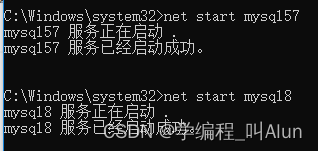
Successful startup 
边栏推荐
- FTP服務與配置
- To forge ahead on a new journey, the city chain science and technology carnival was grandly held in Xiamen
- 198. House raiding
- 【AMC】联邦量化
- Tweenmax+svg Pikachu transformation ball
- I developed an app similar to wechat runnable applet with fluent
- Summernote font displays Chinese
- 在openEuler社区开源的Embedded SIG,来聊聊它的多 OS 混合部署框架
- 开源量子开发框架 Cirq
- Generate 13 bit barcode
猜你喜欢

【HDLBits 刷题】Verilog Language(2)Vectors 部分

Services et configurations FTP

Honey, we are homeless now

Ways to improve the utilization of openeuler resources 01: Introduction

Lumberyard game engine of o3de

summernote富文本编辑器

JS Array isaarray () Type of

软考---程序设计语言基础(上)

The new idea 2022.2 was officially released, and the new features are nice

Analyze the space practice field required by maker education activities
随机推荐
openEuler 资源利用率提升之道 01:概论
summernote 字体显示中文
An introductory example of structure and combinatorial ideas in go language
c语言小练习
Symbol type
SolidWorks CAM data cannot be recovered because a processed part has been detected.
Summernote supports custom video upload function
实现两个页面之前的通信(使用localStorage)
OSPF routing control
How to get gait energy map Gei
uva1445
Attack and defense world web practice area (webshell, command_execution, simple_js)
(6) Decorator extension [email protected] Principle of use
Hospital PACS source code PACS ultrasonic Department source code DICOM image workstation source code [source code free sharing]
Hcip day 10 (initial BGP border gateway protocol)
uva11389
Lcd1602——斌哥51
O3DE 的Lumberyard 游戏引擎
FTP服務與配置
Services et configurations FTP