当前位置:网站首页>Simple Android weather app (III) -- city management and database operation
Simple Android weather app (III) -- city management and database operation
2022-06-21 09:56:00 【roydon_ Guo】
Easy Android weather app( One )—— analysis Json data 、 Data class encapsulation
Easy Android weather app( Two )—— Adapter 、 Hourly data display
Easy Android weather app( 3、 ... and )—— city management 、 Database operation
demand ️
When we look at the weather , We all have our own mobile phones , We all know that today's smart phones can automatically query the weather information of the location according to the location , This depends on the location function of the mobile phone , The project here is purely for practicing , It does not involve positioning operations , I gave up all those steps , So we can sneak around with this function ,,, incorrect , Opportunistic from the weather api Try to get the interface .( See the end of the page for the source code )
The weather used in this project api Interface The weather api
See Chapter 1 for details -->🧿 Easy Android weather app( One )—— analysis Json data<--
When we default not to splice parameters for this interface , Direct access will get the temperature of the current location Json data , This makes up for our shortcomings in positioning , So good , When we add parameters ( this api According to the parameters of city query, you need +&city=( The city name )) that , When we add only parameters but no parameter values (&city=) He will still position himself according to his current position , It's wonderful .
So the next step is Android SQLite Some operations of the database , Save the current location information to the database ( City name , City temperature , Update time )
To be achieved :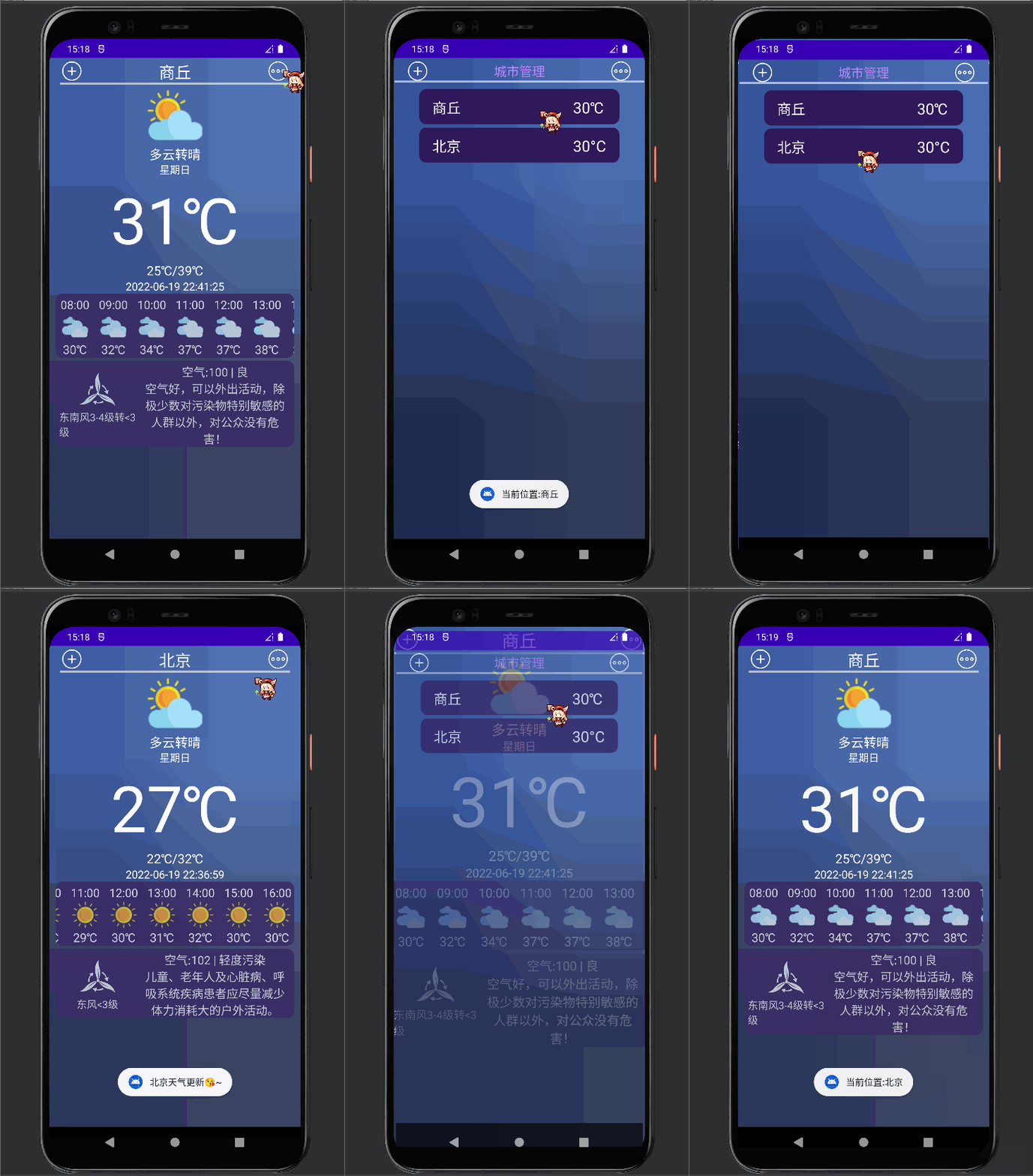
The database successfully inserts the current location data information ( In the previous test, a test reference data from Beijing was inserted ):
The information of location Shangqiu has been successfully inserted , After insertion , The subsequent operation is to update the database in real time 
Contents involved
- SQLite Database operation , Create database , new table , Add, delete, check and change operations
- Adapter adapter Add click event
- Page value transfer jump
Project structure

Other contents are not involved for the time being , This article only covers urban management , A series of operations to add cities to the database, etc , The previous basic content moves to the top address
Interface design
Interface design of urban management city_manager.xml
city_manager.xml Interface layout source code :
<?xml version="1.0" encoding="utf-8"?>
<LinearLayout xmlns:android="http://schemas.android.com/apk/res/android" android:layout_width="match_parent" android:layout_height="match_parent" android:background="@mipmap/bg" android:orientation="vertical">

    <LinearLayout android:layout_width="match_parent" android:layout_height="wrap_content" android:layout_marginTop="5dp" android:orientation="horizontal">

        <ImageView android:id="@+id/iv_add" android:layout_width="35dp" android:layout_height="30dp" android:layout_marginLeft="20dp" android:src="@drawable/add" />

        <TextView android:layout_width="wrap_content" android:layout_height="wrap_content" android:gravity="center" android:text=" city management " android:layout_gravity="center" android:layout_weight="1" android:textColor="@color/purple_200" android:textSize="20dp" />

        <ImageView android:id="@+id/iv_more" android:layout_width="35dp" android:layout_height="30dp" android:layout_marginRight="20dp" android:src="@drawable/more" />
    </LinearLayout>

    <View android:layout_width="390dp" android:layout_height="8px" android:layout_gravity="center" android:layout_marginBottom="5dp" android:alpha="0.6" android:background="@color/white" />

    <androidx.recyclerview.widget.RecyclerView android:layout_width="match_parent" android:layout_height="match_parent" android:id="@+id/city_manager"/>

</LinearLayout>
added_city.xml The page represents the city data to be displayed :
Source code :
<?xml version="1.0" encoding="utf-8"?>
<LinearLayout xmlns:android="http://schemas.android.com/apk/res/android" android:layout_width="match_parent" android:layout_height="55dp" android:textSize="20sp" android:layout_marginLeft="40dp" android:layout_marginRight="40dp" android:layout_marginTop="5dp" android:background="@drawable/blackground" android:gravity="center_vertical" android:paddingLeft="10dp" >

    <LinearLayout android:layout_width="match_parent" android:layout_height="wrap_content" android:orientation="horizontal">
        <TextView android:layout_width="220dp" android:layout_height="wrap_content" android:id="@+id/city_city" android:layout_marginLeft="10dp" android:textSize="22dp" android:textColor="@color/white" android:text=" Xi'an " />
        <TextView android:layout_width="wrap_content" android:layout_height="match_parent" android:text="16°C" android:textSize="24dp" android:textColor="@color/white" android:id="@+id/city_tem"/>


    </LinearLayout>

</LinearLayout>
The effect of getting information from the database :
Adapter AddCityAdapter
After the interface layout design is completed, the next step is the adapter AddCityAdapterpublic class AddCityAdapter extends RecyclerView.Adapter<AddCityAdapter.AddViewHolder>
The adapter is the one that determines this city management page RecyclerView Which page is displayed in , Same as before , The previous articles all have space to summarize , Some basic operations are ,
Add a constructor ,
	private Context mContext;
    private List<CityBean> mCityBeans;

    public AddCityAdapter(Context context, List<CityBean> cityBeans) {

        mContext = context;
        this.mCityBeans = cityBeans;
    }
Create a class class AddViewHolder extends RecyclerView.ViewHolder To bind the control , At this point, click a city on the city management page , The value needs to be transferred to MainActivity, And get the weather information of the designated city
So add a click event to the adapter , First, add an interface to the adapter
	public interface OnItemClickListener {


        /** *  When RecyclerView Call back when a certain item is clicked  * @param view  Click on item The view of  * @param position  Click to get the data , Parameter customization  */
        public void onItemClick(View view, int position);

    }

    private OnItemClickListener onItemClickListener;

    public void setOnItemClickListener(OnItemClickListener onItemClickListener) {

        this.onItemClickListener = onItemClickListener;
    }
Then the class in the adapter AddViewHolder Bind click event in
	class AddViewHolder extends RecyclerView.ViewHolder {


        TextView cityCity,cityTem;// City name , temperature

        public AddViewHolder(@NonNull View itemView) {

            super(itemView);
            // Binding controls
            cityCity=itemView.findViewById(R.id.city_city);
            cityTem = itemView.findViewById(R.id.city_tem);
            // Bind click event
            itemView.setOnClickListener(new View.OnClickListener() {

                @Override
                public void onClick(View view) {

                    if (onItemClickListener!=null) {

                        onItemClickListener.onItemClick(view,getLayoutPosition());
                    }
                }
            });
        }
    }
Then, as always, rewrite the three methods
	@NonNull
    @Override
    public AddViewHolder onCreateViewHolder(@NonNull ViewGroup parent, int viewType) {

    	// Binding controls , Which page is displayed in RecyclerView in ,R.layout.added_city
        View view = LayoutInflater.from(mContext).inflate(R.layout.added_city, parent, false);
        AddViewHolder cityViewHolder = new AddViewHolder(view);
        return cityViewHolder;
    }

    @Override
    public void onBindViewHolder(@NonNull AddViewHolder holder, int position) {

        CityBean cityBean = mCityBeans.get(position);
        // Control
        holder.cityCity.setText(cityBean.getName());
        holder.cityTem.setText(cityBean.getTem());
    }

    @Override
    public int getItemCount() {

        return (mCityBeans == null) ? 0 : mCityBeans.size();
    }
Adapter AddCityAdapter Source code :
public class AddCityAdapter extends RecyclerView.Adapter<AddCityAdapter.AddViewHolder>{


    private Context mContext;
    private List<CityBean> mCityBeans;

    public AddCityAdapter(Context context, List<CityBean> cityBeans) {

        mContext = context;
        this.mCityBeans = cityBeans;
    }

    @NonNull
    @Override
    public AddViewHolder onCreateViewHolder(@NonNull ViewGroup parent, int viewType) {

        View view = LayoutInflater.from(mContext).inflate(R.layout.added_city, parent, false);
        AddViewHolder cityViewHolder = new AddViewHolder(view);
        return cityViewHolder;
    }

    @Override
    public void onBindViewHolder(@NonNull AddViewHolder holder, int position) {

        CityBean cityBean = mCityBeans.get(position);

        holder.cityCity.setText(cityBean.getName());
        holder.cityTem.setText(cityBean.getTem());
    }

    @Override
    public int getItemCount() {

        return (mCityBeans == null) ? 0 : mCityBeans.size();
    }

    class AddViewHolder extends RecyclerView.ViewHolder {


        TextView cityCity,cityTem;

        public AddViewHolder(@NonNull View itemView) {

            super(itemView);

            cityCity=itemView.findViewById(R.id.city_city);
            cityTem = itemView.findViewById(R.id.city_tem);

            // Bind click event
            itemView.setOnClickListener(new View.OnClickListener() {

                @Override
                public void onClick(View view) {

                    if (onItemClickListener!=null) {

                        onItemClickListener.onItemClick(view,getLayoutPosition());
                    }
                }
            });
        }
    }
    /** *  Click to respond to the event  */
    public interface OnItemClickListener {


        /** *  When RecyclerView Call back when a certain item is clicked  * @param view  Click on item The view of  * @param position  Click to get the data  */
        public void onItemClick(View view, int position);

    }

    private OnItemClickListener onItemClickListener;

    public void setOnItemClickListener(OnItemClickListener onItemClickListener) {

        this.onItemClickListener = onItemClickListener;
    }
}
Operating the database
Then build the database tools , To operate the database , General methods need entity classes , Then there is the encapsulation of urban entity classes , When obtaining the current positioning weather information , Save this data class to the database
So first build the urban entity class CityBean
public class CityBean {


    private String name;// The city name
    private String[] area;// county / District
    private String tem;// temperature
    private String updateTime;// Update time

// Constructor customization , It mainly focuses on database operation and new Time transmission value
    public CityBean() {

    }

    public CityBean(String name) {

        this.name = name;
    }

    public CityBean(String name, String tem, String updateTime) {

        this.name = name;
        this.tem = tem;
        this.updateTime = updateTime;
    }
//get and set、toString notes

}

Then there is the database CityDatabaseConfig, There is a database name , Table name information , In case the operation database writes the wrong name , So it is written under this configuration :
public class CityDatabaseConfig {

    // Database name
    public static final String DATABASE_NAME = "cityDb";
    // Table name
    public static final String TABLE_NAME = "city_weather";
}
And then there was CityDbHelper Inherited from SQLiteOpenHelper
public class CityDbHelper extends SQLiteOpenHelper {


    public CityDbHelper(Context context) {

    	// Create database CityDatabaseConfig.DATABASE_NAME
        super(context, CityDatabaseConfig.DATABASE_NAME, null, 1);
    }

    @Override
    public void onCreate(SQLiteDatabase db) {

    // Create table , Field (cityName text,tem text,updateTime text)
        String sql = "create table if not exists "+CityDatabaseConfig.TABLE_NAME+"(cityName text,tem text,updateTime text)";
        db.execSQL(sql);
        Log.i(CityDatabaseConfig.DATABASE_NAME,"created success!!");
    }

    @Override
    public void onUpgrade(SQLiteDatabase db, int oldVersion, int newVersion) {


        Log.i(CityDatabaseConfig.DATABASE_NAME,"updated success!!");
    }

}
Then there are some database operation tools , There are some methods that can be used , You can expand it by yourself
public class DBUtils {


    private Context context;
    private CityDbHelper helper;

    /** *  The singleton pattern  * @param context */
    public DBUtils(Context context) {

        this.context = context;
        helper = new CityDbHelper(context) {

        };
    }

    /** *  Insert... Into the table  * * @param * @return */
    public boolean insertData(String cityName,String tem,String updateTime) {

        SQLiteDatabase db = helper.getReadableDatabase();
        ContentValues values = new ContentValues();

        values.put("cityName", cityName);
        values.put("tem", tem);
        values.put("updateTime", updateTime);
        long insert = db.insert(CityDatabaseConfig.TABLE_NAME, null, values);
        if (insert > 0) {

            return true;
        }
        return false;
    }

// Update data according to city name
    public boolean updateByName(String cityName,String tem,String updateTime){

        SQLiteDatabase db = helper.getReadableDatabase();
        ContentValues values = new ContentValues();

        values.put("cityName", cityName);
        values.put("tem", tem);
        values.put("updateTime", updateTime);
        long update = db.update(CityDatabaseConfig.TABLE_NAME,values,"cityName=?", new String[]{
    cityName});

        if (update>0){

            return true;
        }return false;
    }

    /** *  Query all the information  * * @return */
    public List<CityBean> getAllCity() {

        List<CityBean> list = new ArrayList<>();
        SQLiteDatabase db = helper.getReadableDatabase();
        Cursor cursor = db.rawQuery("select * from " + CityDatabaseConfig.TABLE_NAME, null);
        if (cursor != null && cursor.getCount() > 0) {

            while (cursor.moveToNext()) {


                String cityName = cursor.getString(0);
                String tem = cursor.getString(1);
                String updateTime = cursor.getString(2);

                CityBean cityBean = new CityBean(cityName,tem,updateTime);
                list.add(cityBean);
            }
        }
        return list;
    }

    /** *  Query a message according to the city name  */
    public CityBean getCityByName(String cityName) {

        CityBean cityBean = new CityBean();
        SQLiteDatabase db = helper.getReadableDatabase();
        Cursor cursor = db.rawQuery("select * from " + CityDatabaseConfig.TABLE_NAME + " where cityName=?", new String[]{
    cityName});
        if (cursor != null && cursor.getCount() > 0) {

            while (cursor.moveToFirst()) {


                String cityNameResult = cursor.getString(0);
                cityBean.setName(cityName);
                break;
            }

        }
        return cityBean;

    }

	/** *  Delete a piece of data according to the city name  * @param cityName * @return */
    public boolean delCityByName(String cityName){

        SQLiteDatabase db = helper.getReadableDatabase();

        long delRow = db.delete(CityDatabaseConfig.TABLE_NAME, "cityName=?", new String[]{
    cityName});
        if (delRow > 0) {

            return true;
        }
        return false;

    }

}
Jump to the page , Display data
After some basic methods are written MainActivity.java file , use Intent Jump to the city management interface , Pay attention to introducing the database operation tool first
DBUtils dbUtils = new DBUtils(MainActivity.this);
Set the click event of the icon in the upper right corner , This dot icon is bound to ivMore
	ivMore.setOnClickListener(new View.OnClickListener() {

            @Override
            public void onClick(View view) {

                if (null == dbUtils.getCityByName(tvCity.getText().toString()).getName()) {

                    // If the database does not exist, insert this city
                    dbUtils.insertData(tvCity.getText().toString(),tvTem.getText().toString(),tvTime.getText().toString());
                }
                else {

                    // Update when there is
                    dbUtils.updateByName(tvCity.getText().toString(),tvTem.getText().toString(),tvTime.getText().toString());
// dbUtils.insertData(" Beijing ","30°C","2022-06-19 21:23:35"); Test use
// dbUtils.delCityByName(" Shangqiu "); Test use
                    List<CityBean> list = dbUtils.getAllCity();
                    Log.d("getAllCity", "allList<CityBean>>>>》》》" + list.toString());

                    ToastUtil.showShortToast(MainActivity.this, " The current position :" + tvCity.getText());
                    Intent intent = new Intent(MainActivity.this, CityManagerActivity.class);
                    Log.d("getNowCity", "nowCity<CityBean>>>>》》》" + tvCity.getText());
//  It is required to jump to the page and pass the value back ,requestCode:200;
                    startActivityForResult(intent, 200);
                }
            }
        });
Jump to the city management page , add to activity.java file , name CityManagerActivity
public class CityManagerActivity extends AppCompatActivity {


    private AddCityAdapter addCityAdapter;// Adapter
    private RecyclerView rvAddedCity;

    private List<CityBean> cityDbBeanList;
    DBUtils dbUtils= new DBUtils(CityManagerActivity.this);

    @Override
    protected void onCreate(Bundle savedInstanceState) {

        super.onCreate(savedInstanceState);
        setContentView(R.layout.city_manager);

        initView();
    }


    public void initView() {


        rvAddedCity = findViewById(R.id.city_manager);

        cityDbBeanList = dbUtils.getAllCity();
        Log.d("cityList",">>>>> Data in the database 》》》》》》"+cityDbBeanList);
        addCityAdapter = new AddCityAdapter(CityManagerActivity.this,cityDbBeanList);
        rvAddedCity.setAdapter(addCityAdapter);
        LinearLayoutManager layoutManager = new LinearLayoutManager(this, LinearLayoutManager.VERTICAL, false);
        rvAddedCity.setLayoutManager(layoutManager);
		// Set click event
        addCityAdapter.setOnItemClickListener(new AddCityAdapter.OnItemClickListener() {

            @Override
            public void onItemClick(View view, int position) {

// ToastUtil.showShotToast(CityManagerActivity.this, cityDbBeanList.get(position).getName());
                Intent intent = new Intent(CityManagerActivity.this,MainActivity.class);
                intent.putExtra("selectedCity",cityDbBeanList.get(position).getName());
				// return MainActivity Page and transfer values setResult(200,intent); Set up resultCode:200;
                setResult(200,intent);
                finish();

// ToastUtil.showShotToast(CityManagerActivity.this,"finish");
            }
        });
    }

}
Then, since the page is required to return the value ,MainActivity You have to rewrite the method onActivityResult Accept the incoming value
	@Override
    protected void onActivityResult(int requestCode, int resultCode, @Nullable Intent data) {

        super.onActivityResult(requestCode, resultCode, data);
        if (requestCode == 200 && resultCode == 200) {

        //getString Get the transmitted value
            String dt = data.getExtras().getString("selectedCity");
            tvCity.setText(dt);
            nowCity=dt;
            // From again api Get the weather according to the city name
            getWeather(nowCity);
            ToastUtil.showLongToast(this,dt+" Weather update ~");
        }
    }
Since then, some functions have been realized , Jump to the city management page , Exhibition City , Specify the city to display weather information ,
Database operation realizes :
- Get all the city information in the database 、
- Insert a piece of data 、
- Update data according to city name 、
- Delete a piece of data to be completed ,, Self expanding , As long as the tool class deletion method is written correctly , Nothing more than adding an event to call the delete method
More refined search of cities , Actively add cities to the database according to the searched cities , Later articles will be gradually improved , This article is mainly about some database operations and adapter adding click events , Subscribe to this column to synchronously obtain the project construction process
Source code address :Gitee
边栏推荐
- Versions supported by vuforia engine
- 流式编程:流支持,创建,中间操作以及终端操作
- EIG和沙特阿美签署谅解备忘录,扩大能源合作
- Request and response must know
- Float floating layout clear floating
- 115. secondary packaging of table components
- How to be an interesting person
- 【实战】STM32 FreeRTOS移植系列教程7:FreeRTOS 事件标志组
- Underlying principle of Concurrency: thread, resource sharing, volatile keyword
- Electron checks the CPU and memory performance when the module is introduced
猜你喜欢

leetcode:715. Range 模块【无脑segmentTree】
![[practice] STM32 FreeRTOS porting series tutorial 1: use of FreeRTOS binary semaphores](/img/47/611640b817d3e1573c2cde25a9f2e5.jpg)
[practice] STM32 FreeRTOS porting series tutorial 1: use of FreeRTOS binary semaphores

stm32mp1 Cortex M4开发篇10:扩展板数码管控制

Haplotype analysis using shapeit

Stm32mp1 cortex M4 development part 12: expansion board vibration motor control
西电AI专业排名超清北,南大蝉联全国第一 | 2022软科中国大学专业排名

DSP online upgrade (1) -- understand the startup process of DSP chip

Lodash real on demand approach

123. deep and shallow copy of JS implementation -- code text explanation

Bit segment operation of STM32, LED lighting based on stm32f103xxx multiple methods
随机推荐
DSP online upgrade (4) -- functions implemented by bootloader
Equals and hashcode
并发编程高级部分:并行流,Tasks和Executors以及CompletableFuture类
[practice] stm32mp157 development tutorial FreeRTOS system 6: FreeRTOS list and list items
Common basic functions of R language: LS function lists all data objects in the current workspace, RM function deletes the specified data objects in the current workspace
注解的定义以及注解编译器
[practice] STM32 FreeRTOS porting series tutorial 1: use of FreeRTOS binary semaphores
118. summary of basic knowledge of typescript (data type, interface, abstract class, inheritance, attribute encapsulation, modifier)
The R language uses the sink function to export the dataframe data and save it as a CSV file in the specified directory. In practice, if no directory is specified, it will be output to the current wor
Clipboard learning records and pit encountered
并发底层原理:线程、资源共享、volatile 关键字
音视频格式简介、编解码、音视频同步
TC软件概要设计文档(手机群控)
Request and response must know
流式编程:流支持,创建,中间操作以及终端操作
嵌入式软件项目流程、项目启动说明书(示例)
Use this for attributes in mapstate
Introduction to ground plane in unity
Stm32mp1 cortex M4 development part 12: expansion board vibration motor control
应用配置管理,基础原理分析