当前位置:网站首页>Install SVN in Pagoda and build SVN version Library
Install SVN in Pagoda and build SVN version Library
2022-06-26 04:17:00 【Never bow】
svn The default port number is 3690 Be careful The pagoda needs to be opened 3690 port The server also needs to be open 3690 port
Open the pagoda command line , yum install SVN
First step install SVN command :
yum -y install subversionThere should be no problems during the installation process , If yes, please Baidu by yourself .
This is a successful installation .
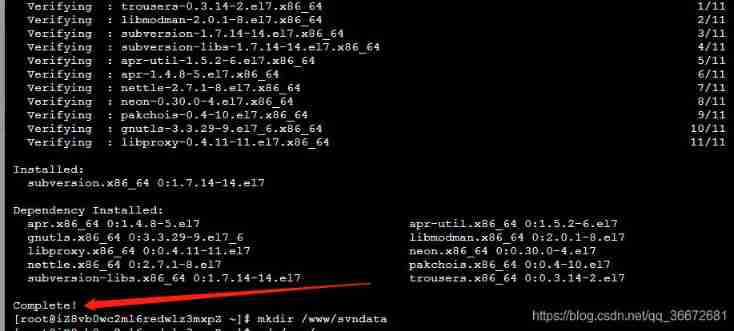
The second step Create directory
Generally speaking, it means where you want to put your documents
I want to put all my svn The project is on /www/svndata Under the table of contents
mkdir /www/svndataThe third step establish svn Version Library
I want to svn Create a project under directory , The name is called obj ,
The order is :
svnadmin create /www/svndata/objStep four Modify the project configuration file
Once created, you need to set who can access your project , Assign personnel permissions .
Enter your project
# Entry project
cd /www/svndata/obj

# Lists the files
ll
You will get this picture

Among them conf Is the configuration project folder
# Go to the configuration folder
cd conf
# Lists the files
ll
You will get

authz Configure read and write permissions
password User account password configuration
svnserve.conf svn Service configuration
First, configure the user information
vim password
I added it myself Account No obj_root password 123456
After modification, save
Configure permissions
vim authzobtain

If you don't have... In your file [/]
Add by yourself [/]
obj_root=rw 【obj_root The account has read and write permission 】
*= 【 Other anonymous accounts do not have any permissions 】
The last step To configure svnserve.conf
vim svnserve.confobtain

You need to uncomment
anin-access = read

auth-access = wirte

password-db = password

authz-db = authz
Change and uncomment this field
realm = /www/svndataexplain
anon-access = read  Anonymous users can read

auth-access = write  Authorized users can write

password-db = passwd  Which file is used as the account file

authz-db = authz  Which file is used as the permission file

realm = /www/svndata  Authentication space name , Version Library Directory , Set this value , Client download svn Version Library in
function svnserve
function svnserve
function svnserve
svnserve -d -r /www/svndata
Connect svn
The connection format is
svn://121.123.123.132/obj
svn:// ip Address / The project name you set
My project name is obj See Step 2 and step 3 above for details
Be careful The pagoda needs to be opened 3690 port
The server also needs to be open 3690 port

Just input the account and password after connecting
边栏推荐
- WPF value conversion
- In 2022, what professional competitions can college students majoring in automation, electrical engineering and automation participate in?
- Knowledge about SQL - DML
- Matplotlib multi line chart, dot scatter chart
- Development trend and prospect forecast report of China's financial industry 2022-2028 Edition
- 【QT】对话框dialog
- Nailing open platform - applet development practice (nailing applet server side)
- Threejs special sky box materials, five kinds of sky box materials are downloaded for free
- mysql自带的性能测试工具mysqlslap执行压力测试
- 捕获数据包(Wireshark)
猜你喜欢

捕获数据包(Wireshark)

Matplotlib multi line chart, dot scatter chart

Parse JSON interface and insert it into the database in batch

How to solve the problem that iterative semi supervised training is difficult to implement in ASR training? RTC dev Meetup

CTF serialization and deserialization

Read / write lock for thread synchronization

pip 批量完全卸载包

35 year old programmer fired Luna millions of assets and returned to zero in three days. Netizen: it's the same as gambling
![ctf [RoarCTF 2019]easy_ calc](/img/c7/16adb8e4b64a4be2129a6c53c5aaa7.jpg)
ctf [RoarCTF 2019]easy_ calc

Spark - 一文搞懂 parquet
随机推荐
小程序中实现视频通话及互动直播功能
Force buckle 515 Find the maximum value in each tree row
The style of the mall can also change a lot. DIY can learn about it
WPF 值转换
Sorting out the examination sites of the 13th Blue Bridge Cup single chip microcomputer objective questions
asp. Net web page, ASP connects to the database, and uses asp:panel and asp:dropdownlist controls
面了个字节拿25k出来的测试,算是真正见识到了基础的天花板
Nailing open platform - applet development practice (nailing applet client)
What's wrong with connecting MySQL database with eclipse and then the words in the figure appear
The stc-isp burning program for 51 single chip microcomputer always shows that "the target single chip microcomputer is being detected..." the cold start board does not respond
Zhubo Huangyu: all the precious metals you want to know are here
三元损失英文版
线程同步之读写锁
Threejs专用天空盒素材,五种天空盒素材免费下载
After four years of outsourcing, people are directly abandoned...
Nailing open platform - applet development practice (nailing applet server side)
Getter actual combat geTx tool class encapsulation -getutils
win10 系统打开的软件太小,如何变大(亲测有效)
Using jsup to extract images from interfaces
Knowledge of SQL - database design, backup and restore