当前位置:网站首页>[ROS introduction] cmakelist Txt and packages XML interpretation
[ROS introduction] cmakelist Txt and packages XML interpretation
2022-06-22 22:14:00 【AMOV-ANUU】
file system
Reproduced in https://mp.weixin.qq.com/s/LwNUvFb5j5acsNkMYH46qQ
ROS File system Only on the hard disk ROS The organization of source code :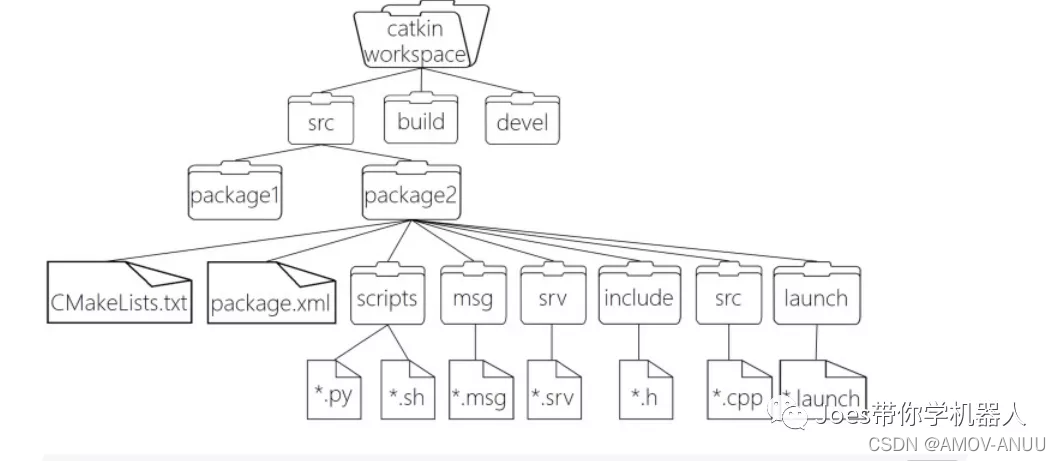
Architecture interpretation :
WorkSpace
workspace Custom workspace
- build
build Compilation space , To hold CMake and catkin Cache information for 、 Configuration information , And other intermediate documents
- devel
devel Development space , Used to store files generated after compilation , Including header files , dynamic & Static link library , Executable file
- src
src Source code
- - package
package Function pack (ROS The basic unit of , Contain multiple nodes , Libraries and profiles , Contains all letters in lowercase , Only letters Numbers And underline )
- - - CmakeLists.txt
CmakeLists.txt To configure Compilation Rules , Such as source files , Dependencies Target file
- - - package.xml
package.xml Package information , such as Package name edition author Dependencies
( The previous version was manifest.xml)
- - - scripts
scripts Storage python file
— include
include The header file
- - - msg
msg Message communication format file
- - - srv
srv Service communication format file
- - - action
action Action format file
- - - lanuch
lanuch Multiple nodes can be run at once
- - - config
config Configuration information
- - CMakeLists.txt
CMakeLists.txt – Basic configuration of compilation
CMakeLists.txt Document definition ( Basic configuration )1
cmake_minimum_required(VERSION 3.0.2)
#  what is needed  cmake  edition
project(ros02_hello_vscode)
  #  Package name , Will be  ${PROJECT_NAME}  Method call
  ------------------------------------------------------

## Find catkin macros and libraries
## if COMPONENTS list like find_package(catkin REQUIRED COMPONENTS xyz)
## is used, also find other catkin packages

## ` lookup catkin Macros and libraries
##  If the component list is as follows find_package(catkin Required components xyz)
##  It's used , You can also find other catkin package
-----------------------------------------------------------------


#  Set up the software package needed for the build
find_package(catkin REQUIRED COMPONENTS
  roscpp
  rospy
  std_msgs
  geometry_msgs
  message_generation
)
---------------------------------------------------------------
## System dependencies are found with CMake's conventions
#  Add system dependency by default
# find_package(Boost REQUIRED COMPONENTS system)
----------------------------------------------------------------
## Uncomment this if the package has a setup.py. This macro ensures
## modules and global scripts declared therein get installed
##  If the package has setup.py, Uncomment this . This macro ensures that the modules and global scripts declared in it are installed
## See http://ros.org/doc/api/catkin/html/user_guide/setup_dot_py.html
#  start-up  python  Module support
# catkin_python_setup()
-----------------------------------------------------------------
CMakeLists.txt Document definition ( Basic configuration )2
################################################
## Declare ROS messages, services and actions ##
##  Statement  ROS  news 、 service 、 action  ##
################################################
------------------------------------------------------------------------------

## To declare and build messages, services or actions from within this
##  To declare and generate messages in this package 、 Service or operation , Please perform the following steps :
-----------------------------------------------------------------------------
## package, follow these steps:
## * Let MSG_DEP_SET be the set of packages whose message types you use in
## your messages/services/actions (e.g. std_msgs, actionlib_msgs, ...).
## * In the file package.xml:
## * add a build_depend tag for "message_generation"
## * add a build_depend and a exec_depend tag for each package in MSG_DEP_SET
## * If MSG_DEP_SET isn't empty the following dependency has been pulled in
## but can be declared for certainty nonetheless:
## * add a exec_depend tag for "message_runtime"

## *MSG_DEP_SET Is the set of packages whose message types you use in
##  Your message / service / operation ( for example std_msgs、actionlib_msgs etc. ).
## * stay package.xml In file :
## * by “ Message generation ” Add build dependency tags
## * by MSG_DEP_SET Add... For each package in build_depend and exec_depend Mark
## * If MSG_DEP_SET Not empty , The following dependencies have been pulled in
##  But it is certain to announce :
## * by “ Message runtime ” add to exec_dependen Mark
-------------------------------------------------------------------
## * In this file (CMakeLists.txt):
## * add "message_generation" and every package in MSG_DEP_SET to
## find_package(catkin REQUIRED COMPONENTS ...)
## * add "message_runtime" and every package in MSG_DEP_SET to
## catkin_package(CATKIN_DEPENDS ...)
## * uncomment the add_*_files sections below as needed
## and list every .msg/.srv/.action file to be processed
## * uncomment the generate_messages entry below
## * add every package in MSG_DEP_SET to generate_messages(DEPENDENCIES ...)

## * In this document (CMakeLists.txt) in :
## * add to “ Message generation ” And will MSG_DEP_ Each package in is set to
##  Find packaging (catkin Required components …)
## * add to “message_runtime” And will MSG_DEP_ Each package in is set to
##  Willow catkin packing (catkin The packing depends on the situation )
## * Uncomment the following as needed “ Add files ” part
##  List each... To be processed .msg/.srv/.action file
## * Uncomment generate_messages entry
## * stay MSG_DEP_SET Add each package to generate _ news ( Dependencies …)
------------------------------------------------------------------------
# Generate messages in the 'msg' folder
#  stay “msg” Generate message in folder
add_message_files(
  FILES
  Topic.msg
)

## Generate services in the 'srv' folder
##  stay “srv” Generate service in folder
# add_service_files(
# FILES
# Service1.srv
# Service2.srv
# )

## Generate actions in the 'action' folder
##  stay “action” Generate operation in folder
# add_action_files(
# FILES
# Action1.action
# Action2.action
# )

## Generate added messages and services with any dependencies listed here
#  Generate messages 、 Service dependent packages
generate_messages(
  DEPENDENCIES
  geometry_msgs
  std_msgs
)

################################################
## Declare ROS dynamic reconfigure parameters ##
##  Statement  ROS  Dynamic parameter configuration  ##
################################################

## To declare and build dynamic reconfigure parameters within this
## package, follow these steps:
## * In the file package.xml:
## * add a build_depend and a exec_depend tag for "dynamic_reconfigure"
## * In this file (CMakeLists.txt):
## * add "dynamic_reconfigure" to
## find_package(catkin REQUIRED COMPONENTS ...)
## * uncomment the "generate_dynamic_reconfigure_options" section below
## and list every .cfg file to be processed
##  To declare and generate dynamic reconfiguration parameters within this package scope , Do the following :
## * stay package.xml In file :
## * by “ Dynamic reconfiguration ” Add build dependency and execute dependency tags
## * In this document (CMakeLists.txt) in :
## * take “dynamic_reconfigure” Add to
##  Find packaging (catkin Required components …)
## * Uncomment “generate_dynamic_reconfigure_options” part
##  List each... To be processed .cfg file

## Generate dynamic reconfigure parameters in the 'cfg' folder
##  stay “cfg” Generate dynamic reconfiguration parameters in the folder
# generate_dynamic_reconfigure_options(
# cfg/DynReconf1.cfg
# cfg/DynReconf2.cfg
# )

###################################
## catkin specific configuration ##
## catkin  Specific configuration  ##
###################################
## The catkin_package macro generates cmake config files for your package
## Declare things to be passed to dependent projects
## INCLUDE_DIRS: uncomment this if your package contains header files
## LIBRARIES: libraries you create in this project that dependent projects also need
## CATKIN_DEPENDS: catkin_packages dependent projects also need
## DEPENDS: system dependencies of this project that dependent projects also need
## catkin_package Macros generate for packages cmake The configuration file
##  The declaration is to be passed on to the dependent project
## INCLUDE_DIRS: If packages Include header file , Please uncomment this
##  library : The dependent projects created in this project also need Libraries
## CATKIN_DEPENDS: rely on CATKIN_packages The project also needs
##  Dependencies : The dependent project also requires the system dependencies of this project

#  Runtime dependency
catkin_package(
  INCLUDE_DIRS include
  LIBRARIES hello_vscode
  CATKIN_DEPENDS roscpp rospy std_msgs geometry_msgs
  DEPENDS system_lib
  message_runtime
)

###########
## Build ##
###########

## Specify additional locations of header files
## Your package locations should be listed before other locations
#  Add the header file path , The header file path of the current package precedes other file paths
include_directories(
# include
  ${catkin_INCLUDE_DIRS}
)

## Declare a C++ library
#  Statement  C++  library
# add_library(${PROJECT_NAME}
# src/${PROJECT_NAME}/hello_vscode.cpp
# )

## Add cmake target dependencies of the library
## as an example, code may need to be generated before libraries
## either from message generation or dynamic reconfigure
#  To add a library  cmake  Target dependence
# add_dependencies(${PROJECT_NAME} ${${PROJECT_NAME}_EXPORTED_TARGETS} ${catkin_EXPORTED_TARGETS})

## Declare a C++ executable
## With catkin_make all packages are built within a single CMake context
## The recommended prefix ensures that target names across packages don't collide
#  Statement  C++  Executable file
add_executable(hello_vs_c src/hello_vs_c.cpp)
add_executable(ssy_c src/ssy_c.cpp)

## Rename C++ executable without prefix
## The above recommended prefix causes long target names, the following renames the
## target back to the shorter version for ease of user use
## e.g. "rosrun someones_pkg node" instead of "rosrun someones_pkg someones_pkg_node"
#  rename c++ Executable file
# set_target_properties(${PROJECT_NAME}_node PROPERTIES OUTPUT_NAME node PREFIX "")

## Add cmake target dependencies of the executable
## same as for the library above
#  Add executable file  cmake  Target dependence
add_dependencies(ssy_c ${PROJECT_NAME}_generate_messages_cpp)

## Specify libraries to link a library or executable target against
#  Specify the library 、 Link library of executable files
target_link_libraries(hello_vs_c
  ${catkin_LIBRARIES}
)
target_link_libraries(ssy_c
  ${catkin_LIBRARIES}
)

#############
## Install  install  ##
#############

# all install targets should use catkin DESTINATION variables
# See http://ros.org/doc/api/catkin/html/adv_user_guide/variables.html

## Mark executable scripts (Python etc.) for installation
## in contrast to setup.py, you can choose the destination
#  Set the executable script for installation
catkin_install_python(PROGRAMS
  scripts/hello_vscode_p.py
  DESTINATION ${CATKIN_PACKAGE_BIN_DESTINATION}
)

## Mark executables for installation
#  Mark the executable to install
## See http://docs.ros.org/melodic/api/catkin/html/howto/format1/building_executables.html
# install(TARGETS ${PROJECT_NAME}_node
# RUNTIME DESTINATION ${CATKIN_PACKAGE_BIN_DESTINATION}
# )

## Mark libraries for installation
##  Mark the libraries to install
## See http://docs.ros.org/melodic/api/catkin/html/howto/format1/building_libraries.html
# install(TARGETS ${PROJECT_NAME}
# ARCHIVE DESTINATION ${CATKIN_PACKAGE_LIB_DESTINATION}
# LIBRARY DESTINATION ${CATKIN_PACKAGE_LIB_DESTINATION}
# RUNTIME DESTINATION ${CATKIN_GLOBAL_BIN_DESTINATION}
# )

## Mark cpp header files for installation
##  Mark the to be installed cpp The header file
# install(DIRECTORY include/${PROJECT_NAME}/
# DESTINATION ${CATKIN_PACKAGE_INCLUDE_DESTINATION}
# FILES_MATCHING PATTERN "*.h"
# PATTERN ".svn" EXCLUDE
# )

## Mark other files for installation (e.g. launch and bag files, etc.)
##  Mark other files to install ( for example , Start and package files, etc )
# install(FILES
# # myfile1
# # myfile2
# DESTINATION ${CATKIN_PACKAGE_SHARE_DESTINATION}
# )

#############
## Testing ##
#############

## Add gtest based cpp test target and link libraries
##  Add based on gtest Of cpp Test target and link library
# catkin_add_gtest(${PROJECT_NAME}-test test/test_hello_vscode.cpp)
# if(TARGET ${PROJECT_NAME}-test)
# target_link_libraries(${PROJECT_NAME}-test ${PROJECT_NAME})
# endif()

## Add folders to be run by python nosetests
##  Add to be created by python Test run folder
# catkin_add_nosetests(test)
Package.xml Document definition
( Function pack (ROS Basic unit ) Contain multiple nodes 、 Libraries and profiles , All the letters of the package name are lowercase , Only letters 、 Numbers and underscores make up ):
<?xml version="1.0"?>
<!--  Format :  It used to be  1, Recommended format  2 -->
<package format="2">
  <!--  Package name  -->
  <name>ros02_hello_vscode</name>
  <!--  edition  -->
  <version>0.0.0</version>
  <!--  Description information  -->
  <description>The ros02_hello_vscode package</description>

  <!--  Need a maintenance personnel tag , Allow multiple , One person per label  -->
  <!--  for example : -->
  <!-- <maintainer email="[email protected]">Jane Doe</maintainer> -->
  <!--  Maintainer  -->
  <maintainer email="[email protected]">joes</maintainer>


  <!--  Need a license label , Allow multiple , One license per label  -->
  <!--  Common license strings  : -->
  <!-- BSD, MIT, Boost Software License, GPLv2, GPLv3, LGPLv2.1, LGPLv3 -->
  <!--  License information ,ROS The core component defaults to  BSD -->
  <license>TODO</license>


  <!-- Url Tags are optional , But allow multiple , One for each tag  -->
  <!--  The optional attribute type can be : Website 、bugtracker Or repository  -->
  <!--  for example : -->
  <!-- <url type="website">http://wiki.ros.org/hello_vscode</url> -->


  <!--  The author tag is optional , Allow multiple , One for each tag  -->
  <!--  The author does not have to be a defender , But it can also be a maintainer  -->
  <!--  for example : -->
  <!-- <author email="[email protected]">Jane Doe</author> -->


<!-- * Dependency tags are used to specify dependencies -->
<!--  Dependencies can be catkin Package or system dependencies -->
<!--  Example :-->
<!--  Use depend As a shortcut for generating dependencies and executing dependency packages -->
<!-- <depend>roscpp</depend>-->
<!--  Please note that , This is equivalent to the following :-->
<!-- <build_depend>roscpp</build_depend>-->
<!-- <exec_depend>roscpp</exec_depend>-->
<!--  Use... For packages required at compile time build_depend:-->
<!-- <build_depend>message_generation</build_depend>-->
<!--  Use... For the packages you need build_export_depend, To generate... From this package :-->
<!-- <build_export_depend>message_generation</build_export_depend>-->
<!--  Use buildtool_depend For building toolkits :-->
<!-- <buildtool_depend>catkin</buildtool_depend>-->
<!--  For packages needed at runtime , Please use exec_depend:-->
<!-- <exec_depend>message_runtime</exec_depend>-->
<!--  Use for test only packages test_depend:-->
<!-- <test_depend>gtest</test_depend>-->
<!--  Use... For packages that are only used to generate documents doc_depend:-->
<!-- <doc_depend>doxygen</doc_depend>-->

  <!--  Dependent build tools , It's a must  -->
  <buildtool_depend>catkin</buildtool_depend>

  <!--  Specify the packages required to build this package  -->
  <build_depend>roscpp</build_depend>
  <build_depend>rospy</build_depend>
  <build_depend>std_msgs</build_depend>
  <build_depend>geometry_msgs</build_depend>

  <!--  Specify the package required to build the library based on this package  -->
  <build_export_depend>roscpp</build_export_depend>
  <build_export_depend>rospy</build_export_depend>
  <build_export_depend>std_msgs</build_export_depend>
  <build_export_depend>geometry_msgs</build_export_depend>

  <!--  The package needed to run the code in this package  -->
  <exec_depend>roscpp</exec_depend>
  <exec_depend>rospy</exec_depend>
  <exec_depend>std_msgs</exec_depend>
  <exec_depend>geometry_msgs</exec_depend>
  <exec_depend>message_runtime</exec_depend>


<!--  The export tag contains other unspecified tags -->
  <export>
    <!--  Other tools can request additional information to be placed here -->

  </export>
</package>
边栏推荐
- 【路径规划】第一周: 大杂烩
- IDC publie le rapport sur la gouvernance des données en Chine
- Introduce sparse activation mechanism! Uni perceiver MOE significantly improves the performance of generalist model
- Kdd'22 | Ali: fine tuning CTR estimation based on EE exploration
- 6月PMP考试准考证问题及注意事项,考生必读
- The third training of Hongmeng
- 7-9 super Mary
- 微软 Edge 浏览器将支持网络测速,内置计算器和单位转换工具
- 【象棋人生】01 人生如棋
- 自助图书馆系统-Tkinter界面和openpyxl表格综合设计案例
猜你喜欢

Campus errand management app Shaanxi Gechuang

British teddy bear joins the pubg mobile game

【持续更新中...】2021年全国大学生电子设计大赛 (三)匿名四轴拓空者飞控系统设计解读

Ten thousand words long text | use RBAC to restrict access to kubernetes resources
![List of outstanding talents: no crystal vibration, one drag, eight burn and upgrade [chapter]](/img/6c/333bc95fe390234d3d06043e4bded1.png)
List of outstanding talents: no crystal vibration, one drag, eight burn and upgrade [chapter]

CyCa children's physique etiquette Shenzhen training results assessment successfully concluded

考生必读篇 | PMP6月25日考试临近,需要注意什么?
【ROS 入门学习 】CmakeList.txt 和Packages.xml释义

Lesson 026: Dictionary: when the index is not easy to use 2 | after class test questions and answers
![Jerry's music mode obtains the directory of playing files [chapter]](/img/2f/efb8a077e3e398cb3b14cfd98a8422.png)
Jerry's music mode obtains the directory of playing files [chapter]
随机推荐
6月PMP考试准考证问题及注意事项,考生必读
Jerry's problem of opening the near end of four channel call [chapter]
IDC發布中國數據治理報告 億信華辰第一
6-5 图的深度遍历-邻接矩阵实现
Summary of differences between localstorage, sessionstorage and cookies
The necessary materials for the soft test have been released. All the soft test materials for the whole subject have been prepared for you!
British teddy bear joins the pubg mobile game
Lesson 018: function: flexible is powerful after class test questions and answers
LeetCode#20. Valid parentheses
IDC releases China Data Governance Report Yixin Huachen No. 1
6-1 operation set of binary search tree
Lesson 016: sequence | after class test questions and answers
Introduce sparse activation mechanism! Uni perceiver MOE significantly improves the performance of generalist model
RuntimeError: CUDA error: CUBLAS_ STATUS_ EXECUTION_ FAILED when calling `cublasSgemmStridedBatched( ha
安卓kotlin sp dp转px
How to operate redis on the IntelliJ idea database console
Lesson 027: Set: in my world, you are the only after-school test question and answer
Jerry's music mode obtains the directory of playing files [chapter]
TC397 Flash
什么是数据资产?数据资产管理应该如何落地?