当前位置:网站首页>[SWT] scrolling container to realize commodity list style
[SWT] scrolling container to realize commodity list style
2022-07-24 15:40:00 【Boy Baoding】
Purpose

As shown in the figure, realize a product list , Vertical support scrolling , When the transverse width changes , Products are automatically filled right and up .
When the mouse hovers over the product , The product border displays . When you click on a product , The console prints the product name .
analysis
Rolling containers are still used ScrolledComposite , The contents of the container should be automatically filled as the container width changes , The need is to use Rowlayout layout . stay Rowlayout Layout , Every product information and special effects use GC Realization . See project for details https://gitee.com/xzbd/epx
The key to realize
This function is still integrated in RCP in , The general steps are as follows :
- plugin.xml Configure the editor in
      <!--  Editor - Rolling containers - List of goods  -->
      <editor class="com.xzbd.editors.ScrollGoodListEditor" default="false" extensions="scgl" icon="icons/20220721/16/paobing.png" id="com.xzbd.editors.ScrollGoodListEditor" name=" Editor - Rolling containers - List of goods ">
      </editor>
- Define editor
package com.xzbd.editors;

import org.eclipse.core.runtime.IProgressMonitor;
import org.eclipse.swt.widgets.Composite;
import org.eclipse.ui.IEditorInput;
import org.eclipse.ui.IEditorSite;
import org.eclipse.ui.PartInitException;
import org.eclipse.ui.part.EditorPart;

import com.xzbd.views.ScrollGoodListEditorViewer;

public class ScrollGoodListEditor extends EditorPart {


	public static String ID = "com.xzbd.editors.ScrollGoodListEditor";

	public boolean isDirty = false;
	private ScrollGoodListEditorViewer viewer;

	@Override
	public void doSave(IProgressMonitor monitor) {

		clearDirty();
	}

	@Override
	public void doSaveAs() {


	}

	@Override
	public void init(IEditorSite site, IEditorInput input) throws PartInitException {

		this.setSite(site);
		this.setInput(input);
	}

	@Override
	public boolean isDirty() {

		return isDirty;
	}

	@Override
	public boolean isSaveAsAllowed() {

		return false;
	}

	@Override
	public void createPartControl(Composite parent) {

		viewer = new ScrollGoodListEditorViewer(parent, this);

	}

	@Override
	public void setFocus() {


	}

	/** *  Transition editor state  * * @param isDirty */
	public void changeDirtyState(boolean isDirty) {

		this.isDirty = isDirty;
		firePropertyChange(PROP_DIRTY);
	}

	public void toDirty() {

		changeDirtyState(true);
	}

	public void clearDirty() {

		changeDirtyState(false);
	}
}
- Implement editor view
package com.xzbd.views;

import org.apache.commons.lang.math.RandomUtils;
import org.eclipse.swt.SWT;
import org.eclipse.swt.graphics.Font;
import org.eclipse.swt.graphics.GC;
import org.eclipse.swt.graphics.Image;
import org.eclipse.swt.graphics.Point;
import org.eclipse.swt.graphics.Rectangle;
import org.eclipse.swt.layout.FillLayout;
import org.eclipse.swt.layout.RowData;
import org.eclipse.swt.widgets.Composite;
import org.eclipse.swt.widgets.Listener;
import org.eclipse.swt.widgets.Widget;

import com.xzbd.constants.ColorConstant;
import com.xzbd.editors.ScrollGoodListEditor;
import com.xzbd.utils.AppPrinter;
import com.xzbd.utils.CompositeUtil;
import com.xzbd.utils.SWTResourceManager;

/** * *  Rolling containers -- Sample product list  * */
public class ScrollGoodListEditorViewer {


	private String[] iconNames = {
     "bingkuai.png", "ganlan.png", "guodong.png", "jiroujuan.png", "kafei.png",
			"kele.png", "mantou.png", "meishikafei.png", "mianhuatang.png", "nailao.png", "paobing.png", "qishui.png",
			"shutiao.png", "tiantong.png", "xuegao.png", "zhenzhunaicha.png" };

	private ScrollGoodListEditor editor;
	private Composite parent;

	public ScrollGoodListEditorViewer(Composite parent, ScrollGoodListEditor editor) {

		this.parent = parent;
		//  cache  Editor
		setEditor(editor);

		//  draw UI
		buildPageUI();
	}

	//  establish UI
	private void buildPageUI() {

		//  Set up  parent  Layout
		parent.setLayout(new FillLayout());

		//  Generate scrolling containers
		Composite scContent = CompositeUtil.getAutoFillScrollCmp(parent);

		for (int i = 0; i <= 50 + RandomUtils.nextInt(50); i++) {

			Composite itemCmp = new Composite(scContent, SWT.NONE);
			itemCmp.setLayoutData(new RowData(160, 120));

			//  Select Picture
			String iconName = iconNames[RandomUtils.nextInt(iconNames.length)];
			String imgPath = "/icons/20220721/32/" + iconName;
			Image img = SWTResourceManager.getImage(ScrollGoodListEditorViewer.class, imgPath);

			// GC  draw
			Boolean[] lineTags = {
     false };
			itemCmp.addPaintListener(e -> {

				GC gc = e.gc;

				Rectangle clientArea = itemCmp.getClientArea();
				Rectangle imgBounds = img.getBounds();
				int imgWidth = (clientArea.width - imgBounds.width) / 2;
// int imgHeight = (clientArea.height - imgBounds.height) / 2;
				gc.drawImage(img, imgWidth, 15);

				String text = iconName.substring(0, iconName.lastIndexOf("."));
				Font font = SWTResourceManager.getFont("Microsoft YaHei", 14, SWT.NORMAL);
				if (lineTags[0]) {

					gc.setLineWidth(5);
					gc.setForeground(ColorConstant.MAIN_BLUE);
					gc.drawRectangle(0, 0, clientArea.width, clientArea.height);
					font = SWTResourceManager.getBoldFont(font);
				}

				gc.setFont(font);
				Point textExtentPoint = gc.textExtent(text);
				gc.setForeground(ColorConstant.MAIN_BLUE);
				int textWidth = (clientArea.width - textExtentPoint.x) / 2;
				int textHeight = clientArea.height - textExtentPoint.y - 10;
				gc.drawText(text, textWidth, textHeight, true);
			});

			//  Event binding
			Listener enterListener = e -> {

				lineTags[0] = true;
				itemCmp.redraw();
			};

			itemCmp.addListener(SWT.MouseEnter, enterListener);

			Listener exitListener = e -> {

				lineTags[0] = false;
				itemCmp.redraw();
			};
			itemCmp.addListener(SWT.MouseExit, exitListener);


			itemCmp.addListener(SWT.MouseUp, e->{

				AppPrinter.println(" You have selected the goods : " + iconName);
			});

		}

	}

	public ScrollGoodListEditor getEditor() {

		return editor;
	}

	public void setEditor(ScrollGoodListEditor editor) {

		this.editor = editor;
	}

	private void addDirtyListener(Widget com) {

		com.addListener(SWT.Modify, e -> {

			editor.toDirty();
		});

	}

}
- Rolling container key code
	/** *  Generate scrolling containers  * <div> * parent  The layout should be  FillLayout, The returned container layout is  RowLayout * </div> * @param parent * @return */
	public static Composite getAutoFillScrollCmp(Composite parent) {

		ScrolledComposite scrollComposite = new ScrolledComposite(parent, SWT.V_SCROLL | SWT.BORDER);

		Composite scContent = new Composite(scrollComposite, SWT.NONE);
		RowLayout rowLayout = new RowLayout();
		rowLayout.spacing = 16;
		rowLayout.marginWidth = 24;

		RowLayout layout = new RowLayout(SWT.HORIZONTAL);
		layout.wrap = true;
		scContent.setLayout(layout);

		scrollComposite.setContent(scContent);
		scrollComposite.setExpandVertical(true);
		scrollComposite.setExpandHorizontal(true);
		scrollComposite.addControlListener(ControlListener.controlResizedAdapter(e -> {

			Rectangle r = scrollComposite.getClientArea();
			scrollComposite.setMinSize(scContent.computeSize(r.width, SWT.DEFAULT));
		}));

		return scContent;
	}
effect
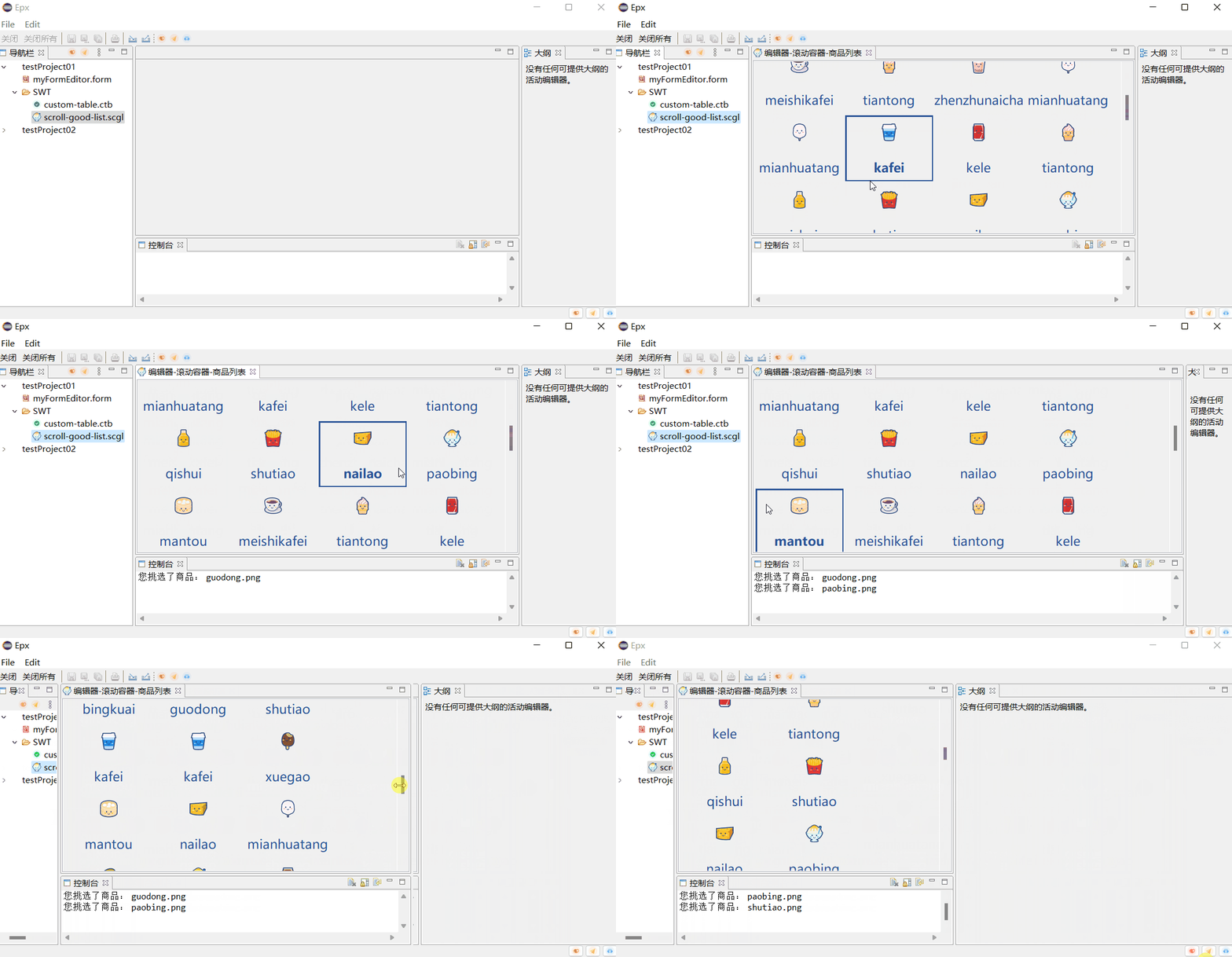
summary
rely on ScrolledComposite ,Rowlayout , GC Implements a rolling container , The container supports vertical scrolling , Horizontal auto fit fill . It is suitable for display scenarios such as product lists .
The code can be found in the : https://gitee.com/xzbd/epx
边栏推荐
- C # exit login if there is no operation
- Kubernetes static storage and dynamic storage
- 3、 Set foundation ArrayList set and simple student management system
- 报错【项目报错】
- [adaptiveavgpool3d] pytorch tutorial
- Huawei wireless device configuration wpa2-802.1x-aes security policy
- JMeter - call the interface for uploading files or pictures
- How to deal with being attacked? Advanced anti DDoS IP protection strategy
- 微调LayoutLM v3进行票据数据的处理和内容识别
- Citic securities account opening process, is it safe to open an account on your mobile phone
猜你喜欢

PyTorch的自动求导
![[shaders realize pixelate mosaic effect _shader effect Chapter 7]](/img/0f/3e8d9468d94b14217875c7e447aa15.png)
[shaders realize pixelate mosaic effect _shader effect Chapter 7]

2022 RoboCom 世界机器人开发者大赛-本科组(省赛)RC-u4 攻略分队 (已完结)

报错【项目报错】
![[machine learning basics] - another perspective to explain SVM](/img/da/3c379d225f9866ed1d3ca853920bd5.png)
[machine learning basics] - another perspective to explain SVM

From which dimensions can we judge the quality of code? How to have the ability to write high-quality code?

AttributeError: module ‘seaborn‘ has no attribute ‘histplot‘

【AdaptiveAvgPool3d】pytorch教程

简化理解:发布订阅

华为无线设备配置WAPI-证书安全策略
随机推荐
华为无线设备配置WAPI-证书安全策略
What is a firewall? What role can firewalls play?
Small list of iptables common commands
PyTorch的自动求导
你不能只会flex居中布局,精制动画讲解所有flex布局方式!通俗易懂纯干货教程!...
MySQL学习笔记(总结)
AttributeError: module ‘seaborn‘ has no attribute ‘histplot‘
kubernetes GPU的困境和破局
力扣 31.下一个排列--双指针法
遭受DDoS时,高防IP和高防CDN的选择
[acwing] 909. Chess game
接参处理和@Param
JMeter - call the interface for uploading files or pictures
4279. Cartesian tree
有了这个机器学习画图神器,论文、博客都可以事半功倍了!
YOLO5Face:为什么要重新发明人脸检测器
celery 启动beat出现报错ERROR: Pidfile (celerybeat.pid) already exists.
[tf.keras]: a problem encountered in upgrading the version from 1.x to 2.x: invalidargumenterror: cannot assign a device for operation embedding_
MySql函数
Memcache cache application (lnmp+memcache)