当前位置:网站首页>03_ Spingboot core profile
03_ Spingboot core profile
2022-06-24 23:06:00 【Book opens autumn maple】
Spring Boot The core configuration file is used to configure Spring Boot Program , The name must be application Start
1. Core configuration format
(1).properties file ( This file is used by default )
By modifying the application.properties The configuration file , After modifying the default tomcat Port number and file root of the project ( Site )

SpringBootController
import org.springframework.stereotype.Controller;
import org.springframework.web.bind.annotation.RequestMapping;
import org.springframework.web.bind.annotation.ResponseBody;

@Controller
public class SpringBootController {
    @RequestMapping(value = "/springBoot/say")
    @ResponseBody
    public String say() {
        return "Hello,springBoot!";
    }
}
application.properties
Key value pairs properties Property file configuration mode
# configure port
server.port=9001

# Configure site name
server.servlet.context-path=/001-springboot-first
Start the test --》 Page display results localhost:9001/001-springboot-first/springBoot/say

(2).yml file
yml Document and properties There is no difference between files , It's just different configurations .
yml It's a kind of yaml Format of the configuration file , It mainly adopts certain Space 、 Line feed and other formatting configuration .
yaml It is an intuitive data serialization format that can be recognized by computer , It's easy for people to read ,yaml Be similar to xml, But grammar is better than xml Concise and many , Value must have a space with the previous colon configuration item , yml Suffixes can also be used yaml suffix
SpringBootController
import org.springframework.stereotype.Controller;
import org.springframework.web.bind.annotation.RequestMapping;
import org.springframework.web.bind.annotation.ResponseBody;

@Controller
public class SpringBootController {
    @RequestMapping(value = "/springBoot/say")
    @ResponseBody
    public String say() {
        return "Hello,springBoot!";
    }
}
application.yml
server:
  port: 8001
  servlet:
    context-path: /001-springboot-first
Be careful : When two format configuration files exist at the same time , It uses .properties The configuration file , To demonstrate yml, You can rename it first , Rerun Application, Check the startup port and context root

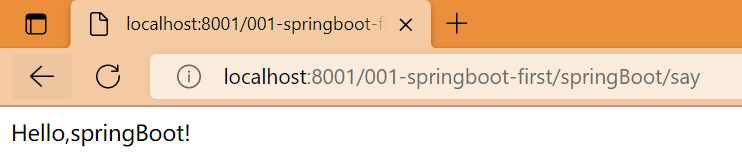
Start the test --》 Page display results localhost:8001/001-springboot-first/springBoot/say
2. Multi environment configuration
In the process of actual development , Our project will go through many stages ( Development --> test --> go online ), The configuration of each phase will also be different , for example : port 、 Up and down Wengen 、 Database etc. , At this time, in order to facilitate switching between different environments ,SpringBoot Provides multiple environment configurations , The specific steps are as follows

SpringBootController
import org.springframework.stereotype.Controller;
import org.springframework.web.bind.annotation.RequestMapping;
import org.springframework.web.bind.annotation.ResponseBody;

@Controller
public class SpringBootController {
    @RequestMapping(value = "/springBoot/say")
    @ResponseBody
    public String say() {
        return "Hello,springBoot!";
    }
}
application.properties
The value to the right of the equal sign is consistent with the environment ID name of the configuration file , You can change the configuration of the master configuration file , Rerun Application, View the boot port and context root directory
# Activate the environment configuration
spring.profiles.active=dev
application-dev.properties
# Development environment core configuration file
server.port=7001
server.servlet.context-path=/001-springboot-first
application-product.properties
# Production environment core configuration file
server.port=6001
server.servlet.context-path=/001-springboot-first
application-test.properties
# Test environment core configuration file
server.port=5001
server.servlet.context-path=/001-springboot-first
Start the test --》 Page display results localhost:7001/001-springboot-first/springBoot/say

3. Spring Boot Custom configuration
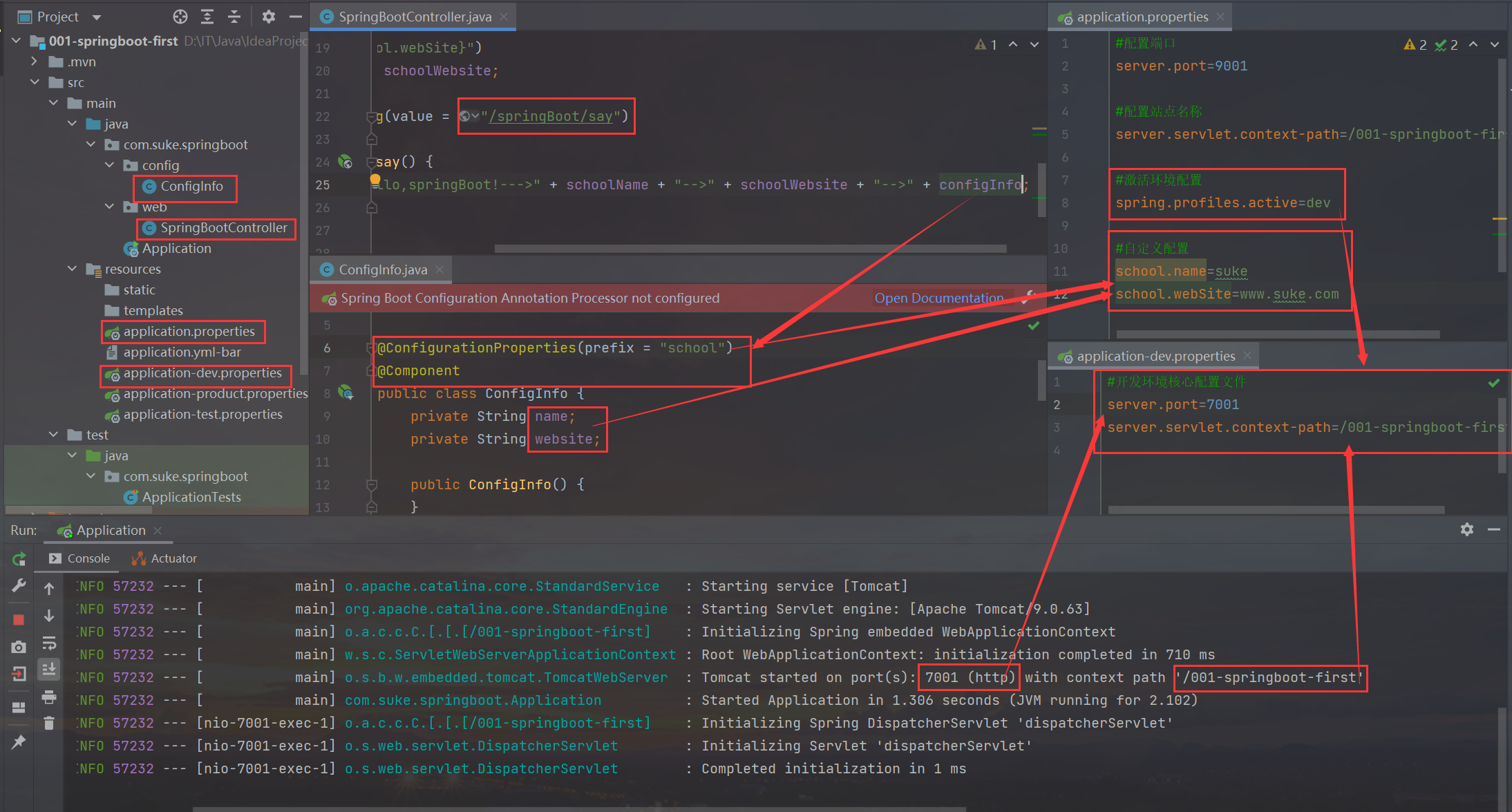
stay SpringBoot In the core configuration file of , In addition to using built-in configuration items , We can also customize the configuration , Then use the following annotation to read the configured attribute value
(1)@Value annotation
In the core configuration file applicatin.properties in , Add two custom configuration items school.name and school.webSite. stay IDEA You can't see these two properties SpringBoot distinguish , The background is orange
stay SpringBootController Define properties in , And use @Value Annotations or custom configuration values , And test the method

SpringBootController
@Controller
public class SpringBootController {

    @Value("${school.name}")
    private String schoolName;

    @Value("${school.webSite}")
    private String schoolWebsite;

    @RequestMapping(value = "/springBoot/say")
    @ResponseBody
    public String say() {
        return "Hello,springBoot!--->" + schoolName + "-->" + schoolWebsite;
    }
}
application.properties
The value to the right of the equal sign is consistent with the environment ID name of the configuration file , You can change the configuration of the master configuration file , Rerun Application, View the boot port and context root directory
# Activate the environment configuration
spring.profiles.active=dev
application-dev.properties
# Development environment core configuration file
server.port=7001
server.servlet.context-path=/001-springboot-first
Start the test --》 Page display results localhost:7001/001-springboot-first/springBoot/say

(2)@ConfigurationProperties
ConfigInfo
import org.springframework.boot.context.properties.ConfigurationProperties;
import org.springframework.stereotype.Component;

@ConfigurationProperties(prefix = "school")
@Component
public class ConfigInfo {
    private String name;
    private String website;

    public ConfigInfo() {
    }

    public String getName() {
        return name;
    }

    public void setName(String name) {
        this.name = name;
    }

    public String getWebsite() {
        return website;
    }

    public void setWebsite(String website) {
        this.website = website;
    }

    @Override
    public String toString() {
        return "ConfigInfo{" +
                "name='" + name + '\'' +
                ", website='" + website + '\'' +
                '}';
    }
}
SpringBootController
@Controller
public class SpringBootController {

    @Autowired
    ConfigInfo configInfo;

    @Value("${school.name}")
    private String schoolName;

    @Value("${school.webSite}")
    private String schoolWebsite;

    @RequestMapping(value = "/springBoot/say")
    @ResponseBody
    public String say() {
        return "Hello,springBoot!--->" + schoolName + "-->" + schoolWebsite + "-->" + configInfo;
    }
}
application.properties
The value to the right of the equal sign is consistent with the environment ID name of the configuration file , You can change the configuration of the master configuration file , Rerun Application, View the boot port and context root directory
# Activate the environment configuration
spring.profiles.active=dev
application-dev.properties
# Development environment core configuration file
server.port=7001
server.servlet.context-path=/001-springboot-first
Start the test --》 Page display results localhost:7001/001-springboot-first/springBoot/say

ConfigInfo Red explosion problem solve
<dependency>
    <groupId>org.springframework.boot</groupId>
    <artifactId>spring-boot-configuration-processor</artifactId>
    <optional>true</optional>
</dependency>

边栏推荐
- docker安装redis-简单而无坑
- Wechat side: what is consistent hash? In what scenario? What problems have been solved?
- A big factory interview must ask: how to solve the problem of TCP reliable transmission? 8 pictures for you to learn in detail
- Attackg: constructing technical knowledge graph from cyber thread intelligence reports
- High level application of SQL statements in MySQL database (II)
- Getting started with the go Cobra command line tool
- 【WSL】SSH 远程连接及宿主机端口转发配置
- 2022年安全员-A证考题及答案
- [laravel series 7.9] test
- Panorama of enterprise power in China SSD industry
猜你喜欢

Web security XSS foundation 06

Cases of addition, deletion, modification and search of C # learning for two years and C # import and export (de duplication)
C#学习两年的增删改查和C#导入导出(去重)案例

Simulated 100 questions and online simulated examination of high voltage electrician examination in 2022

动态菜单,自动对齐

2022年安全员-A证考题及答案

JD 618 conference tablet ranking list announced that the new dark horse brand staff will compete for the top three, learning from Huawei, the leader of domestic products

vulnhub DC: 2

花房集团二次IPO:成于花椒,困于花椒
![[laravel series 7.9] test](/img/49/4b470a8b309bab4a83eed930dcce65.png)
[laravel series 7.9] test
随机推荐
07_SpingBoot 实现 RESTful 风格
How to integrate Huawei cloud function services in fluent
剑指 Offer 13. 机器人的运动范围
China solar thermal market trend report, technical dynamic innovation and market forecast
2022年高处安装、维护、拆除考试模拟100题及模拟考试
LeetCode Algorithm 剑指 Offer II 027. 回文链表
China smallpox vaccine market trend report, technical innovation and market forecast
EPICS記錄參考3 -- 所有記錄都有的字段
High level application of SQL statements in MySQL database (II)
High level application of SQL statements in MySQL database (I)
2022安全员-B证考试题库及答案
Common sense of resolution
Leetcode algorithm The first common node of two linked lists
环境配置 | VS2017配置OpenMesh源码和环境
结构体的内存对齐
See how sparksql supports enterprise level data warehouse
EPICS record Reference 3 - - field available for all Records
Research Report on market evaluation and investment direction of Chinese dermatology drugs (2022 Edition)
【nvm】
Dynamic menu, auto align