当前位置:网站首页>使用nexus3发布yum私服(离线-内网)
使用nexus3发布yum私服(离线-内网)
2022-07-25 09:17:00 【zk_Kang】
公司的服务器没有联网,公司要求内网搭建yum私服
我发现网上的教程很少有这部分,希望我这篇文章能够帮助你
首先你要正确搭建nexus3,我在我公司是使用docker搭建的,大家可以自行百度或者参照我写的连接 docker安装nexus3 (离线/内网)_zk_Kang的博客-CSDN博客,
比较简单,镜像下载,映射目录,启动等等
先说下我的思路,
1.内网环境装好nexus3-使用docker,切记记得映射目录,如果你是linux,那也简单,直接看你安装的目录就行。
2.在安装好的nexus3上创建好yum环境--yum库和yum源地址。
3.从一个有外网环境的机子上下载镜像源包
4.把下载好的镜像源包导入到内网
5.在内网把镜像源包批量执行命令导入到nexus3上的yum源地址中
安装好如下--注意红框中的是我自己建的

1.创建库(如果你想使用default,这步可省略,直接看第二步)
如下-点击create blob store

我用的最新版,这里改了需要在这里选type为file,如果你那没有这,也不要紧,往下看。

定义库名为yum-hub
创建完在这里能看到,这里你的size应该是0,我是因为放了一些东西所以size不为0
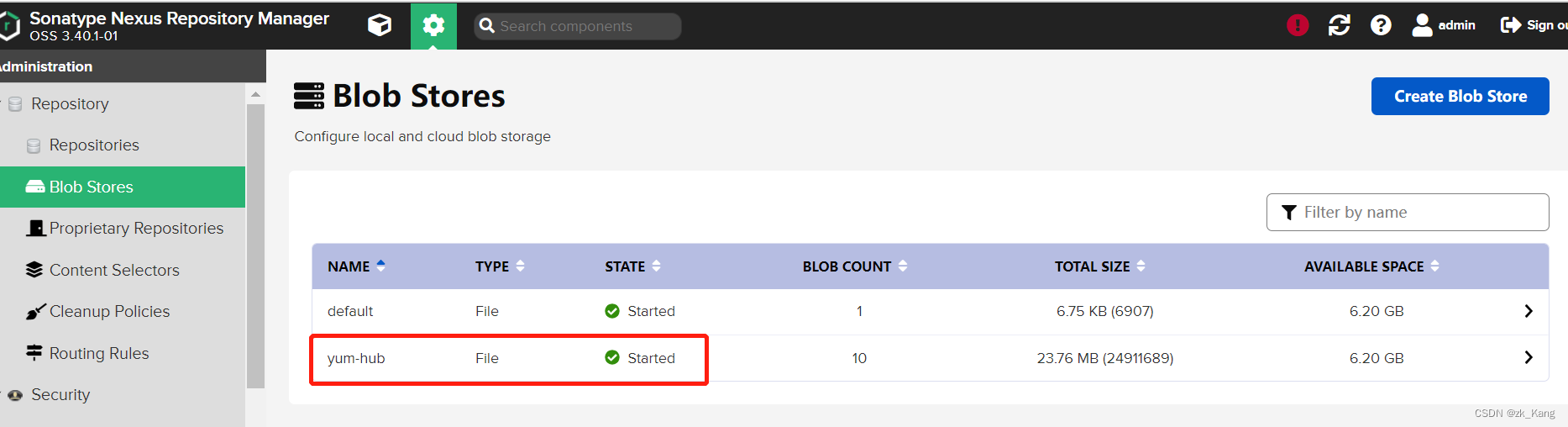
2.创建yum镜像源
这里有proxy(代理) hosted(本地镜像源)group(proxy和hosted的组合)
在内网可以只创建hosted和group ,你也可以只创建一个hosted(反正你没网,一个就够,当然以防万一后续扩展本地镜像源,建议建立一个group,将所有的hosted放入group)
这里演示把proxy也演示了,--这步如果有外网条件的可以看下
1.点create repository

2.建立proxy代理
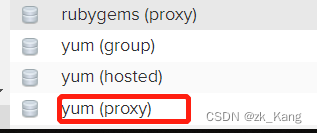
下面的http://url,写一个阿里的镜像源就行

3.hosted-本地镜像源
比较重要的地方我都用红框圈出来了,
这里需要注意的是下面的allow redeplov,这里可以重复发包的意思

4.建立一个group
把proxy(代理) hosted(本地镜像源)都加入到group
记得 hosted(本地镜像源)在上哈,如果你是内网就没有proxy了,就不用建立,更不用加了。
谁在上,先找谁,在本地找到了,就不下载了,这就是私服的作用,节省带宽。
局域网下载总比联网快

5.建立后

这时候,yum里面是空的

3.下载镜像源
有外网的机子,我是在liunx机器上操作的。
具体可以参照这位博主写的这个,我是根据他的所写下载的。 我没有安装他的全部下载,我下载了一个base库
Centos7 搭建自己的私有yum镜像源_Halyace的博客-CSDN博客_私有yum源
# 下载阿里镜像源
curl -o /etc/yum.repos.d/CentOS-Base.repo http://mirrors.aliyun.com/repo/Centos-7.repo
# 下载阿里epel源
curl -o /etc/yum.repos.d/epel.repo http://mirrors.aliyun.com/repo/epel-7.repo
# 删除缓存
yum clean all
# 更新缓存
yum makecache
# 查看镜像源列表
yum repolist
# 安装同步工具
yum install -y yum-utils
# 安装repo制作工具
yum install -y createrepo
# 安装wget
yum install -y wget
# 创建目录
mkdir -p /home/repos_local/centos/7
# 同步
reposync -r base -p /home/repos_local/centos/7
# 创建repo数据
createrepo /home/repos_local/centos/7/base
我到这里就完事了,直接把/home/repos_local这打包传递到内网就可以了。我是到home下执行命令的。
压缩命令:tar -cvf xx.tar.gz repos_local
4.批量上传到内网服务器
首先把 解压
tar -zxvf xx.tar.gz
解压后进入目录后直接执行命令, 全部复制,直接执行,你或者写个文件,再执行一样的,我比较懒,我就直接执行了。记得 ***为你的密码,后面的ip地址也得换下。
这里的目录层级,可以自己定义,我也是自己定义的。
#! /bin/bash
for i in `ls /home/repos_local/CentOS7/base/Packages`;
do curl -v --user 'admin:***' --upload-file /home/repos_local/CentOS7/base/Packages/$i http://ip:8081/repository/yum/CentOS7/base/Packages/$i;
done
完事后就可以在yum-hosted下看到你上传的rpm包了
5.使用yum私服
前面所有的工作都是为这步准备
进入/etc/yum.repos.d目录下,
如果这个目录下有后缀repo的文件,建立一个mkdir bak 把这个目录下的repo文件移动到bak目录下
在/etc/yum.repos.d目录下新建一个repo文件,名字随便起
vi centos.repo
内容如下,这里我看到有的地方是写到base,但是通过我实际发现写到base层yum用不了,如果你们出现这种情况,可以先写到base层,后面的Packages,如果不对了,再改。
我这里的地址是yum的group路径
# 不需要的仓库可以注释掉
# 内网仓库全部关闭gpgcheck校验
# base仓库
[base]
name=Local CentOS-7  Base
baseurl=http://xxx:8081/repository/yum-group/CentOS7/base/Packages/
enabled=1
gpgcheck=0
写完了后,就可以使用了
测试一下,以下两个清空一下缓存,让新的yum从新配置的下载。
yum clean all
yum makecache
# 测试一个下载
yum -y install httpd
到此就完事了,希望这篇文章能帮助到你。
yum repolist--执行这个命令,查看你的镜像源
边栏推荐
- ActiveMQ -- AMQ of persistent mechanism
- Live broadcast preview | how to build an enterprise cloud management platform in the cloudy era?
- What is steel grating?
- Programmers can't SQL? Ashes Engineer: all waiting to be eliminated! This is a must skill!
- 全网最简约的sklearn环境配置教程(百分百成功)
- ActiveMQ -- persistent mechanism
- mysql中的数据结果排名
- Silicon Valley classroom lesson 12 - official account on demand course and live broadcast management module
- JDBC的API解析
- 『每日一问』ReentrantLock加锁解锁
猜你喜欢

yarn : 无法加载文件 yarn.ps1,因为在此系统上禁止运行脚本。

超赞的yolo目标检测训练所用垃圾分类数据集共享——标注好的约3000张

这家十年内容产业基建公司,竟是隐形的Web3先行者

Arrange the array into the smallest number

Bi business interview with data center and business intelligence (I): preparation for Industry and business research

Unity ugui interaction (new ideas)
![[STL]stack&queue模拟实现](/img/92/c040c0e937e2666ee179189c60a3f2.png)
[STL]stack&queue模拟实现

Comments on specific applications of camera

activemq--可持久化机制之JDBC代码

Guangzhou has carried out in-depth "100 day action" to check the safety of self built commercial houses, and more than 2 million houses have been checked in two months
随机推荐
Redis operation uses cursor instead of keys
PHP date() function does not support processing numbers greater than 2147483648? "Suggested collection"
Redis-哨兵,主从部署详细篇
JDBC的API解析
JS pop-up City filtering component matches mobile terminal
Canvas text JS special effect composed of many circles
Activemq-- delayed delivery and scheduled delivery
API健康状态自检
sql注入
This ten-year content industry infrastructure company is actually an invisible Web3 pioneer
对称式加密与非对称式加密的对比
360 degree drag panorama plug-in tpanorama.js
Learn about spark project on Nebula graph
Leetcode组合总和+剪枝
activemq--持久化机制之LevelDB
ActiveMQ -- kahadb of persistent mechanism
『每日一问』volatile干嘛的
[deep learning] overview | the latest progress of deep learning
Shell脚本
activemq--可持久化机制