当前位置:网站首页>ansible+Crontab批部署巡检
ansible+Crontab批部署巡检
2022-07-25 21:43:00 【一个运维小青年】
ansible批量部署巡检
二、ansible安装 有脚本可以 直接传公钥
1、 准备环境----关闭防火墙和selinux
环境:
主机:4台 1个控制节点 3个被控制节点
解析:本地互相解析(所有机器)
vim /etc/hosts
配置ssh公钥认证:控制节点需要发送ssh公钥给所有被控制节点
[[email protected] ~]# ssh-keygen -p -f /root/.ssh/id_rsa -p 跳过密码 -f 存放目录

[[email protected] ~]# ssh-copy-id -i 192.168.1.10 #所有被控节点机器
所有机器:
systemctl stop firewalld && setenforce 0
安装
安装:控制节点

配置EPEL网络yum源
[[email protected] ~]# yum install -y epel-release
安装ansible
[[email protected] ~]# yum install -y ansible
3.查看版本
[[email protected] ~]# ansible --version
4.看帮助
[[email protected] ~]# ansible --help


ansible基础----inventory主机清单
官方文档: http://docs.ansible.com/ansible/intro_inventory.html#>
inventory文件通常用于定义要管理主机的认证信息,例如ssh登录用户名、密码以及key相关信息。
查看配置文件:
[[email protected] ~]# rpm -qc ansible
/etc/ansible/ansible.cfg
/etc/ansible/hosts #ansible主机清单文件
-q:—query查询
1.主配置文件:
/etc/ansible/ansible.cfg #主要设置一些ansible初始化的信息,比如日志存放路径、模块、等配置信息
2.主机清单文件:
默认位置/etc/ansible/hosts 这个比较重要
1.主配置文件:
/etc/ansible/ansible.cfg #主要设置一些ansible初始化的信息,比如日志存放路径、模块、等配置信息
2.主机清单文件:
默认位置/etc/ansible/hosts 这个比较重要

主配置文件
步骤;vim /etc/ansible/hosts 主清单文件
语法;ansible web3 -m ping
主语法 主机名 -m 模块 -o 在一行显示

定义一个组,可以有多个主机
步骤;vim /etc/ansible/hosts 主清单文件
语法;ansible webss -m ping
主语法 总组名 -m 模块 -o 在一行显示

playbook剧本详解


检测语法是否合格; ansible-playbook --syntax-check wenjian.yml
playbook: wenjian.yml 合格语法
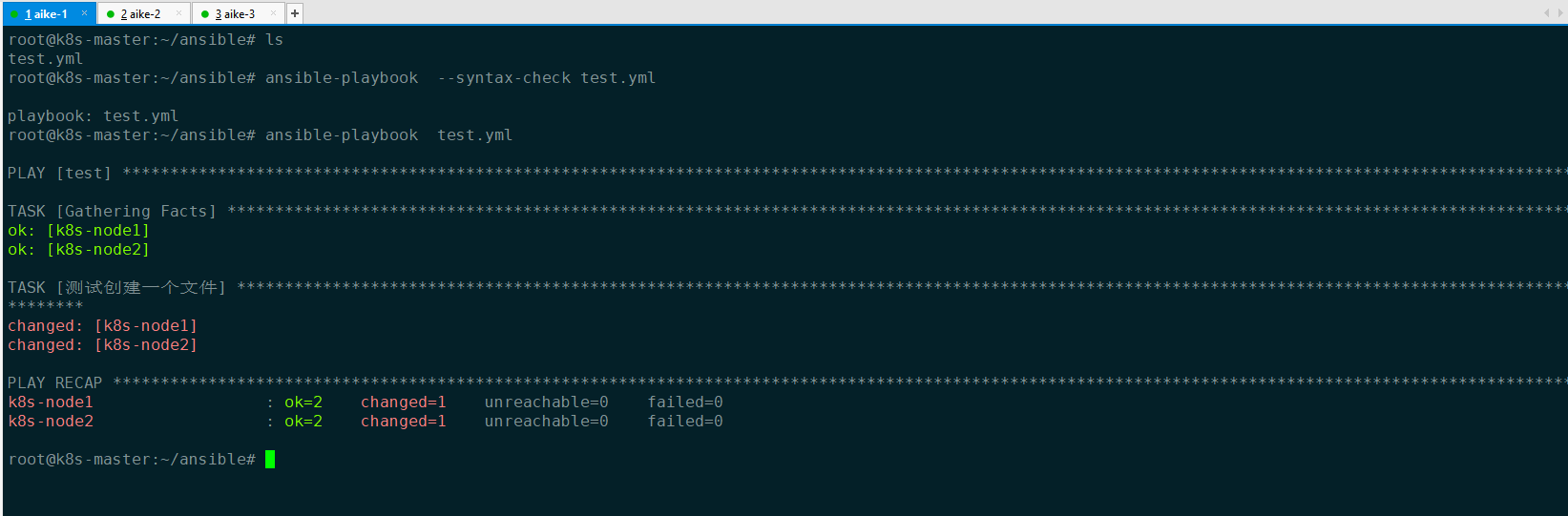
这里主要用到两个功能,fetch和copy,其中copy是将文件拷贝到远程机器,二fetch是把文件从远程拷贝到本机,下面分别做说明(需要注意的是不支持文件夹的拷贝):
实现需要巡检的节点免密登陆到ansible的服务器
ssh免密登录
1、简洁操作
主机A免密码登录主机B:将A的公钥上传到主机B
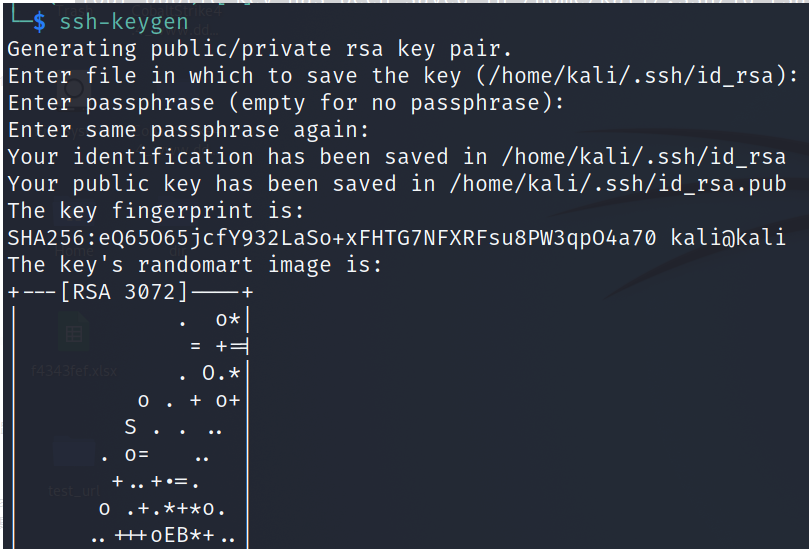
1.1、 在主机A创建密钥对
ssh-keygen #创建证书
#然后均回车(选择默认)
1.2、将公钥文件上传至免登录主机B
ssh-copy-id -i ~/.ssh/id_rsa.pub -p 50028 [email protected](端口不是22的情况)
ssh-copy-id -i ~/.ssh/id_rsa.pub  192.168.198.132

编写传输巡检日志脚本
vim scp.sh
# !/bin/sh

#echo "$processid 请管理员注意,99.88 拼接服务暂停服务 " >>monitor.log
#echo 启动了 | mailx -s "test" [email protected] -f [email protected]
#cd /email/file/error

filelist=`ls /xunjian/log`
for file in $filelist
do
 echo $file
 scp  /xunjian/log/$file [email protected]:/xunjian/
 rm -rf  /xunjian/log/$file
done
编写巡检脚本
vim xunjian.sh
#!/bin/bash
#主机信息每日巡检

IPADDR=$(ifconfig eth0|grep 'inet addr'|awk -F '[ :]' '{print $13}')
#环境变量PATH没设好,在cron里执行时有很多命令会找不到
export PATH=/usr/local/sbin:/usr/local/bin:/sbin:/bin:/usr/sbin:/usr/bin:/root/bin
source /etc/profile

[ $(id -u) -gt 0 ] && echo "请用root用户执行此脚本!" && exit 1
centosVersion=$(awk '{print $(NF-1)}' /etc/redhat-release)
VERSION="2017.08.22"

#日志相关
PROGPATH=`echo $0 | sed -e 's,[\\/][^\\/][^\\/]*$,,'`
[ -f $PROGPATH ] && PROGPATH="."
LOGPATH="$PROGPATH/log"
[ -e $LOGPATH ] || mkdir $LOGPATH
RESULTFILE="$LOGPATH/192.168.2.204.$IPADDR.txt"


#定义报表的全局变量
report_DateTime="" #日期 ok
report_Hostname="" #主机名 ok
report_OSRelease="" #发行版本 ok
report_Kernel="" #内核 ok
report_Language="" #语言/编码 ok
report_LastReboot="" #最近启动时间 ok
report_Uptime="" #运行时间(天) ok
report_CPUs="" #CPU数量 ok
report_CPUType="" #CPU类型 ok
report_Arch="" #CPU架构 ok
report_MemTotal="" #内存总容量(MB) ok
report_MemFree="" #内存剩余(MB) ok
report_MemUsedPercent="" #内存使用率% ok
report_DiskTotal="" #硬盘总容量(GB) ok
report_DiskFree="" #硬盘剩余(GB) ok
report_DiskUsedPercent="" #硬盘使用率% ok
report_InodeTotal="" #Inode总量 ok
report_InodeFree="" #Inode剩余 ok
report_InodeUsedPercent="" #Inode使用率 ok
report_IP="" #IP地址 ok
report_MAC="" #MAC地址 ok
report_Gateway="" #默认网关 ok
report_DNS="" #DNS ok
report_Listen="" #监听 ok
report_Selinux="" #Selinux ok
report_Firewall="" #防火墙 ok
report_USERs="" #用户 ok
report_USEREmptyPassword="" #空密码用户 ok
report_USERTheSameUID="" #相同ID的用户 ok
report_PasswordExpiry="" #密码过期(天) ok
report_RootUser="" #root用户 ok
report_Sudoers="" #sudo授权 ok
report_SSHAuthorized="" #SSH信任主机 ok
report_SSHDProtocolVersion="" #SSH协议版本 ok
report_SSHDPermitRootLogin="" #允许root远程登录 ok
report_DefunctProsess="" #僵尸进程数量 ok
report_SelfInitiatedService="" #自启动服务数量 ok
report_SelfInitiatedProgram="" #自启动程序数量 ok
report_RuningService="" #运行中服务数 ok
report_Crontab="" #计划任务数 ok
report_Syslog="" #日志服务 ok
report_SNMP="" #SNMP OK
report_NTP="" #NTP ok
report_JDK="" #JDK版本 ok
function version(){

echo ""
echo ""
echo "系统巡检脚本:Version $VERSION"
}

function getCpuStatus(){

echo ""
echo ""
echo "############################ CPU检查 #############################"
Physical_CPUs=$(grep "physical id" /proc/cpuinfo| sort | uniq | wc -l)
Virt_CPUs=$(grep "processor" /proc/cpuinfo | wc -l)
CPU_Kernels=$(grep "cores" /proc/cpuinfo|uniq| awk -F ': ' '{print $2}')
CPU_Type=$(grep "model name" /proc/cpuinfo | awk -F ': ' '{print $2}' | sort | uniq)
CPU_Arch=$(uname -m)
echo "物理CPU个数:$Physical_CPUs"
echo "逻辑CPU个数:$Virt_CPUs"
echo "每CPU核心数:$CPU_Kernels"
echo " CPU型号:$CPU_Type"
echo " CPU架构:$CPU_Arch"
#报表信息
report_CPUs=$Virt_CPUs #CPU数量
report_CPUType=$CPU_Type #CPU类型
report_Arch=$CPU_Arch #CPU架构
}

function getMemStatus(){

echo ""
echo ""
echo "############################ 内存检查 ############################"
if [[ $centosVersion < 7 ]];then
free -mo
else
free -h
fi
#报表信息
MemTotal=$(grep MemTotal /proc/meminfo| awk '{print $2}') #KB
MemFree=$(grep MemFree /proc/meminfo| awk '{print $2}') #KB
let MemUsed=MemTotal-MemFree
MemPercent=$(awk "BEGIN {if($MemTotal==0){printf 100}else{printf \"%.2f\",$MemUsed*100/$MemTotal}}")
report_MemTotal="$((MemTotal/1024))""MB" #内存总容量(MB) report_MemFree="$((MemFree/1024))""MB" #内存剩余(MB) report_MemUsedPercent="$(awk "BEGIN {if($MemTotal==0){printf 100}else{printf \"%.2f\",$MemUsed*100/$MemTotal}}")""%" #内存使用率% } function getDiskStatus(){ echo ""
echo ""
echo "############################ 磁盘检查 ############################"
df -hiP | sed 's/Mounted on/Mounted/'> /tmp/inode
df -hTP | sed 's/Mounted on/Mounted/'> /tmp/disk
join /tmp/disk /tmp/inode | awk '{print $1,$2,"|",$3,$4,$5,$6,"|",$8,$9,$10,$11,"|",$12}'| column -t
#报表信息
diskdata=$(df -TP | sed '1d' | awk '$2!="tmpfs"{print}') #KB
disktotal=$(echo "$diskdata" | awk '{total+=$3}END{print total}') #KB
diskused=$(echo "$diskdata" | awk '{total+=$4}END{print total}') #KB
diskfree=$((disktotal-diskused)) #KB
diskusedpercent=$(echo $disktotal $diskused | awk '{if($1==0){printf 100}else{printf "%.2f",$2*100/$1}}')
inodedata=$(df -iTP | sed '1d' | awk '$2!="tmpfs"{print}')
inodetotal=$(echo "$inodedata" | awk '{total+=$3}END{print total}')
inodeused=$(echo "$inodedata" | awk '{total+=$4}END{print total}')
inodefree=$((inodetotal-inodeused))
inodeusedpercent=$(echo $inodetotal $inodeused | awk '{if($1==0){printf 100}else{printf "%.2f",$2*100/$1}}')
report_DiskTotal=$((disktotal/1024/1024))"GB" #硬盘总容量(GB)
report_DiskFree=$((diskfree/1024/1024))"GB" #硬盘剩余(GB)
report_DiskUsedPercent="$diskusedpercent""%" #硬盘使用率% report_InodeTotal=$((inodetotal/1000))"K" #Inode总量 report_InodeFree=$((inodefree/1000))"K" #Inode剩余 report_InodeUsedPercent="$inodeusedpercent""%" #Inode使用率% } function getSystemStatus(){ echo ""
echo ""
echo "############################ 系统检查 ############################"
if [ -e /etc/sysconfig/i18n ];then
default_LANG="$(grep "LANG=" /etc/sysconfig/i18n | grep -v "^#" | awk -F '"' '{print $2}')"
else
default_LANG=$LANG
fi
export LANG="en_US.UTF-8"
Release=$(cat /etc/redhat-release 2>/dev/null)
Kernel=$(uname -r)
OS=$(uname -o)
Hostname=$(uname -n)
SELinux=$(/usr/sbin/sestatus | grep "SELinux status: " | awk '{print $3}')
LastReboot=$(who -b | awk '{print $3,$4}')
uptime=$(uptime | sed 's/.*up \([^,]*\), .*/\1/')
echo " 系统:$OS"
echo " 发行版本:$Release"
echo " 内核:$Kernel"
echo " 主机名:$Hostname"
echo " SELinux:$SELinux"
echo "语言/编码:$default_LANG"
echo " 当前时间:$(date +'%F %T')"
echo " 最后启动:$LastReboot"
echo " 运行时间:$uptime"
#报表信息
report_DateTime=$(date +"%F %T") #日期
report_Hostname="$Hostname" #主机名
report_OSRelease="$Release" #发行版本
report_Kernel="$Kernel" #内核
report_Language="$default_LANG" #语言/编码
report_LastReboot="$LastReboot" #最近启动时间
report_Uptime="$uptime" #运行时间(天)
report_Selinux="$SELinux"
export LANG="$default_LANG"

}

function getServiceStatus(){

echo ""
echo ""
echo "############################ 服务检查 ############################"
echo ""
if [[ $centosVersion > 7 ]];then
conf=$(systemctl list-unit-files --type=service --state=enabled --no-pager | grep "enabled")
process=$(systemctl list-units --type=service --state=running --no-pager | grep ".service")
#报表信息
report_SelfInitiatedService="$(echo "$conf" | wc -l)" #自启动服务数量
report_RuningService="$(echo "$process" | wc -l)" #运行中服务数量
else
conf=$(/sbin/chkconfig | grep -E ":on|:启用")
process=$(/sbin/service --status-all 2>/dev/null | grep -E "is running|正在运行")
#报表信息
report_SelfInitiatedService="$(echo "$conf" | wc -l)" #自启动服务数量
report_RuningService="$(echo "$process" | wc -l)" #运行中服务数量
fi
echo "服务配置"
echo "--------"
echo "$conf" | column -t
echo ""
echo "正在运行的服务"
echo "--------------"
echo "$process"

}


function getAutoStartStatus(){

echo ""
echo ""
echo "############################ 自启动检查 ##########################"
conf=$(grep -v "^#" /etc/rc.d/rc.local| sed '/^$/d')
echo "$conf"
#报表信息
report_SelfInitiatedProgram="$(echo $conf | wc -l)" #自启动程序数量
}

function getLoginStatus(){

echo ""
echo ""
echo "############################ 登录检查 ############################"
last | head
}

function getNetworkStatus(){

echo ""
echo ""
echo "############################ 网络检查 ############################"
if [[ $centosVersion < 7 ]];then
/sbin/ifconfig -a | grep -v packets | grep -v collisions | grep -v inet6
else
#ip a
for i in $(ip link | grep BROADCAST | awk -F: '{print $2}');do ip add show $i | grep -E "BROADCAST|global"| awk '{print $2}' | tr '\n' ' ' ;echo "" ;done
fi
GATEWAY=$(ip route | grep default | awk '{print $3}')
DNS=$(grep nameserver /etc/resolv.conf| grep -v "#" | awk '{print $2}' | tr '\n' ',' | sed 's/,$//')
echo ""
echo "网关:$GATEWAY "
echo " DNS:$DNS"
#报表信息
IP=$(ip -f inet addr | grep -v 127.0.0.1 | grep inet | awk '{print $NF,$2}' | tr '\n' ',' | sed 's/,$//')
MAC=$(ip link | grep -v "LOOPBACK\|loopback" | awk '{print $2}' | sed 'N;s/\n//' | tr '\n' ',' | sed 's/,$//')
report_IP="$IP" #IP地址
report_MAC=$MAC #MAC地址
report_Gateway="$GATEWAY" #默认网关
report_DNS="$DNS" #DNS
}

function getListenStatus(){

echo ""
echo ""
echo "############################ 监听检查 ############################"
TCPListen=$(ss -ntul | column -t)
echo "$TCPListen"
#报表信息
report_Listen="$(echo "$TCPListen"| sed '1d' | awk '/tcp/ {print $5}' | awk -F: '{print $NF}' | sort | uniq | wc -l)"
}

function getCronStatus(){

echo ""
echo ""
echo "############################ 计划任务检查 ########################"
Crontab=0
for shell in $(grep -v "/sbin/nologin" /etc/shells);do
for user in $(grep "$shell" /etc/passwd| awk -F: '{print $1}');do
crontab -l -u $user >/dev/null 2>&1
status=$?
if [ $status -eq 0 ];then
echo "$user"
echo "--------"
crontab -l -u $user
let Crontab=Crontab+$(crontab -l -u $user | wc -l)
echo ""
fi
done
done
#计划任务
find /etc/cron* -type f | xargs -i ls -l {
    } | column -t
let Crontab=Crontab+$(find /etc/cron* -type f | wc -l)
#报表信息
report_Crontab="$Crontab" #计划任务数
}
function getHowLongAgo(){

# 计算一个时间戳离现在有多久了
datetime="$*"
[ -z "$datetime" ] && echo "错误的参数:getHowLongAgo() $*"
Timestamp=$(date +%s -d "$datetime") #转化为时间戳
Now_Timestamp=$(date +%s)
Difference_Timestamp=$(($Now_Timestamp-$Timestamp))
days=0;hours=0;minutes=0;
sec_in_day=$((60*60*24));
sec_in_hour=$((60*60));
sec_in_minute=60
while (( $(($Difference_Timestamp-$sec_in_day)) > 1 ))
do
let Difference_Timestamp=Difference_Timestamp-sec_in_day
let days++
done
while (( $(($Difference_Timestamp-$sec_in_hour)) > 1 ))
do
let Difference_Timestamp=Difference_Timestamp-sec_in_hour
let hours++
done
echo "$days 天 $hours 小时前"
}

function getUserLastLogin(){

# 获取用户最近一次登录的时间,含年份
# 很遗憾last命令不支持显示年份,只有"last -t YYYYMMDDHHMMSS"表示某个时间之间的登录,我
# 们只能用最笨的方法了,对比今天之前和今年元旦之前(或者去年之前和前年之前……)某个用户
# 登录次数,如果登录统计次数有变化,则说明最近一次登录是今年。
username=$1
: ${username:="`whoami`"}
thisYear=$(date +%Y)
oldesYear=$(last | tail -n1 | awk '{print $NF}')
while(( $thisYear >= $oldesYear));do
loginBeforeToday=$(last $username | grep $username | wc -l)
loginBeforeNewYearsDayOfThisYear=$(last $username -t $thisYear"0101000000" | grep $username | wc -l)
if [ $loginBeforeToday -eq 0 ];then
echo "从未登录过"
break
elif [ $loginBeforeToday -gt $loginBeforeNewYearsDayOfThisYear ];then
lastDateTime=$(last -i $username | head -n1 | awk '{
     for(i=4;i<(NF-2);i++)printf"%s ",$i}')" $thisYear" #格式如: Sat Nov 2 20:33 2015 lastDateTime=$(date "+%Y-%m-%d %H:%M:%S" -d "$lastDateTime") echo "$lastDateTime" break else thisYear=$((thisYear-1)) fi done } function getUserStatus(){ echo "" echo "" echo "############################ 用户检查 ############################" #/etc/passwd 最后修改时间 pwdfile="$(cat /etc/passwd)" Modify=$(stat /etc/passwd | grep Modify | tr '.' ' ' | awk '{
    print $2,$3}') echo "/etc/passwd 最后修改时间:$Modify ($(getHowLongAgo $Modify))" echo "" echo "特权用户" echo "--------" RootUser="" for user in $(echo "$pwdfile" | awk -F: '{
    print $1}');do if [ $(id -u $user) -eq 0 ];then echo "$user" RootUser="$RootUser,$user" fi done echo "" echo "用户列表" echo "--------" USERs=0 echo "$( echo "用户名 UID GID HOME SHELL 最后一次登录" for shell in $(grep -v "/sbin/nologin" /etc/shells);do for username in $(grep "$shell" /etc/passwd| awk -F: '{
    print $1}');do userLastLogin="$(getUserLastLogin $username)" echo "$pwdfile" | grep -w "$username" |grep -w "$shell"| awk -F: -v lastlogin="$(echo "$userLastLogin" | tr ' ' '_')" '{
    print $1,$3,$4,$6,$7,lastlogin}' done let USERs=USERs+$(echo "$pwdfile" | grep "$shell"| wc -l) done )" | column -t echo "" echo "空密码用户" echo "----------" USEREmptyPassword="" for shell in $(grep -v "/sbin/nologin" /etc/shells);do for user in $(echo "$pwdfile" | grep "$shell" | cut -d: -f1);do r=$(awk -F: '$2=="!!"{
    print $1}' /etc/shadow | grep -w $user) if [ ! -z $r ];then echo $r USEREmptyPassword="$USEREmptyPassword,"$r fi done done echo "" echo "相同ID的用户" echo "------------" USERTheSameUID="" UIDs=$(cut -d: -f3 /etc/passwd | sort | uniq -c | awk '$1>1{
    print $2}') for uid in $UIDs;do echo -n "$uid"; USERTheSameUID="$uid" r=$(awk -F: 'ORS="";$3=='"$uid"'{
    print ":",$1}' /etc/passwd) echo "$r" echo "" USERTheSameUID="$USERTheSameUID $r," done #报表信息 report_USERs="$USERs" #用户 report_USEREmptyPassword=$(echo $USEREmptyPassword | sed 's/^,//') report_USERTheSameUID=$(echo $USERTheSameUID | sed 's/,$//') report_RootUser=$(echo $RootUser | sed 's/^,//') #特权用户 } function getPasswordStatus { echo "" echo "" echo "############################ 密码检查 ############################" pwdfile="$(cat /etc/passwd)" echo "" echo "密码过期检查" echo "------------" result="" for shell in $(grep -v "/sbin/nologin" /etc/shells);do for user in $(echo "$pwdfile" | grep "$shell" | cut -d: -f1);do get_expiry_date=$(/usr/bin/chage -l $user | grep 'Password expires' | cut -d: -f2) if [[ $get_expiry_date = ' never' || $get_expiry_date = 'never' ]];then printf "%-15s 永不过期\n" $user result="$result,$user:never" else password_expiry_date=$(date -d "$get_expiry_date" "+%s") current_date=$(date "+%s") diff=$(($password_expiry_date-$current_date)) let DAYS=$(($diff/(60*60*24))) printf "%-15s %s天后过期\n" $user $DAYS result="$result,$user:$DAYS days" fi done done report_PasswordExpiry=$(echo $result | sed 's/^,//') echo "" echo "密码策略检查" echo "------------" grep -v "#" /etc/login.defs | grep -E "PASS_MAX_DAYS|PASS_MIN_DAYS|PASS_MIN_LEN|PASS_WARN_AGE" } function getSudoersStatus(){ echo "" echo "" echo "############################ Sudoers检查 #########################" conf=$(grep -v "^#" /etc/sudoers| grep -v "^Defaults" | sed '/^$/d') echo "$conf" echo "" #报表信息 report_Sudoers="$(echo $conf | wc -l)" } function getInstalledStatus(){ echo "" echo "" echo "############################ 软件检查 ############################" rpm -qa --last | head | column -t } function getProcessStatus(){ echo "" echo "" echo "############################ 进程检查 ############################" if [ $(ps -ef | grep defunct | grep -v grep | wc -l) -ge 1 ];then echo "" echo "僵尸进程"; echo "--------" ps -ef | head -n1 ps -ef | grep defunct | grep -v grep fi echo "" echo "内存占用TOP10" echo "-------------" echo -e "PID %MEM RSS COMMAND $(ps aux | awk '{
    print $2, $4, $6, $11}' | sort -k3rn | head -n 10 )"| column -t echo "" echo "CPU占用TOP10" echo "------------" top b -n1 | head -17 | tail -11 #报表信息 report_DefunctProsess="$(ps -ef | grep defunct | grep -v grep|wc -l)" } function getJDKStatus(){ echo "" echo "" echo "############################ JDK检查 #############################" java -version 2>/dev/null if [ $? -eq 0 ];then java -version 2>&1 fi echo "JAVA_HOME=\"$JAVA_HOME\"" #报表信息 report_JDK="$(java -version 2>&1 | grep version | awk '{
    print $1,$3}' | tr -d '"')"
}
function getSyslogStatus(){

echo ""
echo ""
echo "############################ syslog检查 ##########################"
echo "服务状态:$(getState rsyslog)"
echo ""
echo "/etc/rsyslog.conf"
echo "-----------------"
cat /etc/rsyslog.conf 2>/dev/null | grep -v "^#" | grep -v "^\\$" | sed '/^$/d' | column -t
#报表信息
report_Syslog="$(getState rsyslog)"
}
function getFirewallStatus(){

echo ""
echo ""
echo "############################ 防火墙检查 ##########################"
#防火墙状态,策略等
if [[ $centosVersion < 7 ]];then
/etc/init.d/iptables status >/dev/null 2>&1
status=$?
if [ $status -eq 0 ];then
s="active"
elif [ $status -eq 3 ];then
s="inactive"
elif [ $status -eq 4 ];then
s="permission denied"
else
s="unknown"
fi
else
s="$(getState iptables)"
fi
echo "iptables: $s"
echo ""
echo "/etc/sysconfig/iptables"
echo "-----------------------"
cat /etc/sysconfig/iptables 2>/dev/null
#报表信息
report_Firewall="$s"
}

function getSNMPStatus(){

#SNMP服务状态,配置等
echo ""
echo ""
echo "############################ SNMP检查 ############################"
status="$(getState snmpd)"
echo "服务状态:$status"
echo ""
if [ -e /etc/snmp/snmpd.conf ];then
echo "/etc/snmp/snmpd.conf"
echo "--------------------"
cat /etc/snmp/snmpd.conf 2>/dev/null | grep -v "^#" | sed '/^$/d'
fi
#报表信息
report_SNMP="$(getState snmpd)"
}


function getState(){

if [[ $centosVersion < 7 ]];then
if [ -e "/etc/init.d/$1" ];then
if [ `/etc/init.d/$1 status 2>/dev/null | grep -E "is running|正在运行" | wc -l` -ge 1 ];then
r="active"
else
r="inactive"
fi
else
r="unknown"
fi
else
#CentOS 7+
r="$(systemctl is-active $1 2>&1)"
fi
echo "$r"
}

function getSSHStatus(){

#SSHD服务状态,配置,受信任主机等
echo ""
echo ""
echo "############################ SSH检查 #############################"
#检查受信任主机
pwdfile="$(cat /etc/passwd)"
echo "服务状态:$(getState sshd)"
Protocol_Version=$(cat /etc/ssh/sshd_config | grep Protocol | awk '{print $2}')
echo "SSH协议版本:$Protocol_Version"
echo ""
echo "信任主机"
echo "--------"
authorized=0
for user in $(echo "$pwdfile" | grep /bin/bash | awk -F: '{print $1}');do
authorize_file=$(echo "$pwdfile" | grep -w $user | awk -F: '{printf $6"/.ssh/authorized_keys"}')
authorized_host=$(cat $authorize_file 2>/dev/null | awk '{print $3}' | tr '\n' ',' | sed 's/,$//')
if [ ! -z $authorized_host ];then
echo "$user 授权 \"$authorized_host\" 无密码访问"
fi
let authorized=authorized+$(cat $authorize_file 2>/dev/null | awk '{print $3}'|wc -l)
done

echo ""
echo "是否允许ROOT远程登录"
echo "--------------------"
config=$(cat /etc/ssh/sshd_config | grep PermitRootLogin)
firstChar=${config:0:1}
if [ $firstChar == "#" ];then
PermitRootLogin="yes" #默认是允许ROOT远程登录的
else
PermitRootLogin=$(echo $config | awk '{print $2}')
fi
echo "PermitRootLogin $PermitRootLogin"

echo ""
echo "/etc/ssh/sshd_config"
echo "--------------------"
cat /etc/ssh/sshd_config | grep -v "^#" | sed '/^$/d'

#报表信息
report_SSHAuthorized="$authorized" #SSH信任主机
report_SSHDProtocolVersion="$Protocol_Version" #SSH协议版本
report_SSHDPermitRootLogin="$PermitRootLogin" #允许root远程登录
}
function getNTPStatus(){

#NTP服务状态,当前时间,配置等
echo ""
echo ""
echo "############################ NTP检查 #############################"
if [ -e /etc/ntp.conf ];then
echo "服务状态:$(getState ntpd)"
echo ""
echo "/etc/ntp.conf"
echo "-------------"
cat /etc/ntp.conf 2>/dev/null | grep -v "^#" | sed '/^$/d'
fi
#报表信息
report_NTP="$(getState ntpd)"
}


function uploadHostDailyCheckReport(){

json="{ \"DateTime\":\"$report_DateTime\", \"Hostname\":\"$report_Hostname\", \"OSRelease\":\"$report_OSRelease\", \"Kernel\":\"$report_Kernel\", \"Language\":\"$report_Language\", \"LastReboot\":\"$report_LastReboot\", \"Uptime\":\"$report_Uptime\", \"CPUs\":\"$report_CPUs\", \"CPUType\":\"$report_CPUType\", \"Arch\":\"$report_Arch\", \"MemTotal\":\"$report_MemTotal\", \"MemFree\":\"$report_MemFree\", \"MemUsedPercent\":\"$report_MemUsedPercent\", \"DiskTotal\":\"$report_DiskTotal\", \"DiskFree\":\"$report_DiskFree\", \"DiskUsedPercent\":\"$report_DiskUsedPercent\", \"InodeTotal\":\"$report_InodeTotal\", \"InodeFree\":\"$report_InodeFree\", \"InodeUsedPercent\":\"$report_InodeUsedPercent\", \"IP\":\"$report_IP\", \"MAC\":\"$report_MAC\", \"Gateway\":\"$report_Gateway\", \"DNS\":\"$report_DNS\", \"Listen\":\"$report_Listen\", \"Selinux\":\"$report_Selinux\", \"Firewall\":\"$report_Firewall\", \"USERs\":\"$report_USERs\", \"USEREmptyPassword\":\"$report_USEREmptyPassword\", \"USERTheSameUID\":\"$report_USERTheSameUID\", \"PasswordExpiry\":\"$report_PasswordExpiry\", \"RootUser\":\"$report_RootUser\", \"Sudoers\":\"$report_Sudoers\", \"SSHAuthorized\":\"$report_SSHAuthorized\", \"SSHDProtocolVersion\":\"$report_SSHDProtocolVersion\", \"SSHDPermitRootLogin\":\"$report_SSHDPermitRootLogin\", \"DefunctProsess\":\"$report_DefunctProsess\", \"SelfInitiatedService\":\"$report_SelfInitiatedService\", \"SelfInitiatedProgram\":\"$report_SelfInitiatedProgram\", \"RuningService\":\"$report_RuningService\", \"Crontab\":\"$report_Crontab\", \"Syslog\":\"$report_Syslog\", \"SNMP\":\"$report_SNMP\", \"NTP\":\"$report_NTP\", \"JDK\":\"$report_JDK\" }"
#echo "$json"
curl -l -H "Content-type: application/json" -X POST -d "$json" "$uploadHostDailyCheckReportApi" 2>/dev/null
}

function check(){

version
getSystemStatus
getCpuStatus
getMemStatus
getDiskStatus
getNetworkStatus
getListenStatus
getProcessStatus
getServiceStatus
getAutoStartStatus
getLoginStatus
getCronStatus
getUserStatus
getPasswordStatus
getSudoersStatus
getJDKStatus
getFirewallStatus
getSSHStatus
getSyslogStatus
getSNMPStatus
getNTPStatus
getInstalledStatus
}


#执行检查并保存检查结果
check > $RESULTFILE

echo "检查结果:$RESULTFILE"

ansible节点配置
ansible-playbook
- hosts: xunjian
  user: root
  tasks:
  - name: 执行巡检脚本
    shell: bash /xunjian/xunjian.sh
  - name: "拷贝被控制节点上的巡检文件到本机"
    shell : bash /xunjian/scp.sh

执行剧本

Debian上Crontab的使用
配置计划任务每天执行
一、Crontab的安装
*1、Debian下面安装Crontab*
apt-get install cron //大部分情况下Debian都已安装。
/etc/init.d/cron restart //重启Crontab
二、Crontab使用方法
1、查看crontab定时执行任务列表
crontab -l
2、添加crontab定时执行任务
crontab -e
输入crontab任务命令时可能会因为crontab默认编辑器的不同。

如上图所示为nano编辑器,使用比较简单,直接在文件末尾按crontab命令格式输入即可,Ctrl+x退出,再输y 回车保存。
另外一种是vi编辑器,首先按i键,在文件末尾按crontab命令格式输入,再按ESC键,再输入:wq 回车即可。
测试计划任务执行成功

0 9 * * * /ansible/ansible.sh
0 18 * * * rm -rf /xunjian/*

ansible.sh脚本
# !/bin/sh
cd /ansible/

ansible-playbook xunjian.yml
就此结束配置完成,每天到公司第一件时间查看巡检日志文件
AoPA-1658555733826)]
Debian上Crontab的使用
配置计划任务每天执行
一、Crontab的安装
*1、Debian下面安装Crontab*
apt-get install cron //大部分情况下Debian都已安装。
/etc/init.d/cron restart //重启Crontab
二、Crontab使用方法
1、查看crontab定时执行任务列表
crontab -l
2、添加crontab定时执行任务
crontab -e
输入crontab任务命令时可能会因为crontab默认编辑器的不同。
[外链图片转存中…(img-o7fIHQr9-1658555733826)]
如上图所示为nano编辑器,使用比较简单,直接在文件末尾按crontab命令格式输入即可,Ctrl+x退出,再输y 回车保存。
另外一种是vi编辑器,首先按i键,在文件末尾按crontab命令格式输入,再按ESC键,再输入:wq 回车即可。
测试计划任务执行成功
[外链图片转存中…(img-1O3UstBa-1658555733826)]
0 9 * * * /ansible/ansible.sh
0 18 * * * rm -rf /xunjian/*
[外链图片转存中…(img-nX6pwblx-1658555733826)]
ansible.sh脚本
# !/bin/sh
cd /ansible/

ansible-playbook xunjian.yml
就此结束配置完成,每天到公司第一件时间查看巡检日志文件
边栏推荐
- mysql8.0 mha实现高可用《mha》
- ES6 -- Deconstruction assignment
- C#常见的集合
- Is there any document for synchronizing from Oracle to ODPs?
- How to use RS485 half duplex chip correctly
- Dear bosses, how can I print the result of Flink SQL to the console and display it completely?
- The adequacy of source evaluation forum · observation model test
- Bitcoin.com:USDD代表了真正去中心化稳定币
- 字节一面:TCP 和 UDP 可以使用同一个端口吗?
- 全志芯片bsp命名规则
猜你喜欢
![[manageengine]itsm application in retail industry](/img/25/e8d9a320c5d4b1cf2e187b61180991.png)
[manageengine]itsm application in retail industry
![[interview: concurrent 25: multithreading: volatile] visibility](/img/03/6b44242a019775222fdf9c7a920ae5.png)
[interview: concurrent 25: multithreading: volatile] visibility

ONEFLOW V0.8.0 officially released

Create EDA - why should I learn EDA

919. Complete binary tree inserter: simple BFS application problem

NVIDIA has opened source a comprehensive library of 3D deep learning based on pytorch
![[redis underlying parsing] linked list type](/img/e8/c192629dce1a958155a562d216d532.png)
[redis underlying parsing] linked list type
![[leetcode ladder] linked list · 876 find the middle node of the linked list](/img/72/d3e46a820796a48b458cd2d0a18f8f.png)
[leetcode ladder] linked list · 876 find the middle node of the linked list

立创EDA——器件的创建01-电阻(二)
![[redis underlying parsing] string type](/img/a6/47083b033125195ebaf80090919fe2.png)
[redis underlying parsing] string type
随机推荐
919. Complete binary tree inserter: simple BFS application problem
Reading the pointpillar code of openpcdet -- Part 3: Calculation of loss function
【面试:并发篇25:多线程:volatile】可见性
How will Web3 change the future of people?
Redis 使用详解
Pyqt5 use pyqtgraph to draw multiple y-value scatter plots
Shopify sellers: share some tips for social media marketing!
【饭谈】细说:下克上,向上管理,向上画饼。
In depth understanding of seven specific ways to enhance code scalability
C#程序设计的6大原则
MPI learning notes (II): two implementation methods of matrix multiplication
少儿编程 电子学会图形化编程等级考试Scratch一级真题解析(判断题)2022年6月
Talk about what's going on with C # backstage GC?
es6--解构赋值
How to solve the problem of high concurrency and large traffic with PHP
我也是醉了,Eureka 延迟注册还有这个坑!
Apple estimates that iPhone will give up the Chinese market, and the Chinese industrial chain needs to consider living a hard life
Detailed explanation of several ideas for implementing timed tasks in PHP
Vivo official website app full model UI adaptation scheme
Job interviews are always a second kill? After reading the seckill system notes secretly stored by JD T8, I have given my knees