当前位置:网站首页>selenium中元素定位正确但是操作失败,6种解决办法全稿定
selenium中元素定位正确但是操作失败,6种解决办法全稿定
2022-07-23 17:52:00 【软件测试呀】
selenium中元素定位正确但是操作失败的原因无外乎以下4种:
一、页面没加载好
解决方法:添加等待方法,如: time.sleep()
二、页面提交需要等待给数据后台
解决方法:添加等待方法,如: time.sleep()
三、浏览器没有以最大化方式打开,导致元素被隐藏,定位不到
解决方法:
将网页最大化:driver.maximize_window()
如果屏幕比例固定,分辨率有限,通过网页最大化也没办法解决的话,可以通过执行JS方法来实现。
browser.execute_script(‘window.scrollBy(200,0)’) #此处(200,0)为网页偏移坐标,200为横坐标,0为纵坐标
#window.scrollBy()为JS方法#
四、网页中存在多个frame框架,所定位的元素不在当前frame中。所以尽管元素明明看起来是定位正确的,但是点击无效。
frame框架作用:frame对象代表一个HTML框架,frame就是一个子窗口,在里面可以加载网页,内部子窗口进行刷新的时候,不会影响外部窗口。
对于嵌套多个frame的页面,操作时需要层层跳转,跳到元素所在的frame。
frame标签有frameset、frame、iframe三种,frameset与其他普通标签一样,不会影响元素的定位;而frame与iframe的切换方法是一样的。
frame 下是个独立的HTML文件:
解决方法:可以利用selenium中的switch_to.frame()方法来实现frame之间的跳转。
具体操作如下:
1.如何对frame进行切换?
利用switch_to.frame()方法来进行切换。
switch_to.frame(reference)
reference是传入的参数,用来定位frame,可以是id,name,tag name等。假设有下面HTML代码:
<html lang="en">
<head>
    <title>FrameTest</title>
</head>
<body>
<iframe src="myframe.html" id="frame1" name="myframe"></iframe>
</body>
</html>
则想要切换到上述iframe的方法有:
driver.switch_to.frame(0)  #用frame的index定位,第一个是0
driver.switch_to.frame("frame1")  #用frame的id来定位
driver.switch_to.frame("myframe") #用name来定位
driver.switch_to.frame(driver.find_element_by_tag_name("iframe"))  #用iframe对应的tag name来定位
driver.switch_to_frame(driver.find_element_by_xpath("//iframe[contains(@src,'myframe')]"))  #利用xpath来定位
2.如何从子frame切换回主文档?
切换到子frame后就无法再对主文档元素进行操作了,所以要切换回主文档。方法为:driver.switch_to.default_content()
driver.switch_to.default_content()
3.多层frame如何切换?
如果有多层frame要逐层进行切换,例如下列多个frame嵌套的HTML代码:
<html>
    <iframe id="frame1">
        <iframe id="frame2" / >
    </iframe>
</html>
(1)从主文档切换到frame 2:
driver.switch_to.frame(‘frame1’) #先从主文档切换到frame1
driver.switch_to.frame(‘frame2’) #再从frame1切换到frame2
(2)从frame2切回到frame1:
从frame2再切回frame1,这里selenium给我们提供了一个方法能够从子frame切回到父frame,而不用我们切回主文档再切进来。
driver.switch_to.parent_frame() # 如果当前已是主文档,则无效果
有了parent_frame()这个相当于后退的方法,我们可以随意切换不同的frame,随意的跳来跳去了。
总结下,遇到frame跳转问题,利用以下三个方法便可以搞定:
driver.switch_to.frame(reference)
driver.switch_to.parent_frame()
driver.switch_to.default_content()
五、元素属性为动态属性,看着定位已经正确,但是随着鼠标点击位置不同,元素的属性发生变化。
例如下面这个页面的目录的class属性就随着该元素是否被点击而发生变化:
解决方法:换元素的另一个固定属性来进行定位。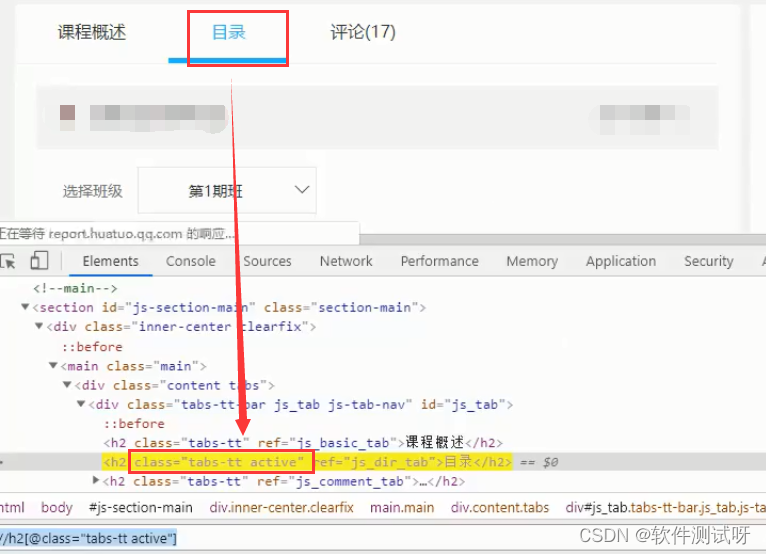
六、页面元素在页面打开的时候被其他弹出窗口挡住。
解决方法:添加关闭弹出窗口步骤。
房子要一层一层盖,知识要一点一点学。大家在学习过程中要好基础,多上手实操,话不多说,这里狠狠上一次干货!我熬夜整理好的各阶段(功能、接口、自动化、性能、测开)技能学习资料+实操讲解,非常适合私下里学习,比找资料自学高效多了,分享给你们。
领取关 w/x/g/z/h:软件测试小dao
敲字不易,如果此文章对你有帮助的话,点个赞收个藏来个关注,给作者一个鼓励。也方便你下次能够快速查找。
边栏推荐
- TCL scripting language foundation (2)
- Elk notes 25 - experience APM quickly
- Technical scheme of face recognition system
- Gvim/vim tips
- R语言使用quantile函数计算向量数据或者dataframe指定数据列的分位数(百分位数)
- Alibaba最新神作!耗时187天肝出来1015页分布式全栈手册太香了
- 小熊拍学习之LED灯的点亮
- Three ways to realize multithreading
- What is the difference between preamplifier and power amplifier?
- How can zero foundation self-study software testing? Ten year test Laoniao's strongest software test learning Roadmap
猜你喜欢

Lendingclub loan status business details current, charge off, issued, full paid, grace period
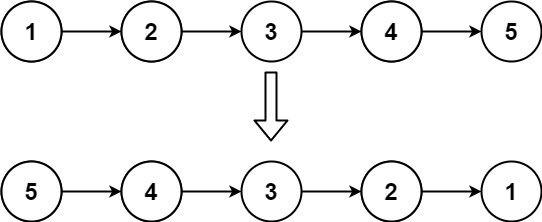
【leetcode天梯】链表 · 206 反转链表

Type-C蓝牙音箱单C口可充电可OTG方案

ACM MM 2022 Oral | DIG: 自监督文字识别的新框架,刷新11个公开场景文字数据集的识别性能,平均提升5%...

canvas绘制文本和清除绘制

Calculation of structure size (structure memory alignment)

还在用Xshell?你out了,推荐一个更现代的终端连接工具

mBio | 海洋所孙超岷组在深海原位验证了微生物介导的单质硫形成新通路

时代潮头,华为将风帆对准数字金融的风与海

Access intranet rds+mysql through SSH
随机推荐
使用 frp 实现内网穿透
Mbio | the sun Chaomin formation of Ocean Institute has verified in situ the new pathway of microbial mediated elemental sulfur formation in the deep sea
Synopsys TCL of Tcl language (3) (Digital IC)
关于:在企业局域网中启用 Delivery Optimization
Alibaba's latest masterpiece! It took 187 days for the liver to come out. 1015 pages of distributed full stack manuals are so delicious
What is the difference between preamplifier and power amplifier?
PHP file lock lottery to prevent concurrency
mBio | 海洋所孙超岷组在深海原位验证了微生物介导的单质硫形成新通路
Exch:POP3 和 IMAP4 操作指南
USB3.0:VL817Q7-C0的LAYOUT指南
虹科干货 | 教您如何解析MODBUS中的浮点型数据
Challenges of decentralized storage
TCL scripting language foundation (2)
What content does the software test plan include and how to write it. Share test plan template
三维点云课程(七)——特征点描述
有向图之求两点之间所有路径
作为一名后台开发人员,你必须知道的两种过滤器
VB connecting access database customization
Analyse de l'industrie | interphone logistique
【leetcode天梯】链表 · 206 反转链表