当前位置:网站首页>After idea installs these plug-ins, the code can be written to heaven. My little sister also has to arrange it
After idea installs these plug-ins, the code can be written to heaven. My little sister also has to arrange it
2022-06-24 20:46:00 【Interesting talk about handsome men】
Today's society is an age of beauty , It is also the time to show yourself . Not only does my little sister dress up as a fashion star , We programmers should keep pace with the times , Change the unkempt and unkempt appearance in everyone's impression , Then we should be able to dress up , Also make the development tools cool , Let the ladies see the magic of technology . Now let's take a look at my idea What magic plug-ins are installed on the .
I think there are many posts on the Internet that just list the plug-ins , There is no indication of how to use , This is really a headache . This time, the handsome guy makes up for everyone , Not only let you know that these plug-ins are easy to use , Also tell you how to use , You take off in an instant .

Plug-in installation method :
- open idea Of Setting Set up , Shortcut key Ctrl+Alt+s, choice plugin, Then select MarketPlace( Plug in store ),installed( Installed ).
- Click on installed Check which plug-ins are currently installed , Avoid re installation .
- Click on MarketPlace, Enter the plug-in to be added in the search box , Click on install install , Depending on the plug-in , Will need to be restarted to take effect .


The first paragraph : Setting the background Background Image Plus, Recommend index :
- Copy search directly , Will find a lot , You choose to install and download the most frequently . What I chose is the number of downloads 275.6K Of

- Here are the key points , How to use . Create a new directory , Prepare some beautiful pictures , Pay attention to the format jpg And so on , If the format is not common, it may not display the effect .
- Open again Setting Set up , Search for background image plus, Click on the folder style button image , Set the file path of the picture , Set as the file path of the first step ;change every Is to set the replacement frequency , If there are multiple photos, it can be switched automatically , The unit is minutes .

- The following figure shows the effect after successful setting . If you and the woman ticket ( Boyfriend ) Two places apart , Arrangement can be a section of Acacia pain , The speed of writing code is amazing .
 In the second paragraph : translate Translation, Recommend index :
As we all know, English is a headache for every programmer , In the past, our solution was to install Youdao dictionary , Or it is triggered by mistake , Or it's inconvenient . The following figure shows the recommended plug-ins , It is much more convenient to use than others , Start my Google Translate plugin installation , I can't translate it when I have frequent ventilation . The installation method is to copy directly Translation Direct search installation , Pay attention to the following installation logo Icon's .

- Usage method : Select the word to be translated , Right click , There are two functions here , One is translation , One is translation + Replace , It's convenient. Don't .

- Is the display effect very beautiful , Click in to see the second picture , Very convenient , It is recommended that everyone should install


In the third paragraph : Code view CodeGlance, Recommend index :
In the actual development process , There are often hundreds of lines of code , In addition to entering the line number, the method of sliding to a certain line is to slide the mouse wheel back and forth to , The efficiency is not high , Time is long. , My hands are aching . So this CodeGlance It's very important , Students who have experienced pain points , deep feeling
- Installation method

- After installation, there will be a view on the right side of the code editing window , The edit area of the current window will be highlighted , Click on that part of the mouse , The edit view switches to where , Number of specific lines , Slide through the mouse tube wheel , Especially the jump with large span is very convenient .

The fourth paragraph : Dynamic effects Activate-power-mode perhaps Intellij_power_mode_II, Recommend index :
Both plug-ins can be installed , One of them can also be installed , The main effect is when entering code , The cursor effect is cool , There are rockets blowing fire , Firefly effect , It also shows the code speed . In boring and highly concentrated coding , It is also the existence of a clear stream
- I installed both , Everyone likes it personally , Install at will .

- In terms of effect activate A little more cool

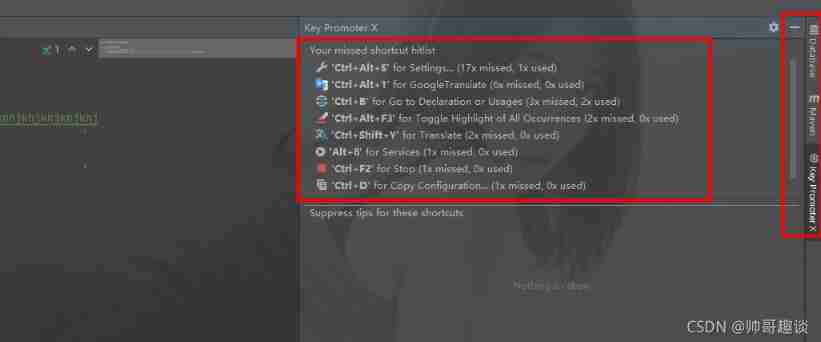
The fifth paragraph : Shortcut key prompt Key promoter, Recommend index :
This plug-in , I strongly recommend , Have used Mac and Windows Systematic students will have a deeper understanding , Due to the difference of operating system , Shortcut keys are also quite different , Of course, you can specify the type of shortcut key to try to offset the system differences , But there is always something unexpected , This plug-in is very useful at this time , In the course of your operation , Show me the shortcut keys , I've seen so much , Naturally you can remember , In the future, you don't have to care what system it is .
- Installation method , Be sure to install the same model

- The effect of the installation is , You will see... In the toolbar on the right key promoter The button , It will record our operations , At the same time, it indicates which shortcut keys correspond to these operations , Is it smart , It's hard to forget the shortcut keys in the future .
 6 : The brackets at different levels are colorful and highlighted Rainbow Brackets and HighlightBracketPair, Recommend index :
When the code is nested more , Or a certain method is very long , It is difficult for us to know this method or for The beginning and end of the loop , It is very convenient to highlight with this bracket .
- Installation method

- Show the effect , The color of curly braces and brackets is very obvious .
 The seventh paragraph : Automatically fill in set Method GenerateAllSetter, Recommend index :
Automatically help us write out all attributes set Method , You can also specify a default value , It is also possible not to formulate . Especially in entity It is very convenient when there are many attributes , We just need to care about value that will do .
- Installation method

- Instructions , Shortcut key Alt+Enter open GenerateAllSetter Operation view , Select the corresponding method .

Section 8 : Entity class to json plug-in unit POJO to Json, Recommend index :
- Installation method

- Usage method , To select json The object of , Right click to have two choices , The first is the default value It's empty , The second is a random value , As shown in the second figure

{
  "id": 74,
  "serial": "fake_data"
}
9 : according to json Generate entity classes GsonFormatPlus, Recommend index :
adopt Json There are many ways to generate entity classes , For example, online json Tools , But I recommend it GsonFormatPlus, First, we can idea Directly in , Don't cut out . Second, you can specify how classes are generated , For example, now everyone uses lombok To enhance the entity class ,GsonFormatPlus Born to support , Isn't it a perfect fit .
- Installation method

- Instructions : First create an empty class , Shortcut key Alt+Enter, choice GsonFormatPlus. Or the shortcut key Alt+s Open the operation window

- On the left is json, On the right is json The comments in , Click on format, The plug-in will automatically replace the original json The comments in the .id Type of by String Processed , It's not 100 percent accurate , Don't take it too seriously
{
  "id": 90,//id
  "serial": "fake_data"// Serial number
}
- Generated Java Class display , But generated Java There are no comments in class , Bad review .id yes Long Type or Integer The type is not clear , We need to specify according to our actual needs .
import lombok.Data;
import lombok.NoArgsConstructor;

@NoArgsConstructor
@Data
public class Test {

    private Integer id;
    private String serial;
}
summary :
- The instructions here list the easy-to-use plug-ins I currently use , There are still many things not listed , I'll share it later
- If you have any interesting plug-ins, please leave a message in the comment area
- Students who have not played must install their own trial , You won't do much in these years , You are ashamed to say that you are a programmer
Access to the source code , Please pay attention to the official account. , reply 【cloud】

You are also welcome to add personal wechat 【shishuai860505】, I pull everyone into my reader exchange group .

边栏推荐
- Sequential stack traversal binary tree
- Freshman girls' nonsense programming is popular! Those who understand programming are tied with Q after reading
- [cann document express issue 04] unveiling the development of shengteng cann operator
- Stackoverflow annual report 2022: what are developers' favorite databases?
- 字节、腾讯也下场,这门「月赚3000万」的生意有多香?
- Jd.com: how does redis implement inventory deduction? How to prevent oversold?
- Berkeley, MIT, Cambridge, deepmind and other industry leaders' online lectures: towards safe, reliable and controllable AI
- Byte and Tencent have also come to an end. How fragrant is this business of "making 30million yuan a month"?
- 苹果、微软、谷歌不再掐架,今年要合力干一件大事
- [suggested collection] time series prediction application and paper summary
猜你喜欢

Difference between map and object

2022年最新四川建筑八大员(电气施工员)模拟题库及答案

The Google File System (GFS) learning notes

Camera rental management system based on qt+mysql

Otaku can't save yuan universe

Prototype mode -- clone monster Army

网络安全审查办公室对知网启动网络安全审查,称其“掌握大量重要数据及敏感信息”

Visitor model -- generation gap between young and middle-aged people

使用gorm查询数据库时reflect: reflect.flag.mustBeAssignable using unaddressable value
Interpreter mode -- formulas for dating
随机推荐
Enjoy yuan mode -- a large number of flying dragons
C langage pour le déminage (version simplifiée)
The largest DPU manufacturer in history (Part 1)
思源笔记工具栏中的按钮名称变成了 undefined,有人遇到过吗?
华为云ModelArts第四次蝉联中国机器学习公有云服务市场第一!
Vant component used in wechat applet
微信小程序自定义tabBar
Leetcode(146)——LRU 缓存
Wait for the victory of the party! After mining ebb tide, graphics card prices plummeted across the board
刚购买了一个MYSQL数据库,提示已有实例,控制台登录实例要提供数据库账号,我如何知道数据库账号。
[cloud resident co creation] ModelBox draws your own painting across the air
Leetcode (135) - distribute candy
unity之模糊背景(带你欣赏女人的朦胧美)
在Dialog中使用透明的【X】叉叉按钮图片
Accurate calculation of task progress bar of lol mobile game
OpenVINO2022 Dev Tools安装与使用
宅男救不了元宇宙
红象云腾完成与龙蜥操作系统兼容适配,产品运行稳定
《梦华录》“超点”,鹅被骂冤吗?
The Google File System (GFS) learning notes