当前位置:网站首页>Gao fushuai in the unit testing industry, pytest framework, hands-on teaching, will do this in the future test reports~
Gao fushuai in the unit testing industry, pytest framework, hands-on teaching, will do this in the future test reports~
2022-06-27 22:01:00 【Software testing】
One 、 Generate HTML The report
pytest Generate HTML There are a lot of plug-ins , such as pytest-html,pytest-testreport wait , Here is how to use pytest-testreport This plug-in generates HTML Test report .
1.1、 Installing a plug-in
pip install pytest-testreport
Be careful : If installed pytest-html Please uninstall this plugin first , Otherwise, there may be conflicts
1.2、 Introduction to the use of plug-ins
In the use of pytest When running tests , If you want to use pytest-testreport Generate test reports , Run the test with parameters --report Specify the report file name , That is to say .
Other operating parameters :
–title : Specify report title
–tester : Specify the tester in the report
–desc : Specify the item description in the report
–template : Specify the report template style (1 or 2)
Command line execution :
pytest --report=musen.html --title= Test report --tester= Munson --desc= Project description --template=2
The code uses pytest.main perform
import pytest
The generated report style is as follows
The style of a 
Style 2 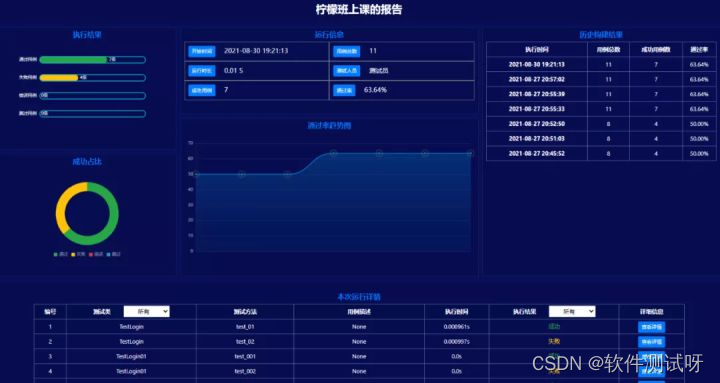
About HTML The format of report generation will be introduced here , Next, let's talk about how to integrate allure The report
Two 、 Integrate Allure The report
If you want to in pytest In the integration allure The report , You have to download it first allure, And configure the environment
2.1、allure Environment configuration
One 、 download allure:
Address :https://github.com/allure-framework/allure2/releases
Download and unzip
Two 、 Environment variable configuration
take allure After decompression allure The path of bin Put the directory path into the environment variable 
3、 ... and 、 install allure Of pytest plug-in unit
pip install allure-pytest
2.2、 Generate allure The report
Installed and configured allure After the environment , In the use of pytest When executing use cases , You can go through allure Plug-in parameters to specify the generation allure Here we go .
Operation parameters :
--alluredir : Appoint allure The path where the report is saved
Command line run
pytest --alluredir=reports
The code uses pytest.main perform
import pytest
2.3、 start-up allure service
Enter the following command at the command terminal , start-up allure service
# command :allure serve Generated report path
Execute the above command ,allure After the service is started, the browser will be opened automatically , Show allure Service page of 
2.4、allure Built in common methods
Add error screenshot
allure.attach
def error_save_screenshot(driver,file_path, desc):
Add the use case name in the report
allure.title
import allure
Use case names are dynamically set in parameterized use cases
allure.dynamic.title
# Use case data
Add function description in the report
allure.story
@allure.story(' Login function ')
Add the package name in the report
allure.suite
@allure.suite(' Log in to the test suite ')
The house needs to be built layer by layer , Knowledge needs to be learned at one point one . We should lay a good foundation in the process of learning , More hands-on practice , Don't talk much , The last dry goods here ! I stayed up late to sort out the stages ( function 、 Interface 、 automation 、 performance 、 Test open ) Skills learning materials + Practical explanation , Very suitable for studying in private , It's much more efficient than self-study , Share with you .
Get off w/x/g/z/h: Software testing tips dao
Typing is not easy , If this article is helpful to you , Click a like, collect a hide and pay attention , Give the author an encouragement . It's also convenient for you to find it quickly next time .
边栏推荐
- Go from starting to Real - Interface (note)
- Bean paste green protects your eyes
- Example of using gbase 8A OLAP function group by grouping sets
- [LeetCode]动态规划解分割数组I[Red Fox]
- 真香,自从用了Charles,Fiddler已经被我彻底卸载了
- AQS SOS AQS with me
- Go from introduction to practice -- shared memory concurrency mechanism (notes)
- 如何做好功能测试?你确定不想知道吗?
- BAT测试专家对web测试和APP测试的总结
- STM32F107+LAN8720A使用STM32cubeMX配置网络连接+tcp主从机+UDP app
猜你喜欢
Go from introduction to actual combat - context and task cancellation (notes)

"Apprendre cette image" apparaît sur le Bureau win11 comment supprimer
![[leetcode] dynamic programming solution split integer i[silver fox]](/img/18/8dc8159037ec1262444db8899cde0c.png)
[leetcode] dynamic programming solution split integer i[silver fox]

美团20k软件测试工程师的经验分享

List of language weaknesses --cwe, a website worth learning

熊市慢慢,Bit.Store提供稳定Staking产品助你穿越牛熊
Go from introduction to practice -- coordination mechanism (note)

Burp suite遇到的常见问题
语言弱点列表--CWE,一个值得学习的网站
![[MySQL] database function clearance Tutorial Part 2 (window function topic)](/img/03/2b37e63d0d482d5020b7421ac974cb.jpg)
[MySQL] database function clearance Tutorial Part 2 (window function topic)
随机推荐
Gbase 8A OLAP analysis function cume_ Example of dist
Magic POI error in reading excel template file
Xiao Wang's interview training task
excel读取文件内容方法
At 19:00 on Tuesday evening, the 8th live broadcast of battle code Pioneer - how to participate in openharmony's open source contribution in multiple directions
GBase 8a V8版本节点替换期间通过并发数控制资源使用减少对系统影响的方法
Process control task
GBase 8a OLAP分析函数 cume_dist的使用样例
Array assignment
Quick excel export
Gbase 8A method for reducing the impact on the system by controlling resource usage through concurrency during node replacement of V8 version
豆沙绿保护你的双眼
[leetcode] dynamic programming solution split integer i[silver fox]
Go from introduction to actual combat - all tasks completed (notes)
GBase 8a数据库用户密码安全相关参数汇总
GBase 8a OLAP分析函数cume_dist的使用样例
Stm32f107+lan8720a use stm32subemx to configure network connection +tcp master-slave +udp app
管理系统-ITclub(中)
[sword offer ii] sword finger offer II 029 Sorted circular linked list
matlab查找某一行或者某一列在矩阵中的位置