当前位置:网站首页>EasyUI drop-down box, add and put on and off shelves of products
EasyUI drop-down box, add and put on and off shelves of products
2022-07-25 17:01:00 【Sooner or later, I will go bald】
One 、 A drop-down box
1. Write the value to be displayed in the drop-down box to the entity class
package com.mjx.entity;

public class Category {

	private long id;
	private String name;

	public long getId() {

		return id;
	}

	public void setId(long id) {

		this.id = id;
	}

	public String getName() {

		return name;
	}

	public void setName(String name) {

		this.name = name;
	}

	@Override
	public String toString() {

		return "Category [id=" + id + ", name=" + name + "]";
	}

}
2.dao Method to query
public List<Category> list(Category category, PageBean pageBean) throws Exception {

        String sql = "select * from t_easyui_category";
        long id = category.getId();
        if (id != 0) {

            sql += "and id=" + id;

        }
        return super.executeQuery(sql, Category.class, pageBean);
    }
3.action Call in the sub controller
public String combobox(HttpServletRequest req, HttpServletResponse resp) {

        try {

            List<Category> list = categoryDao.list(category, null);
            ResponseUtil.writeJson(resp, list);
        } catch (Exception e) {

            e.printStackTrace();
        }
        return null;
    }
4. To configure mvc file
<action path="/category" type="com.mjx.web.CategoryAction">
    </action>
5. Add a drop-down box component to the form
 <input id="cid" name="cid" value="" label=" Category " >

 $(function () {

        $('#cid').combobox({

            url:'${pageContext.request.contextPath}/category.action?methodName=list',
            valueField:'id',
            textField:'name'
        });


    });

Two 、 add to
1. Add form
 <form id="ff" action="" method="post">
        <div style="margin-bottom:20px">
            <input class="easyui-textbox" name="name" style="width:100%" data-options="label:' Title :',required:true">
        </div>
        <div style="margin-bottom:20px">
            <input id="cid" name="cid" value="" label=" Category " >
            <%--<select class="easyui-combobox" name="cid" label=" Category " style="width:100%">--%>
                <%--<option value="1"> literature </option>--%>
                <%--<option value="2"> A novel </option>--%>
                <%--<option value="3"> youth </option>--%>
            <%--</select>--%>
        </div>
        <div style="margin-bottom:20px">
            <input class="easyui-textbox" name="author" style="width:100%" data-options="label:' author :',required:true">
        </div>
        <div style="margin-bottom:20px">
            <input class="easyui-textbox" name="price" style="width:100%"
                   data-options="label:' Price :',required:true">
        </div>
        <div style="margin-bottom:20px">
            <input class="easyui-textbox" name="publishing" style="width:100%"
                   data-options="label:' Press. :',required:true">
        </div>
        <div style="margin-bottom:20px">
            <input class="easyui-textbox" name="description" style="width:100%;height:60px"
                   data-options="label:' brief introduction :',required:true">
        </div>
        <%-- Default not on shelves --%>
        <input type="hidden" name="state" value="1">
        <%-- The default starting sales volume is 0--%>
        <input type="hidden" name="sales" value="0">
    </form>
2. Add a click event to the form
<div style="text-align:center;padding:5px 0">
        <a href="javascript:void(0)" class="easyui-linkbutton" οnclick="submitForm()" style="width:80px">Submit</a>
        <a href="javascript:void(0)" class="easyui-linkbutton" οnclick="clearForm()" style="width:80px">Clear</a>
    </div>
3. Submit forms and empty
// Submit the form of editing information
function submitForm() {

	$('#ff').form('submit', {

		success : function(param) {

			$('#dd').dialog('close');
			$('#dg').datagrid('reload');
			$('#ff').form('clear');
		}
	});
}

function clearForm() {

	$('#ff').form('clear');
}
3、 ... and 、 On and off the shelf
1. Book entity class

package com.mjx.entity;

import java.util.Date;

import com.fasterxml.jackson.annotation.JsonFormat;

public class Book {

	private long id;
	private String name;
	private String pinyin;
	private long cid;
	private String author;
	private float price;
	private String image;
	private String publishing;
	private String description;
	private int state;
	@JsonFormat(pattern="yyyy-MM-dd HH-mm-ss",timezone="GMT+8")
	private Date deployTime;
	private int sales;

	public long getId() {

		return id;
	}

	public void setId(long id) {

		this.id = id;
	}

	public String getName() {

		return name;
	}

	public void setName(String name) {

		this.name = name;
	}

	public String getPinyin() {

		return pinyin;
	}

	public void setPinyin(String pinyin) {

		this.pinyin = pinyin;
	}

	public long getCid() {

		return cid;
	}

	public void setCid(long cid) {

		this.cid = cid;
	}

	public String getAuthor() {

		return author;
	}

	public void setAuthor(String author) {

		this.author = author;
	}

	public float getPrice() {

		return price;
	}

	public void setPrice(float price) {

		this.price = price;
	}

	public String getImage() {

		return image;
	}

	public void setImage(String image) {

		this.image = image;
	}

	public String getPublishing() {

		return publishing;
	}

	public void setPublishing(String publishing) {

		this.publishing = publishing;
	}

	public String getDescription() {

		return description;
	}

	public void setDescription(String description) {

		this.description = description;
	}

	public int getState() {

		return state;
	}

	public void setState(int state) {

		this.state = state;
	}

	public Date getDeployTime() {

		return deployTime;
	}

	public void setDeployTime(Date deployTime) {

		this.deployTime = deployTime;
	}

	public int getSales() {

		return sales;
	}

	public void setSales(int sales) {

		this.sales = sales;
	}

	@Override
	public String toString() {

		return "Book [id=" + id + ", name=" + name + ", pinyin=" + pinyin + ", cid=" + cid + ", author=" + author
				+ ", price=" + price + ", image=" + image + ", publishing=" + publishing + ", description="
				+ description + ", state=" + state + ", deployTime=" + deployTime + ", sales=" + sales + "]";
	}

}
2. Of books dao Methods add, modify and check
public List<Book> list(Book book, PageBean pageBean) throws Exception {

		String sql = "select * from t_eastui_book where 1=1";
		String name = book.getName();
		int state = book.getState();
		if (StringUtils.isNotBlank(name)) {

			sql += "and name like '%" + name + "%'";
		}
		if (state != 0) {

			sql += "and state ="+state;
		}
		return super.executeQuery(sql, Book.class, pageBean);
	}

	public void edit(Book t) throws Exception {

		// TODO Auto-generated method stub
		super.executeUpdate("update t_easyui_book set name=?,pinyin=?,cid=?,image=?,state=?,sales=? where id=?", t,
				new String[] {
     "name", "pinyin", "cid", "image", "state", "sales", "id" });
	}

	public void add(Book t) throws Exception {

		t.setPinyin(PinYinUtil.getAllPingYin(t.getName()));
		super.executeUpdate(
				"insert into t_easyui_book(name,pinyin,cid,author,price,image,publishing,description,state,deployTime,sales) values(?,?,?,?,?,?,?,?,?,?,?)",
				t, new String[] {
     "name", "pinyin", "cid", "author", "price", "image", "publishing", "description",
						"state", "deployTime", "sales" });
	}
3. Of books action
package com.mjx.web;

import java.util.List;

import javax.servlet.http.HttpServletRequest;
import javax.servlet.http.HttpServletResponse;

import com.mjx.dao.BookDao;
import com.mjx.entity.Book;
import com.zking.framework.ActionSupport;
import com.zking.framework.ModelDriver;
import com.zking.util.PageBean;
import com.zking.util.R;
import com.zking.util.ResponseUtil;

public class BookAction extends ActionSupport implements ModelDriver<Book> {

	private Book book = new Book();
	private BookDao bookDao = new BookDao();

	@Override
	public Book getModel() {

		// TODO Auto-generated method stub
		return book;
	}

	public void list(HttpServletRequest req, HttpServletResponse resp) {

		PageBean pageBean = new PageBean();
		pageBean.setRequest(req);
		try {

			List<Book> list = bookDao.list(book, pageBean);
			ResponseUtil.writeJson(resp, new R().data("total", pageBean.getTotal()).data("rows", list));
		} catch (Exception e) {

			e.printStackTrace();
		}
	}

	public void add(HttpServletRequest req, HttpServletResponse resp) {

		try {

			bookDao.add(book);
			ResponseUtil.writeJson(resp, 0);
		} catch (Exception e) {

			e.printStackTrace();
		}
	}
/** *  If put on the shelf , The status of the book is changed to 2 *  If you get off the shelf , The status of the book is changed to 3 * @param req * @param resp */
	public void upDown(HttpServletRequest req, HttpServletResponse resp) {

		try {

			bookDao.edit(book);
			ResponseUtil.writeJson(resp, 1);
		} catch (Exception e) {

			e.printStackTrace();
			try {

				ResponseUtil.writeJson(resp, 1);
			} catch (Exception e1) {

				e.printStackTrace();
			}
		}
	}

	public void editStatus(HttpServletRequest req, HttpServletResponse resp) {

		try {

			bookDao.editStatus(book);
			ResponseUtil.writeJson(resp, 1);
		} catch (Exception e) {

			e.printStackTrace();
			try {

				ResponseUtil.writeJson(resp, 1);
			} catch (Exception e1) {

				e.printStackTrace();
			}
		}
	}
}
4. To configure mvc file
<action path="/book" type="com.mjx.web.BookAction">
    </action>
5. On the shelf js Code
function shangjia() {

		$.messager
				.confirm(
						' confirm ',
						' Are you sure you want to put this book on the shelf ?',
						function(r) {

							if (r) {

								var row = $('#dg').datagrid('getSelected');
								if (row) {

									$
											.ajax({

												url : '${pageContext.request.contextPath}/book.action?methodName=editStatus&state=2&id='
														+ row.id,
												success : function(data) {


												}
											})
								}
							}
						});

	}
6. Off shelf js Code
function xiajia() {

        $.messager.confirm(' confirm ',' Are you sure you want to take this book off the shelf ?',function(r){

            if (r){

                var row = $('#dg').datagrid('getSelected');
                if (row){

                    $.ajax({

                        url:'${pageContext.request.contextPath}/book.action?methodName=shangjia&state=3&id=' + row.id,
                        success:function (data) {


                        }
                    })
                }
            }
        });

    }
Be careful : Book status (1 Not on the shelves 2 It's on the shelf 3 It's off the shelf The default value is 1)
effect :
Added a new book 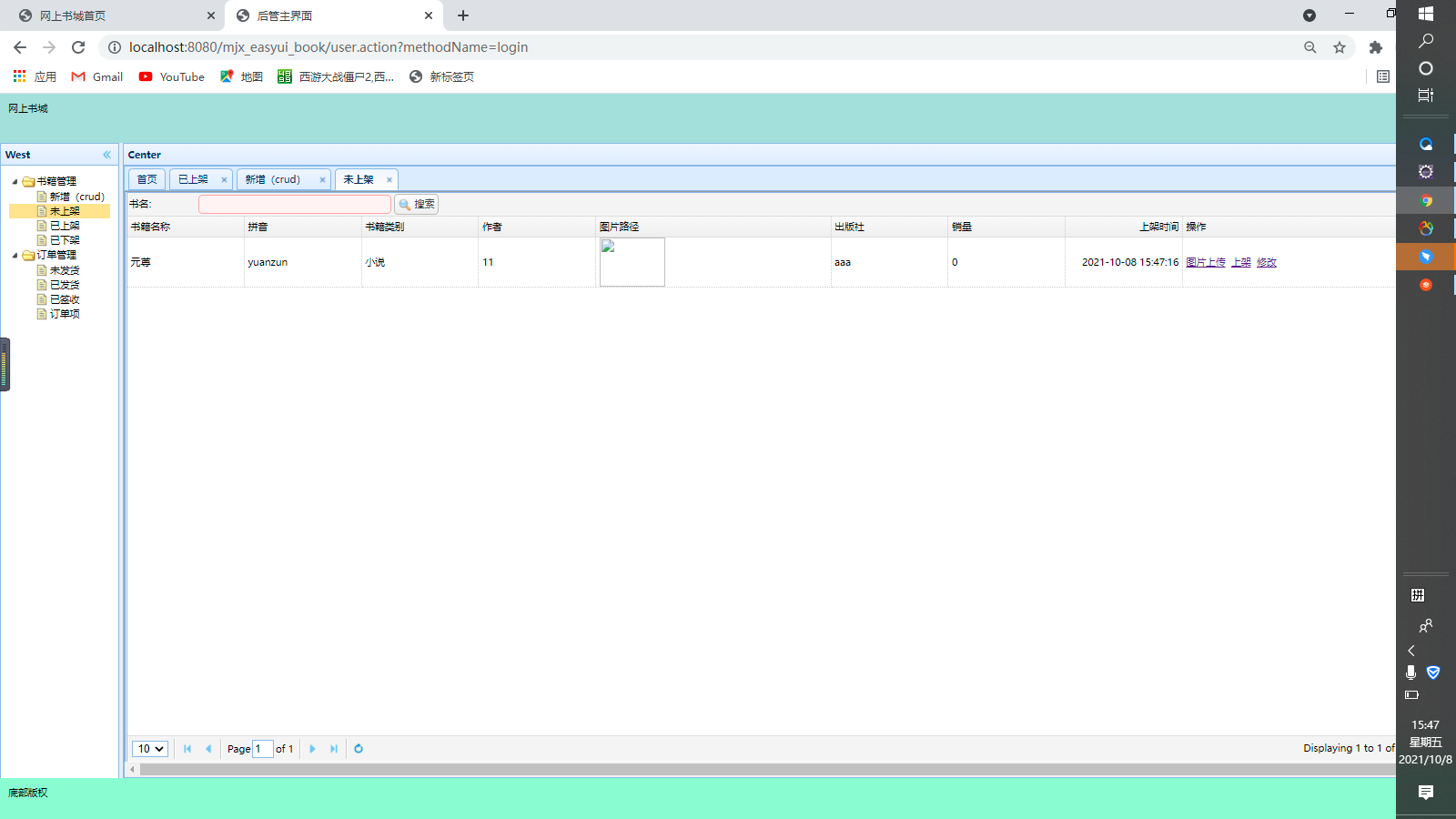
shelves 
Off the shelf 
边栏推荐
猜你喜欢

基于redis6.2.4的redis cluster部署

Outlook 教程,如何在 Outlook 中搜索日历项?

easyui修改以及datagrid dialog form控件使用

第三章、数据类型和变量

【小5聊】公众号排查<该公众号提供的服务出现故障,请稍后>

中国芯片自给率大幅提升,导致外国芯片库存高企而损失惨重,美国芯片可谓捧起石头砸自己的脚...

EasyUI DataGrid control uses

Replicate swin on Huawei ascend910_ transformer

【目标检测】TPH-YOLOv5:基于transformer的改进yolov5的无人机目标检测

7.依赖注入
随机推荐
Automatic reply of wechat official account development message
2022 latest Beijing Construction welder (construction special operation) simulation question bank and answer analysis
【读书会第13期】+FFmpeg视频采集功能
MySQL之联表查询、常用函数、聚合函数
Ilssi certification | the course of Six Sigma DMAIC
第五章:流程控制
聊聊如何用 Redis 实现分布式锁?
Chain game development ready-made version chain game system development detailed principle chain game source code delivery
Rosen's QT journey 100 QML four standard dialog boxes (color, font, file, promotion)
【目标检测】YOLOv5跑通VOC2007数据集(修复版)
[target detection] tph-yolov5: UAV target detection based on Transformer's improved yolov5
China's chip self-sufficiency rate has increased significantly, resulting in high foreign chip inventories and heavy losses. American chips can be said to have thrown themselves in the foot
[target detection] yolov5 Runtong visdrone data set
Fudan University emba2022 graduation season - graduation does not forget the original intention and glory to embark on the journey again
From digitalization to intelligent operation and maintenance: what are the values and challenges?
SAP Fiori 的附件处理(Attachment handling)
免费的低代码开发平台有哪些?
Talk about how to use redis to realize distributed locks?
第四章:操作符
How to delete Microsoft Pinyin input method in win10