当前位置:网站首页>Solve the problem that the win10 account has no administrator rights
Solve the problem that the win10 account has no administrator rights
2022-07-25 19:16:00 【I'm not Xiao Haiwa~~~~】
For some reason , The current user account does not have administrator privileges or the only administrator account is disabled , As a result, the program cannot be run as an administrator , Or prompt the administrator user name or password when running the program , But there is no input window . In such cases , You need to enter the security mode to reset the user account permissions , The specific operation is as follows :
1. Press at the same time win key +R key , Input cmd enter .

2. Enter... In the command prompt window :net localgroup Administrators And return , Confirm that there is only one member Administrator Account , Before subsequent operations .
3. Click start in the system - Power Supply , Hold down shift Key and then click restart , After the computer restarts, select an option page and click troubleshoot - Advanced options - Startup settings - restart 
4. On the startup settings page , Press the specified key to enter safe mode ( It's usually 4).
5. After entering safe mode , Click Start - Account , You can see Administrator Account name , Click and login .
6. After logging in, press Win key +R key entry netplwiz And return .
7. Enter the user control page , Find your account under the local user and click properties .
8. Switch to the group members page , And click administrator , Apply and confirm , Click OK again after returning to the user account page .
9. Restart the computer , At the beginning - Set up - Under the account, you can see that the local account has restored administrator privileges .
Win10/Win11 Get administrator permission under the system
There is often a situation : I'm the Administrator , But when it is opened, it still shows that it is not administrator permission
1. Get administrator privileges
Many computers have actually completed this step , If you set up discovery is complete , Skip directly to the second part
Right click here to manage 


How to check whether you are already an administrator
Click Start , Open the control panel 


2. Get true · Administrator rights
Win+R Open the run window , Input gpedit.msc, enter .


Find all administrators running in administrator approved mode , And forbid 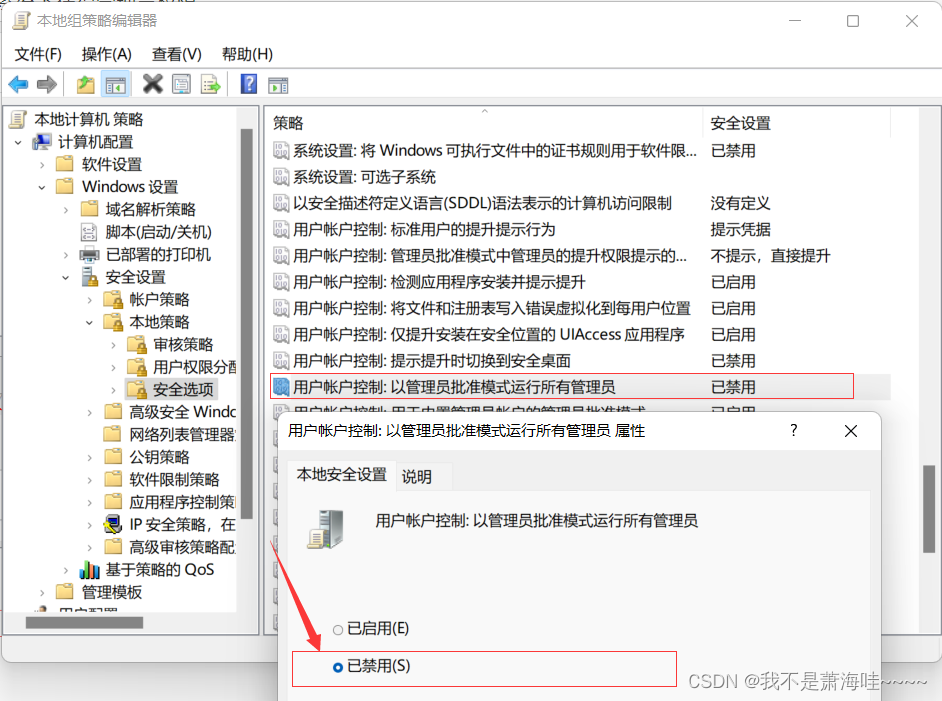
After prohibition, restart the computer to take effect
Why ban it ? Because your users are even Administrators , You also need to ask the most senior administrator every time .( Is this still called an administrator ? I just want to do whatever I want )
Win10 The solution of system administrator without permission
Open Group Policy Editor , Then turn on : Computer configuration -》windows Set up -》 Security Settings -》 The local policy -》 Security options ;
Find it in the page on the right “ User account control : Administrator approval mode for built-in administrator account ”, You will find that the current mode is “ Has been disabled ”;
open “ User account control ” After page , take “ Has been disabled ” Change the mode to “ Enabled ”;
Source :https://jingyan.baidu.com/article/22a299b508fee2df18376a12.html
边栏推荐
- qt之编译成功但程序无法运行
- JS 基本类型 引用类型 深/浅克隆复制
- PHP等于==和恒等于===的区别
- ThreadLocal Kills 11 consecutive questions
- Dynamic implementation of wechat applet 27 progress bar and static construction of search box and hot search list
- How to ensure the consistency of double write between database and cache?
- 无惧高温暴雨,有孚网络如何保您无忧?
- Alibaba cloud technology expert haochendong: cloud observability - problem discovery and positioning practice
- Korean AI team plagiarizes shock academia! One tutor with 51 students, or plagiarism recidivist
- [Detr for 3D object detection] detr3d: 3D object detection from multi view images via 3D-to-2D queries
猜你喜欢

Modelsim and quartus jointly simulate PLL FIFO and other IP cores

InTouch advanced alarm (alarm filtering)

Single arm routing experiment demonstration (Huawei router device configuration)

iMeta | Sangerbox: 交互式整合临床生信分析平台

【加密周报】加密市场有所回温?寒冬仍未解冻!盘点上周加密市场发生的重大事件!
解决Win10账户没有了管理员权限

前夕 - 0day威胁情报

Alibaba cloud free SSL certificate application detailed process

Pymoo学习 (6):终止条件

微信小程序 26 播放音乐页的完善②
随机推荐
Wechat campus maintenance and repair applet graduation design finished product (5) assignment of applet completion work
FPGA based 1080p 60Hz bt1120 interface debugging process record
无惧高温暴雨,有孚网络如何保您无忧?
The difference between PHP equal to = = and identity equal to = = =
微信小程序 29 热搜榜的完善②
房企打响“保交战”
Full scale and Xuan of C key
Dynamic implementation of wechat applet 27 progress bar and static construction of search box and hot search list
MES管理系统有什么应用价值
聊聊接口性能优化的11个小技巧
Go code checking tool
Hough transform understanding [easy to understand]
基于FPGA的1080P 60Hz BT1120接口调试过程记录
Baklib: make excellent product instruction manual
Deng Qinglin, a technical expert of Alibaba cloud: Best Practices for disaster recovery and remote multi activity across availability zones on cloud
C 调的满级和玄
【小程序开发】宿主环境详解
MySQL sub query (selected 20 sub query exercises)
Gan, why ".Length! == 3??
【刷题记录】21. 合并两个有序链表