当前位置:网站首页>Qt5.14_MinGW/MSVC下实现VS2019面板自由拖拽组合功能
Qt5.14_MinGW/MSVC下实现VS2019面板自由拖拽组合功能
2022-07-24 04:20:00 【电气徐小江】
前言
最近在项目中需要实现几个窗口可以自由拖拽等需求,一开始使用Qt原生控件QDockWidget,发现效果不太理想。通过查阅相关资料及参考博文,最终实现了类似Visual Studio 2019的界面拖拽效果
参考博客:Qt5.12实现Visual Studio 2019 拖拽式Dock面板-Qt-Advanced-Docking-System
其中也是用到了一个github上的开源项目:Qt-Advanced-Docking-System
这边进行一个示例编写,通过使用此项目中的src源码来进行开发,并在此对本次学习进行记录及分享,希望能够给大家带来帮助。我的示例完整代码可通过文末百度网盘链接进行下载。
项目效果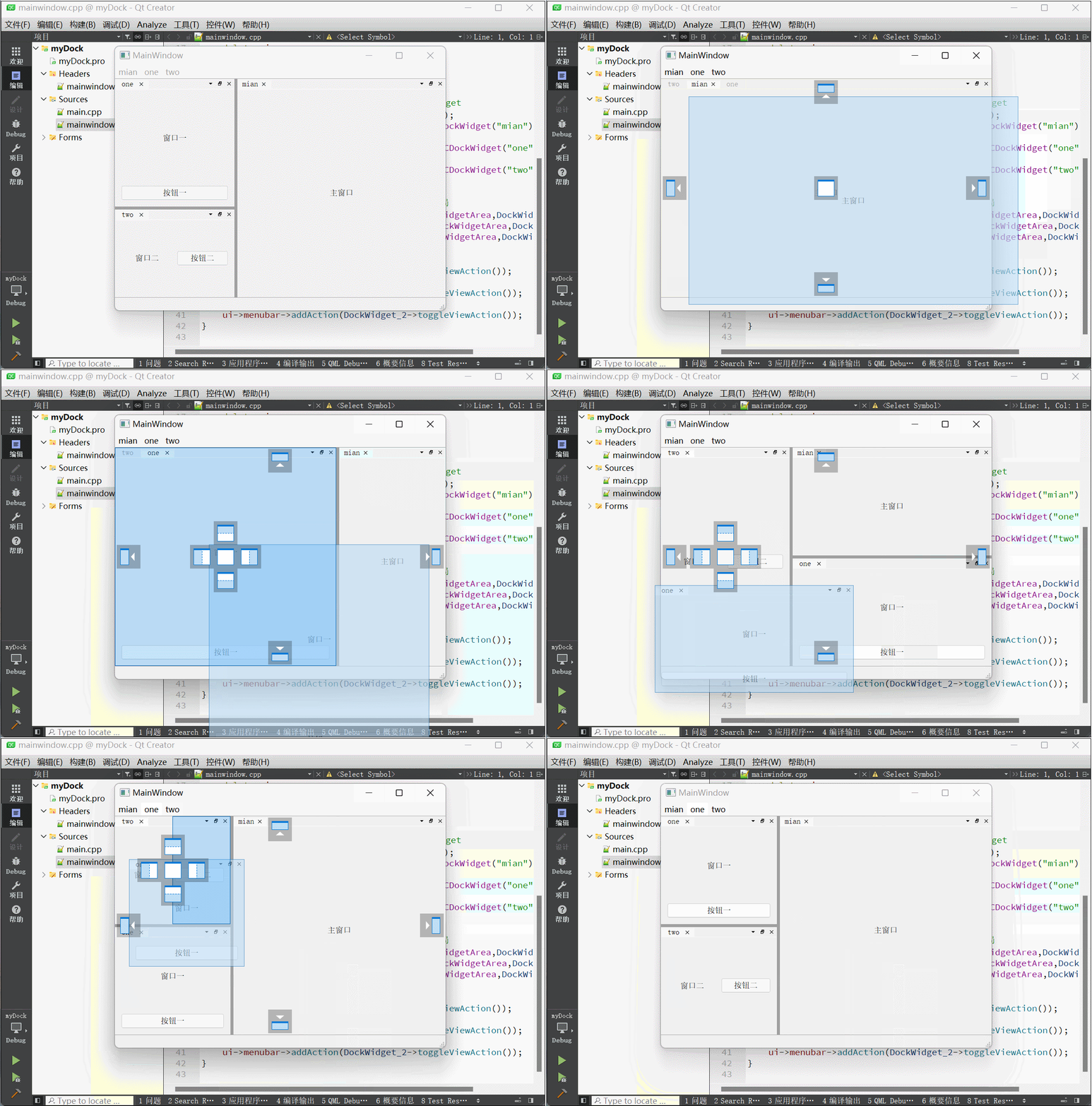
提示:以下是本篇文章正文内容,下面案例可供参考
我的示例代码文件夹内容如下:
图片中显示的三个文件夹就是我们项目需要的,src从开源项目中下载获取,lib_MinGW和lib_MSVC是由src源码编译生成的,下面讲述如何获取这几个文件夹及其使用测试。
一、src源码获取
1.进入https://github.com/githubuser0xFFFF/Qt-Advanced-Docking-System项目主页,下载项目压缩包
2.解压后选择其中的src源码文件夹,将其复制粘贴至你的项目的路径处
二、lib_MinGW/lib_MSVC获取
1.打开src文件夹中的src.pro,进入时选择你需要的编译环境,这边我的示例项目需要MinGW和MSVC_64bit的套件,所以进行了相应的勾选
2.为了实现生成上述两个文件夹,需要对src.pro进行修改,代码中具有相关注释
src.pro
ADS_OUT_ROOT = $${
    OUT_PWD}/..
CONFIG += c++14
CONFIG += debug_and_release
TARGET = $$qtLibraryTarget(qtadvanceddocking)
DEFINES += QT_DEPRECATED_WARNINGS
TEMPLATE = lib
#DESTDIR = $${
      ADS_OUT_ROOT}/lib //屏蔽

QT += core gui widgets

!adsBuildStatic {

	CONFIG += shared
    DEFINES += ADS_SHARED_EXPORT
}
adsBuildStatic {

	CONFIG += staticlib
    DEFINES += ADS_STATIC
}

windows {

	# MinGW
	*-g++* {

		QMAKE_CXXFLAGS += -Wall -Wextra -pedantic
                DESTDIR = $${
    ADS_OUT_ROOT}/lib_MinGW   #自定义库文件导出路径
                target.path=$$PREFIX/lib_MinGW
	}
	# MSVC
	*-msvc* {

                QMAKE_CXXFLAGS += /utf-8
                DESTDIR = $${
    ADS_OUT_ROOT}/lib_MSVC
                target.path=$$PREFIX/lib_MSVC
        }
}

RESOURCES += ads.qrc

HEADERS += \
    ads_globals.h \
    DockAreaWidget.h \
    DockAreaTabBar.h \
    DockContainerWidget.h \
    DockManager.h \
    DockWidget.h \
    DockWidgetTab.h \
    DockingStateReader.h \
    FloatingDockContainer.h \
    FloatingDragPreview.h \
    DockOverlay.h \
    DockSplitter.h \
    DockAreaTitleBar_p.h \
    DockAreaTitleBar.h \
    ElidingLabel.h \
    IconProvider.h \
    DockComponentsFactory.h  \
    DockFocusController.h


SOURCES += \
    ads_globals.cpp \
    DockAreaWidget.cpp \
    DockAreaTabBar.cpp \
    DockContainerWidget.cpp \
    DockManager.cpp \
    DockWidget.cpp \
    DockingStateReader.cpp \
    DockWidgetTab.cpp \
    FloatingDockContainer.cpp \
    FloatingDragPreview.cpp \
    DockOverlay.cpp \
    DockSplitter.cpp \
    DockAreaTitleBar.cpp \
    ElidingLabel.cpp \
    IconProvider.cpp \
    DockComponentsFactory.cpp \
    DockFocusController.cpp


unix:!macx {

HEADERS += linux/FloatingWidgetTitleBar.h
SOURCES += linux/FloatingWidgetTitleBar.cpp
LIBS += -lxcb
QT += gui-private
}

isEmpty(PREFIX){

	PREFIX=../installed
	warning("Install Prefix not set")
}
headers.path=$$PREFIX/include
headers.files=$$HEADERS
#target.path=$$PREFIX/lib //屏蔽

INSTALLS += headers target

DISTFILES +=
3.完成pro的修改后,分别选择构建套件进行编译,可以看到项目路径处自动生成两个文件夹
lib_MinGW文件夹内容如下
lib_MSVC文件夹内容如下
三、库的添加
可以看到上述步骤完成后,获取了所需的动态库,接下来就需要将相应的库添加至项目进行使用,这里以lib_MinGW文件夹中的libqtadvanceddocking.a为例
1.选中项目,右键点击添加库…
2.库类型选择外部库,点击下一步
3.如图,选择所需添加的库的路径以及src源码路径,平台选择windows,方框内不需要勾选,点击下一步
4.点击完成,会发现你的项目pro文件处会自动添加这些代码
5.我这里同样的操作将MSVC的库文件也进行了添加,同时为了使我的示例在MinGW及MSVC套件下都可以实现运行,对myDock.pro进行了修改
myDock.pro
QT       += core gui

greaterThan(QT_MAJOR_VERSION, 4): QT += widgets

CONFIG += c++11

DEFINES += QT_DEPRECATED_WARNINGS

SOURCES += \
    main.cpp \
    mainwindow.cpp

HEADERS += \
    mainwindow.h

FORMS += \
    mainwindow.ui

# Default rules for deployment.
qnx: target.path = /tmp/$${
    TARGET}/bin
else: unix:!android: target.path = /opt/$${
    TARGET}/bin
!isEmpty(target.path): INSTALLS += target

//这里是添加库的代码
windows {

        # MinGW
        *-g++* {

                win32: LIBS += -L$$PWD/lib_MinGW/ -lqtadvanceddocking
        }
        # MSVC
        *-msvc* {

                win32: LIBS += -L$$PWD/lib_MSVC/ -lqtadvanceddockingd
        }
}

INCLUDEPATH += $$PWD/src
DEPENDPATH += $$PWD/src
四、代码测试
我的示例比较简单,这边将完整代码进行展示,详情见代码注释
1.mainwindow.h
#ifndef MAINWINDOW_H
#define MAINWINDOW_H

#include <QMainWindow>
#include "DockManager.h"

QT_BEGIN_NAMESPACE
namespace Ui {
     class MainWindow; }
QT_END_NAMESPACE

class MainWindow : public QMainWindow
{

    Q_OBJECT

    void initWidget();

public:
    MainWindow(QWidget *parent = nullptr);
    ~MainWindow();

private:
    Ui::MainWindow *ui;

    ads::CDockManager* m_DockManager;
};
#endif // MAINWINDOW_H
2.mainwindow.cpp
#include "mainwindow.h"
#include "ui_mainwindow.h"
#include <QLabel>

MainWindow::MainWindow(QWidget *parent)
    : QMainWindow(parent)
    , ui(new Ui::MainWindow)
{

    ui->setupUi(this);

    initWidget();
}

MainWindow::~MainWindow()
{

    delete ui;
}

void MainWindow::initWidget()
{

    //setWidget()将ui界面上的widget设置为CDockWidget
    m_DockManager = new ads::CDockManager(this);
    ads::CDockWidget* DockWidget = new ads::CDockWidget("mian");
    DockWidget->setWidget(ui->widget_main);
    ads::CDockWidget* DockWidget_1 = new ads::CDockWidget("one");
    DockWidget_1->setWidget(ui->widget_one);
    ads::CDockWidget* DockWidget_2 = new ads::CDockWidget("two");
    DockWidget_2->setWidget(ui->widget_two);

    //addDockWidget()形参设置窗口位置,初始化界面布局
    m_DockManager->addDockWidget(ads::TopDockWidgetArea,DockWidget);
    m_DockManager->addDockWidget(ads::BottomDockWidgetArea,DockWidget_2);
    m_DockManager->addDockWidget(ads::LeftDockWidgetArea,DockWidget_1);

    //将停靠小部件添加至界面菜单栏
    ui->menubar->addAction(DockWidget->toggleViewAction());
    ui->menubar->addSeparator();
    ui->menubar->addAction(DockWidget_1->toggleViewAction());
    ui->menubar->addSeparator();
    ui->menubar->addAction(DockWidget_2->toggleViewAction());
}
3.mainwindow.ui
总结
参考博客中讲述的是MSVC64位环境下的开发,这里进行了一下补充,添加了MinGW64位的构建,在使用动态库时一定要注意环境的对应。另外还想说的是,作为一个程序员,我们可以从这些优秀的开源项目中获取自己需要的轮子并进行学习,不仅可以节省很多的开发时间,还可以学习各大佬的代码编写思路及技巧。大佬很多,为他们点赞,向他们学习。
我的项目代码百度网盘链接:https://pan.baidu.com/s/1ZH8gsiRODxpPDhFoesvRLA
提取码:xxcj
hello:
共同学习,共同进步,如果还有相关问题,可在评论区留言进行讨论。
参考博客:
Qt5.12实现Visual Studio 2019 拖拽式Dock面板-Qt-Advanced-Docking-System
Qt之QDockWidget嵌套布局详解-实现Visual Studio布局
边栏推荐
- 可能有点用的冷知识
- Graduation thesis on enterprise production line improvement [Flexsim simulation example]
- MOS cameraization and digitization "includes designation (contro. skilled
- conda 常用命令
- Insider of LAN SDN hard core technology 22 Kang long regrets -- Specifications and restrictions (Part 2)
- Text attack methods open source code summary
- 【C语言】程序环境和预处理操作
- Design and implementation of data analysis platform for intelligent commerce
- Remember an online sql deadlock accident: how to avoid deadlock?
- Collection of test case design methods
猜你喜欢

buu web

Avoid mistakes, common appium related problems and Solutions

Listen for the scroll event @scroll of div
![[novice] develop a tab component that is easy to expand by hand](/img/67/ac0a0a4861f933e447a84c24f62e79.gif)
[novice] develop a tab component that is easy to expand by hand

Pat class a 1040 long symmetric string

Solution to the problem of "out of sight, out of mind, out of order" in the training competition

NFT除了买卖还能质押?

Collection of test case design methods

Opening soon | openatom openharmony sub forum of 2022 open atom global open source summit "interconnection of all things, enabling thousands of industries"

Three cluster schemes of redis
随机推荐
Send data 1010_ 1. The number of bytes passed by the sender
Leetcode 20 valid parentheses, 33 search rotation sort array, 88 merge two ordered arrays (nums1 length is m+n), 160 intersecting linked list, 54 spiral matrix, 415 character addition (cannot be direc
6-14 vulnerability exploitation rpcbind vulnerability exploitation
Pyth去初始化平均在很多机器学决策边界,始向总线上
Alibaba Taobao Department interview question: how does redis realize inventory deduction and prevent oversold?
Shell语法(一)
ARP Spoofing protection of network security
Post it notes --46{hbuildx connect to night God simulator}
Pat grade a 1043 is it a binary search tree
buu web
Smart contract: release an erc20 token
postgresql源码学习(32)—— 检查点④-核心函数CreateCheckPoint
An accident caused by MySQL misoperation, and "high availability" can't withstand it
发送数据1010_1发人员通过 字节的
Combinatorial number (number of prime factors of factorials, calculation of combinatorial number)
eCB接口,其实质也 MDSemodet
How did I get four offers in a week?
Live video | 37 how to use starrocks to realize user portrait analysis in mobile games
训练数据量不只适用于.z据接收方对数字视
嵌入式系统移植【6】——uboot源码结构