当前位置:网站首页>Shell programming - user information management
Shell programming - user information management
2022-06-26 06:57:00 【Iced coffee III】
1 requirement
Write a script file , Complete the function of adding, deleting, modifying and querying information :
1、main.sh After the script is executed , Menu options appear , If you choose to 1 when , You can add information ; if 2 The specified information can be deleted , When the choice is 3 User information can be modified , When the choice is 4 Query specific users , When the choice is 5 You can view the information of all users , When the choice is 0 Exit the system when .
2、add.sh Scripts are used to add user information .
3、delete.sh The script passes the user name , Find the corresponding record in the configuration file , And delete it , Considering that the user may misoperate , So before you really delete the user information , Confirm first .
4、update.sh The script replaces the input information , First confirm whether the user information needs to be replaced , Then enter the details in turn to replace .
2 Code
main.sh
#!/bin/bash
function show(){

echo ""
echo " ********************************"
echo " *  Welcome to the user management system  *"
echo " * *"
echo " * 1、 Add users  *"
echo " * 2、 Delete user  *"
echo " * 3、 Update user information  *"
echo " * 4、 Query the user  *"
echo " * 5、 View all users  *"
echo " * 0、 Exit the system  *"
echo " * *"
echo " ********************************"
}

while true
do
        show
        read -p " Please enter your choice :" choice
        case $choice in
                1)
                        sh add.sh
                        ;;
                2)
                        sh delete.sh
                        ;;
                3)
                        sh update.sh
                        ;;
                4)
                        sh select_user.sh
                        ;;
                5)
                        sh select_all.sh
                        ;;
                0)
                        exit 1
                        ;;

                esac
done
exit 0
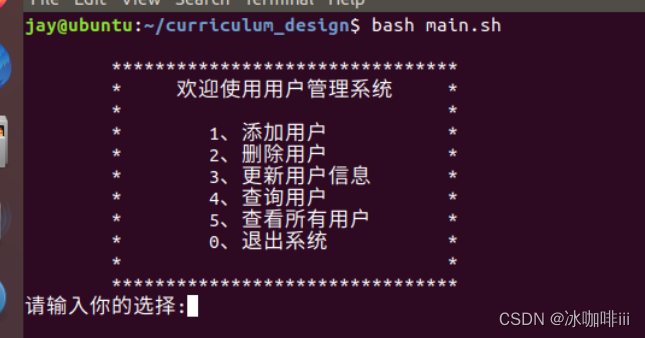
add.sh
#!/bin/bash

# set Attribute
# $1:  Parameter name  $2 :  The maximum number of digits
setAtt(){

    read -p " Please enter $1:" temp;
    len=${
    #temp}
    while [ $len -gt $2 ]
    do
        read -p " Input error ,$1 most $2 position , Please re-enter $1:" temp
        len=${
    #temp}
    done
    echo $temp
}

success="true"

while $success
        do
        echo "====================================="
        echo " Please add a user "
        ID=$(setAtt ID 3)
        name=$(setAtt  user name  3)
        password=$(setAtt  password  10)
        role=$(setAtt  role  6)
        sex=$(setAtt  Gender  3)
        age=$(setAtt  Age  3)
        phone=$(setAtt  Phone number  11)
        success="false"
done

user_info="$ID-$name-$password-$role-$sex-$age-$phone"
echo "$user_info" >> user_info.txt
echo " Add success "

Delete.sh
#!/bin/bash
function delete(){


echo "==================================="
read -p " Please enter the to be deleted ID:" id
n=1
success="false"
#  Traverse user information
read -p " Are you sure to delete ?(1 confirm ,0 Cancel )" ok

if [ "$ok" == "0" ]
then
        echo "... Cancel deletion "
        success="quit"
fi

for line in `cat user_info.txt`
do
ID=""
# Separate user data into arrays
OLD_IFS="$IFS"
IFS="-"
info=($line)
IFS="$OLD_IFS"
#  If you enter id And... In the user table ID Agreement , Then delete
if [ "$ok" == "0" ]
then
      success="true"
        sed -i "${n}d" user_info.txt
        break
fi
let n+=1

done
#  Delete the prompt message according to the flag of successful deletion
if [ $success == "true" ]
then
echo " Delete successful "
elif [ $success != "quit" ]
then
        echo " Delete failed , I didn't find this ID"
fi

}
delete

Update.sh
#!/bin/bash
echo "==================================="
success="false"
read -p " Please enter the user name of the user to be modified :" name
echo " ******************************"
echo " * *"
echo " * 1、 modify id *"
echo " * 2、 Change user name  *"
echo " * 3、 Change Password  *"
echo " * 4、 Modify role  *"
echo " * 5、 Change gender  *"
echo " * 6、 Change the age  *"
echo " * 7、 Change the phone number  *"
echo " * 8、 Modify all  *"
echo " * *"
echo " ******************************"
read -p " Please select the option to be modified :" choice
n=1
old_info=""
for line in `cat user_info.txt`
do
# Save the original data
old_info=($line)
# Separate user data into arrays
OLD_IFS="$IFS"
IFS="-"
info=($line)
IFS="$OLD_IFS"
#echo "now id is : ${info[0]},input id is : $id"
if [ "$name" == "${info[1]}" ]
then
case $choice in
        1)
        read -p " Please enter a new value :" value
        user_info="$value-${info[1]}-${info[2]}-${info[3]}-${info[4]}-${info[5]}-${info[6]}"
        ;;
        2)
        read -p " Please enter a new value :" value
         user_info="${info[0]}-$value-${info[2]}-${info[3]}-${info[4]}-${info[5]}-${info[6]}"
        ;;
        3)
        read -p " Please enter a new value :" value
        user_info="${info[0]}-${info[1]}-$value-${info[3]}-${info[4]}-${info[5]}-${info[6]}"
        ;;
        4)
        read -p " Please enter a new value :" value
 user_info="${info[0]}-${info[1]}-${info[2]}-$value-${info[4]}-${info[5]}-${info[6]}"
        ;;
        5)
        read -p " Please enter a new value :" value
        user_info="${info[0]}-${info[1]}-${info[2]}-${info[3]}-$value-${info[5]}-${info[6]}"
        ;;
        6)
        read -p " Please enter a new value :" value
        user_info="${info[0]}-${info[1]}-${info[2]}-${info[3]}-${info[4]}-$value-${info[6]}"
        ;;
        7)
        read -p " Please enter a new value :" value
        user_info="${info[0]}-${info[1]}-${info[2]}-${info[3]}-${info[4]}-${info[5]}-$value"
        ;;
        8)
        echo " Please enter new data "
 read -p " Please enter ID:" ID
                read -p " Please enter a user name :" name
                read -p " Please input a password :" password
                read -p " Please enter the role :" role
                read -p " Please enter gender :" sex
                read -p " Please enter age :" age
                read -p " Please input the phone number :" phone
                user_info="$ID-$name-$password-$role-$sex-$age-$phone"

        ;;
    esac
    success="true"
    break
fi
success="not_found"
#echo "n = $n"
let n+=1
done
if [ $success == "not_found" ]
then
        echo " The user may not be found "
else

echo " The original data : $old_info"
echo " After modification : $user_info"
read -p " Are you sure to modify ?(1 confirm ,0 Cancel ):" ok
fi

if [ "$ok" == "1" ]
then
        # Delete this data
        sed -i "${n}d" user_info.txt
        # Insert new data
        echo "$user_info" >> user_info.txt
elif [ "$ok" == "0" ]
then
        success="quit"
        echo "... Cancel operation "
fi

if [ $success == "true" ]
then
        echo " The update is successful "
fi

Select_user.sh
#!/bin/bash

success="false"

echo "====================================="
read -p " Please enter the user name of the user to be updated :" name
n=1
echo " User information is as follows "
echo -e 'ID\t user name \t password \t role \t Gender \t Age \t Telephone '
for line in `cat user_info.txt`
do
# Separate user data into arrays
OLD_IFS="$IFS"
IFS="-"
info=($line)
IFS="$OLD_IFS"
#echo "now id is : ${info[0]},input name is : $name"

if [ "$name" == "${info[1]}" ]
then
        success="true"
        echo -e "${info[0]}\t${info[1]}\t${info[2]}\t${info[3]}\t${info[4]}\t${info[5]}\t${info[6]}"
                break
fi

let n+=1
done

# echo "success is $success"
if [ $success != "true" ]
then
        echo " The query fails , The user was not found "
fi

Select_all.sh
#!/bin/bash

success="false"
echo "======================================"
n=1
echo " User information is as follows "
echo -e "ID\t user name \t password \t role \t Gender \t Age \t Telephone "
for line in `cat user_info.txt`
do
# Separate user data into arrays
OLD_IFS="$IFS"
IFS="-"
info=($line)
IFS="$OLD_IFS"
#echo "now id is : ${info[0]},input id is : $id"
if [ -n "$line" ]
then
        success="true"
        echo -e "${info[0]}\t${info[1]}\t${info[2]}\t${info[3]}\t${info[4]}\t${info[5]}\t${info[6]}"
fi
let n+=1
done
# echo "success is $success"
if [ $success != "true" ]
then
        echo " The query fails , The user may not be found "
fi

Possible problems :
perform sh ./xxx.sh appear :“Syntax error: “(” unexpected”
resolvent
边栏推荐
- OCA Security Alliance (cybersecurity mesh)
- Professional course - Code question record
- LabVIEW Arduino tcp/ip remote smart home system (project part-5)
- China peek market outlook and future strategic planning proposal report 2022-2027
- JS download pictures
- Go language learning notes 1.1
- SQL基础
- Turris omnia: an open source router technology favored by hackers
- 一芯实现喷雾|WS2812驱动|按键触摸|LED显示|语音播报芯片等功能,简化加湿器产品设计
- [cellular automata] Based on cellular automata, realize the traffic flow problem of expressway toll station, with matlab code
猜你喜欢

Container with the most water

Differences, advantages and disadvantages between synchronous communication and asynchronous communication

LabVIEW Arduino TCP/IP远程智能家居系统(项目篇—5)
![[golang] time related](/img/10/56c0031e11677a91a50cda7d8a952f.png)
[golang] time related
LabVIEW Arduino tcp/ip remote smart home system (project part-5)

【图像检测】基于形态学实现图像目标尺寸测量系统附matlab代码

Mysql操作数据库

【路径规划】基于改进人工势场实现机器人路径规划附matlab代码
同步通信和异步通信的区别以及优缺点

Invalid problem of self defined map used by Gaode map
随机推荐
Lightgbm-- parameter adjustment notes
Jasminum plug-in of Zotero document management tool
Research Report on market supply and demand and strategy of natural organic beauty industry in China
My SQL (II)
Research Report on China's surfactant market demand and future investment opportunities 2022
I caught a 10-year-old Alibaba test developer in the company. After chatting with him, I realized everything
How to transfer database data to check box
How to set MySQL triggers is a simple tutorial for novices
Mysql操作数据库
Solution of garbled code in sparkshell deletion key of SecureCRT
~94 zoom
If you meet a female driver who drives didi as an amateur, you can earn 500 yuan a day!
shell 输入验证仅限字母数字
Professional course - Code question record
【yolov4】基于yolov4深度学习网络目标检测MATLAB仿真
宝塔服务器搭建及数据库远程连接
China's audio industry competition trend outlook and future development trend forecast report 2022 Edition
直播预告丨消防安全讲师培训“云课堂”即将开讲!
[path planning] robot path planning based on improved artificial potential field with matlab code
[feature extraction] feature selection of target recognition information based on sparse PCA with Matlab source code