当前位置:网站首页>Atlas200dk brush machine
Atlas200dk brush machine
2022-06-26 00:34:00 【Hui e】
Catalog
One 、 Download the packages you need
1.1、 download ubuntu Driver file
2.2、 Create installation users
2.3、 Install the Developer Suite
2.4.1 Check the installation JDK
3、 ... and 、 Business card printing
3.1、 Configuration environment :
3.2、 Start business card printing
4.1、 Access to electricity Atlas
imitation Manual build Atlas 200DK Development and operation environment _ Bili, Bili _bilibili Installation , Here are the notes
One 、 Download the packages you need
You'd better download the things here in the same folder
1.1、 download ubuntu Driver file
Get into 18.04 Driver download , download ubuntu-18.04-server-arm64.iso This one .
1.2、 Developer Suite Download
Get into Shengteng community hardware platform
Change the information to :

1.3、cann Package download
Get into Shengteng community software platform download cann package , Need to find historical version 5.0.2
1.3.1 aarch64
Choose aarch64 download :1、Ascend-cann-nnrt_5.0.2.alpha003_linux-aarch64.run 2、Ascend-cann-toolkit_5.0.2.alpha003_linux-aarch64.run, Click twice to download the software package

1.3.2 x86_64
Choose x86_64, download Ascend-cann-toolkit_5.0.2.alpha003_linux-x86_64.run
1.4、 download mindstudio
Get into Shengteng community mindstudio Find the historical version ,3.0.1, Download the middle linux Systematic

1.5、 other
Bring up a black box , Input
wget https://gitee.com/ascend/tools/raw/master/makesd/generic_script/make_sd_card.py

wget https://gitee.com/ascend/tools/raw/master/makesd/generic_script/make_ubuntu_sd.sh

wget http://gitee.com/ascend/tools/raw/master/configure_usb_ethernet/for_20.1/configure_usb_ethernet.sh

wget https://www.python.org/ftp/python/3.7.5/Python-3.7.5.tgz
Download four scripts
1.6、 Download complete

Two 、 To configure Ubuntu x86
2.1、 install python3.7.5
Enter the following commands on your computer
sudo apt-get install -y gcc g++ make cmake zlib1g zlib1g-dev libbz2-dev libsqlite3-dev libssl-dev libxslt1-dev libffi-dev unzip pciutils net-tools libncursesw5-dev Enter just now 【1.5 other 】 Where to download the package , Unzip the package Python-3.7.5.tgz
tar zxvf Python-3.7.5.tgzConfigure, compile, and install
cd Python-3.7.5/

./configure --prefix=/usr/local/python3.7.5 --enable-loadable-sqlite-extensions --enable-shared

make

sudo make install
Set up soft connections
sudo ln -s /usr/local/python3.7.5/bin/python3 /usr/local/python3.7.5/bin/python3.7.5

sudo ln -s /usr/local/python3.7.5/bin/pip3 /usr/local/python3.7.5/bin/pip3.7.5
Modify environment variables
Get into ~/.bashrc, Add at the end
# Used for setting up python3.7.5 Library file path
export LD_LIBRARY_PATH=/usr/local/python3.7.5/lib:$LD_LIBRARY_PATH
# If the user environment has multiple python3 edition , Then specify to use python3.7.5 edition
export PATH=/usr/local/python3.7.5/bin:$PATH
Then proceed
source ~/.bashrcverification :
python3.7.5 --version
# result :Python 3.7.5
to update pip:
pip install --upgrade pip2.2、 Create installation users
Create user
sudo groupadd HwHiAiUser
sudo useradd -g HwHiAiUser -d /home/HwHiAiUser -m HwHiAiUser -s /bin/bash
Set the password
passwd HwHiAiUser2.3、 Install the Developer Suite
Enter one 、 Installation position of medium package
Grant authority
chmod +x *.runperform
./Ascend-cann-toolkit_5.0.2.alpha003_linux-x86_64.run  --install

./Ascend-cann-toolkit_5.0.2.alpha003_linux-aarch64.run --install

./Ascend-cann-nnrt_5.0.2.alpha003_linux-aarch64.run --install
The following message will pop up when it is successful

We need to remember the last address , At two 、4.2 Will use
2.4、 install MindStudio
2.4.1 Check the installation JDK
Installation dependency (Ubuntu18.04-x86_64)_MindStudio edition : 3.0.1_ User guide _ appendix _ Installation dependency _ Hua Wei Yun Turn to the bottom , Look at the tutorial

2.4.2 function MindStudio
Enter one 、 Installation position of medium package
Unzip and enter bin Catalog
tar zxvf MindStudio_3.0.1_linux.tar.gz

cd MindStudio/bin/
perform
./MindStudio.shHere the probability will be wrong , But it doesn't matter , Directly copy the prompt of error message, and then run .
Here's the validation MindStudio Is the installation successful
a、 Then re run will succeed , eject

spot ok
b、 Here we need to change the address , The address is the first two 、3 Address in , Modified point Finish
c、 tick , confirm

d、 New projects , Then click Ascend App, then next

e、 choice ResNet-50

f、 Success interface :

3、 ... and 、 Business card printing
3.1、 Configuration environment :
In user PC Execute the following commands to install qemu-user-static、binfmt-support、yaml、squashfs-tools
su - rootExecute the following command to update the source :
apt-get updateExecute the following command to install the related python rely on :
pip3 install pyyaml

apt-get install qemu-user-static binfmt-support python3-yaml squashfs-tools gcc-aarch64-linux-gnu g++-aarch64-linux-gnu
3.2、 Start business card printing
Insert microSD card
Get into root
su - rootthen cd Enter one 、 The directory where the files are stored , function
fdisk -lView inserted microSD Card address , Let's say mine is /dev/sda

Then run the business card printing file
python3 make_sd_card.py local /dev/sdaAfter running, you will be prompted Make SD Card successfully!
At this time, you can SD Card pull out
Four 、 Brush machine
4.1、 Access to electricity Atlas
First from x86 Input ifconfig, View interface status
To be made SD Card insertion Atlas, And then use Type-C The line will Atlas and x86 Connect , The final will be Atlas Connect the power supply .
!!!! Be careful !!!!
- Atlas 200 DK After business card printing , The firmware will be upgraded during the first power on , After the upgrade, the system will restart automatically , Restart and install other components .
- For the first time to start Atlas 200 DK The developer board cannot be powered off , So as not to Atlas 200 DK Developer boards cause damage , The power on time shall be the same as the last power off time 2S The above safe time interval .
etc. Atlas All four lights inside are on , We from x86 Input ifconfig See which interface comes out , I have more enp6s0f3u2u1u1
4.2、 Configure the machine IP
Go to the download location in No. 1 , function
bash configure_usb_ethernet.shIt's strange here , As soon as this sentence is executed, the network will be disconnected , We need to configure it Ubuntu Connect the development board with a wired network card , At the same time, use the wireless network card to access the Internet _ Ranranyun's blog -CSDN Blog _ubuntu Connect the development board
4.3、ssh Connect
HwHiAiUser It is a non..., created earlier root user
ssh [email protected]The initial password here is [email protected]
4.4、 Connect MindStudio
Get into MindStudio->Ascend->Device Manager
Point pen , Click the plus sign , The configuration is as follows , The code is still [email protected], click Test Connection, determine

spot ok , Just ok 了
边栏推荐
- no_expand和use_concat
- Redis jump table
- 信号处理函数内必须使用可重入函数
- Cloud rendering and Intel jointly create the "core" era of cloud rendering
- Apache基金会正式宣布Apache InLong成为顶级项目
- Understanding of prototypes and prototype chains
- 【TSP问题】基于Hopfield神经网络求解旅行商问题附Matlab代码
- Ffmpeg version switching
- idea设置mapper映射文件的模板
- 19c installing PSU 19.12
猜你喜欢
![Mysql5.7 is in the configuration file my Ini[mysqld] cannot be started after adding skip grant tables](/img/b2/2b87b3cea1422e2a860f5e0e7dcc40.png)
Mysql5.7 is in the configuration file my Ini[mysqld] cannot be started after adding skip grant tables

Apache基金会正式宣布Apache InLong成为顶级项目
Atlas200dk刷机

Run the test program using rknn-toolkit-lite2 for rk3568 development board

小红书微服务框架及治理等云原生业务架构演进案例
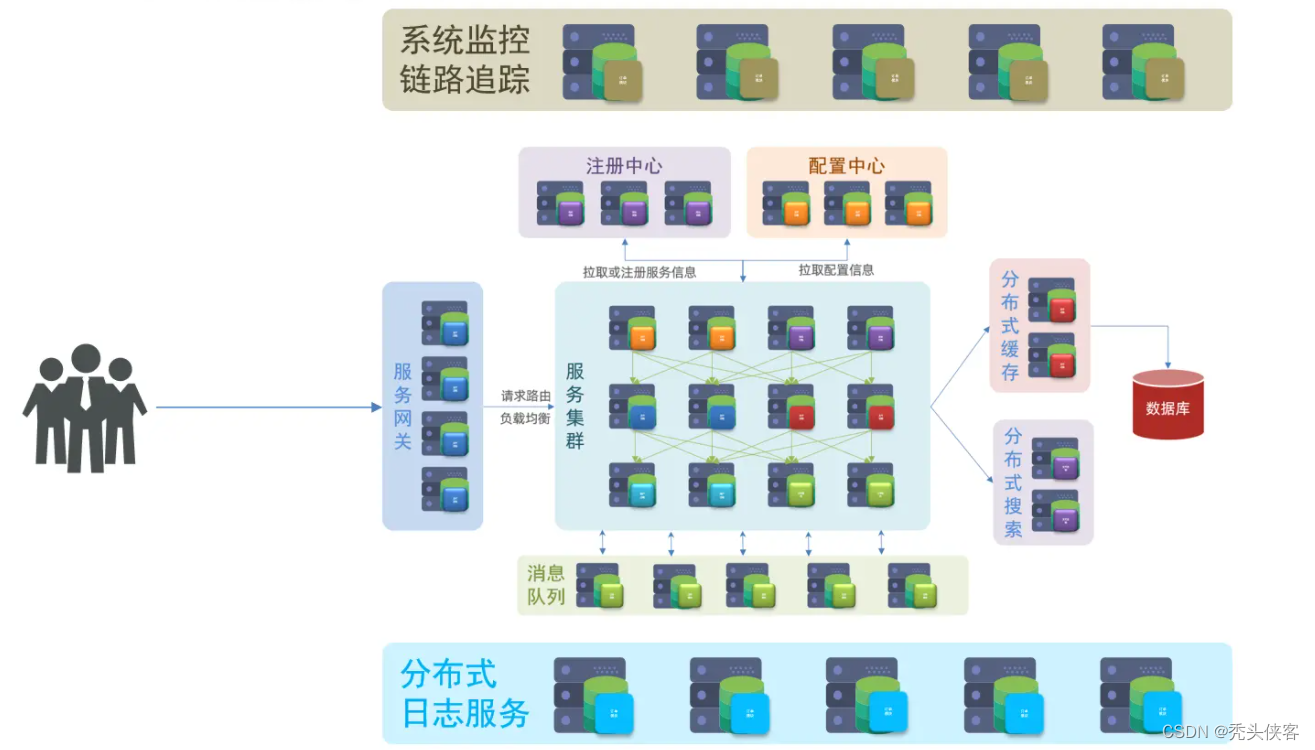
What is micro service

《SQL优化核心思想》

Redis memory elimination mechanism

yolov5 提速多GPU训练显存低的问题

1-9Vmware中网络配置
随机推荐
防抖和节流
Setting up a cluster environment under Linux (2) -- installing MySQL under Linux
Graduation season | fitting the best self in continuous exploration
什么是微服务
How ASA configures port mapping and pat
Cloud rendering and Intel jointly create the "core" era of cloud rendering
Mysql5.7.31 user defined installation details
anchor free dection简介
1-10Vmware构建自定义的网络架构
元宇宙中的法律与自我监管
What do SMT operators do? operating duty?
Xiaohongshu microservice framework and governance and other cloud native business architecture evolution cases
Introduction to anchor free decision
1-11Vmware虚拟机常见的问题解决
Multi-Instance Redo Apply
Use js to obtain the last quarter based on the current quarter
"Seamless" deployment of paddlenlp model based on openvinotm development kit
Maintenance and key points of SMT Mounter
The problem of low video memory in yolov5 accelerated multi GPU training
no_expand和use_concat