当前位置:网站首页>(typora picture bed) Alibaba cloud OSS building picture bed +picgo uploading picture detailed tutorial
(typora picture bed) Alibaba cloud OSS building picture bed +picgo uploading picture detailed tutorial
2022-06-26 11:07:00 【Love you, Bai~】
One , What is cloud storage
stay Typora When you copy and paste pictures, you can directly store them in the warehouse , And the address of the file will be changed to the warehouse address , When sending Markdown when , The picture can also be seen by others , Realize direct storage in the cloud warehouse .
Two , preparation :
1.node.js
download | Node.js Chinese net
Download on your own computer node.js( Just download it without any other operation )
2. Upload tool :picGo
The installation package is as follows :
link :https://pan.baidu.com/s/1DtIgrXKmvtTPm4b9Mw4VgQ?pwd=aicc
Extraction code :aicc
3.Typora
When a more convenient note taking software , This version is free and supports automatic uploading of the drawing bed
link :https://pan.baidu.com/s/1ndKMISFznKtwA2S8NHDnXQ?pwd=aicc
Extraction code :aicc
4. Register aliyun account
Friendship tips :( For free drawing bed gitee for )
at present gitee The immobilizer mechanism is enabled , Use gitee The drawing bed pictures can be uploaded normally , But the document may not be browsed properly , Therefore, it is no longer recommended that gitee The warehouse is used as a drawing bed .
On the basis of the anti-theft chain gitee The open source settings for are also updated , Now open source warehouse requires system audit , Neither of the two warehouses established yesterday has been open source successfully , This will result in typora Pictures can be uploaded , But not in typora Displayed on the , If the image is saved locally, it can be displayed, but it is more troublesome to import it manually
Typora For other drawing beds, please refer to the settings in this article , The method is the same
So Alibaba cloud is used here , It's only a year 9 Yuan ,40GB It's enough for taking notes
( It's OK to use other free drawing beds, but Ali is relieved to use them )
Register live or log in users through the website
3、 ... and , Start the operation
1. Enter alicloud's official website , After signing in , Click on the object store OSS
Search in the search box Object storage OSS

Click on the discount package

The year here is optional

After opening, create a new... On the console Bucket
bucket The role of : It is equivalent to a storage of pictures ” house “. The following figure shows the configuration ” house “ Information about , We pass this ” house “ Upload the picture to this ” house “ Inside

establish Bucket

Then follow the picture

This is the created Buckert, Click on your own Bucket
At the same time own Bucket Also remember the name !!!( It's best to write it down on the tablet and use it at the back )

Create a new one img/ The catalog of
img/ Specify a storage path for
( It's best to write it down on the tablet and use it at the back )

Then view your own... In the overview Set the storage area ( Because the selected regions are different, the setting storage areas are different )
What I have here is oss-cn-beijing ( It's best to write it down on the tablet and use it at the back )

And then at the personal portrait AccessKey

Choose to continue using AccessKey

Click Create AccessKey
After authentication, it will generate AccessKeyID and AcessKeySecret
AccessKeyID and AcessKeySecret Two are also recorded on the WordPad
( There are five data to remember )
2. Open the installed Picgo
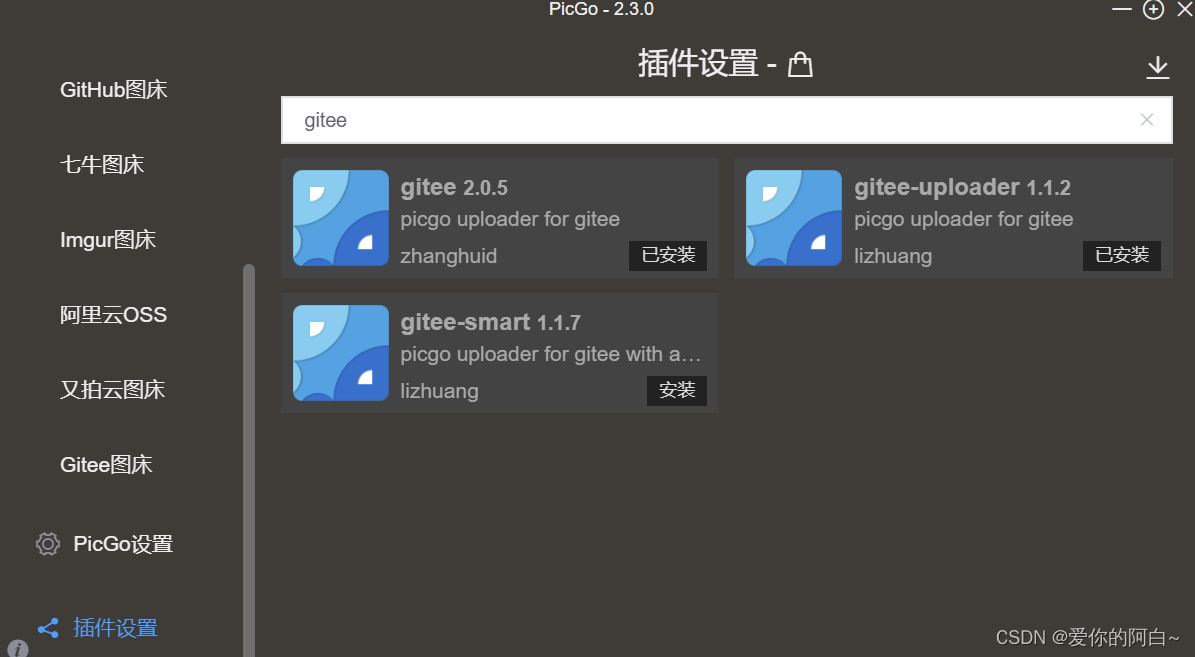
Install the two plug-ins already installed by the author in the following plug-ins
Then select Alibaba cloud in the drawing bed settings OSS


The first two are AccessKeyID and AcessKeySecret
The third data is Bucket name
The fourth and fifth items are also recorded in the WordPad. Just copy and paste them
Then determine
Set as default
Set as default
Set as default
3,Typora Middle configuration
open Typora Preferences for (Ctrl+ comma ) Shortcut key
In the image content :
1. Insert picture select upload picture
2. Select two settings
3. In the upload service PicGo Set the path of to itself PicGO.exe The path of

It's done here
Copy and paste to Typora Give it a try
If you have any questions, you can write them privately !!!
边栏推荐
猜你喜欢

栖霞市住建局和消防救援大队开展消防安全培训

Jasperreports - print PDF (project tool)

Fabric.js 上划线、中划线(删除线)、下划线

机器学习LDA——实验报告

10 years' experience in programmer career - for you who are confused

3、 Linked list exercise

PC QQ hall upload update modify VersionInfo

April 13, 2021 interview with beaver family

Getting started with postman

机器学习PCA——实验报告
随机推荐
UDP Flood攻击防御原理
近期工作汇报
Plookup table in appliedzkp zkevm (8)
9、 Beautify tables, forms, and hyperlinks
一键部署属于自己的社区论坛
在Oracle中update大量数据会不会导致undo空间爆掉
深度理解STM32的串口实验(寄存器)【保姆级教程】
How does unity prevent other camera positions and rotations from being controlled by steamvrplugin when using steamvrplugin
Machine learning LDA - Experimental Report
redux相关用法
Machine Learning Clustering - Experimental Report
机器学习SVM——实验报告
[echart] i. how to learn echart and its characteristic document reading notes
Redis knowledge mind map
CEPH operation and maintenance common instructions
Win10 start FTP service and set login authentication
Machine learning linear regression - Experimental Report
代码规范 & 详细解释 husky、prettier、eslint、lint-staged 的作用和使用
Laravel admin hidden button, and set button display, default sequence, form form form non modifiable value
滑动窗口