当前位置:网站首页>Deploy docker and install MySQL in centos7
Deploy docker and install MySQL in centos7
2022-06-23 05:48:00 【Zhun Xiaozhao】
centos7 Deploy docker
docker Installation and deployment
Create deployment user , give sudo jurisdiction
[r[email protected] ~]# useradd docker -d /home/docker
[[email protected] ~]# passwd docker
 Change user  docker  Password  .
 new   password :
 Invalid password :  The password is less than  8  Characters
 Reenter the new   password :
passwd: All authentication tokens have been successfully updated .
[[email protected] ~]# echo 'docker ALL=(ALL) NOPASSWD: ALL' >> /etc/sudoers
[[email protected] ~]# su - docker
[[email protected] ~]$
One key deployment
[[email protected] ~]$ # Use the official installation script to automatically install
[[email protected] ~]$ curl -fsSL https://get.docker.com | bash -s docker --mirror Aliyun
At home daocloud One click Install command :
curl -sSL https://get.daocloud.io/docker | sh
start-up
[[email protected] ~]$ sudo systemctl start docker
Check the status
[[email protected] ~]$ systemctl status docker
Set boot up
[[email protected] ~]$ #  Set boot up
[[email protected] ~]$ sudo systemctl enable docker
Created symlink from /etc/systemd/system/multi-user.target.wants/docker.service to /usr/lib/systemd/system/docker.service.
[[email protected] ~]$
Mirror operation
Look at the mirror image
[[email protected] ~]$  docker images
REPOSITORY   TAG       IMAGE ID   CREATED   SIZE
Download mirroring ( Timeout error )
[[email protected] ~]$ docker pull hello-world
Using default tag: latest
Error response from daemon: Get "https://registry-1.docker.io/v2/": net/http: TLS handshake timeout
Specifies that the image is pulled again
[[email protected] ~]$ sudo vi /etc/docker/daemon.json
[[email protected] ~]$ cat /etc/docker/daemon.json
{
    "registry-mirrors":["https://docker.mirrors.ustc.edu.cn"]
}
[[email protected] ~]$ docker pull hello-world
Using default tag: latest
latest: Pulling from library/hello-world
2db29710123e: Pull complete

Digest: sha256:10d7d58d5ebd2a652f4d93fdd86da8f265f5318c6a73cc5b6a9798ff6d2b2e67
Status: Downloaded newer image for hello-world:latest
docker.io/library/hello-world:latest
[[email protected] ~]$
[[email protected] ~]$  docker images
REPOSITORY    TAG       IMAGE ID       CREATED        SIZE
hello-world   latest    feb5d9fea6a5   7 months ago   13.3kB
delete mirror
[[email protected] ~]$ docker rmi hello-world
Untagged: hello-world:latest
Untagged: [email protected]:10d7d58d5ebd2a652f4d93fdd86da8f265f5318c6a73cc5b6a9798ff6d2b2e67
Deleted: sha256:feb5d9fea6a5e9606aa995e879d862b825965ba48de054caab5ef356dc6b3412
Deleted: sha256:e07ee1baac5fae6a26f30cabfe54a36d3402f96afda318fe0a96cec4ca393359
[[email protected] ~]$  docker images
REPOSITORY   TAG       IMAGE ID   CREATED   SIZE
[[email protected] ~]$
Container operation
####  Look at all the containers
[[email protected] ~]$ docker ps -a
CONTAINER ID   IMAGE     COMMAND   CREATED   STATUS    PORTS     NAMES
Create a container
[[email protected] ~]$ docker create -it --name=test hello-world
aaa8f6652052d88c159e53ac9f88cbfa77934c8f7b31a615ec9f18acedb88f1e
[[email protected] ~]$ docker ps -a
CONTAINER ID   IMAGE         COMMAND    CREATED         STATUS    PORTS     NAMES
aaa8f6652052   hello-world   "/hello"   8 seconds ago   Created             test
Start the container
[[email protected] ~]$ docker start aaa8f6652052
aaa8f6652052
[[email protected] ~]$ docker ps -a
CONTAINER ID   IMAGE         COMMAND    CREATED          STATUS                     PORTS     NAMES
aaa8f6652052   hello-world   "/hello"   29 seconds ago   Exited (0) 3 seconds ago             test
Check the log
[[email protected] ~]$ docker logs aaa8f6652052

Hello from Docker!
This message shows that your installation appears to be working correctly.

To generate this message, Docker took the following steps:
 1. The Docker client contacted the Docker daemon.
 2. The Docker daemon pulled the "hello-world" image from the Docker Hub.
    (amd64)
 3. The Docker daemon created a new container from that image which runs the
    executable that produces the output you are currently reading.
 4. The Docker daemon streamed that output to the Docker client, which sent it
    to your terminal.

To try something more ambitious, you can run an Ubuntu container with:
 $ docker run -it ubuntu bash

Share images, automate workflows, and more with a free Docker ID:
 https://hub.docker.com/

For more examples and ideas, visit:
 https://docs.docker.com/get-started/
Check container details
[[email protected] ~]$ docker inspect aaa8f6652052
[
    {
        "Id": "aaa8f6652052d88c159e53ac9f88cbfa77934c8f7b31a615ec9f18acedb88f1e",
        "Created": "2022-05-07T06:56:57.904666417Z",
        "Path": "/hello",
        "Args": [],
        "State": {
            "Status": "exited",
            "Running": false,
            "Paused": false,
            "Restarting": false,
            "OOMKilled": false,
            "Dead": false,
            "Pid": 0,
            "ExitCode": 0,
            "Error": "",
            "StartedAt": "2022-05-07T06:57:22.999901707Z",
            "FinishedAt": "2022-05-07T06:57:23.018206468Z"
        },
        "Image": "sha256:feb5d9fea6a5e9606aa995e879d862b825965ba48de054caab5ef356dc6b3412",
        "ResolvConfPath": "/var/lib/docker/containers/aaa8f6652052d88c159e53ac9f88cbfa77934c8f7b31a615ec9f18acedb88f1e/resolv.conf",
        "HostnamePath": "/var/lib/docker/containers/aaa8f6652052d88c159e53ac9f88cbfa77934c8f7b31a615ec9f18acedb88f1e/hostname",
        "HostsPath": "/var/lib/docker/containers/aaa8f6652052d88c159e53ac9f88cbfa77934c8f7b31a615ec9f18acedb88f1e/hosts",
        "LogPath": "/var/lib/docker/containers/aaa8f6652052d88c159e53ac9f88cbfa77934c8f7b31a615ec9f18acedb88f1e/aaa8f6652052d88c159e53ac9f88cbfa77934c8f7b31a615ec9f18acedb88f1e-json.log",
        "Name": "/test",
        "RestartCount": 0,
        "Driver": "overlay2",
        "Platform": "linux",
        "MountLabel": "",
        "ProcessLabel": "",
        "AppArmorProfile": "",
        "ExecIDs": null,
        "HostConfig": {
            "Binds": null,
            "ContainerIDFile": "",
            "LogConfig": {
                "Type": "json-file",
                "Config": {}
            },
            "NetworkMode": "default",
            "PortBindings": {},
            "RestartPolicy": {
                "Name": "no",
                "MaximumRetryCount": 0
            },
            "AutoRemove": false,
            "VolumeDriver": "",
            "VolumesFrom": null,
            "CapAdd": null,
            "CapDrop": null,
            "CgroupnsMode": "host",
            "Dns": [],
            "DnsOptions": [],
            "DnsSearch": [],
            "ExtraHosts": null,
            "GroupAdd": null,
            "IpcMode": "private",
            "Cgroup": "",
            "Links": null,
            "OomScoreAdj": 0,
            "PidMode": "",
            "Privileged": false,
            "PublishAllPorts": false,
            "ReadonlyRootfs": false,
            "SecurityOpt": null,
            "UTSMode": "",
            "UsernsMode": "",
            "ShmSize": 67108864,
            "Runtime": "runc",
            "ConsoleSize": [
                0,
                0
            ],
            "Isolation": "",
            "CpuShares": 0,
            "Memory": 0,
            "NanoCpus": 0,
            "CgroupParent": "",
            "BlkioWeight": 0,
            "BlkioWeightDevice": [],
            "BlkioDeviceReadBps": null,
            "BlkioDeviceWriteBps": null,
            "BlkioDeviceReadIOps": null,
            "BlkioDeviceWriteIOps": null,
            "CpuPeriod": 0,
            "CpuQuota": 0,
            "CpuRealtimePeriod": 0,
            "CpuRealtimeRuntime": 0,
            "CpusetCpus": "",
            "CpusetMems": "",
            "Devices": [],
            "DeviceCgroupRules": null,
            "DeviceRequests": null,
            "KernelMemory": 0,
            "KernelMemoryTCP": 0,
            "MemoryReservation": 0,
            "MemorySwap": 0,
            "MemorySwappiness": null,
            "OomKillDisable": false,
            "PidsLimit": null,
            "Ulimits": null,
            "CpuCount": 0,
            "CpuPercent": 0,
            "IOMaximumIOps": 0,
            "IOMaximumBandwidth": 0,
            "MaskedPaths": [
                "/proc/asound",
                "/proc/acpi",
                "/proc/kcore",
                "/proc/keys",
                "/proc/latency_stats",
                "/proc/timer_list",
                "/proc/timer_stats",
                "/proc/sched_debug",
                "/proc/scsi",
                "/sys/firmware"
            ],
            "ReadonlyPaths": [
                "/proc/bus",
                "/proc/fs",
                "/proc/irq",
                "/proc/sys",
                "/proc/sysrq-trigger"
            ]
        },
        "GraphDriver": {
            "Data": {
                "LowerDir": "/var/lib/docker/overlay2/66c71552979e600283024720c28fce1bbffdba0baeb948675a02c5d6ee31cc9e-init/diff:/var/lib/docker/overlay2/176b33a38f9b52db5535389d92450c23bbd3f1beb06036d93b9853ea9550a3f1/diff",
                "MergedDir": "/var/lib/docker/overlay2/66c71552979e600283024720c28fce1bbffdba0baeb948675a02c5d6ee31cc9e/merged",
                "UpperDir": "/var/lib/docker/overlay2/66c71552979e600283024720c28fce1bbffdba0baeb948675a02c5d6ee31cc9e/diff",
                "WorkDir": "/var/lib/docker/overlay2/66c71552979e600283024720c28fce1bbffdba0baeb948675a02c5d6ee31cc9e/work"
            },
            "Name": "overlay2"
        },
        "Mounts": [],
        "Config": {
            "Hostname": "aaa8f6652052",
            "Domainname": "",
            "User": "",
            "AttachStdin": true,
            "AttachStdout": true,
            "AttachStderr": true,
            "Tty": true,
            "OpenStdin": true,
            "StdinOnce": true,
            "Env": [
                "PATH=/usr/local/sbin:/usr/local/bin:/usr/sbin:/usr/bin:/sbin:/bin"
            ],
            "Cmd": [
                "/hello"
            ],
            "Image": "hello-world",
            "Volumes": null,
            "WorkingDir": "",
            "Entrypoint": null,
            "OnBuild": null,
            "Labels": {}
        },
        "NetworkSettings": {
            "Bridge": "",
            "SandboxID": "46ecfbf481103b2f5bc9d5cbae762c0eb427589483e905ed1d9216e530525d39",
            "HairpinMode": false,
            "LinkLocalIPv6Address": "",
            "LinkLocalIPv6PrefixLen": 0,
            "Ports": {},
            "SandboxKey": "/var/run/docker/netns/46ecfbf48110",
            "SecondaryIPAddresses": null,
            "SecondaryIPv6Addresses": null,
            "EndpointID": "",
            "Gateway": "",
            "GlobalIPv6Address": "",
            "GlobalIPv6PrefixLen": 0,
            "IPAddress": "",
            "IPPrefixLen": 0,
            "IPv6Gateway": "",
            "MacAddress": "",
            "Networks": {
                "bridge": {
                    "IPAMConfig": null,
                    "Links": null,
                    "Aliases": null,
                    "NetworkID": "c0c4813d6f77ca6c8b0b6c4faddd8a2041a3e1f93c56acd5fb22533b70e96444",
                    "EndpointID": "",
                    "Gateway": "",
                    "IPAddress": "",
                    "IPPrefixLen": 0,
                    "IPv6Gateway": "",
                    "GlobalIPv6Address": "",
                    "GlobalIPv6PrefixLen": 0,
                    "MacAddress": "",
                    "DriverOpts": null
                }
            }
        }
    }
]
[[email protected] ~]$
uninstall docker
docker-ce Community Edition ,docker-ee Enterprise Edition 
[[email protected] ~]$ sudo yum remove docker-ce -y
[[email protected] ~]$ sudo rm -rf /var/lib/docker
After unloading , You can also see the version number , Where is not unloaded clean ???
[[email protected] ~]$ docker -v
Docker version 20.10.15, build fd82621
[[email protected] ~]$
Uninstall old version command
[[email protected] ~]$ sudo yum remove docker docker-client docker-client-latest docker-common docker-latest docker-latest-logrotate docker-logrotate docker-engine -y
 Loaded plug-in :fastestmirror
 Parameters  docker  There is no match
 Parameters  docker-client  There is no match
 Parameters  docker-client-latest  There is no match
 Parameters  docker-common  There is no match
 Parameters  docker-latest  There is no match
 Parameters  docker-latest-logrotate  There is no match
 Parameters  docker-logrotate  There is no match
 Parameters  docker-engine  There is no match
 Don't delete any packages
[[email protected] ~]$
Manual deployment
Set up warehouse
Install dependency packages
sudo yum install -y yum-utils device-mapper-persistent-data lvm2
Set warehouse address , Select alicloud source address ( The official source address is slow )
sudo yum-config-manager --add-repo http://mirrors.aliyun.com/docker-ce/linux/centos/docker-ce.repo
install Docker Community Edition
sudo yum install -y docker-ce docker-ce-cli containerd.io
docker install MySQL
Pull MySQL Image file
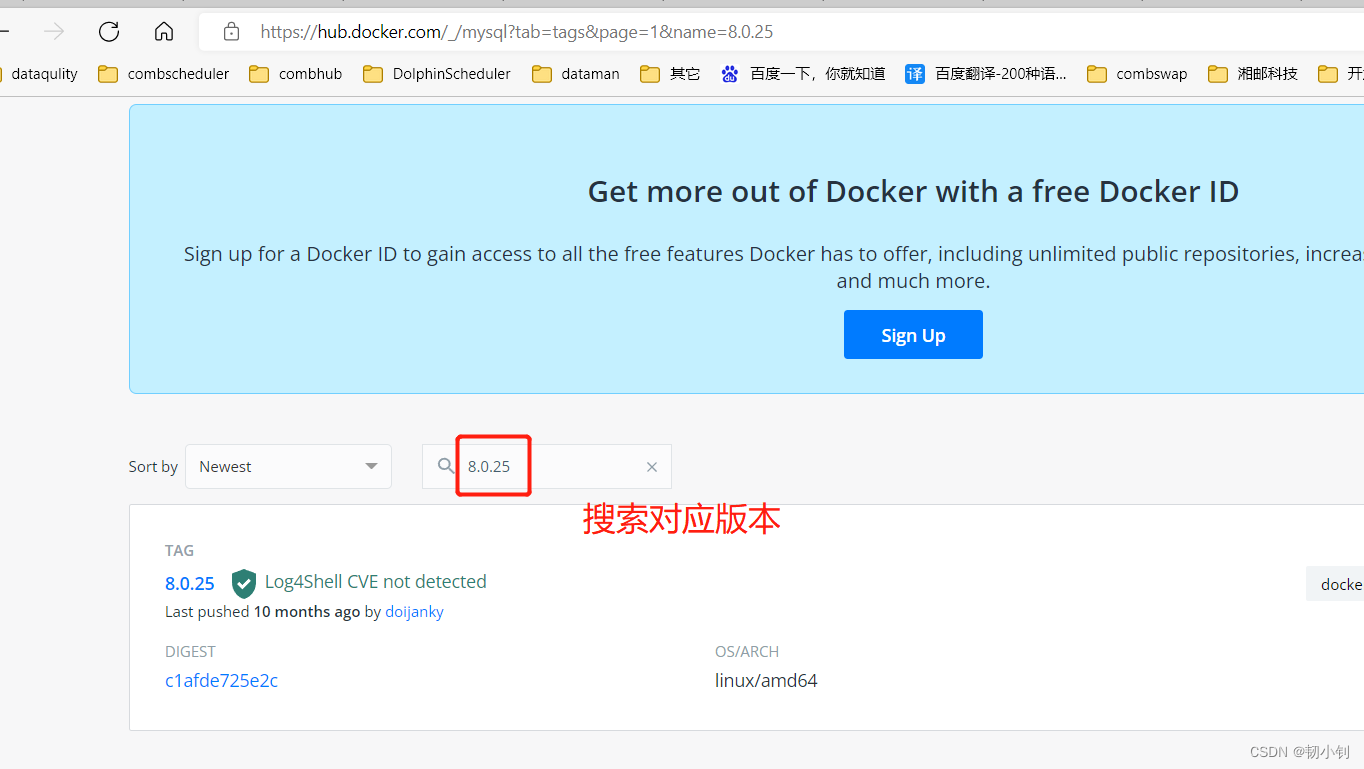
[[email protected] ~]$ sudo docker pull mysql:8.0.25
8.0.25: Pulling from library/mysql
b4d181a07f80: Pull complete
a462b60610f5: Pull complete
578fafb77ab8: Pull complete
524046006037: Pull complete
d0cbe54c8855: Pull complete
aa18e05cc46d: Pull complete
32ca814c833f: Pull complete
9ecc8abdb7f5: Pull complete
ad042b682e0f: Pull complete
71d327c6bb78: Pull complete
165d1d10a3fa: Pull complete
2f40c47d0626: Pull complete
Digest: sha256:52b8406e4c32b8cf0557f1b74517e14c5393aff5cf0384eff62d9e81f4985d4b
Status: Downloaded newer image for mysql:8.0.25
docker.io/library/mysql:8.0.25
[[email protected] ~]$
Look at the mirror image
[[email protected] ~]$ sudo  docker images
REPOSITORYTAG   IMAGE ID   CREATED SIZE
hello-world   latestfeb5d9fea6a5   7 months ago13.3kB
mysql 8.0.255c62e459e087   10 months ago   556MB
[[email protected] ~]$
start-up MySQL Mirror image
docker run -itd --name test-mysql1 -p 3307:3306 -e MYSQL_ROOT_PASSWORD=123456 mysql
Parameter description :
- -p 3307:3306 : Mapping container service's 3306 Port to host 3307 port , The external host can directly pass through the host ip:3307 Access to the MySQL Service for
- MYSQL_ROOT_PASSWORD=123456: Set up MySQL service root User's password .
The machine was installed before mysql, Therefore, the port is changed to 3307, Otherwise conflict !
verification

边栏推荐
- Special research on Intelligent upgrading of heavy trucks in China in 2022
- 制造业数字化转型存在问题及原因分析
- FS4059A与FS5080E充电芯片的区别
- Ansible 使用普通用户管理被控端
- 编址和编址单位
- AHA C language Chapter 8 game time is up (lesson 29)
- 【斯坦福计网CS144项目】Lab2: TCPReceiver
- PAT 乙等 1009 C语言
- mysql字符集
- [opencv450] image subtraction, binarization, threshold segmentation
猜你喜欢

Advanced Mathematics (Seventh Edition) Tongji University exercises 1-8 personal solutions

MySQL面试真题(二十四)——行列互换

MySQL面试真题(二十二)——表连接后的条件筛选及分组筛选

数字藏品——新的投资机遇
Pkav simple blasting

【owt】owt-client-native-p2p-e2e-test vs2017构建 6:修改脚本自动生成vs工程

Differences between fs4059a and fs5080e charging chips

Wechat applet: future wife query generator

iNFTnews | 加密之家从宇宙寄来的明信片,你会收到哪一张?

Wechat applet: elderly blessing short video
随机推荐
What does the English letter PC mean? What does the Internet PC mean
MySQL面试真题(三十)——贝壳-房产订单分析
高等数学(第七版)同济大学 习题1-9 个人解答
MySQL面试真题(二十一)——金融-贷款逾期
PAT 乙等 1026 程序运行时间
MySQL Foundation
FS2119A同步升压IC输出3.3V和FS2119B同步升压IC输出5V
ORB_ Slam2 operation
PAT 乙等 1015 C语言
Real MySQL interview question (30) -- shell real estate order analysis
AI艺术的基因工程?使用 #Artbreeder 改变图像的任意形态
华为软硬件生态圈成型,从根子上改变美国对软硬件体系的领导地位
PAT 乙等 1016 C语言
iNFTnews | 加密之家从宇宙寄来的明信片,你会收到哪一张?
PAT 乙等 1019 C语言
[Stanford Jiwang cs144 project] lab2: tcpreceiver
Software design and Development Notes 2: serial port debugging tool based on QT design
Wechat applet: an artifact for calculating the full amount of orders
PAT 乙等 1025 反转链表
True MySQL interview question (24) -- row column exchange