当前位置:网站首页>JDBC elementary learning ------ (learning from Shang Silicon Valley)
JDBC elementary learning ------ (learning from Shang Silicon Valley)
2022-07-24 06:08:00 【Probably gouqing】
JDBC
Preface : Understand the project — Study java Reflection ! And learn to maven Basics !
Go to shangsilicon Valley to download teacher song Hongkang's materials for learning ..
1. Driver Interface - Connect to database (5 Ways of planting , The last is the most important )
First you have to learn to use maven Create a module . Again, I won't go into too much detail .
A few notes :
mysql Be consistent with the corresponding driver version ( my mysql8.0.29, So is the drive )
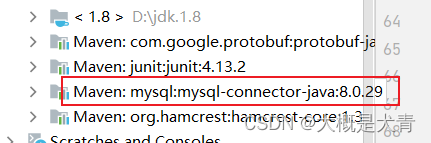
About url Back Whether to add code comments depends on the situation , Role is ( Drive and mysql The inconsistency of causes some parameters to change , Check the specific practice )
Code up :
package com.jdbc;

import com.mysql.cj.jdbc.Driver;
import com.mysql.cj.jdbc.integration.c3p0.MysqlConnectionTester;
import org.junit.Test;

import java.io.IOException;
import java.io.InputStream;
import java.sql.Connection;
import java.sql.DriverManager;
import java.sql.SQLException;
import java.util.Properties;

public class Driverconnect {


    // Mode one : The most common
    @Test
    public void testConnection1() throws SQLException {

        Driver driver = new Driver();

        String url = "jdbc:mysql://localhost:3306/jdbc";
        Properties info = new Properties();
        info.setProperty("user", "root");
        info.setProperty("password", "123456");

        Connection connect = driver.connect(url, info);
        System.out.println(connect);
    }

    // Mode two -- Advanced   With reflection ( The first step of mode 1 is not modular enough )
    @Test
    public void testConnection2() throws ClassNotFoundException, InstantiationException, IllegalAccessException, SQLException {

        //1.  obtain Driver Implementation class object , Using reflection
        Class<?> aClass = Class.forName("com.mysql.cj.jdbc.Driver");
        Driver driver = (Driver) aClass.newInstance();

        //?useUnicode=true&characterEncoding=utf8&zeroDateTimeBehavior=convertToNull&useSSL=true&serverTimezone=GMT%2B8
        //2. Connect to database , User name and password
        String url = "jdbc:mysql://localhost:3306/jdbc";
        Properties info = new Properties();
        info.setProperty("user", "root");
        info.setProperty("password", "123456");

        //3. Get the connection
        Connection connection = driver.connect(url, info);
        System.out.println(connection);
    }


    // Mode three : use DriverManager Realize the connection of database . Experience getting the connection necessary 4 Basic elements .
    @Test
    public void testConnection() throws ClassNotFoundException, InstantiationException, IllegalAccessException, SQLException {

        //?useSSL=false&useUnicode=true&characterEncoding=utf-8&useLegacyDatetimeCode=false&serverTimezone=UTC
        //1. Four elements
        String url = "jdbc:mysql://localhost:3306/jdbc?";
        String user = "root";
        String password = "123456";
        String driverName = "com.mysql.cj.jdbc.Driver";

        //2. Instantiation Driver
        Class<?> aClass = Class.forName(driverName);
        Driver driver = (Driver) aClass.newInstance();

        //3. register Driver drive
        DriverManager.registerDriver(driver);

        //4. Get the connection
        Connection connection = DriverManager.getConnection(url, user, password);
        System.out.println(connection);
    }

    // Mode 4 :- Edition can be omitted
    @Test
    public void connnection4() throws ClassNotFoundException, SQLException {

        //1. Four elements needed
        String url = "jdbc:mysql://localhost:3306/jdbc";
        String user = "root";
        String password = "123456";
        String driverClass = "com.mysql.cj.jdbc.Driver";// Interface location

        //2. The load driver
        Class.forName(driverClass);

        //3. Get the connection
        Connection connection = DriverManager.getConnection(url, user, password);
        System.out.println(connection);

    }

    // Methods five  --final Final version  -- How to load the configuration file
    @Test
    public void finalconnection() throws IOException, ClassNotFoundException, SQLException {


        //1.  Load profile
        InputStream is = Driverconnect.class.getClassLoader().getResourceAsStream("properties");
// --Driverconnect  The current class
// * --Driverconnect.class.getClassLoader()  This loader is the system loader ,-- Custom classes are system loaders
// * --getResourceAsStream specify the path to a file   The default is src Next
        Properties properties = new Properties();
        properties.load(is);

        //2. Read configuration information
        String user = properties.getProperty("user");
        String password = properties.getProperty("password");
        String url = properties.getProperty("url");
        String driverClass = properties.getProperty("driverClass");

        //3. The load driver
        Class.forName(driverClass);

        //4. Get the connection
        Connection connection = DriverManager.getConnection(url, user, password);
        System.out.println(connection);
    }
}
//************ among final The configuration file of version has particular
Mode 5 is the final version : By reading the configuration file (+ Some ellipsis ) complete jdbc The connection of
What needs to be noted here is : The configuration file properties Put it on maven Work area resource Next ( Otherwise, the information of the configuration file is always unrecognized )
The following is the content of the configuration file : The configuration file is a simple file file , It must be placed in resource Below !
user=root
password=123456
url=jdbc:mysql://localhost:3306/jdbc
driverClass=com.mysql.cj.jdbc.Driver
#  The configuration file cannot have spaces , There will be ambiguity
Running effect picture :
Problems in learning
- @Test Cell error : First you have to create a maven project , Then add junit The driver
For specific methods, please refer to my previous maven Study - my mysql by 8.0.29 Using the corresponding driver should also be 8.0.29
- Report errors :java.sql.SQLException: The server time zone value ‘Öйú±ê׼ʱ¼ä’ is unrecognized or represents more than one time zone.
 resolvent : This is a little forgotten , resolvent May be :1. The problem of guiding the package , Use the latest import com.mysql.cj.jdbc.Driver; 2. Drive and mysql The versions of the two should correspond
 - There's another problem
 resolvent : Many factors !
Refer to the This big guy's idea , First of all to ensure Drive and mysql Consistency of versions ; The second is the problem of ports ( Personally, I have these two problems , Well 3306 and 3360 A mistake tnnd)
2. PreparedStatement We will increase, delete, and change inspections
First of all Statement The disadvantages of :
- There are string operations
- Fleeing sql Injection problem ( Just check it online )
So the introduction of PreparedStatement, Precompile first sql sentence , Involving placeholders ?( The question mark here does not mean question mark , It is a symbol that means Place holder !)
2.1 General to general — Additions and deletions
Conventional approach : Take the increase as an example ( Add a piece of data to the database )
Code up :
package com.statement;

import com.jdbc.Driverconnect;
import org.junit.Test;

import java.io.IOException;
import java.io.InputStream;
import java.sql.Connection;
import java.sql.DriverManager;
import java.sql.PreparedStatement;
import java.sql.SQLException;
import java.text.ParseException;
import java.text.SimpleDateFormat;
import java.util.Date;
import java.util.Properties;

public class PreparedStatementOpration {

    /* *  Insert a piece of data  * */
    @Test
    public void testInsert() throws IOException, ClassNotFoundException, SQLException, ParseException {

        //1.  Load profile
        InputStream is = Driverconnect.class.getClassLoader().getResourceAsStream("properties");
        Properties properties = new Properties();
        properties.load(is);

        //2. Read configuration information
        String user = properties.getProperty("user");
        String password = properties.getProperty("password");
        String url = properties.getProperty("url");
        String driverClass = properties.getProperty("driverClass");

        //3. The load driver
        Class.forName(driverClass);

        //4. Get the connection
        Connection connection = DriverManager.getConnection(url, user, password);
        System.out.println(connection);

        //5. precompile sql sentence
        String sql = "insert into customers(name,email,birth)values(?,?,?)";//? Placeholder means
        PreparedStatement ps = connection.prepareStatement(sql);
        //6. Fill in placeholders
        ps.setString(1, " Daniel Wen ");
        ps.setString(2, "[email protected]");
        SimpleDateFormat simpleDateFormat = new SimpleDateFormat("yyyy-MM-dd");
        Date date = simpleDateFormat.parse("2001-2-28");
        ps.setDate(3, new java.sql.Date(date.getTime()));

        //7. perform
        ps.execute();

        //8. close
        ps.close();
        connection.close();
    }
}
The effect is as follows :
This leads to the general code :
The first is fixed Connect to database and Close operation Part of
Code up :
package com.statement;
/* Connection fixed code */

import com.jdbc.Driverconnect;

import java.io.IOException;
import java.io.InputStream;
import java.sql.Connection;
import java.sql.DriverManager;
import java.sql.SQLException;
import java.sql.Statement;
import java.util.Properties;

public class JDBCUtils {


    /* Connection part */
    public static Connection getConnection() throws IOException, ClassNotFoundException, SQLException {

        //1.  Load profile
        InputStream is = Driverconnect.class.getClassLoader().getResourceAsStream("properties");
        Properties properties = new Properties();
        properties.load(is);

        //2. Read configuration information
        String user = properties.getProperty("user");
        String password = properties.getProperty("password");
        String url = properties.getProperty("url");
        String driverClass = properties.getProperty("driverClass");

        //3. The load driver
        Class.forName(driverClass);

        //4. Get the connection
        Connection connection = DriverManager.getConnection(url, user, password);
        return connection;
    }

    //* Closed flow
    public static void closeResource(Connection conn, Statement ps) throws SQLException {

        if (conn != null) {

            conn.close();
        }

        if (ps != null) {

            ps.close();
        }
    }
}
Summarize the above : The above code is a generic extraction , Connecting to the database and closing resources are duplicate code , So extract them all and write them as a class .( Subsequent overloading of code that may be used for resource shutdown )
The second is general code :
Explain the general code ( Written in another main class ), adopt JDBCUtils Get the connection , Then practical preparedstatement The way , Precompile first sql sentence ( Here sql Parameters are passed in , Define yourself later ); In addition, fill in the code of occupier ,sql The number of placeholders is the length of the array .
    public void update(String sql, Object... args) throws SQLException, IOException, ClassNotFoundException {

        //!!! It should be noted that :sql Placeholder inside ? ==  Variable parameter array args[] Same length

        //1. Get the connection
        Connection connection = JDBCUtils.getConnection();
        //2. precompile sql sentence
        PreparedStatement ps = connection.prepareStatement(sql);
        //3. Fill in placeholders
        for (int i = 0; i < args.length; i++) {

            ps.setObject(i + 1, args[i]);
        }
        //4. perform
        ps.execute();
        //5. close
        JDBCUtils.closeResource(connection, ps);
    }
test :
    @Test   //-- Try general operation -- Delete
    public void deleteTest() throws SQLException, IOException, ClassNotFoundException {

        String sql = "delete from customers where id = ?";
        update(sql,18);
    }

– The effect is as follows 


2.2 Inquire about — Universal
General queries for a particular table .
The so-called general refers to any number of query fields
Universal — Inquire about — in the light of Customers surface
The query is special , The final result should be displayed . So it's not void, The choice is Customer class .

Code up :
1.ORM Programming idea :
Customer class :
package com.statement;

import java.sql.Date;

public class Customer {

    private int id;
    private String name;
    private String email;
    private Date birth;

    public Customer() {

    }

    public Customer(int id, String name, String email, Date birth) {

        this.id = id;
        this.name = name;
        this.email = email;
        this.birth = birth;
    }

    public int getId() {

        return id;
    }

    public void setId(int id) {

        this.id = id;
    }

    public String getName() {

        return name;
    }

    public void setName(String name) {

        this.name = name;
    }

    public String getEmail() {

        return email;
    }

    public void setEmail(String email) {

        this.email = email;
    }

    public Date getBirth() {

        return birth;
    }

    public void setBirth(Date birth) {

        this.birth = birth;
    }

    @Override
    public String toString() {

        return "Customer{" +
                "id=" + id +
                ", name='" + name + '\'' +
                ", email='" + email + '\'' +
                ", birth=" + birth +
                '}';
    }
}
2.JDBCUtils — close resource , Method overloading
package com.statement;
/* Connection fixed code */

import com.jdbc.Driverconnect;

import java.io.IOException;
import java.io.InputStream;
import java.sql.*;
import java.util.Properties;

public class JDBCUtils {


    /* Connection part */
    public static Connection getConnection() throws IOException, ClassNotFoundException, SQLException {

        //1.  Load profile
        InputStream is = Driverconnect.class.getClassLoader().getResourceAsStream("properties");
        Properties properties = new Properties();
        properties.load(is);

        //2. Read configuration information
        String user = properties.getProperty("user");
        String password = properties.getProperty("password");
        String url = properties.getProperty("url");
        String driverClass = properties.getProperty("driverClass");

        //3. The load driver
        Class.forName(driverClass);

        //4. Get the connection
        Connection connection = DriverManager.getConnection(url, user, password);
        return connection;
    }

    //* close resource
    public static void closeResource(Connection conn, Statement ps) throws SQLException {

        if (conn != null) {

            conn.close();
        }

        if (ps != null) {

            ps.close();
        }
    }

    // close resource -- Method overloading
    public static void closeResource(Connection conn, Statement ps, ResultSet rs) throws SQLException {

        if (conn != null) {

            conn.close();
        }

        if (ps != null) {

            ps.close();
        }
        if (rs != null) {

            rs.close();
        }
    }
}
3. Query general — For forms Customers
    //-- Query general
    public Customer queryForCustomers(String sql, Object... args) throws SQLException, IOException, ClassNotFoundException, NoSuchFieldException, IllegalAccessException {


        //1. For a link
        Connection connection = JDBCUtils.getConnection();
        //2. Set up a place holder
        PreparedStatement ps = connection.prepareStatement(sql);
        for (int i = 0; i < args.length; i++) {

            ps.setObject(i + 1, args[i]);
        }

        //3. perform , And return the result set
        ResultSet rs = ps.executeQuery();

        //4. Processing result set
        // Get metadata of result set
        ResultSetMetaData rsmd = rs.getMetaData();
        // Get the number of columns
        int columnCount = rsmd.getColumnCount();

        if (rs.next()) {
    // Look up a piece of data -- Query a row of data ( Many data are used while) --- .next() It's a bit like an iterator ,
            Customer customer = new Customer(); //ORM
            /*ORM Programming idea : ---- Encapsulate the data in the table into an object  *  A table corresponds to   One java class  *  A record in the table corresponds to  java An object of class  *  A field in the table corresponds to  java A property in a class */
            for (int i = 0; i < columnCount; i++) {

                Object value = rs.getObject(i + 1);// Get the value of the column   Still from 1 At the beginning !

                // Get the column name of the result set
                String columnName = rsmd.getColumnName(i + 1);

                // Reflection --  to cust object   designated columnName attribute , assignment value: By reflection
                Field declaredField = Customer.class.getDeclaredField(columnName);
                declaredField.setAccessible(true);
                declaredField.set(customer, value);
            }
            return customer;
        }

        // Closure of resources -- Method overloading
        JDBCUtils.closeResource(connection, ps, rs);
        return null;
    }
4. test + effect :
    @Test   // Query general tests
    public void testQuery() throws SQLException, IOException, NoSuchFieldException, ClassNotFoundException, IllegalAccessException {

        String sql = "select id, name, email, birth from customers where id = ?";
        Customer customer = queryForCustomers(sql, 21);
        System.out.println(customer);
    }

Universal — Inquire about — in the light of Order surface
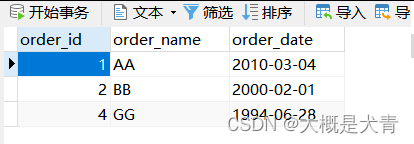
- It should be noted that ,order As a sensitive word ( about sql Come on ), How to deal with it ?
- order_id,order_name,order_date Another name used orderId,orderName,orderDate How to deal with it ?
Code up :
1.Order class (ORM Programming thinking ): The thing to notice here is this Property has changed alias
package com.statement;

import java.sql.Date;

/** *  in the light of order Table query  */
public class Order {

    private int orderId;
    private String orderName;
    private Date orderDate;

    public Order() {

    }

    public Order(int orderId, String orderName, Date orderDate) {

        this.orderId = orderId;
        this.orderName = orderName;
        this.orderDate = orderDate;
    }

    public int getOrderId() {

        return orderId;
    }

    public void setOrderId(int orderId) {

        this.orderId = orderId;
    }

    public String getOrderName() {

        return orderName;
    }

    public void setOrderName(String orderName) {

        this.orderName = orderName;
    }

    public Date getOrderDate() {

        return orderDate;
    }

    public void setOrderDate(Date orderDate) {

        this.orderDate = orderDate;
    }

    @Override
    public String toString() {

        return "Order{" +
                "orderId=" + orderId +
                ", orderName='" + orderName + '\'' +
                ", orderDate=" + orderDate +
                '}';
    }
}
2.order General query of table + verification
    /** *  in the light of order General query of tables  */
    public Order queryForOrder(String sql, Object... args) throws SQLException, IOException, ClassNotFoundException, NoSuchFieldException, IllegalAccessException {

        //1. Get the connection
        Connection connection = JDBCUtils.getConnection();

        //2. Set up a place holder , precompile sql sentence
        PreparedStatement ps = connection.prepareStatement(sql);
        for (int i = 0; i < args.length; i++) {

            ps.setObject(i + 1, args[i]); // The first i+1 Placeholders ( from 1 Starting meter )-- Corresponding args[i]( from 0 Start counting )
        }

        //3. perform
        ResultSet rs = ps.executeQuery();

        //4. Processing result set
        // Fetch metadata
        ResultSetMetaData rsmd = rs.getMetaData();
        // Get the number of columns
        int columnCount = rsmd.getColumnCount();

        if (rs.next()) {

            Order order = new Order();
            for (int i = 0; i < columnCount; i++) {

                Object value = rs.getObject(i + 1);// Get the value of the column ,( from 1 Starting meter
                // Get the alias of the column  ----  This is different from getting the column name of the table , Instead, get the alias of the table ..
                String columnLabel = rsmd.getColumnLabel(i + 1);
                // By reflection ( Dynamic loading ) It's the realization of : to order Object ( Alias ) attribute , assignment value
                Field declaredField = Order.class.getDeclaredField(columnLabel);
                declaredField.setAccessible(true);
                declaredField.set(order, value);
            }
            return order;
        }
        return null;
    }

    @Test   // test order General query of table
    public void testQueryForOrder() throws SQLException, IOException, NoSuchFieldException, ClassNotFoundException, IllegalAccessException {

        String sql = "select order_id orderId , order_name orderName, order_date orderDate from `order` where order_id = ?";// Notice the sql In the sentence order use `` Symbol box out , Avoid sensitive words
        Order order = queryForOrder(sql, 2);
        System.out.println(order);

    }
effect :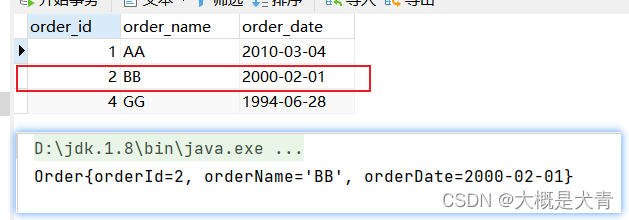
Summary
Summary and comparison :
General query for a specific table .
- For a table , I don't know how many fields to query , So we used it
rs.getMetaDate()Get the number of fields - Render the query results in the way of class objects , Dynamic loading through reflection
- use
rsdm.getColumnLabel(i+1)More reliable , Answer The attribute name of the class is inconsistent with the field name of the table The problem of (order surface ) - Reflection
Universal — Generic Templates
Get the general query of any table through generics
Code up :
    /** *  Generic   General query  */
    public <T> T queryForAnyone(Class<T> clazz, String sql, Object... args) throws SQLException, IOException, ClassNotFoundException, IllegalAccessException, NoSuchFieldException, InstantiationException {

        //1. Get the connection
        Connection connection = JDBCUtils.getConnection();

        //2. Set up a place holder , precompile sql sentence
        PreparedStatement ps = connection.prepareStatement(sql);
        for (int i = 0; i < args.length; i++) {

            ps.setObject(i + 1, args[i]); // The first i+1 Placeholders ( from 1 Starting meter )-- Corresponding args[i]( from 0 Start counting )
        }

        //3. perform
        ResultSet rs = ps.executeQuery();

        //4. Processing result set
        // Fetch metadata
        ResultSetMetaData rsmd = rs.getMetaData();
        // Get the number of columns
        int columnCount = rsmd.getColumnCount();

        if (rs.next()) {

            // Create objects
            T t = clazz.newInstance();
            for (int i = 0; i < columnCount; i++) {

                Object value = rs.getObject(i + 1);// Get the value of the column ,( from 1 Starting meter
                // Get the alias of the column
                String columnLabel = rsmd.getColumnLabel(i + 1);
                // By reflection ( Dynamic loading ) It's the realization of : to order Object ( Alias ) attribute , assignment value
                Field declaredField = clazz.getDeclaredField(columnLabel);
                declaredField.setAccessible(true);
                declaredField.set(t, value);
            }
            return t;
        }
        return null;
    }

    @Test // Test the above code  --  Generic
    public void testQueryForAnyone() throws SQLException, IOException, NoSuchFieldException, ClassNotFoundException, IllegalAccessException, InstantiationException {

        String sql1 = "select name , email , birth from customers where id = ?";
        Object result1 = queryForAnyone(Customer.class, sql1, 1);
        System.out.println(result1);

        String sql2 = "select order_id orderId, order_name orderName, order_date orderDate from `order` where order_id = ?";
        Order result2 = queryForAnyone(Order.class, sql2, 1);
        System.out.println(result2);

    }
effect :
Universal – Generic queries – Multiple data
if Change to while, use list Check and accept
Code up :
    /** *  General query  ---  Multiple data  ---  Generic  */
    public <T> List<T> getQueryList(Class<T> clazz, String sql, Object... args) throws SQLException, IOException, ClassNotFoundException, InstantiationException, IllegalAccessException, NoSuchFieldException {

        //1. Get the connection
        Connection connection = JDBCUtils.getConnection();

        //2. Set up a place holder , precompile sql sentence
        PreparedStatement ps = connection.prepareStatement(sql);
        for (int i = 0; i < args.length; i++) {

            ps.setObject(i + 1, args[i]); // The first i+1 Placeholders ( from 1 Starting meter )-- Corresponding args[i]( from 0 Start counting )
        }

        //3. perform
        ResultSet rs = ps.executeQuery();

        //4. Processing result set
        // Fetch metadata
        ResultSetMetaData rsmd = rs.getMetaData();
        // Get the number of columns
        int columnCount = rsmd.getColumnCount();
        // establish list aggregate
        ArrayList<T> list = new ArrayList<>();

        while (rs.next()) {

            // Create objects
            T t = clazz.newInstance();
            for (int i = 0; i < columnCount; i++) {

                Object value = rs.getObject(i + 1);// Get the value of the column ,( from 1 Starting meter
                // Get the alias of the column
                String columnLabel = rsmd.getColumnLabel(i + 1);
                // By reflection ( Dynamic loading ) It's the realization of : to order Object ( Alias ) attribute , assignment value
                Field declaredField = clazz.getDeclaredField(columnLabel);
                declaredField.setAccessible(true);
                declaredField.set(t, value);
            }
            list.add(t);
        }
        return list;
    }

    @Test //- Guess is the above code , ---  Generically query multiple pieces of data
    public void testGetQueryList() throws SQLException, IOException, NoSuchFieldException, ClassNotFoundException, InstantiationException, IllegalAccessException {

        String sql1 = "select name, email, birth from customers where id < ?";
        List<Customer> result1 = getQueryList(Customer.class, sql1, 4);
        result1.forEach(System.out::println);// Langmu tower expression -- To tell the truth, I forgot Gan ! Just remember to output the list line by line ..

        String sql2 = "select order_id orderId, order_name orderName, order_date orderDate from `order` where order_id < ?";
        List<Order> result2 = getQueryList(Order.class, sql2, 4);
        result2.forEach(System.out::println);
    }
effect :
Practice after class :
1. towards customers Table inserts a piece of data ( key entry )
Code up :
   // General purpose - Additions and deletions - operation  --- Suitable for any form
    public int update(String sql, Object... args) throws SQLException, IOException, ClassNotFoundException {

        //!!! It should be noted that :sql Placeholder inside ? ==  Variable parameter array args[] Same length

        //1. Get the connection
        Connection connection = JDBCUtils.getConnection();
        //2. precompile sql sentence
        PreparedStatement ps = connection.prepareStatement(sql);
        //3. Fill in placeholders
        for (int i = 0; i < args.length; i++) {

            ps.setObject(i + 1, args[i]);
        }
        //4. perform
        // ps.execute()
        int n = ps.executeUpdate(); // there n Express n Data has been changed ,0 There is no change
        //5. close
        JDBCUtils.closeResource(connection, ps);

        return n;
    }
    /** *  Insert a piece of data --- surface customers in  */
    @Test   //---- practice 1  insert data
    public void test1_AddOnetoCustomers() throws SQLException, IOException, ClassNotFoundException {

        Scanner sc = new Scanner(System.in);
        System.out.print(" Input name:");
        String name = sc.nextLine();
        System.out.print(" Input email:");
        String email = sc.nextLine();
        System.out.println(" Input birth:");
        String birth = sc.nextLine();

        String sql1 = "insert into customers (name, email, birth) values(?,?,?)";
        int i = update(sql1, name, email, birth);

        if (i!=0){

            System.out.println(" Add success !");
        }else {

            System.out.println(" Add failure !");
        }
    }
Process issues : About idea in ,@Test The problem of continuous blocking caused by keyboard key input in
Reference resources IDEA Unit tests have been circling , Blocking , The console cannot type data
resolvent :
effect :
2. Add grade 4 or grade 6
form examstudent(FlowID Set the primary key ,not null, Self increasing )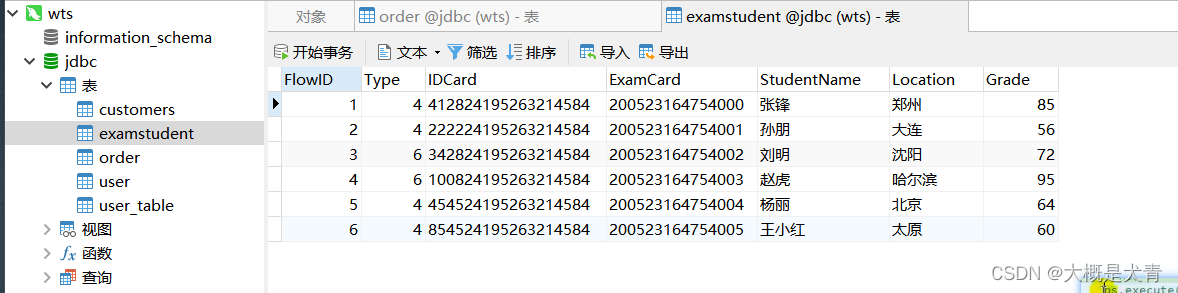
Code up :
 /** *  practice 2 ---  Add grade 4 or grade 6  */
    @Test
    public void test2_AddGrade() throws SQLException, IOException, ClassNotFoundException {

        Scanner sc = new Scanner(System.in);
        System.out.print(" Level Four / Level six :");
        int Type = sc.nextInt();
        System.out.print(" Student number :");
        String IDCard = sc.next();
        System.out.print(" Ticket number :");
        String ExamCard = sc.next();
        System.out.print(" full name :");
        String StudentName = sc.next();
        System.out.print(" region :");
        String Location = sc.next();
        System.out.print(" fraction :");
        int Grade = sc.nextInt();

        String sql = "insert into examstudent(type,idcard,examcard,studentname,location,grade) values(?,?,?,?,?,?)";
        int i = update(sql, Type, IDCard, ExamCard, StudentName, Location, Grade);
        if (i != 0) {

            System.out.println(" Add success !");
        } else {

            System.out.println(" Add failure !");
        }
    }
effect :
3. Enter the student id / Ticket number , Search for student information
Code up :
Student class :
package com.statement;

public class Student {

    private int FlowID;
    private int Type;
    private String IDCard;
    private String ExamCard;
    private String StudentName;
    private String Location;
    private int Grade;

    public Student() {

    }

    public Student(int flowID, int type, String IDCard, String examCard, String studentName, String location, int grade) {

        FlowID = flowID;
        Type = type;
        this.IDCard = IDCard;
        ExamCard = examCard;
        StudentName = studentName;
        Location = location;
        Grade = grade;
    }

    public int getFlowID() {

        return FlowID;
    }

    public void setFlowID(int flowID) {

        FlowID = flowID;
    }

    public int getType() {

        return Type;
    }

    public void setType(int type) {

        Type = type;
    }

    public String getIDCard() {

        return IDCard;
    }

    public void setIDCard(String IDCard) {

        this.IDCard = IDCard;
    }

    public String getExamCard() {

        return ExamCard;
    }

    public void setExamCard(String examCard) {

        ExamCard = examCard;
    }

    public String getStudentName() {

        return StudentName;
    }

    public void setStudentName(String studentName) {

        StudentName = studentName;
    }

    public String getLocation() {

        return Location;
    }

    public void setLocation(String location) {

        Location = location;
    }

    public int getGrade() {

        return Grade;
    }

    public void setGrade(int grade) {

        Grade = grade;
    }

    @Override
    public String toString() {

        return "\n------------\n" +
                "\n Type=" + Type +
                "\n IDCard='" + IDCard +
                "\n ExamCard='" + ExamCard +
                "\n StudentName='" + StudentName +
                "\n Location='" + Location +
                "\n Grade=" + Grade;
    }
}
Query operation :
   /** *  practice 3 ---- according to IDCard( Student number )  perhaps  ExamCard( Admission No )  Inquire about  */
    @Test
    public void test3_QueryForStudent() throws SQLException, IOException, NoSuchFieldException, ClassNotFoundException, InstantiationException, IllegalAccessException {

        System.out.println("a: Student number query ");
        System.out.println("b: Ticket No. query ");
        System.out.print("(a/b):");
        Scanner sc = new Scanner(System.in);
        String k = sc.next();
        if ("a".equals(k)) {

            System.out.print(" Enter the student id :");
            String IDCard = sc.next();

            String sql = "select FlowID, Type, IDCard, ExamCard, StudentName, Location, Grade from examstudent where IDCard = ?";
            List<Student> queryList = getQueryList(Student.class, sql, IDCard);
            queryList.forEach(System.out::println);

        } else if ("b".equals(k)) {

			// Not happy to write , Is dubious !
        } else {

            System.out.println(" Input error !");
        }
    }

    //**- Query multiple data  - - - -  Universal
    public <T> List<T> getQueryList(Class<T> clazz, String sql, Object... args) throws SQLException, IOException, ClassNotFoundException, InstantiationException, IllegalAccessException, NoSuchFieldException {

        //1. Get the connection
        Connection connection = JDBCUtils.getConnection();

        //2. Set up a place holder , precompile sql sentence
        PreparedStatement ps = connection.prepareStatement(sql);
        for (int i = 0; i < args.length; i++) {

            ps.setObject(i + 1, args[i]); // The first i+1 Placeholders ( from 1 Starting meter )-- Corresponding args[i]( from 0 Start counting )
        }

        //3. perform
        ResultSet rs = ps.executeQuery();

        //4. Processing result set
        // Fetch metadata
        ResultSetMetaData rsmd = rs.getMetaData();
        // Get the number of columns
        int columnCount = rsmd.getColumnCount();
        // establish list aggregate
        ArrayList<T> list = new ArrayList<>();

        while (rs.next()) {

            // Create objects
            T t = clazz.newInstance();
            for (int i = 0; i < columnCount; i++) {

                Object value = rs.getObject(i + 1);// Get the value of the column ,( from 1 Starting meter
                // Get the alias of the column
                String columnLabel = rsmd.getColumnLabel(i + 1);
                // By reflection ( Dynamic loading ) It's the realization of : to order Object ( Alias ) attribute , assignment value
                Field declaredField = clazz.getDeclaredField(columnLabel);
                declaredField.setAccessible(true);
                declaredField.set(t, value);
            }
            list.add(t);
        }
        return list;
    }
effect :
4. Delete ---- according to IDCard
Code up :
    /** *  practice 3: according to IDCard( Student number ), Delete data  */
    @Test
    public void test3_Delete() throws SQLException, IOException, ClassNotFoundException {

        System.out.println(" Enter the student number to be deleted (IDCard):");
        Scanner sc = new Scanner(System.in);
        String IDCard = sc.next();

        String sql = "delete from examstudent where IDCard = ?";
        int i = update(sql, IDCard);
        if (i!=0){

            System.out.println(" Delete successful .");
        }else {

            System.out.println(" Check no one , Delete failed !");
        }
    }
update Code Above have , Don't go into details .
effect :
Summary :
- 7.13 Reviewing ,JDBCUtils It doesn't say static
- JDBCUtils_re.class.getClassLoader().getResourceAsStream(“properties”) Forget to write
2.3 Blob Large data types
There is no general method for large data , The most basic insertion .
1. Add images — Addition of large data
Code up :
    /** * blob Large data types  --- Add images  */
    @Test
    public void BlobAddImage() throws SQLException, IOException, ClassNotFoundException {

        //1. Get the connection
        Connection connection = JDBCUtils.getConnection();

        //2. precompile  +  Fill in placeholders
        String sql = "insert into customers(name,email,birth,photo) value (?,?,?,?)";
        PreparedStatement ps = connection.prepareStatement(sql);
        ps.setObject(1, " Wen Erniu ");
        ps.setObject(2, "[email protected]");
        ps.setDate(3, null);

        FileInputStream fis = new FileInputStream("G:\\1_Program\\java_ data structure \\ Code \\JDBC\\src\\test\\java\\com\\statement\\wen.png");
        ps.setObject(4, fis);

        //3. perform
        ps.execute();

        //4.
        fis.close();
        JDBCUtils.closeResource(connection, ps);
    }
effect : Use blob Add pictures to the database 
2. Search for pictures — Download pictures from the database
Code up :
    /** * blob ---  Download pictures to local  -- Inquire about  *  Brother, I can't remember this fucking byte stream at all . Review the byte stream carefully  */
    @Test
    public void BlobDownLoad() throws SQLException, IOException, ClassNotFoundException {

        Connection connection = JDBCUtils.getConnection();

        String sql = "select id, name, email, birth, photo from customers where id = ?";
        PreparedStatement ps = connection.prepareStatement(sql);
        ps.setInt(1, 16);

        ResultSet rs = ps.executeQuery();

        //4. Processing result set
        if (rs.next()) {

            int id = rs.getInt("id");
            String name = rs.getString("name");
            String email = rs.getString("email");
            Date birth = rs.getDate("birth");

            Customer customer = new Customer(id, name, email, (java.sql.Date) birth);
            System.out.println(customer);

            // Read blob Type field
            Blob photo = rs.getBlob("photo");
            InputStream is = photo.getBinaryStream();// The core
            OutputStream os = new FileOutputStream("G:\\1_Program\\java_ data structure \\ Code \\JDBC\\src\\test\\java\\com\\statement\\zhuyin.jpg");
            byte[] buffer = new byte[1024];
            int len = 0;
            while ((len = is.read(buffer))!= -1){

                os.write(buffer,0,len);
            }

            // close
            JDBCUtils.closeResource(connection,ps,rs);
            is.close();
            os.close();
        }
    }
effect :
3. Batch insert
PreparedStatement The good thing is that it will precompile sql sentence
Optimize code step by step :
Efficient batch insert
The database provides a goods form
CREATE TABLE goods( id INT PRIMARY KEY AUTO_INCREMENT, NAME VARCHAR(20) );
Implementation level 1 : Use Statement
        Connection conn = JDBCUtils.getConnection();
        Statement st = conn.createStatement();
        for (int i = 1; i <= 20000; i++) {

            String sql = "insert into goods(name) values('name_' + " + i + ")";
            st.executeUpdate(sql);
        }
Implementation level 2 : Use PreparedStatement
        long start = System.currentTimeMillis();
        Connection conn = JDBCUtils.getConnection();
        String sql = "insert into goods(name)values(?)";
        PreparedStatement ps = conn.prepareStatement(sql);
        for (int i = 1; i <= 20000; i++) {

            ps.setString(1, "name_" + i);
            ps.executeUpdate();
        }
        long end = System.currentTimeMillis();
        System.out.println(" The time spent is :" + (end - start));
		JDBCUtils.close.......
    }
ok Analyze one or two :
- PreparedStatement There is precompiled
- Two , There are cached . by comparison , One , Run before each execution sql sentence ; then , Two , With cache , You can use less resources ( Vernacular analysis , Is dubious )
Now take off
There are three levels of realization :
    /** * *  modify 1:  Use  addBatch() / executeBatch() / clearBatch() * *  modify 2:mysql The server turns off batch processing by default , We need to pass a parameter , Give Way mysql Turn on batch support .?rewriteBatchedStatements=true  Write it in the configuration file url Back  * *  modify 3: Use updated mysql  drive :mysql-connector-java-5.1.37-bin.jar --- This is driven by teachers   I don't use this ! *  The last set : Do not submit data automatically , Submit data after all execution  */
    @Test
    public void AddBigData() throws SQLException, IOException, ClassNotFoundException {


        long start = System.currentTimeMillis();
        Connection connection = JDBCUtils.getConnection();
        // Set not to submit automatically
        connection.setAutoCommit(false);

        String sql = "insert into goods(name) values(?)";
        PreparedStatement ps = connection.prepareStatement(sql);

        for (int i = 0; i <= 1000000; i++) {

            ps.setObject(1, "name" + i);

            //1. Fabulous ”sql“
            ps.addBatch();
            if (i % 1000 == 0) {

                //2. perform
                ps.executeBatch();
                //3. Empty
                ps.clearBatch();
            }
        }

        // Submit data
        connection.commit();

        long end = System.currentTimeMillis();
        System.out.println(" Time consuming :" + (end - start));

        JDBCUtils.closeResource(connection,ps);
    }
effect :
The above summary and supplement
First Statement – vs – PreparedStatement:
Statement Is to transmit sql Statement to operate on the database .
but , There are two drawbacks : tedious +sql Injection problem .PreparedStatement yes Statement A subinterface . PreparedStatement Placeholder used , precompile .
repair :( Provides performance optimization for precompiled statements . Because precompiled statements can be called repeatedly , So the sentence is being DBServer Of The execution code compiled by the compiler is cached , So the next time you call it, you don't need to compile as long as it's the same precompiled statement , As long as you will participate If the number is directly passed into the compiled statement execution code, it will be executed .)
22.7.13
Spent a morning reviewing the basics here , There are a few questions :
The understanding of addition, deletion and modification is further deepened, which is very good .
- JDBCUtils Of static I don't know what to add
- JDBCUtils The acquisition constructor always forgets
- In addition, I'm not familiar with the way to write the byte array of the stream ( Click )
- There is a misunderstanding about the cycle of batch insertion ( Repeat the operation many times , Instead of having multiple placeholders )
- In addition to Blob Query and download of large data , There is a core operation in the middle, which is very important , Not familiar with .
Since then , It's like the north wind boiling a bowl of crucian carp soup , The monk glanced at the little girl .
Unspeakable joy and suffering .
边栏推荐
- day-7 jvm完结
- C语言链表(创建、遍历、释放、查找、删除、插入一个节点、排序,逆序)
- MySql下载,及安装环境设置
- [MYCAT] MYCAT installation
- [activiti] group task
- day2-WebSocket+排序
- Write the list to txt and directly remove the comma in the middle
- day1-jvm+leetcode
- JUC并发编程基础(8)--读写锁
- [USB host] stm32h7 cubemx porting USB host with FreeRTOS to read USB disk, usbh_ Process_ The OS is stuck. There is a value of 0xa5a5a5
猜你喜欢

信号与系统:希尔伯特变换

Synergy LAN realizes multi host shared keyboard and mouse (AMD, arm)

Typora installation package in November 2021, the last free version of the installation package to download v13.6.1

Unity基础知识及一些基本API的使用

【树莓派4B】七、远程登录树莓派的方法总结XShell,PuTTY,vncServer,Xrdp
Typora 安装包2021年11月最后一次免费版本的安装包下载V13.6.1

Thymeleaf quick start learning
![[activiti] group task](/img/f1/b99cae9e840d3a91d0d823655748fe.png)
[activiti] group task

【FatFs】手动移植FatFs,将SRAM虚拟U盘

AD1256
随机推荐
[raspberry pie 4B] VII. Summary of remote login methods for raspberry pie xshell, putty, vncserver, xrdp
Unity(三)三维数学和坐标系统
PDF文本合并
day3-jvm+排序总结
Paper reading endmember guided unmixing network (EGU net)
Iotp2pgate two IOT devices point-to-point communication fast implementation scheme
HAL_ Delay() delay error about 1ms
Detailed explanation of KMP code distribution
JUC并发编程基础(9)--线程池
JSON. Dumps() function parsing
JDBC进阶—— 师承尚硅谷(DAO)
数组常用方法
QT novice entry level calculator addition, subtraction, multiplication, division, application
UDP通讯应用于多种环境的Demo
[principles of database system] Chapter 4 advanced database model: Unified Modeling Language UML, object definition language ODL
MySQL foundation - constraints
tensorflow和pytorch框架的安装以及cuda踩坑记录
HAL_Delay()延时误差约1ms的问题
用指针访问一维数组
day4-jvm