当前位置:网站首页>【FFH】实时聊天室之WebSocket实战
【FFH】实时聊天室之WebSocket实战
2022-07-24 08:35:00 【做完就睡觉】
【FFH】实时聊天室之WebSocket实战
前言
如果要实现像微信聊天一样的功能,在组网内进行通信显然是不够的,所以软总线并不作用与这种远距离传输。如果我们要完成微信的聊天功能,传统的方法就是利用webSocket借助服务器进行全双工通信。
WebSocket是什么?
WebSocket 是 一种在单个 TCP 连接上进行全双工通讯的网络通信协议。
在以前没有webSocket的时候,大家都用HTTP协议进行网络通信,但是HTTP协议是一个无状态,无连接,单向的应用层协议,因此只能让客户端对服务端进行单向请求,服务端无法主动向客户端发送消息,导致了像实时聊天这种业务开展起来比较困难。
有开发者就使用HTTP进行长轮询的方案,也就是说需要HTTP在一段时间内必须一直保持连接请求,以获取最新的服务器的消息。这样显然效率低下,而且非常浪费资源。
因此就诞生了WebSocket,只需要进行一次连接,就可以一直保持全双工的通信状态。
Demo展示
下面我们就来用官方提供的WebSocket接口实现一个简易实时聊天室的Demo。效果如下: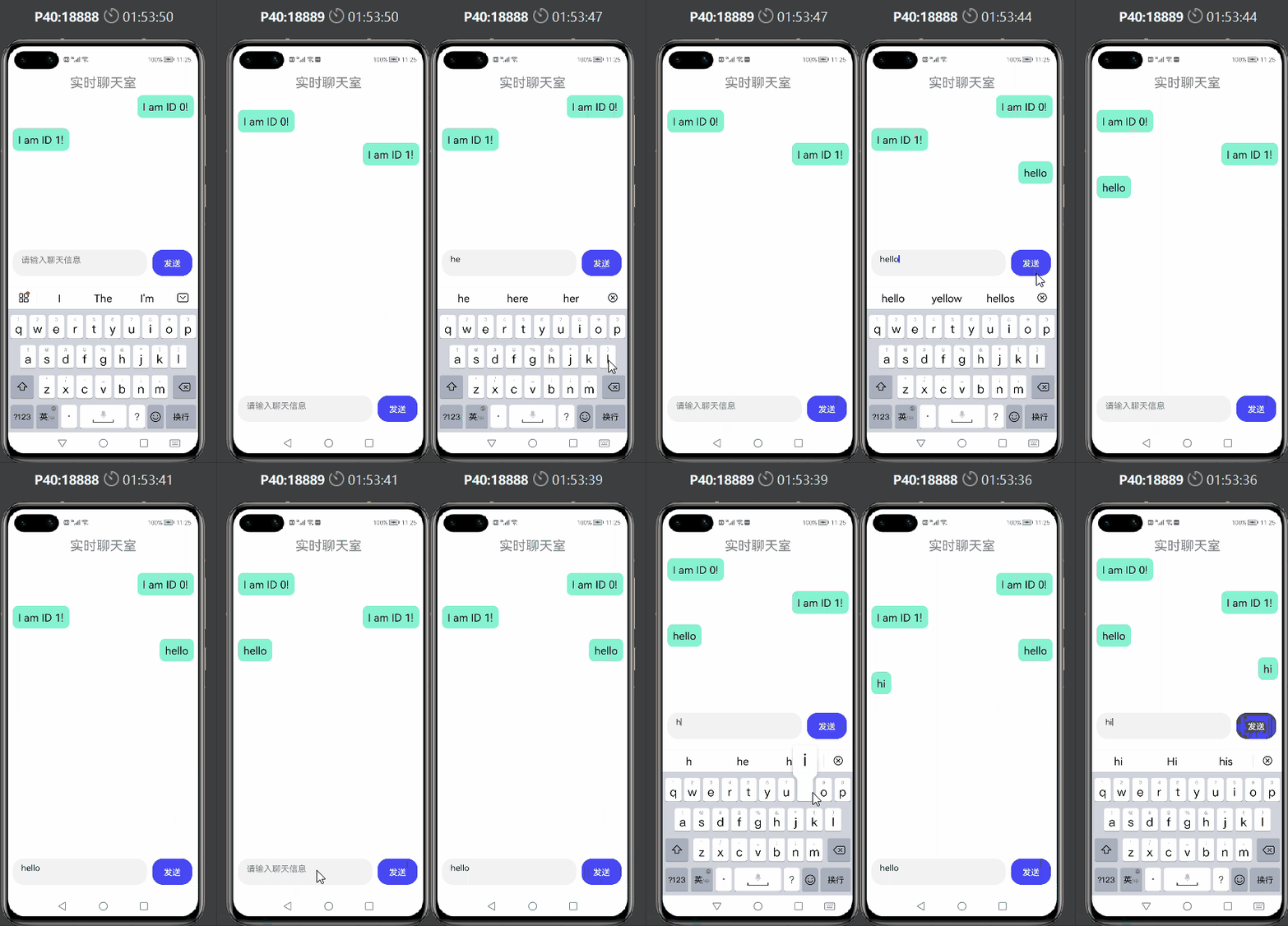
代码实现
可以看到官方文档的接口说明,我们只需要简单用到几个接口就可以实现我们的业务需求了。
https://developer.harmonyos.com/cn/docs/documentation/doc-guides/websocket-connection-0000001333321005

① 申请网络权限
在config.json文件里面注册网络权限,该权限允许程序打开网络套接字,进行网络连接。
"reqPermissions": [
  {
    "name": "ohos.permission.INTERNET"
  }
]
② 导入webSocket模块
import webSocket from '@ohos.net.webSocket';
③ 创建webSocket对象
接着我们调用createWebSocket()接口生成一个webSocket对象,并且保存起来。
let ws = webSocket.createWebSocket();
④ 连接webSocket通道
调用connect()接口进行连接。这里需要一个URL作为参数传入,在这个demo中,直接用了一个以前开发好的服务器接口进行调用,但是不对外开放,因此大家只需要将自己开发好的接口地址放到”wsURL“内即可。
    onInit() {

        let that = this;
        ws.connect("wsURL", (err, value) => {

            if (!err) {

                console.log("xxx---connect success");
            } else {

                console.log("xxx---connect fail, err:" + JSON.stringify(err));
            }
        });
    },
⑤ 订阅通道内消息更新
这里我们调用on( type:‘message’ )接口进行消息监听,这里要注意的是服务端传递过来的是字符串类型,所以如果消息是JSON对象,则需要用JSON.parse()进行解析,还原成JSON对象。
    onInit() {

        let that = this;
        ws.on('message', (err, value) => {

            console.log("xxx---on message, message:" + value);
            //传递的是序列化后的字符串,需要解序列化为JSON对象
            let dataObj = JSON.parse(value)
            console.log("xxx---parse success---postId: "+dataObj.postId+",message:"+dataObj.message)
            that.message.push(dataObj)
            console.log("xxx---check message: "+JSON.stringify(that.message))
        });
    },
⑥ 发送消息
紧接着调用send()接口进行消息的发送,这里注意,如果要传递的是JSON对象,要使用JSON.stringify()进行序列化操作, 保证我们传递的是流字符串的形式。
在该接口的回调中,我们也可以打印出来,看看消息是否发送成功。
   	sendMessage(){

        let that  = this;
        let data = {

            postId:that.id,
            message:that.sendMes
        }
        let dataStr = JSON.stringify(data)
        ws.send(dataStr, (err, value) => {

            if (!err) {

                console.log("xxx---send success");
            } else {

                console.log("xxx---send fail, err:" + JSON.stringify(err));
            }
        });
        that.message.push(data)
    },
⑦ 隐藏标题栏
细心的小伙伴就会发现,我的demo展示的黑色标题栏不见了,其实是可以隐藏掉的,只需要在config.json文件中module.abilities下添加几行代码即可。
"metaData":{

            "customizeData":[
              {

                "name": "hwc-theme",
                "value": "androidhwext:style/Theme.Emui.NoTitleBar",
                "extra":""
              }
            ]
          }
⑧ 样式设计
接着就是简单设计一下界面样式,把获取到的消息渲染出来就完成啦。
<div class="container">
    <div style="width: 100%;height: 8%;color: #ff86868a;font-size: 25px;justify-content: center;position: absolute;">
        <text style="top: 10px;">
            实时聊天室
        </text>
    </div>
    <list style="height: 80%;">
        <list-item for="{
     {message}}" class="{
     {$item.postId==id?'listItemRight':'listItemLeft'}}" >
            <div class="listItemDiv" >
                <text style="padding:5px;border-radius: 10px;font-size: 20px;margin: 5px;max-width: 70%;">
                    {
   {$item.message}}
                </text>
            </div>
        </list-item>
    </list>
    <div style="position: absolute;left:10px;bottom: 20px;">

        <textarea id="textarea" class="textarea" extend="true" placeholder="请输入聊天信息" onchange="inputChange" >
        </textarea>
        <button style="width: 75px;height: 50px;margin-left: 10px;background-color: #ff4848f5;" onclick="sendMessage">  发送 </button>
    </div>

</div>
.container {

    display: flex;
    flex-direction: column;
    justify-content: center;
    align-items: center;
    left: 0px;
    top: 0px;
    width: 100%;
    height: 100%;
}
.textarea {

    placeholder-color: gray;
    width: 70%;
}

.listItemDiv{

    background-color: #ff87f3d0;
    border-radius: 10px;

}

.listItemLeft{

    margin: 10px;
    width: 100%;
    justify-content: flex-start;
}
.listItemRight{

    margin: 10px;
    width: 100%;
    justify-content: flex-end;
}
边栏推荐
- Confusing defer, return, named return value, anonymous return value in golang
- Porting boa server on imx6ull
- Why does the metauniverse need NFT?
- C language - the difference between sizeof and strlen
- Meta tags let search engines search your website
- 「题解」火神之友
- Shanghai issued a document to support the entry of NFT cultural exchange: the trend of digital collections has arrived!
- In the next bull market, can platofarm, the leading project in the Web3 world, set foot on the top of the mountain
- Take out the string in brackets
- Is gamefi in decline or in the future?
猜你喜欢

Introduction to wechat authorized login third-party app applet method

Crypto giants all in metauniverse, and platofarm may break through

The beta version of move protocol is stable, and it is temporarily decided to expand the scale of the prize pool

Local warehouse associated with remote warehouse
![Typora prompt [this beta version of typora is expired, please download and install a new version]](/img/76/eb4ac7e717198a1bf613e8e71f9330.png)
Typora prompt [this beta version of typora is expired, please download and install a new version]

Learn the rxjs operator

Wargames NATAS (11-15) problem solving essay

MySQL日期格式化

Use the bark app to realize the process of pushing messages to mobile phones

Encryption market ushers in a new historical cycle. Look at jpex's "stability" and "health"
随机推荐
dba
Figure storage geabase
Ansible automatic operation and maintenance
[MySQL] 08: aggregate function
3587. Connected graph (Jilin University postgraduate entrance examination machine test question)
3587. 连通图(吉林大学考研机试题)
【一起上水硕系列】EE feedback 详解
Web3≠NFT? A digital Renaissance?
Sed add content after a line
[wechat applet development (III)] realize the stacking and sliding of cards
Look at the most influential infrastructure m-dao of Web3 through the current situation of Dao
「题解」蝙蝠侠的麻烦
You can't access this shared folder because your organization's security policies prevent unauthenticated guests from accessing it. These policies can help protect your computer from unsafe or malicio
G1 (garbage first) collector
In 2022, how to choose cross end technology solutions?
积分管理系统项目小结
Protocol buffer learning notes
Dynamic programming & backtracking various deformation problems
js获取当前浏览器的默认语言
Online lover