当前位置:网站首页>Vertex buffer and shader (the cherno + leranopongl) notes
Vertex buffer and shader (the cherno + leranopongl) notes
2022-07-24 07:43:00 【Liu jingyiru】
Catalog
Introduction of graphics rendering pipeline
1. The graphics rendering pipeline is mainly divided into two main parts , The first part is to put the 3D Coordinate conversion to 2D coordinate , The second part is to put 2D The coordinates are converted to pixels with actual colors . The general steps are : Vertex shader -> Primitive Assembly -> Geometry shaders -> Rasterize -> Fragment Shader ->Alpha Testing and mixing .
2. Graphics rendering pipelines are highly specialized , So most graphics cards can execute in parallel , And in the GPU Run your own applet for each render pipeline stage on , These applets are called shaders . And shaders can also use their own shaders (GLSL) Instead of default .
( One ) Vertex buffer
1. The concept and analysis of vertex buffer : Basically, remove vertex, It's just a memory buffer , An array of memory bytes , Literally, it is a block of memory used to store bytes .
Differentiation and analysis : But vertex buffer and C++ Memory buffers like character arrays in are different , It is OpenGL Memory buffer in , This means that it is actually in the video memory of the graphics card (Video RAM) On .
2. Conceptual understanding : So the basic idea here is that I want to define some data to represent triangles , I want to put it into the graphics card VRAM in , Then you need to send DrawCall Draw instructions . In fact, we also need to tell the graphics card how to read and interpret these data , And how to put it on our screen , Once we send DrawCall Draw instructions , You have to clarify the memory layout of the shader , How to display it and what the graphics card needs to do , Need to program the graphics card , It's a shader . Shaders are a bunch of code that we can write to run in a very special way on the graphics card .
3. Operation principle :“ Send data to the graphics card ---> Explain the data to the graphics card ---> Draw target steps ”. and OpenGL Like a state machine , We need to deal with a series of states rather than objects . This is it. OpenGL Rendering process .
4. Code practice :
Statement : Old edition OpenGL And new edition OpenGL There are implementation differences . For the new version VBO and VAO binding .
In addition, before generating the buffer object , Need to check glad Can I get the address , Otherwise, the buffer object cannot be generated .
if (!gladLoadGLLoader((GLADloadproc)glfwGetProcAddress))
{
std::cout << "Failed to initialize GLAD" << std::endl;
return -1;
}
// Old version processing : It's written in glad Version of OpenGL China is out of date , But in glew.h You can run under the weather .
//(glad.h yes glew.h Evolution version )
unsigned int buffer;
glGenBuffer(1,&buffer);
glBindBuffer(GL_VERTEX_BUFFER,buffer);
glBufferData(GL_ARRAY_BUFFER,6*sizeof(float),positions,GL_STATIC_DRAW);

glEnableVertexAttribArray(0);
glVertexAttribPointer(0,2,GL_FLOAT,GL_FALSE,sizeof(float)*2,0);

glBindBuffer(GL_ARRAY_BUFFER,0);
Create a vertex buffer :
unsigned int buffer;
glGenBuffers(1,&buffer);

// The first parameter :  Specify that several declared buffers need to be generated
// The second parameter :  Specify the memory address that returns an integer
// effect :  Generate buffer id, It is an integer in representation , But it refers to the actual object .
// When you want to use this object, you can use this number to call .
however , We want to render triangles , It needs to be explained that the buffer is used to render triangles , Pass this integer .
glBindBuffer(GL_ARRAY_BUFFER,buffer);
The next step is to specify the data . A simple way is to fill in vertex data directly when declaring data
float positions[6]={
      -0.5f,-0.5f,
      0.0f ,0.5f,
      0.5f,-0.5f
};

glBufferData(GL_ARRAY_BUFFER,6*sizeof(float),positions,GL_STATIC_DRAW);

// Then we usually need to create an index buffer , No index buffer can be called glDrawArrays() To draw the specified element

glDrawArrays(GL_TRIANGLE,0,3);
This choice is similar to PS, Select the layer , Select the brush , Only this layer is affected .OpenGL It's the same thing , Before using it, you need to select or bind Necessary things , This is how it works , It is a context sensitive state machine .
Finally remember to call glEnableVertexAttribArray(), Enable glVertexAttribPointer();
glEnableVertexAttribArray(0);
glVertexAttribPointer(0,2,GL_FLOAT,GL_FALSE,sizeof(float)*2,0);
// effect : These two pieces of code tell OpenGL What is the buffer layout , Theoretically, you can see triangles on the screen with a shader .
( Two )VAO/VBO/IBO
1. Several concepts introduced by the new version of vertex buffer
Vertex array object Vertex Array Object ,VAO
Vertex buffer object Vertex Buffer Object ,VBO 【 It is equivalent to the vertex buffer of the old version 】
Element buffer object Element Buffer Object ,EBO/ Or index buffer object Index Buffer Object,IBO
Reading reflection :
stay LearnOpenGl The tutorial , mention OpenGL The core model of requirement We use VAO. This sentence means must . Read... Carefully , Even a tone may affect your grasp of the conditions of use .
In addition, pay attention to accurate understanding The term . For example, when it comes to “ object " when , We can refer to C++ Understand the concepts of objects and attributes .
Qualitative understanding . Vertex buffer object . The vertex is the data to be input , An object is an integration of States . The key word here is ” buffer “, So that means , This is a piece of memory . This refers to the memory of the object , Not memory objects .
2. Analysis of old and new versions
// Old version processing : It's written in glad Version of OpenGL China is out of date . But in glew.h You can run under the weather .(glad.h yes glew.h Evolution version )

//0. Generate a specified number of buffer objects
unsigned int buffer;
glGenBuffer(1,&buffer);

//1. Copy the array of pairs of vertices into the buffer for OpenGL Use
glBindBuffer(GL_VERTEX_BUFFER,buffer);
glBufferData(GL_ARRAY_BUFFER,6*sizeof(float),positions,GL_STATIC_DRAW);

//2. Set vertex property pointer
glVertexAttribPointer(0,2,GL_FLOAT,GL_FALSE,sizeof(float)*2,0);
glEnableVertexAttribArray(0);

//3. But when we render an object, we need to use shader program
glUseProgram(shaderProgram);

//4. Draw objects
glUseProgram(shaderProgram);

// Unbundling : End the life cycle of an object
glBindVertexArray(0);
analysis : Through the old version of the vertex array processing , We can observe that when we draw an object, we have to repeat this process , But if there are more than five vertex attributes , Hundreds of objects . Bind the correct buffer object , Configuring all vertex attributes for each object quickly becomes a hassle . This is the disadvantage of process oriented programming .
3. summary
// How to handle the new version

//   Initialization code ( Only run once  ( Unless your objects change frequently ))
// 1.  binding VAO
glBindVertexArray(VAO);

// 2.  Copy the vertex array to the buffer for OpenGL Use
glBindBuffer(GL_ARRAY_BUFFER, VBO);
glBufferData(GL_ARRAY_BUFFER, sizeof(vertices), vertices, GL_STATIC_DRAW);

// 3.  Set vertex property pointer
glVertexAttribPointer(0, 3, GL_FLOAT, GL_FALSE, 3 * sizeof(float), (void*)0);
glEnableVertexAttribArray(0);

[...]

//  Draw code ( In the rendering loop )
// 4.  Draw objects
glUseProgram(shaderProgram);
glBindVertexArray(VAO);
someOpenGLFunctionThatDrawsOurTriangle();
(1) VAO Design idea Similar to the concept of object-oriented classes . We use a vertex array object to integrate any number of attributes . When configuring vertex attribute pointers , You only need to execute those calls once , Then when drawing objects, you only need to bind the corresponding VA0 That's it .
(2) VBO But I want to use VAO, We also need to bind the corresponding VBO To show that this is the memory of that object .VBO Like we call a function , It will occupy a virtual space on the stack ,( Memory ) It will be released as the life cycle of the object ends ( It can be understood as failure ) therefore VBO And VAO Have life cycle .
(3) VAO + VBO= One that stores our vertex attribute configuration and what should be used VBO Vertex array object .
4. Configure vertex attribute pointer
// Set vertex property pointer , Set location properties
	glVertexAttribPointer(0, 3, GL_FLOAT, GL_FALSE, 6 * sizeof(float), (void*)0);
	glEnableVertexAttribArray(0);
	// Set color properties
	glVertexAttribPointer(1, 3, GL_FLOAT, GL_FALSE, 6 * sizeof(float), (void*)(3 * sizeof(float)));
	glEnableVertexAttribArray(1);
    ........ We can also configure texture and other attributes next
notes :
1.glVertexAttribPointer Function is used to configure vertex attributes .
The meanings of the parameters are ,1 The starting position of the vertex position ,2 In groups of several ,3 data type ,4 Whether standardization is needed ,5 step ( In bytes ), Offset pointer ( Bytes are units ))
2.glEnableVertexAttribArray() The vertex shader used to activate the corresponding attribute
( 3、 ... and ) Shaders
1. Concept : Shader is a program code that runs on a graphics card . Code form : Written as text or string .
Compile the way : Send to GPU Compile link to run .
CPU And GPU With :GPU Processing graphics is much faster , So use the ability of the graphics card to draw graphics on the screen .
and CPU There are also good parts , We can send the result data to the graphics card while still CPU Upper processing .
2. type : For most graphic programming : Focus on two shaders , Vertex shaders and clip shaders .
(1) Vertex shader : It will be called by every vertex rendered , It mainly tells the graphics card where we plan this vertex in the screen space . And the window is basically composed of pixels , The specified vertex needs to be filled with actual pixels , Outline the outline of the figure .
(2) Fragment Shader : Vertex shader ends running , Enter the clip shader pipeline . The fragment shader is called once for each pixel that needs to be filled , It mainly determines the color of pixels . It is equivalent to coloring the outline .
contrast : Vertex shaders and fragment shaders are similar in nature , But the cost of using fragment shaders is higher .
Because vertex shaders send data in batches at one time , But the fragment shader is run for each pixel , The latter is more expensive . also , Vertex shading input information , Fragment shaders require compositing information , The amount of information calculated is different . However Some things have to be calculated in pixels , Such as light source . Receiving light source , Environmental Science , texture , Provide the influence of surface material and other factors , The color value of each pixel is different . And after these inputs , The decision in the clip shader is just the color of a single pixel .
3. Code practice
There are three main tasks to be completed , Create shader binding to program , Compile shader source code as program , Call shader .
How to manage shader file ? First, classify the code files with different functions to facilitate our management . So we will shader The source code of is placed separately .shader In file , among vertex shader and fragment shader The file can be divided into two , It can also be written as . But if in the future, for example, a vertex shader needs to be matched with multiple fragment shaders , It will still be divided into multiple files according to functions .
in addition ,shader After being independently documented , You need to establish links by reading files .
//shader  Source code
#shader vertex
#version 330 core

layout(location = 0) in vec4 position;

void main()
{
    gl_Position = position;
};

#shader fragment
#version 330 core

layout(location = 0) out vec4 color;

void main()
{
    color = vec4(1.0, 0.0, 0.0, 1.0);
};
And then we need to use parse Line by line parsing shader, Resolved to #shader Just judge what type it is shader, Then fill in string stream in .
struct ShaderProgramSource
{
	std::string VertexSource;
	std::string FragmentSource;
};

static ShaderProgramSource ParseShader(const std::string& filepath)
{
	std::ifstream stream(filepath);  // From hard disk to memory
	enum class ShaderType
	{
		NONE=-1,VERTEX=0,FRAGMENT=1
	};
	std::stringstream ss[2];
	ShaderType type=ShaderType::NONE;
	std::string line;
	while (getline(stream, line))
	{
		if (line.find("#shader") != std::string::npos)
		{
			if (line.find("vertex") != std::string::npos)
				type = ShaderType::VERTEX;
			else  if (line.find("fragment") != std::string::npos)
				type = ShaderType::FRAGMENT;
		}
		else
		{
			ss[(int)type] << line << "\n";
		}
	}
	return { ss[0].str(),ss[1].str() };
}
4. Above, we have completed the generation of shaders , compile , Read . Next, call the shader program . Then we need to create a buffer , Generate a specified number of buffer objects ; Bind buffer ; Copy the data in memory to GPU In the video memory of ; Activate shader ; Specify the memory layout of the shader according to the attributes ; analysis shader Source code ; establish shader Program ; Activate program .
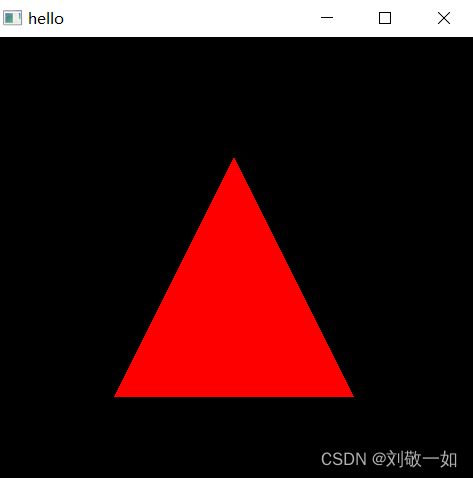
Complete code
#include"glad/glad.h"
#include"GLFW/glfw3.h"
#include<iostream>
#include<fstream>
#include<sstream>

struct ShaderProgramSource
{
	std::string VertexSource;
	std::string FragmentSource;
};

static ShaderProgramSource ParseShader(const std::string& filepath)
{
	std::ifstream stream(filepath);  // From hard disk to memory
	enum class ShaderType
	{
		NONE=-1,VERTEX=0,FRAGMENT=1
	};
	std::stringstream ss[2];
	ShaderType type=ShaderType::NONE;
	std::string line;
	while (getline(stream, line))
	{
		if (line.find("#shader") != std::string::npos)
		{
			if (line.find("vertex") != std::string::npos)
				type = ShaderType::VERTEX;
			else  if (line.find("fragment") != std::string::npos)
				type = ShaderType::FRAGMENT;
		}
		else
		{
			ss[(int)type] << line << "\n";
		}
	}
	return { ss[0].str(),ss[1].str() };
}
static unsigned int CompileShader(unsigned int type, const std::string& source)
{
	unsigned int id = glCreateShader(type);
	const char* src = source.c_str();
	glShaderSource(id, 1, &src, nullptr);
	glCompileShader(id);
	//to do error handing
	int result;
	glGetShaderiv(id, GL_COMPILE_STATUS, &result);
	if (result == GL_FALSE)
	{
		int length;
		glGetShaderiv(id, GL_INFO_LOG_LENGTH, &length);
		char* message = (char*)alloca(length * sizeof(char));//C function , Allocate... On the stack

		glGetShaderInfoLog(id, length, &length, message);
		std::cout << "Failed to compile " << (type == GL_VERTEX_SHADER ? "vertex" : "fragment")
			<< " shader" << std::endl;

		std::cout << message << std::endl;
		glDeleteShader(id);
		return 0;
	}
	return id;
}

static unsigned int CreateShader(const std::string& vertexShader, const std::string& fragmentShader)
{
	unsigned int program = glCreateProgram();
	unsigned int vs = CompileShader(GL_VERTEX_SHADER, vertexShader);
	unsigned int fs = CompileShader(GL_FRAGMENT_SHADER, fragmentShader);
	glAttachShader(program, vs);
	glAttachShader(program, fs);
	glLinkProgram(program);
	glValidateProgram(program);
	glDeleteShader(vs);
	glDeleteShader(fs);
    return program;
}
 int main(void)
{
	GLFWwindow* window;
	glfwInit();
	if (!glfwInit()) return -1;
	glfwWindowHint(GLFW_CONTEXT_VERSION_MAJOR, 3);
	glfwWindowHint(GLFW_CONTEXT_VERSION_MINOR, 3);
	glfwWindowHint(GLFW_OPENGL_PROFILE, GLFW_OPENGL_CORE_PROFILE);

	window = glfwCreateWindow(480, 480, "hello", NULL, NULL);
	if (!window)
	{
		std::cout << "error" << std::endl;
		glfwTerminate();
		return -1;
	}
	glfwMakeContextCurrent(window);

	if (!gladLoadGLLoader((GLADloadproc)glfwGetProcAddress))
	{
		std::cout << "Failed to initialize GLAD" << std::endl;
		return -1;
	}

	float positions[6] = {
		-0.5f,-0.5f,
		 0.0f, 0.5f,
		 0.5f, -0.5f
	};
	unsigned int VBO, VAO;
	glGenVertexArrays(1, &VAO);
	glGenBuffers(1, &VBO);

	glBindVertexArray(VAO);
	glBindBuffer(GL_ARRAY_BUFFER, VBO);

	glBufferData(GL_ARRAY_BUFFER, 6* sizeof(float) , positions, GL_STATIC_DRAW);

	glVertexAttribPointer(0,2,GL_FLOAT,GL_FALSE,8,(const void*)0);
	glEnableVertexAttribArray(0);

	ShaderProgramSource source = ParseShader("res/shaders/Basic.shader");
	unsigned int shader = CreateShader(source.VertexSource,source.FragmentSource);
	glUseProgram(shader);

	while (!glfwWindowShouldClose(window))
	{
		glClear(GL_COLOR_BUFFER_BIT);

		glDrawArrays(GL_TRIANGLES, 0, 3);

		glfwSwapBuffers(window);
		glfwPollEvents();
	}
	glDeleteVertexArrays(1, &VAO);
	glDeleteBuffers(1, &VBO);
	glDeleteProgram(shader);
	glfwTerminate();
	return 0;
} 
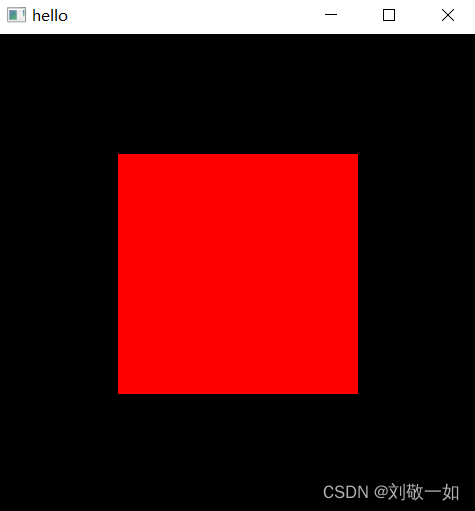
( Four ) Index buffer
(1) background
The lines , Review the process of drawing a triangle , How can we draw a quadrilateral ? From one angle We can think that all polygons are composed of triangles , Then we can draw several triangles in different positions in the same way to splice our target polygon . But once the model becomes complex , There will be many repeated vertices , This approach is completely unrealistic .
Another angle , according to “ link ” Think about it , We should outline the vertex shader pipeline , Then color the clip shader pipe . Obviously, the first angle does not meet OpenGL Design concept of .
The purpose of vertex buffer is not to provide redundant or repeated vertex positions .
(2) Concept :
Delete any duplicate vertices , You get a completely unique vertex in the vertex buffer , Then create an index to paint vertices more than once , And then we use IBO The binding code sends the index buffer to the graphics card ; Finally we use glDrawElement() Drawing graphics .
(3) Code implementation :
	unsigned int IBO;
	glGenBuffers(1, &IBO);
	glBindBuffer(GL_ELEMENT_ARRAY_BUFFER, IBO);
	glBufferData(GL_ELEMENT_ARRAY_BUFFER, 6 * sizeof(unsigned int), indicesGL_STATIC_DRAW);


    //rendering
    glDrawElements(GL_TRIANGLES,6,GL_UNSIGNED_INT,nullptr);
Draw the complete code of rectangle :
//main.cpp
#include"glad/glad.h"
#include"GLFW/glfw3.h"
#include<iostream>
#include<fstream>
#include<sstream>

struct ShaderProgramSource
{
	std::string VertexSource;
	std::string FragmentSource;
};

static ShaderProgramSource ParseShader(const std::string& filepath)
{
	std::ifstream stream(filepath);  // From hard disk to memory
	enum class ShaderType
	{
		NONE=-1,VERTEX=0,FRAGMENT=1
	};
	std::stringstream ss[2];
	ShaderType type=ShaderType::NONE;
	std::string line;
	while (getline(stream, line))
	{
		if (line.find("#shader") != std::string::npos)
		{
			if (line.find("vertex") != std::string::npos)
				type = ShaderType::VERTEX;
			else  if (line.find("fragment") != std::string::npos)
				type = ShaderType::FRAGMENT;
		}
		else
		{
			ss[(int)type] << line << "\n";
		}
	}
	return { ss[0].str(),ss[1].str() };
}
static unsigned int CompileShader(unsigned int type, const std::string& source)
{
	unsigned int id = glCreateShader(type);
	const char* src = source.c_str();
	glShaderSource(id, 1, &src, nullptr);
	glCompileShader(id);
	//to do error handing
	int result;
	glGetShaderiv(id, GL_COMPILE_STATUS, &result);
	if (result == GL_FALSE)
	{
		int length;
		glGetShaderiv(id, GL_INFO_LOG_LENGTH, &length);
		char* message = (char*)alloca(length * sizeof(char));//C function , Allocate... On the stack

		glGetShaderInfoLog(id, length, &length, message);
		std::cout << "Failed to compile " << (type == GL_VERTEX_SHADER ? "vertex" : "fragment")
			<< " shader" << std::endl;

		std::cout << message << std::endl;
		glDeleteShader(id);
		return 0;
	}
	return id;
}

static unsigned int CreateShader(const std::string& vertexShader, const std::string& fragmentShader)
{
	unsigned int program = glCreateProgram();
	unsigned int vs = CompileShader(GL_VERTEX_SHADER, vertexShader);
	unsigned int fs = CompileShader(GL_FRAGMENT_SHADER, fragmentShader);
	glAttachShader(program, vs);
	glAttachShader(program, fs);
	glLinkProgram(program);
	glValidateProgram(program);
	glDeleteShader(vs);
	glDeleteShader(fs);
    return program;
}
 int main(void)
{
	GLFWwindow* window;
	glfwInit();
	if (!glfwInit()) return -1;
	glfwWindowHint(GLFW_CONTEXT_VERSION_MAJOR, 3);
	glfwWindowHint(GLFW_CONTEXT_VERSION_MINOR, 3);
	glfwWindowHint(GLFW_OPENGL_PROFILE, GLFW_OPENGL_CORE_PROFILE);

	window = glfwCreateWindow(480, 480, "hello", NULL, NULL);
	if (!window)
	{
		std::cout << "error" << std::endl;
		glfwTerminate();
		return -1;
	}
	glfwMakeContextCurrent(window);

	if (!gladLoadGLLoader((GLADloadproc)glfwGetProcAddress))
	{
		std::cout << "Failed to initialize GLAD" << std::endl;
		return -1;
	}


	// Vertex Attribute

	float positions[] = {
		-0.5f,-0.5f,
		 0.5, -0.5f,
		 0.5f, 0.5f,
		 -0.5f,0.5f
	};
	unsigned int indices[] =
	{
		0,1,2,
		2,3,0
	};

	unsigned int VAO,VBO;
	glGenVertexArrays(1, &VAO);
	glBindVertexArray(VAO);

	glGenBuffers(1, &VBO);
	glBindBuffer(GL_ARRAY_BUFFER, VBO);
	glBufferData(GL_ARRAY_BUFFER, 6 * 2 * sizeof(float), positions, GL_STATIC_DRAW);


	glEnableVertexAttribArray(0);
	glVertexAttribPointer(0,2,GL_FLOAT,GL_FALSE,8,(const void*)0);


	unsigned int IBO;
	glGenBuffers(1, &IBO);
	glBindBuffer(GL_ELEMENT_ARRAY_BUFFER, IBO);
	glBufferData(GL_ELEMENT_ARRAY_BUFFER, 6 * sizeof(unsigned int), indices, GL_STATIC_DRAW);

	ShaderProgramSource source = ParseShader("res/shaders/Basic.shader");
	unsigned int shader = CreateShader(source.VertexSource,source.FragmentSource);
	glUseProgram(shader);

	while (!glfwWindowShouldClose(window))
	{
		glClear(GL_COLOR_BUFFER_BIT);
		glPolygonMode(GL_FRONT_AND_BACK, GL_LINE);// Wireframe mode
		glDrawElements(GL_TRIANGLES, 6, GL_UNSIGNED_INT, nullptr);

		glfwSwapBuffers(window);
		glfwPollEvents();
	}

	glDeleteProgram(shader);
	glfwTerminate();
	return 0;
} 边栏推荐
- Advanced part of C language VI. file operation
- PHP link log scheme
- AMD64 (x86_64) architecture ABI document: upper
- Mutual implementation of stack and queue (c)
- 【Pytorch】nn.Module
- XSS漏洞学习
- About the solution of thinking that you download torch as a GPU version, but the result is really a CPU version
- China trichlorosilane Market Forecast and Strategic Research Report (2022 Edition)
- App performance test case
- Automatic test and manual test
猜你喜欢

Deep analysis of data storage in memory

Introduction to C language III Array 4. Operators

【Pytorch】conv2d torchvision.transforms

Anaconda install pytorch

C language advanced part III. string functions and memory operation functions

About using the alignment function of VMD

AMD64 (x86_64) architecture ABI document: upper

Postman extracts the token parameter value in the response header and sets it as an environment variable, with code attached

Mutual implementation of stack and queue (c)
![[sklearn] RF cross validation out of bag data parameter learning curve grid search](/img/1f/936e4fe42ed97de2c3caa3f025744d.png)
[sklearn] RF cross validation out of bag data parameter learning curve grid search
随机推荐
Selenium basics controls the scroll bar of the browser
Introduction to C language v First understanding pointer VI. first understanding structure
Fopen, fwrite, fseek, fTell, FREAD use demo
Cloud version upgrade
[leetcode simple] 20. Valid brackets stack
23.组件自定义事件
Log in to the server using the fortress machine (springboard machine)
FlinkSQL-UDF自定义数据源
The difference between get and post
Selenium basic knowledge multi window processing
Deep analysis of data storage in memory
Advanced part of C language VI. file operation
Vulnhub DC1
C language to achieve mine sweeping game
剑指offer专项突击版第8天
Use JMeter to analyze and test the lottery probability of the lottery interface
23. Component customization events
Sense dimension design responsive layout
Selenium basic knowledge debugging method
Good programmers and bad programmers