当前位置:网站首页>Deploy kubersphere in kubernetes
Deploy kubersphere in kubernetes
2022-06-23 07:40:00 【Jianghu predestined relationship】
Active address : Graduation season · The technique of attack er
stay kubernetes Deployment in China kubersphere
- One 、 Check local kubernetes Environmental Science
- Two 、 install nfs
- 3、 ... and 、 Configure default storage
- Four 、 install metrics-server Components
- 5、 ... and 、 install KubeSphere
- 6、 ... and 、 visit kubersphere Of web
- 7、 ... and 、 matters needing attention
One 、 Check local kubernetes Environmental Science
[[email protected]-master ~]# kubectl get nodes -owide
NAME         STATUS   ROLES                  AGE   VERSION   INTERNAL-IP     EXTERNAL-IP   OS-IMAGE                KERNEL-VERSION          CONTAINER-RUNTIME
k8s-master   Ready    control-plane,master   16h   v1.23.1   192.168.3.201   <none>        CentOS Linux 7 (Core)   3.10.0-957.el7.x86_64   containerd://1.6.6
k8s-node01   Ready    <none>                 16h   v1.23.1   192.168.3.202   <none>        CentOS Linux 7 (Core)   3.10.0-957.el7.x86_64   containerd://1.6.6
k8s-node02   Ready    <none>                 16h   v1.23.1   192.168.3.203   <none>        CentOS Linux 7 (Core)   3.10.0-957.el7.x86_64   containerd://1.6.6
Two 、 install nfs
1. install nfs package
yum install -y nfs-utils
2. Create shared directory
mkdir -p /nfs/data
3. Configure shared directory
echo "/nfs/data/ *(insecure,rw,sync,no_root_squash)" > /etc/exports
4. Start related services
systemctl enable rpcbind
systemctl enable nfs-server
systemctl start rpcbind
5. Make configuration effective
exportfs -r
6. see nfs
[[email protected]-master nfs]# exportfs
/nfs/data     	<world>
7. Two slave nodes are attached nfs
① Check from node nfs
[[email protected]-node01 ~]# showmount -e 192.168.3.201
Export list for 192.168.3.201:
/nfs/data *
② Create mount directory
mkdir -p /nfs/data
③ mount nfs
mount 192.168.3.201:/nfs/data /nfs/data
④ Check nfs Mounting situation
[[email protected]-node01 ~]# df -hT |grep nfs
192.168.3.201:/nfs/data nfs4       18G   12G  6.3G  65% /nfs/data
8.showmount Command error troubleshooting
service rpcbind stop
service nfs stop
service rpcbind start
service nfs start
3、 ... and 、 Configure default storage
1. edit sc.yaml file
[[email protected]-master kubersphere]# cat sc.yaml
apiVersion: storage.k8s.io/v1
kind: StorageClass
metadata:
 name: nfs-storage
 annotations:
   storageclass.kubernetes.io/is-default-class: "true"
provisioner: k8s-sigs.io/nfs-subdir-external-provisioner
parameters:
 archiveOnDelete: "true"  ##  Delete pv When ,pv Do you want to back up your content

---
apiVersion: apps/v1
kind: Deployment
metadata:
 name: nfs-client-provisioner
 labels:
   app: nfs-client-provisioner
 # replace with namespace where provisioner is deployed
 namespace: default
spec:
 replicas: 1
 strategy:
   type: Recreate
 selector:
   matchLabels:
     app: nfs-client-provisioner
 template:
   metadata:
     labels:
       app: nfs-client-provisioner
   spec:
     serviceAccountName: nfs-client-provisioner
     containers:
       - name: nfs-client-provisioner
         image: registry.cn-hangzhou.aliyuncs.com/lfy_k8s_images/nfs-subdir-external-provisioner:v4.0.2
         # resources:
         # limits:
         # cpu: 10m
         # requests:
         # cpu: 10m
         volumeMounts:
           - name: nfs-client-root
             mountPath: /persistentvolumes
         env:
           - name: PROVISIONER_NAME
             value: k8s-sigs.io/nfs-subdir-external-provisioner
           - name: NFS_SERVER
             value: 192.168.3.201 ##  Specify yourself nfs Server address
           - name: NFS_PATH
             value: /nfs/data  ## nfs Server shared directory
     volumes:
       - name: nfs-client-root
         nfs:
           server: 192.168.3.201
           path: /nfs/data
---
apiVersion: v1
kind: ServiceAccount
metadata:
 name: nfs-client-provisioner
 # replace with namespace where provisioner is deployed
 namespace: default
---
kind: ClusterRole
apiVersion: rbac.authorization.k8s.io/v1
metadata:
 name: nfs-client-provisioner-runner
rules:
 - apiGroups: [""]
   resources: ["nodes"]
   verbs: ["get", "list", "watch"]
 - apiGroups: [""]
   resources: ["persistentvolumes"]
   verbs: ["get", "list", "watch", "create", "delete"]
 - apiGroups: [""]
   resources: ["persistentvolumeclaims"]
   verbs: ["get", "list", "watch", "update"]
 - apiGroups: ["storage.k8s.io"]
   resources: ["storageclasses"]
   verbs: ["get", "list", "watch"]
 - apiGroups: [""]
   resources: ["events"]
   verbs: ["create", "update", "patch"]
---
kind: ClusterRoleBinding
apiVersion: rbac.authorization.k8s.io/v1
metadata:
 name: run-nfs-client-provisioner
subjects:
 - kind: ServiceAccount
   name: nfs-client-provisioner
   # replace with namespace where provisioner is deployed
   namespace: default
roleRef:
 kind: ClusterRole
 name: nfs-client-provisioner-runner
 apiGroup: rbac.authorization.k8s.io
---
kind: Role
apiVersion: rbac.authorization.k8s.io/v1
metadata:
 name: leader-locking-nfs-client-provisioner
 # replace with namespace where provisioner is deployed
 namespace: default
rules:
 - apiGroups: [""]
   resources: ["endpoints"]
   verbs: ["get", "list", "watch", "create", "update", "patch"]
---
kind: RoleBinding
apiVersion: rbac.authorization.k8s.io/v1
metadata:
 name: leader-locking-nfs-client-provisioner
 # replace with namespace where provisioner is deployed
 namespace: default
subjects:
 - kind: ServiceAccount
   name: nfs-client-provisioner
   # replace with namespace where provisioner is deployed
   namespace: default
roleRef:
 kind: Role
 name: leader-locking-nfs-client-provisioner
 apiGroup: rbac.authorization.k8s.io
2. application sc.yaml
[[email protected]-master kubersphere]# kubectl apply -f sc.yaml
storageclass.storage.k8s.io/nfs-storage created
deployment.apps/nfs-client-provisioner created
serviceaccount/nfs-client-provisioner created
clusterrole.rbac.authorization.k8s.io/nfs-client-provisioner-runner created
clusterrolebinding.rbac.authorization.k8s.io/run-nfs-client-provisioner created
role.rbac.authorization.k8s.io/leader-locking-nfs-client-provisioner created
rolebinding.rbac.authorization.k8s.io/leader-locking-nfs-client-provisioner created
3. see sc
[[email protected]-master kubersphere]# kubectl get sc
NAME                    PROVISIONER                                   RECLAIMPOLICY   VOLUMEBINDINGMODE   ALLOWVOLUMEEXPANSION   AGE
nfs-storage (default)   k8s-sigs.io/nfs-subdir-external-provisioner   Delete          Immediate           false                  43s
4. Test installation pv
① To write pv.yaml
[[email protected]-master kubersphere]# cat pv.ymal
kind: PersistentVolumeClaim
apiVersion: v1
metadata:
 name: nginx-pvc
spec:
 accessModes:
   - ReadWriteMany
 resources:
   requests:
     storage: 200Mi
② function pv
[[email protected]-master kubersphere]# kubectl apply -f pv.ymal
persistentvolumeclaim/nginx-pvc created
③ see pvc and pv
[[email protected]-master kubersphere]# kubectl get pv
NAME                                       CAPACITY   ACCESS MODES   RECLAIM POLICY   STATUS   CLAIM               STORAGECLASS   REASON   AGE
pvc-92610d7d-9d70-4a57-bddb-7fffab9a5ee4   200Mi      RWX            Delete           Bound    default/nginx-pvc   nfs-storage             73s
[[email protected]-master kubersphere]# kubectl get pvc
NAME        STATUS   VOLUME                                     CAPACITY   ACCESS MODES   STORAGECLASS   AGE
nginx-pvc   Bound    pvc-92610d7d-9d70-4a57-bddb-7fffab9a5ee4   200Mi      RWX            nfs-storage    78s
Four 、 install metrics-server Components
1. edit metrics.yaml file
apiVersion: v1
kind: ServiceAccount
metadata:
  labels:
    k8s-app: metrics-server
  name: metrics-server
  namespace: kube-system
---
apiVersion: rbac.authorization.k8s.io/v1
kind: ClusterRole
metadata:
  labels:
    k8s-app: metrics-server
    rbac.authorization.k8s.io/aggregate-to-admin: "true"
    rbac.authorization.k8s.io/aggregate-to-edit: "true"
    rbac.authorization.k8s.io/aggregate-to-view: "true"
  name: system:aggregated-metrics-reader
rules:
- apiGroups:
  - metrics.k8s.io
  resources:
  - pods
  - nodes
  verbs:
  - get
  - list
  - watch
---
apiVersion: rbac.authorization.k8s.io/v1
kind: ClusterRole
metadata:
  labels:
    k8s-app: metrics-server
  name: system:metrics-server
rules:
- apiGroups:
  - ""
  resources:
  - pods
  - nodes
  - nodes/stats
  - namespaces
  - configmaps
  verbs:
  - get
  - list
  - watch
---
apiVersion: rbac.authorization.k8s.io/v1
kind: RoleBinding
metadata:
  labels:
    k8s-app: metrics-server
  name: metrics-server-auth-reader
  namespace: kube-system
roleRef:
  apiGroup: rbac.authorization.k8s.io
  kind: Role
  name: extension-apiserver-authentication-reader
subjects:
- kind: ServiceAccount
  name: metrics-server
  namespace: kube-system
---
apiVersion: rbac.authorization.k8s.io/v1
kind: ClusterRoleBinding
metadata:
  labels:
    k8s-app: metrics-server
  name: metrics-server:system:auth-delegator
roleRef:
  apiGroup: rbac.authorization.k8s.io
  kind: ClusterRole
  name: system:auth-delegator
subjects:
- kind: ServiceAccount
  name: metrics-server
  namespace: kube-system
---
apiVersion: rbac.authorization.k8s.io/v1
kind: ClusterRoleBinding
metadata:
  labels:
    k8s-app: metrics-server
  name: system:metrics-server
roleRef:
  apiGroup: rbac.authorization.k8s.io
  kind: ClusterRole
  name: system:metrics-server
subjects:
- kind: ServiceAccount
  name: metrics-server
  namespace: kube-system
---
apiVersion: v1
kind: Service
metadata:
  labels:
    k8s-app: metrics-server
  name: metrics-server
  namespace: kube-system
spec:
  ports:
  - name: https
    port: 443
    protocol: TCP
    targetPort: https
  selector:
    k8s-app: metrics-server
---
apiVersion: apps/v1
kind: Deployment
metadata:
  labels:
    k8s-app: metrics-server
  name: metrics-server
  namespace: kube-system
spec:
  selector:
    matchLabels:
      k8s-app: metrics-server
  strategy:
    rollingUpdate:
      maxUnavailable: 0
  template:
    metadata:
      name: metrics-server
      labels:
        k8s-app: metrics-server
    spec:
      containers:
      - args:
        - --cert-dir=/tmp
        - --secure-port=4443
        - --kubelet-preferred-address-types=InternalIP,ExternalIP,Hostname
        - --kubelet-use-node-status-port
        #  skip TLS Certificate validation
        - --kubelet-insecure-tls
        image: jjzz/metrics-server:v0.4.1
        imagePullPolicy: IfNotPresent
        livenessProbe:
          failureThreshold: 3
          httpGet:
            path: /livez
            port: https
            scheme: HTTPS
          periodSeconds: 10
        name: metrics-server
        ports:
        - containerPort: 4443
          name: https
          protocol: TCP
        readinessProbe:
          failureThreshold: 3
          httpGet:
            path: /readyz
            port: https
            scheme: HTTPS
          periodSeconds: 10
        securityContext:
          readOnlyRootFilesystem: true
          runAsNonRoot: true
          runAsUser: 1000
        volumeMounts:
        - mountPath: /tmp
          name: tmp-dir
      nodeSelector:
        kubernetes.io/os: linux
      priorityClassName: system-cluster-critical
      serviceAccountName: metrics-server
      volumes:
      - emptyDir: {
    }
        name: tmp-dir
---
apiVersion: apiregistration.k8s.io/v1
kind: APIService
metadata:
  labels:
    k8s-app: metrics-server
  name: v1beta1.metrics.k8s.io
spec:
  group: metrics.k8s.io
  groupPriorityMinimum: 100
  insecureSkipTLSVerify: true
  service:
    name: metrics-server
    namespace: kube-system
  version: v1beta1
  versionPriority: 100
2. application metrics.ymal file
[[email protected]-master kubersphere]# kubectl apply -f metrics.yaml
serviceaccount/metrics-server created
clusterrole.rbac.authorization.k8s.io/system:aggregated-metrics-reader created
clusterrole.rbac.authorization.k8s.io/system:metrics-server created
rolebinding.rbac.authorization.k8s.io/metrics-server-auth-reader created
clusterrolebinding.rbac.authorization.k8s.io/metrics-server:system:auth-delegator created
clusterrolebinding.rbac.authorization.k8s.io/system:metrics-server created
service/metrics-server created
deployment.apps/metrics-server created
apiservice.apiregistration.k8s.io/v1beta1.metrics.k8s.io created
3. View post installation pod
[[email protected]-master kubersphere]# kubectl get pod -A |grep metric
kube-system   metrics-server-6988f7c646-rt6bz           1/1     Running   0              86s
4. Check the effect after installation
[[email protected]-master kubersphere]# kubectl top nodes
NAME         CPU(cores)   CPU%   MEMORY(bytes)   MEMORY%
k8s-master   221m         5%     1360Mi          17%
k8s-node01   72m          1%     767Mi           9%
k8s-node02   66m          1%     778Mi           9%
5、 ... and 、 install KubeSphere
1. download kubesphere Components
wget https://github.com/kubesphere/ks-installer/releases/download/v3.2.1/kubesphere-installer.yaml

wget https://github.com/kubesphere/ks-installer/releases/download/v3.2.1/cluster-configuration.yaml
2. Execution and installation —— Minimize installation
[[email protected]-master kubersphere]# kubectl top nodes^C
[[email protected]-master kubersphere]# kubectl apply -f kubesphere-installer.yaml
customresourcedefinition.apiextensions.k8s.io/clusterconfigurations.installer.kubesphere.io created
namespace/kubesphere-system created
serviceaccount/ks-installer created
clusterrole.rbac.authorization.k8s.io/ks-installer created
clusterrolebinding.rbac.authorization.k8s.io/ks-installer created
deployment.apps/ks-installer created
[[email protected]-master kubersphere]# kubectl apply -f cluster-configuration.yaml
clusterconfiguration.installer.kubesphere.io/ks-installer created
3. see pod
[[email protected]-master kubersphere]# kubectl get pods -A |grep ks
kubesphere-system   ks-installer-5cd4648bcb-vxrqf             1/1     Running   0             37s
5. Check the installation progress
kubectl logs -n kubesphere-system $(kubectl get pod -n kubesphere-system -l app=ks-install -o jsonpath=‘{.items[0].metadata.name}’) -f
**************************************************
Collecting installation results ...
#####################################################
###              Welcome to KubeSphere!           ###
#####################################################

Console: http://192.168.3.201:30880
Account: admin
Password: [email protected]88w0rd

NOTES:
  1. After you log into the console, please check the
     monitoring status of service components in
     "Cluster Management". If any service is not
     ready, please wait patiently until all components
     are up and running.
  2. Please change the default password after login.

#####################################################
https://kubesphere.io 2022-06-22 22:48:32
#####################################################
6. Check all pod
[[email protected]-master ~]# kubectl get pods -A
NAMESPACE                      NAME                                               READY   STATUS    RESTARTS        AGE
default                        nfs-client-provisioner-779b7f4dfd-nj2fg            1/1     Running   0               9m41s
kube-system                    calico-kube-controllers-6b77fff45-xvnzm            1/1     Running   2 (37m ago)     46h
kube-system                    calico-node-dq9nr                                  1/1     Running   1 (37m ago)     46h
kube-system                    calico-node-fkzh9                                  1/1     Running   2 (37m ago)     46h
kube-system                    calico-node-frd8m                                  1/1     Running   1 (37m ago)     46h
kube-system                    coredns-6d8c4cb4d-f9c28                            1/1     Running   2 (37m ago)     47h
kube-system                    coredns-6d8c4cb4d-xb2qf                            1/1     Running   2 (37m ago)     47h
kube-system                    etcd-k8s-master                                    1/1     Running   2 (37m ago)     47h
kube-system                    kube-apiserver-k8s-master                          1/1     Running   2 (37m ago)     47h
kube-system                    kube-controller-manager-k8s-master                 1/1     Running   2 (37m ago)     47h
kube-system                    kube-proxy-9nkbf                                   1/1     Running   1 (37m ago)     46h
kube-system                    kube-proxy-9wxvr                                   1/1     Running   2 (37m ago)     47h
kube-system                    kube-proxy-nswwv                                   1/1     Running   1 (37m ago)     46h
kube-system                    kube-scheduler-k8s-master                          1/1     Running   2 (37m ago)     47h
kube-system                    metrics-server-6988f7c646-2lxn4                    1/1     Running   0               8m51s
kube-system                    snapshot-controller-0                              1/1     Running   0               6m38s
kubesphere-controls-system     default-http-backend-696d6bf54f-mhdwh              1/1     Running   0               5m42s
kubesphere-controls-system     kubectl-admin-b49cf5585-lg4gw                      1/1     Running   0               2m41s
kubesphere-monitoring-system   alertmanager-main-0                                2/2     Running   0               4m6s
kubesphere-monitoring-system   alertmanager-main-1                                2/2     Running   0               4m5s
kubesphere-monitoring-system   alertmanager-main-2                                2/2     Running   0               4m4s
kubesphere-monitoring-system   kube-state-metrics-796b885647-xhx9t                3/3     Running   0               4m13s
kubesphere-monitoring-system   node-exporter-hlp9k                                2/2     Running   0               4m16s
kubesphere-monitoring-system   node-exporter-w4rg6                                2/2     Running   0               4m16s
kubesphere-monitoring-system   node-exporter-wpqdj                                2/2     Running   0               4m17s
kubesphere-monitoring-system   notification-manager-deployment-7dd45b5b7d-qnd46   2/2     Running   0               74s
kubesphere-monitoring-system   notification-manager-deployment-7dd45b5b7d-w82nf   2/2     Running   0               73s
kubesphere-monitoring-system   notification-manager-operator-8598775b-wgnfg       2/2     Running   0               3m48s
kubesphere-monitoring-system   prometheus-k8s-0                                   2/2     Running   1 (3m11s ago)   4m9s
kubesphere-monitoring-system   prometheus-k8s-1                                   2/2     Running   1 (3m32s ago)   4m8s
kubesphere-monitoring-system   prometheus-operator-756fbd6cb-68pzs                2/2     Running   0               4m18s
kubesphere-system              ks-apiserver-6649dd8546-cklcr                      1/1     Running   0               3m25s
kubesphere-system              ks-console-75b6799bf9-t8t99                        1/1     Running   0               5m42s
kubesphere-system              ks-controller-manager-65b94b5779-7j7cb             1/1     Running   0               3m25s
kubesphere-system              ks-installer-5cd4648bcb-vxrqf                      1/1     Running   0               7m42s
[[email protected]-master ~]#
7. modify cluster-configuration.yaml file ( Optional installation components )
① Turn on etcd monitor
  local_registry: ""        # Add your private registry address if it is needed.
  etcd:
    monitoring: true       # Enable or disable etcd monitoring dashboard installation. You have to create a Secret for etcd before you enable it.
    endpointIps: 192.168.3.201  # etcd cluster EndpointIps. It can be a bunch of IPs here.
    port: 2379              # etcd port.
    tlsEnable: true
② Turn on redis
The following false Change it to true
 etcd:
    monitoring: true       # Enable or disable etcd monitoring dashboard installation. You have to create a Secret for etcd before you enable it.
    endpointIps: 192.168.3.201  # etcd cluster EndpointIps. It can be a bunch of IPs here.
    port: 2379              # etcd port.
    tlsEnable: true
  common:
    redis:
      enabled: true
    openldap:
      enabled: true
③ Turn on the system alarm 、 Audit 、devops、 event 、 Log function
The following false Change it to true
  alerting:                # (CPU: 0.1 Core, Memory: 100 MiB) It enables users to customize alerting policies to send messages to receivers in time with different time intervals and alerting levels to choose from.
    enabled: true         # Enable or disable the KubeSphere Alerting System.
    # thanosruler:
    # replicas: 1
    # resources: {
      }
  auditing:                # Provide a security-relevant chronological set of records,recording the sequence of activities happening on the platform, initiated by different tenants.
    enabled: true         # Enable or disable the KubeSphere Auditing Log System.
  devops:                  # (CPU: 0.47 Core, Memory: 8.6 G) Provide an out-of-the-box CI/CD system based on Jenkins, and automated workflow tools including Source-to-Image & Binary-to-Image.
    enabled: true             # Enable or disable the KubeSphere DevOps System.
    jenkinsMemoryLim: 2Gi      # Jenkins memory limit.
    jenkinsMemoryReq: 1500Mi   # Jenkins memory request.
    jenkinsVolumeSize: 8Gi     # Jenkins volume size.
    jenkinsJavaOpts_Xms: 512m  # The following three fields are JVM parameters.
    jenkinsJavaOpts_Xmx: 512m
    jenkinsJavaOpts_MaxRAM: 2g
  events:                  # Provide a graphical web console for Kubernetes Events exporting, filtering and alerting in multi-tenant Kubernetes clusters.
    enabled: true         # Enable or disable the KubeSphere Events System.
    ruler:
      enabled: true
      replicas: 2
  logging:                 # (CPU: 57 m, Memory: 2.76 G) Flexible logging functions are provided for log query, collection and management in a unified console. Additional log collectors can be added, such as Elasticsearch, Kafka and Fluentd.
    enabled: true
④ Open the network 、 Appoint calico、 Open store 、 open servicemesh、kubeedge
  network:
    networkpolicy: # Network policies allow network isolation within the same cluster, which means firewalls can be set up between certain instances (Pods).
      # Make sure that the CNI network plugin used by the cluster supports NetworkPolicy. There are a number of CNI network plugins that support NetworkPolicy, including Calico, Cilium, Kube-router, Romana and Weave Net.
      enabled: true  # Enable or disable network policies.
    ippool: # Use Pod IP Pools to manage the Pod network address space. Pods to be created can be assigned IP addresses from a Pod IP Pool.
      type: calico # Specify "calico" for this field if Calico is used as your CNI plugin. "none" means that Pod IP Pools are disabled.
    topology: # Use Service Topology to view Service-to-Service communication based on Weave Scope.
      type: none # Specify "weave-scope" for this field to enable Service Topology. "none" means that Service Topology is disabled.
  openpitrix: # An App Store that is accessible to all platform tenants. You can use it to manage apps across their entire lifecycle.
    store:
      enabled: true # Enable or disable the KubeSphere App Store.
  servicemesh:         # (0.3 Core, 300 MiB) Provide fine-grained traffic management, observability and tracing, and visualized traffic topology.
    enabled: true     # Base component (pilot). Enable or disable KubeSphere Service Mesh (Istio-based).
  kubeedge:          # Add edge nodes to your cluster and deploy workloads on edge nodes.
    enabled: true   # Enable or disable KubeEdge.
6、 ... and 、 visit kubersphere Of web
1.web Address
Console: http://192.168.3.201:30880
Account: admin
Password: [email protected]
2. Sign in web
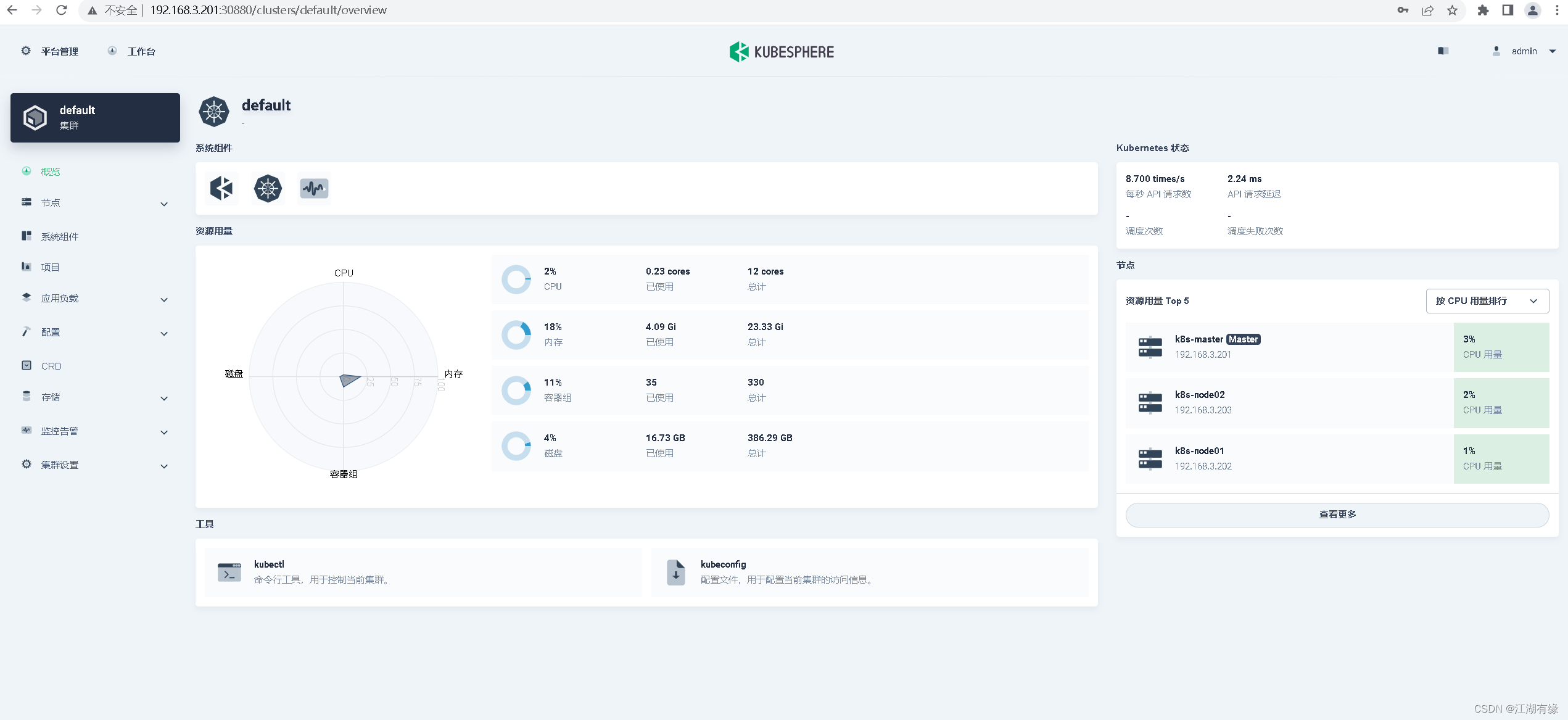
7、 ... and 、 matters needing attention
1. solve etcd The monitoring certificate cannot find the problem
kubectl -n kubesphere-monitoring-system create secret generic kube-etcd-client-certs --from-file=etcd-client-ca.crt=/etc/kubernetes/pki/etcd/ca.crt --from-file=etcd-client.crt=/etc/kubernetes/pki/apiserver-etcd-client.crt --from-file=etcd-client.key=/etc/kubernetes/pki/apiserver-etcd-client.key
2. Cluster card slow crash problem
Because there are many components , When all components are installed , It is better to give sufficient resources , Suggest :
master——4 nucleus 8G And above
node node ——8 nucleus 16G And above
3. eliminate kubersphere Environmental Science
Official uninstall script
https://github.com/kubesphere/ks-installer/blob/release-3.1/scripts/kubesphere-delete.sh
Active address : Graduation season · The technique of attack er
边栏推荐
猜你喜欢

一篇文章学会er图绘制

30 sets of report templates necessary for the workplace, meeting 95% of the report needs, and no code is required for one click application

Tp6+redis+think-queue+supervisor implements the process resident message queue /job task

MySQL (11) - sorting out MySQL interview questions

Data types in tensorflow

CIRIUM(睿思誉)逐渐成为航空公司二氧化碳排放报告的标准

【博弈论】基础知识

这道字符串反转的题目,你能想到更好的方法吗?

【PyQt5系列】修改计数器实现控制

SimpleDateFormat 线程安全问题
随机推荐
【markdown】markdown 教程大归纳
电脑如何安装MySQL?
左乘右乘矩阵问题
How flannel works
Design of temperature detection and alarm system based on 51 single chip microcomputer
The Sandbox 与《足球小将》达成合作,将流行的足球漫画及动画带入元宇宙
G++ compilation command use
Chain tour airship development farmers' world chain tour development land chain tour development
Nacos适配oracle11g-建表ddl语句
【AI实战】xgb.XGBRegressor之多回归MultiOutputRegressor调参1
g++编译命令使用
HCIP之路第八次实验
Nacos adapts to oracle11g- modify the source code of Nacos
[pit stepping record] a pit where the database connection is not closed and resources are released
To conquer salt fields and vegetable fields with AI, scientific and technological innovation should also step on the "field"
Abnormal logic reasoning problem of Huawei software test written test
[AI practice] xgb Xgbregression multioutputregressor parameter 2 (GPU training model)
【AI实战】机器学习数据处理之数据归一化、标准化
Data types in tensorflow
What is the experience of being a data product manager in the financial industry