当前位置:网站首页>SkiaSharp 之 WPF 自绘时钟(案例版)
SkiaSharp 之 WPF 自绘时钟(案例版)
2022-07-13 16:56:00 【蓝创精英团队】
SkiaSharp是一个跨平台2D图形API,用于.NET平台,基于Google’s Skia Graphics库(skia.org网站). 它提供了一个全面的2D API,可以跨移动、服务器和桌面模型来渲染图像。该图形库可实现获取指定坐标像素值、绘制2d图形、绘制文字(必须有相应字库支持)、创建缩略图等,微软是大力支持的。
可见此地址:
https://docs.microsoft.com/zh-cn/dotnet/api/skiasharp
首先是想熟悉下SkiaSharp的操作,另外呢,想基于SkiaSharp来做跨平台的UI渲染器,一直没有动手,在搜集资料,现在基本搜集的差不多了,所以,就找点例子,学学,也挺有趣的。
一个时钟的效果
大概是以下的样子,也挺简单的,就是对度数是要计算的,用到的方法,也就画圆和画路径以及画文本几个方法。

然后,根据时间,自动转动时钟的指针。
自从毕业后,就没有做过这样的案例了。但是,上手了,感觉还是很欣喜的。
Wpf 和 SkiaSharp
新建一个WPF项目,然后,Nuget包即可
Install-Package SkiaSharp.Views.WPF -Version 2.88.0
其中核心逻辑是这部分,会以我设置的60FPS来刷新当前的画板。
skContainer.PaintSurface += SkContainer_PaintSurface;
_ = Task.Run(() =>
{

    while (true)
    {

        try
        {

            Dispatcher.Invoke(() =>
            {

                skContainer.InvalidateVisual();
            });
            _ = SpinWait.SpinUntil(() => false, 1000 / 60);//每秒60帧
        }
        catch
        {

            break;
        }
    }
});
时钟逻辑
    /// <summary>
    /// 一个简单版的时钟
    /// </summary>
    public class DrawClock
    {

        public SKPoint centerPoint;
        public int Radius = 0;
        public int HAND_TRUNCATION;
        public int HOUR_HAND_TRUNCATION;
        public int HAND_RADIUS;
        public int TIPS;
        /// <summary>
        /// 渲染
        /// </summary>
        public void Render(SKCanvas canvas, SKTypeface Font, int Width, int Height)
        {

            centerPoint = new SKPoint(Width / 2, Height / 2);
            this.Radius = (int)(centerPoint.Y - 50);
            HAND_TRUNCATION = Width / 25;
            HOUR_HAND_TRUNCATION = Width / 10;
            HAND_RADIUS = this.Radius + 15;
            TIPS = this.Radius - 40;

            canvas.Clear(SKColors.SkyBlue);
            DrawCircle(canvas, Font);
            DrawCenter(canvas, Font);
            DrawHands(canvas, Font);
            DrawTimeNumber(canvas, Font);
            DrawTips(canvas, Font);


            using var paint = new SKPaint
            {

                Color = SKColors.Black,
                IsAntialias = true,
                Typeface = Font,
                TextSize = 20
            };
            using var paint2 = new SKPaint
            {

                Color = SKColors.Blue,
                IsAntialias = true,
                Typeface = Font,
                TextSize = 24
            };
            string msg = $"{
      DateTime.Now:yyyy-MM-dd HH:mm:ss:fff:ffffff}";
            string tishi = " WPF SkiaSharp 自绘时钟 基础代码";
            string by = $"by 蓝创精英团队";

            canvas.DrawText(msg, 0, 30, paint);
            canvas.DrawText(tishi, 450, 30, paint);
            canvas.DrawText(by, 600, 400, paint2);
        }
        /// <summary>
        /// 画一个圆
        /// </summary>
        public void DrawCircle(SKCanvas canvas, SKTypeface Font)
        {

            using var paint = new SKPaint
            {

                Color = SKColors.Black,
                Style = SKPaintStyle.Stroke,
                IsAntialias = true,
                StrokeWidth = 2
            };
            canvas.DrawCircle(centerPoint.X, centerPoint.Y, Radius, paint);
        }
        /// <summary>
        /// 时钟的核心
        /// </summary>
        public void DrawCenter(SKCanvas canvas, SKTypeface Font)
        {

            using var paint = new SKPaint
            {

                Color = SKColors.Black,
                Style = SKPaintStyle.Fill,
                IsAntialias = true,
                StrokeWidth = 2
            };
            canvas.DrawCircle(centerPoint.X, centerPoint.Y, 5, paint);
        }

        private void DrawHand(SKCanvas canvas, SKTypeface Font, int times, bool isHour = false)
        {

            var angle = Math.PI * 2 * (times / (double)60) - Math.PI / 2;
            var handRadius = isHour ? this.Radius - HAND_TRUNCATION - HOUR_HAND_TRUNCATION : this.Radius - HAND_TRUNCATION;
            using var paint = new SKPaint
            {

                Color = (DateTimeOffset.Now.Second % 4 <= 1) ? SKColors.Red : SKColors.Green,
                Style = SKPaintStyle.Fill,
                StrokeWidth = 2,
                IsStroke = true,
                StrokeCap = SKStrokeCap.Round,
                IsAntialias = true
            };
            var path = new SKPath();
            path.MoveTo(centerPoint);
            path.LineTo((float)(centerPoint.X + Math.Cos(angle) * handRadius), (float)(centerPoint.Y + Math.Sin(angle) * handRadius));
            path.Close();
            canvas.DrawPath(path, paint);
        }
        /// <summary>
        /// 画时针
        /// </summary>
        public void DrawHands(SKCanvas canvas, SKTypeface Font)
        {

            var time = DateTime.Now;
            var hour = time.Hour > 12 ? time.Hour - 12 : time.Hour;
            DrawHand(canvas, Font, hour * 5 + time.Minute / 60 * 5, true);
            DrawHand(canvas, Font, time.Minute, false);
            DrawHand(canvas, Font, time.Second, false);
        }
        /// <summary>
        /// 画时间点
        /// </summary>
        public void DrawTimeNumber(SKCanvas canvas, SKTypeface Font)
        {

            using var paint = new SKPaint
            {

                Color = SKColors.Black,
                IsAntialias = true,
                Typeface = Font,
                TextSize = 24
            };
            for (int i = 1; i <= 12; i++)
            {

                var angle = Math.PI / 6 * (i - 3);
                var number = i.ToString();
                var numberTextWidth = paint.MeasureText(number);
                canvas.DrawText(number, (float)(centerPoint.X + Math.Cos(angle) * HAND_RADIUS - numberTextWidth / 2), (float)(centerPoint.Y + Math.Sin(angle) * HAND_RADIUS + 24 / 3), paint);
            }
        }
        /// <summary>
        /// 画提示信息
        /// </summary>
        public void DrawTips(SKCanvas canvas, SKTypeface Font)
        {

            using var paint = new SKPaint
            {

                Color = SKColors.Black,
                IsAntialias = true,
                Typeface = Font,
                TextSize = 20
            };
            var now = DateTime.Now;
            //年月日
            var Date = $"{
      now.Year}/{
      now.Month}/{
      now.Day}";
            var DateTextWidth = paint.MeasureText(Date);
            var angle = Math.PI / 6 * (6 - 3);
            canvas.DrawText(Date, (float)(centerPoint.X + Math.Cos(angle) * TIPS - DateTextWidth / 2), (float)(centerPoint.Y + Math.Sin(angle) * TIPS), paint);
            //PM AM
            var amOrPm = now.Hour > 12 ? "PM" : "AM";
            var amOrPmTextWidth = paint.MeasureText(amOrPm);
            var angle2 = Math.PI / 6 * (12 - 3);
            canvas.DrawText(amOrPm, (float)(centerPoint.X + Math.Cos(angle2) * TIPS - amOrPmTextWidth / 2), (float)(centerPoint.Y + Math.Sin(angle2) * TIPS), paint);
        }
    }
运行结果
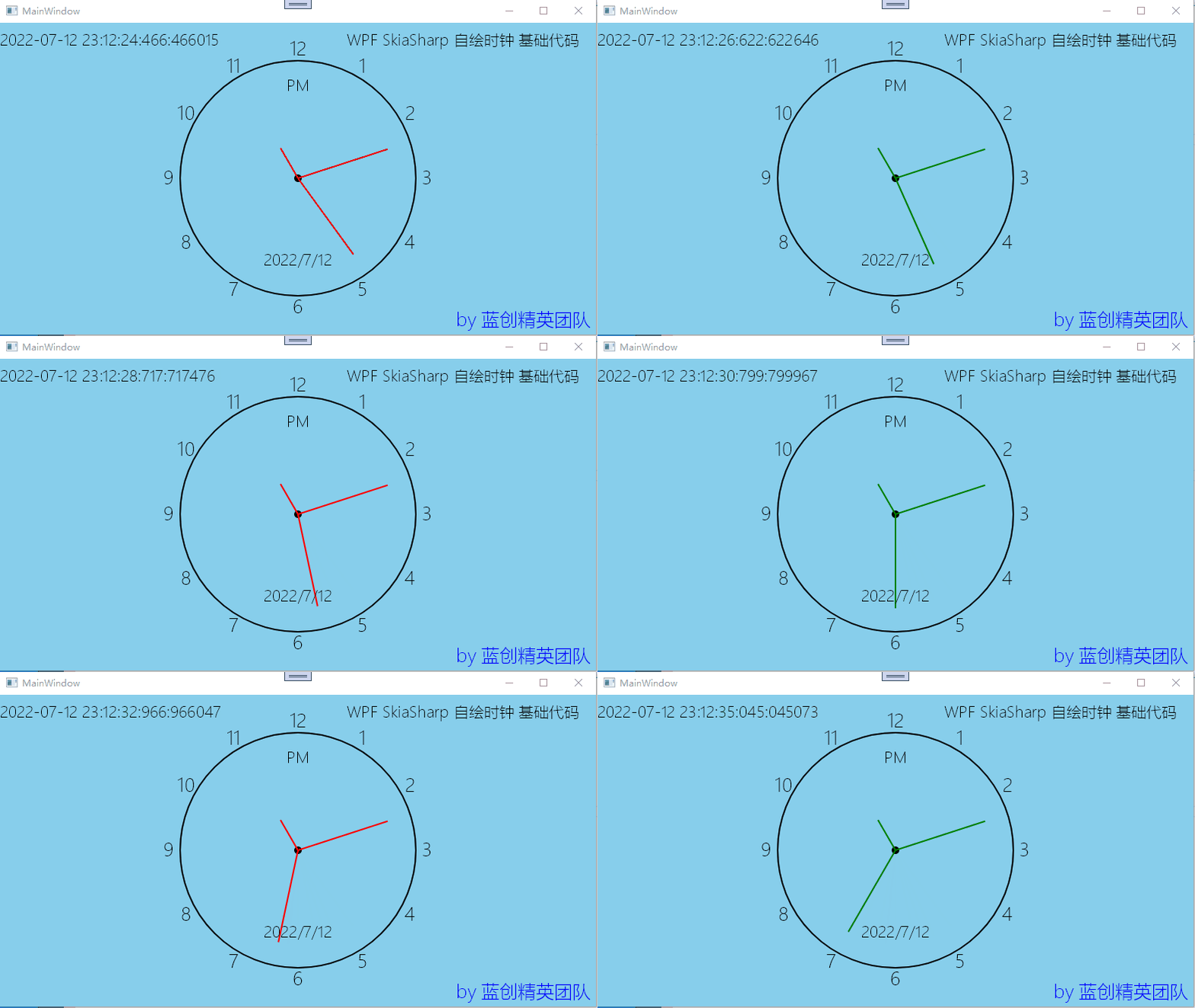
总结
这个录的GIF播放效果真不错,基本体现出来了效果。
也算是入门了,后期,可以基于SkiaSharp,做更多的案例,出来,当然,还是基于自绘的实现。
代码地址
https://github.com/kesshei/WPFSkiaClockDemo.git
https://gitee.com/kesshei/WPFSkiaClockDemo.git
阅
一键三连呦!,感谢大佬的支持,您的支持就是我的动力!
边栏推荐
- DCL单例模式
- 数据仓库体系之贴源层、历史层
- Random类生成随机数详解
- File vulnerability exploitation posture after vulnerability [network security]
- DCC888 :Instruction Level Parallelism
- Young people begin to "rectify" assassins in shopping malls
- 深入分析 LD_PRELOAD
- The color emission point of JS event occurs
- 任务管理器显示不全怎么办?
- [Beijing Forestry University] information sharing of the first and second postgraduate examinations
猜你喜欢


随机推荐
Don't you know the process yet? Just this one!
1309. Decode letter to integer mapping
Qucs preliminary use guide (not Multism)
"Double first-class" xiong'an campus of China University of Geosciences (Beijing), put into use in 2025
从矩阵中查找数字是否存在
深入分析 LD_PRELOAD
Three meanings of stack
Xilinx Vitis
(PC+WAP)织梦模板智能家居生活类网站
新书上市 | C 语言经典教材配套“习题解答”,原书累计印数 10 万 +
一个整数队列的偶数放在前面,奇数放后面且偶数奇数的相对位置不变
In depth analysis of LD_ PRELOAD
AVL tree
Qt Designer设置背景以及背景图片
电脑桌面图标有小黄锁怎么办?
织梦内容图片添加A链接新窗口打开
QT designer sets the background and background picture
gcc __ attribute__ Keyword example visibility
【一知半解】AQS
DCC888 :Instruction Level Parallelism