当前位置:网站首页>三层架构实验
三层架构实验
2022-06-23 03:54:00 【空丶白灬】


网络部署思路:
1、设计拓扑一ip地址规划
2、实施一拓扑搭建
3、配置
0)交换部分的配置-VLAN STP channel
1)底层一所有节点配置合法ip地址
2)路由
3)策略
4)测试
5)排错
4维护
5升级
一、eth-trunk
[sw3]int Eth-Trunk 0
[sw3-Eth-Trunk0]int g0/0/4
[sw3-GigabitEthernet0/0/4]eth-trunk 0
[sw3-Eth-Trunk0]int g0/0/5
[sw3-GigabitEthernet0/0/5]eth-trunk 0
sw4同理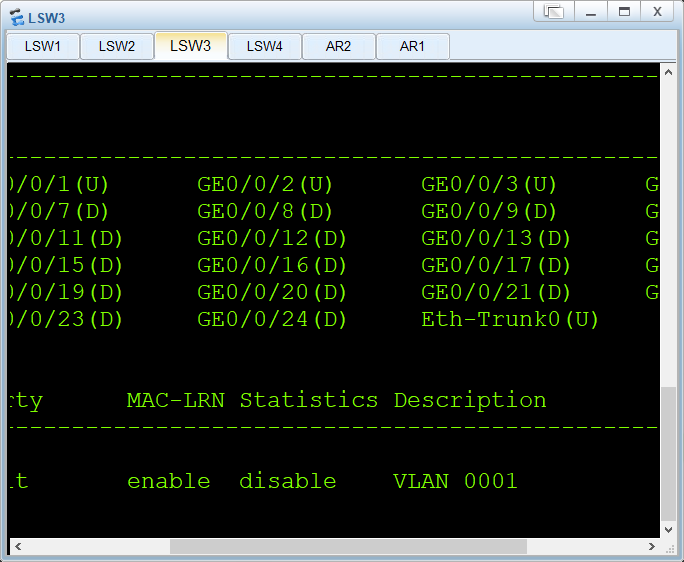
二、trunk
[sw3]port-group group-member g0/0/2 to g0/0/3 Eth-Trunk 0
[sw3-port-group]port l t
[sw3-GigabitEthernet0/0/2]port l t
[sw3-GigabitEthernet0/0/3]port l t
[sw3-Eth-Trunk0]port l t
[sw3-port-group]port trunk a
[sw3-port-group]port trunk allow-pass vlan 2
[sw3-GigabitEthernet0/0/2]port trunk allow-pass vlan 2
[sw3-GigabitEthernet0/0/3]port trunk allow-pass vlan 2
[sw3-Eth-Trunk0]port trunk allow-pass vlan 2
[sw4]port-group group-member g0/0/2 to g0/0/3 Eth-Trunk 0
[sw4-port-group]p l t
[sw4-port-group]p l t
[sw4-GigabitEthernet0/0/2]p l t
[sw4-GigabitEthernet0/0/3]p l t
[sw4-Eth-Trunk0]p l t
[sw4-port-group]p t a vlan 2
[sw4-GigabitEthernet0/0/2]p t a vlan 2
[sw4-GigabitEthernet0/0/3]p t a vlan 2
[sw4-Eth-Trunk0]p t a vlan 2
[sw1]port-group group-member g0/0/1 to g0/0/2
[sw1-port-group]p l t
[sw1-GigabitEthernet0/0/1]p l t
[sw1-GigabitEthernet0/0/2]p l t
[sw1-port-group]p t a
Jul 22 2021 14:47:42-08:00 sw1 DS/4/DATASYNC_CFGCHANGE:OID 1.3.6.1.4.1.2011.5.25
.191.3.1 configurations have been changed. The current change number is 7, the c
hange loop count is 0, and the maximum number of records is 4095.v
[sw1-port-group]p t a vlan 2
[sw1-port-group]p t a vlan 2
[sw1-GigabitEthernet0/0/1]p t a vlan 2
[sw1-GigabitEthernet0/0/2]p t a vlan 2
[sw2]port-group group-member g0/0/1 to g0/0/2
[sw2-port-group]p l t
[sw2-GigabitEthernet0/0/1]p l t
[sw2-GigabitEthernet0/0/2]p l t
[sw2-port-group]p t a vlan 2
[sw2-GigabitEthernet0/0/1]p t a vlan 2
[sw2-GigabitEthernet0/0/2]p t a vlan 2
[sw2-port-group]
[sw2-port-group]qu
三、创建vlan
[sw4]vlan 2
其他同理
[sw1]int e0/0/2
[sw1-Ethernet0/0/2]p l a
[sw1-Ethernet0/0/2]p d vlan 2
[sw2]int e0/0/2
[sw2-Ethernet0/0/2]p l a
[sw2-Ethernet0/0/2]p d vlan 2
[sw2-Ethernet0/0/2]p d vlan 2
四、STP
[sw3]stp mode ms
[sw3]stp mode mstp
[sw3] User interface con0 is available
Please Press ENTER.
[sw3]stp mode mstp
[sw3]stp enable
[sw3]stp region-configuration
[sw3-mst-region]region-name a
[sw3-mst-region]instance 1 vlan 1
[sw3-mst-region]instance 2 vlan 2
[sw3-mst-region]active region-configuration
其他同理
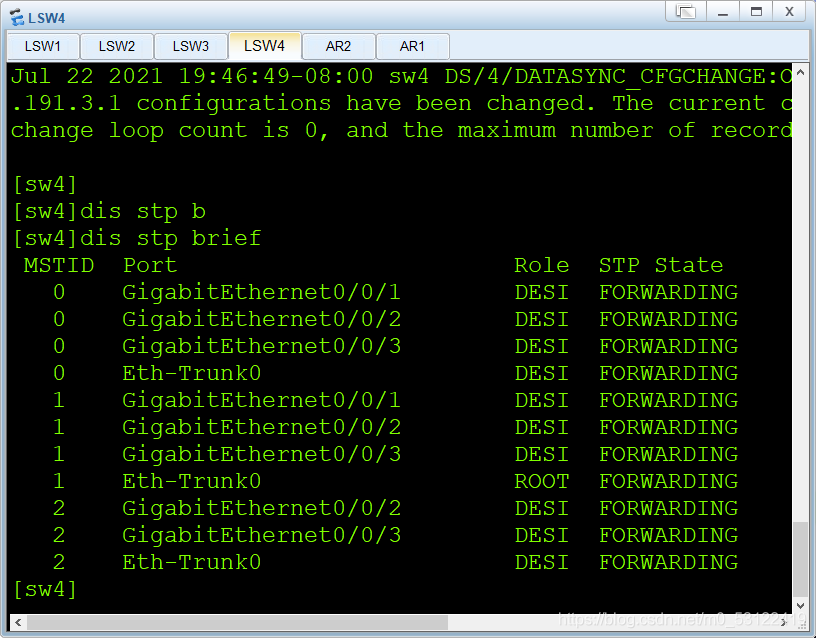
根节点为SW4
让sw3做组一的主根 组二的备份 sw4相反
[sw3]stp instance 1 root primary
[sw3]stp instance 2 root secondary
[sw4]stp instance 1 root secondary
[sw4]stp instance 2 root primary
调节二层交换机边缘接口
[sw1]port-group group-member e0/0/1 to e0/0/2
[sw1-port-group]stp enable
[sw1-Ethernet0/0/1]stp enable
[sw1-Ethernet0/0/2]stp enable
[sw1-port-group]stp enable
[sw1-port-group]stp edged-port enable
[sw1-Ethernet0/0/1]stp edged-port enable
[sw1-Ethernet0/0/2]stp edged-port enable
五、配置SVI
[sw4]int vlan 1
[sw4-Vlanif1]ip add 172.16.1.2 25
[sw4-Vlanif1]int vlan 2
[sw4-Vlanif2]ip add 172.16.1.130 25
[sw3]int vlan 1
[sw3-Vlanif1]ip add 172.16.1.1 25
[sw3]int vlan 2
[sw3-Vlanif2]ip add 172.1.1.129 25
六、配置VRRP
[sw3-Vlanif1]vrrp vrid 1 virtual-ip 172.16.1.126
[sw3-Vlanif1]vrrp vrid 1 priority 120
[sw3-Vlanif1]vrrp vrid 1 track interface GigabitEthernet0/0/1 reduced 30
[sw3]int vlan 2
[sw3-Vlanif2]vrrp vrid 1 virtual-ip 172.16.1.254
[sw4]int vlan 1
[sw4-Vlanif1]vrrp vrid 1 virtual-ip 172.16.1.126
[sw4]int vlan 2
[sw4-Vlanif2]vrrp vrid 1 virtual-ip 172.16.1.254
[sw4-Vlanif2]vrrp vrid 1 priority 120
[sw4-Vlanif2]vrrp vrid 1 track int g0/0/1 reduced 30


七、DHCP
[sw3]dhcp enable
[sw3]ip pool v1
Info:It’s successful to create an IP address pool.
[sw3-ip-pool-v1]net 172.16.1.0 mask 25
[sw3-ip-pool-v1]gateway-list 172.16.1.126
[sw3-ip-pool-v1]dns 8.8.8.8
[sw3-ip-pool-v1]q
[sw3]ip pool v2
Info:It’s successful to create an IP address pool.
[sw3-ip-pool-v2]network 172.16.1.128 mask 25
[sw3-ip-pool-v2]gateway-list 172.16.1.254
[sw3-ip-pool-v2]dns 8.8.8.8
[sw3-ip-pool-v2]qu
[sw3-Vlanif1]dhcp select global
[sw3-Vlanif2]dhcp select global
sw4同理
七、配置IP
[sw3]vlan 10
[sw3-vlan10]int g0/0/1
[sw3-GigabitEthernet0/0/1]port link-type access
[sw3-GigabitEthernet0/0/1]port default vlan 10
[sw3-GigabitEthernet0/0/1]qu
[sw3]int vlan10
[sw3-Vlanif10]ip add 172.16.0.1 30
[sw4]vlan 10
[sw4-vlan10]int g0/0/1
[sw4-GigabitEthernet0/0/1]p l a
[sw4-GigabitEthernet0/0/1]p d vlan 10
[sw4-GigabitEthernet0/0/1]int vlan10
[sw4-Vlanif10]
[sw4-Vlanif10]ip address 172.16.0.5 30
[r2]int g0/0/1
[r2-GigabitEthernet0/0/1]ip add 172.16.0.2 30
[r2-GigabitEthernet0/0/1]int g0/0/2
[r2-GigabitEthernet0/0/2]ip add 172.16.0.6 30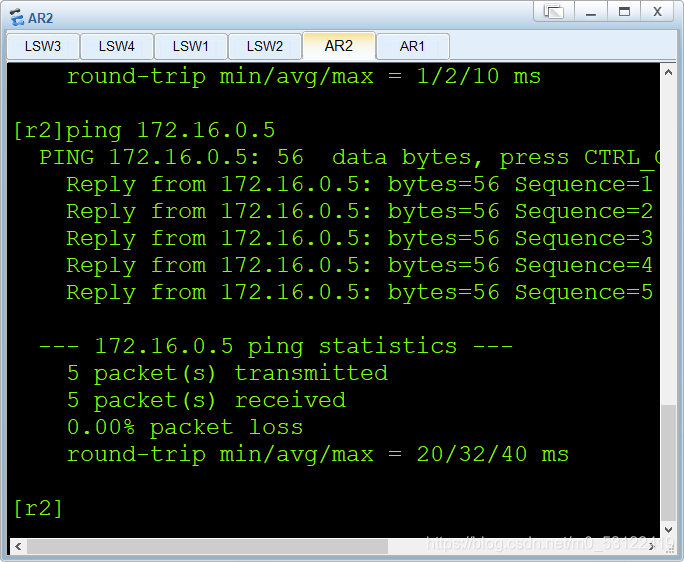
[r2]int g0/0/0
[r2-GigabitEthernet0/0/0]ip add 10.1.1.1 24
八、OSPF
[r2]ospf 1 r
[r2]ospf 1 router-id 2.2.2.2
[r2-ospf-1]a 0
[r2-ospf-1-area-0.0.0.0]net 172.16.0.0 0.0.0.255
[r2-ospf-1-area-0.0.0.0]
ospf 1 router-id 3.3.3.3
[sw3-ospf-1]dis this
area 0.0.0.0
network 172.16.0.1 0.0.0.0
area 0.0.0.1
network 172.16.1.1 0.0.0.0
network 172.16.1.129 0.0.0.0
[sw4-ospf-1]dis this
ospf 1 router-id 4.4.4.4
area 0.0.0.0
network 172.16.0.5 0.0.0.0
area 0.0.0.1
network 172.16.1.2 0.0.0.0
network 172.16.1.130 0.0.0.0

进行汇总
[sw4-ospf-1-area-0.0.0.1]abr-summary 172.16.1.0 255.255.255.0
[sw3-ospf-1-area-0.0.0.1]abr-summary 172.16.1.0 255.255.255.0
[sw3-ospf-1]dis th
ospf 1 router-id 3.3.3.3
silent-interface all
undo silent-interface GigabitEthernet0/0/1
undo silent-interface Eth-Trunk0
undo silent-interface Vlanif1
undo silent-interface Vlanif10
[sw4-ospf-1]dis th
ospf 1 router-id 4.4.4.4
silent-interface all
undo silent-interface GigabitEthernet0/0/1
undo silent-interface Eth-Trunk0
undo silent-interface Vlanif10
undo silent-interface Vlanif1
九、配置路由和nat
[r2]ip route-static 0.0.0.0 0 10.1.1.2
[r2]ospf 1
[r2-ospf-1]default-route-advertise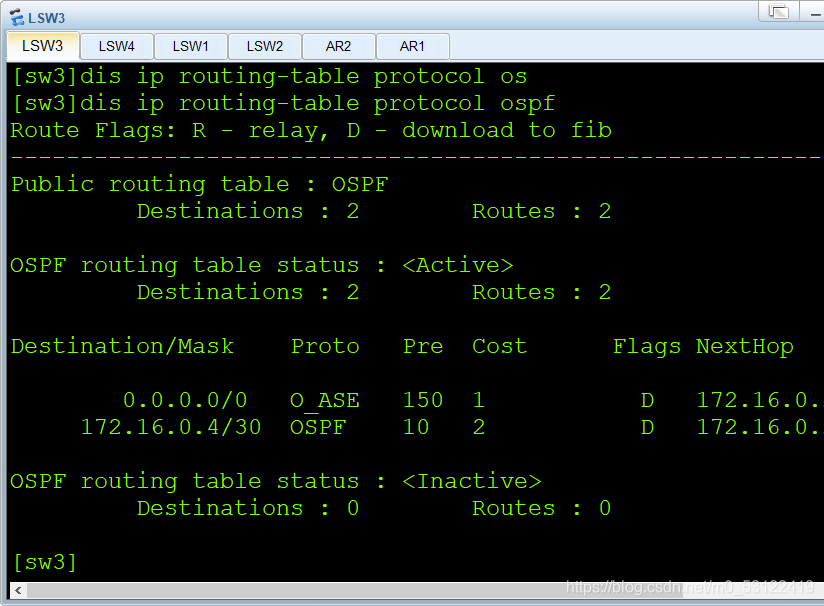
[r2]acl 2000
[r2-acl-basic-2000]rule permit source 172.16.0.0 0.0.255.255
[r2-acl-basic-2000]int g0/0/1
[r2-GigabitEthernet0/0/0]nat outbound 2000
测试连通性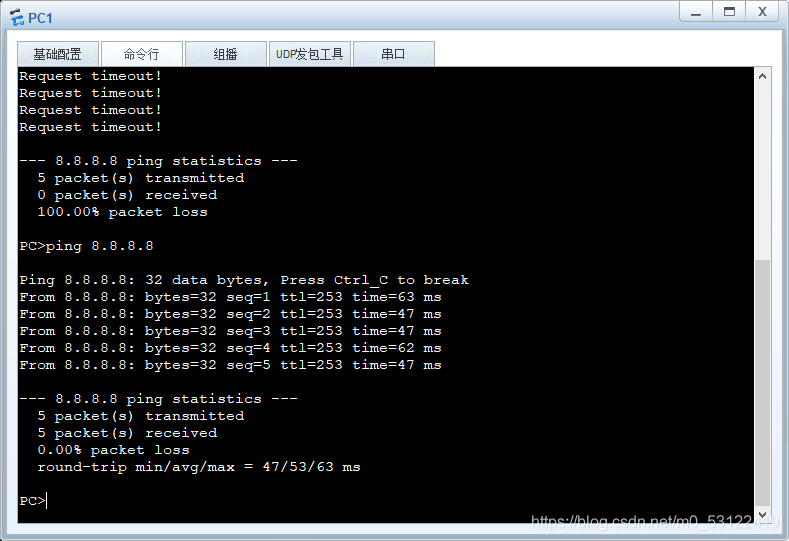
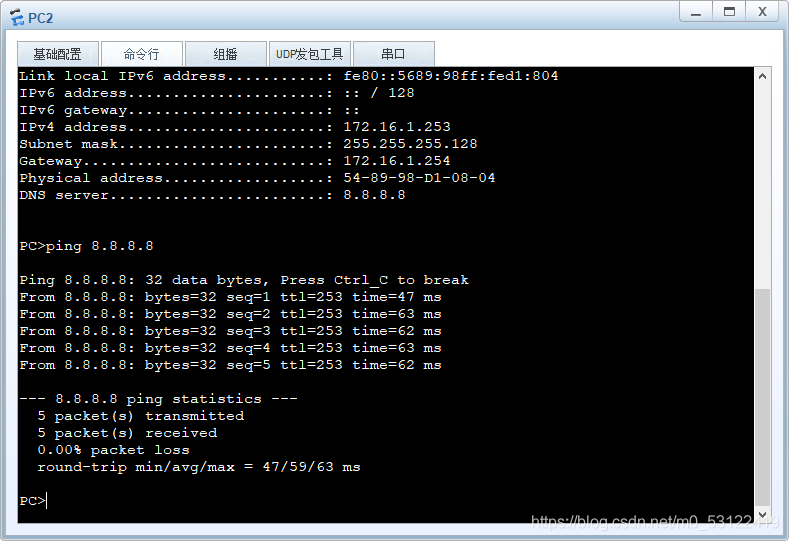
关闭SW3


边栏推荐
- Mini Homer - can you get a remote map data transmission link for hundreds of yuan?
- ICer技能02makefile脚本自跑vcs仿真
- How to make social media the driving force of cross-border e-commerce? This independent station tool cannot be missed!
- 怎样利用数据讲一个精彩故事?
- Automatically add watermark to screenshot
- prometheus、influxdb2.2安装及flume_export下载编译使用
- Do280openshift command and troubleshooting -- common troubleshooting and chapter experiments
- 当SBAS遇上rtklib
- apache atlas 快速入门
- SwiftUI 2.0 课程笔记 Chapter 4
猜你喜欢

硬核,成为高素质测试人员:学会和产品沟通需求

dolphinscheduler 2.0.5 spark 任务测试总结(源码优化)

8年经验之谈:月薪3000到30000,测试工程师的变“行”记
![[graph theory] - bipartite graph](/img/2d/999820edafe7294440cf1873a26084.png)
[graph theory] - bipartite graph

centos7安装postgresql8.2.15及存储过程创建

【C语言】关键字

Official download and installation of QT and QT vs tools plug-ins

Notepad++ find replace group replace retain

直接插入排序——【常见排序法(1/8)】
精密星历介绍与使用
随机推荐
centos7安装postgresql8.2.15及存储过程创建
Thinkphp6 linked table query without associated ID (2 tables) is mainly the application of select
功能测试人员如何做到花一个月的时间进阶自动化软件测试工程师
Mini Homer——几百块钱也能搞到一台远距离图数传链路?
Li Kou today's question 513 Find the value in the lower left corner of the tree
Getting started with the shutter AppBar
Dolphin scheduler 2.0.5 spark task test summary (source code optimization)
【毕业季_进击的技术er】送别过去两年迷茫的自己。重整旗鼓,大三我来啦
Meituan's good article: understand swift, Objective-C and the mixing mechanism from the perspective of precompiling
Shadertoy basic teaching 02. Drawing smiling faces
ICER skill 02makefile script self running VCs simulation
Course design C for freshmen -- clothing management system
【Laravel系列7.8】广播系统
SwiftUI 2.0 课程笔记 Chapter 4
How to better organize the minimum web api code structure
微信小程序:爱情保证书制作生成
单行或多行文本溢出,省略号代替
精密星历介绍与使用
Shadertoy基础教学02、画笑脸
《微信小程序-基础篇》带你了解小程序的路由系统(二)