当前位置:网站首页>The MIUI 13 development version of Xiaomi mobile phone blocks the chrome application and cannot be opened after installation
The MIUI 13 development version of Xiaomi mobile phone blocks the chrome application and cannot be opened after installation
2022-06-23 03:21:00 【Deshun】
Used by bloggers Redmi K30 Pro from MIUI 12.5 The official version sneaks into MIUI 13 Development Edition , I found my... After updating recently Chrome The browser is missing !!!
The truth is the most important thing in the world , Xiaomi, this is really a dog taking a mouse , It's unnecessary !
But for front-end developers , The mobile phone is still inseparable Chrome Browser's , Xiaomi killed me directly , It's really a bit immoral .
Can't , Still need to use . I tried to install Dev The version is no good , There are no icons on the desktop , Click the open button of the app store to prompt that it cannot be opened , Uninstall the app to find .
Finally, find a solution , Make a note of :
Preparatory work : download platform-tools and Chrome Installation package . If it doesn't open , Here I provide a link to the network disk :
platform-tools_r31.0.3-windows.zip: Baidu SkyDrive | Express Lane ( Access password :8135)
com.android.chrome_97.0.4692.87-469208723.apk: Baidu SkyDrive | Express Lane ( Access password :8135)
Now in order to Windows For example , Tutorial begins :
1、 Turn on the phone settings —— My device —— All parameters —— find “MIUI edition ”, Keep clicking the , Until the hint “ You are now in developer mode ”.
2、 Go back to the setting home page , Search for “USB”, You can see “USB debugging ”, Click in ,“USB debugging ” and “USB install ” open .
3、 The mobile phone is connected to the computer with a data cable , Can pop up the window “USB be used for ”, choose “ Transfer files ”.
4、 Will download platform-tools Tool extraction , I decompressed to D:\platform-tools Under the table of contents , Enter this directory , Enter in the address field cmd Enter to enter the command prompt tool .
Make sure the command line is in :
D:\platform-tools>
5、 Enter the command to connect the phone :
adb devices
Authorization will be prompted on the mobile phone , Click agree .
The following prompt is displayed to indicate that the connection is successful :
D: \platform-tools>adb devices
* daemon not running; starting now at tcp: 5038
* daemon started successfully
List of devices attached
6、 install Chrome ( Here I put the installation package in D:\platform-tools\apks The directory ).
Execute the installation command :
adb install ./apks/com.android.chrome_97.0.4692.87-469208723.apk
The following prompt is displayed to indicate that the installation is successful :
D: \platform-tools>adb install ./apks/com.android.chrome_97.0.4692.87-469208723.apk
Performing Streaned Install
Success
Now look at the desktop of your mobile phone Chrome Is it coming out , Be accomplished !
Finishing work :
Set the homepage search “ Developer options ”, Click in and turn it off .
Set the home page —— Application settings —— Application management —— find “ Set up ”, Clear data , You can turn off the display of developer options .
You may find this article through the keywords below :
Xiaomi mobile phone cannot be installed Chrome, Xiaomi mobile phone installation application does not display , Xiaomi mobile phone installs third-party applications , Xiaomi mobile phone can't install apps ,MIUI Install third party applications ,MIUI13 Unable to install ,MIUI13 Unable to install app , Mi phones adb Install application ,MIUI13 adb Install application ,adb Connect Xiaomi mobile phone , Mi phones adb Tools ,MIUI13 install Chrome
No reprint without permission :w3h5 » Mi phones MIUI 13 Development version shielding Chrome application , Solutions that cannot be opened after installation
边栏推荐
- Batch generation of Codabar codes using Excel files
- The difference between the use of return, break and continue in the if statement in JS
- Wi Fi 6 is coming - larger capacity, lower latency, faster network speed and more security
- How to generate code-11 barcode in batch through TXT file
- Compile your own openwrt firmware using Tencent cloud lightweight application server
- Reading redis source code (VI) multi threading of redis 6.0
- Brief introduction to arm architecture
- Initial xxE
- Xiamen's hidden gaopuge smart park has finally been uncovered
- [Alibaba middleware technology series] "Nacos technology" service registration and discovery related principle analysis
猜你喜欢

Analysis on the development of China's graphene industry chain in 2021: with the support of energy conservation and environmental protection policies, the scale of graphene industry will continue to e
![Analysis on the development prospect of China's brain computer interface industry in 2021: wide application prospect, sustained and rapid growth of market scale [figure]](/img/84/192d152ceb760264b6b555b321f129.jpg)
Analysis on the development prospect of China's brain computer interface industry in 2021: wide application prospect, sustained and rapid growth of market scale [figure]

Encryption related to returnee of national market supervision public service platform
![Analysis on the development status of China's watch industry in 2021: a large number of electric watches are imported [figure]](/img/ca/672bfe49c8123da8679b2abeb43a2e.jpg)
Analysis on the development status of China's watch industry in 2021: a large number of electric watches are imported [figure]
![[quick view] Analysis on the development status and future development trend of the global and Chinese diamond cultivation industry in 2021 [figure]](/img/f1/972a760459a6d599b5681aa634df09.jpg)
[quick view] Analysis on the development status and future development trend of the global and Chinese diamond cultivation industry in 2021 [figure]
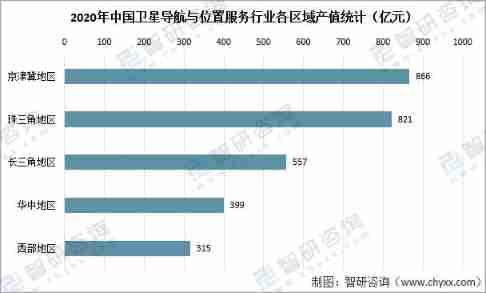
Analysis on the development of China's satellite navigation industry chain in 2021: satellite navigation is fully integrated into production and life, and the satellite navigation industry is also boo
![Analysis of China's integrated circuit industry chain in 2021: huge downstream market demand [figure]](/img/de/d73805aaf4345ca3d2a7baf85aab8d.jpg)
Analysis of China's integrated circuit industry chain in 2021: huge downstream market demand [figure]
![Analysis of the number of urban residents covered by basic medical insurance, their treatment and medical treatment in other places in China in 2021 [figure]](/img/81/4d3cb059f700dd9243645e64023be7.jpg)
Analysis of the number of urban residents covered by basic medical insurance, their treatment and medical treatment in other places in China in 2021 [figure]
![Analysis on development history, industrial chain, output and enterprise layout of medical polypropylene in China in 2020 [figure]](/img/28/ebfc25ec288627706e15a07e6bdb77.jpg)
Analysis on development history, industrial chain, output and enterprise layout of medical polypropylene in China in 2020 [figure]
![Analysis on demand and market scale of China's steamed stuffed bun industry in 2020 [figure]](/img/4b/dd272f98b89a157180bf68570d2763.jpg)
Analysis on demand and market scale of China's steamed stuffed bun industry in 2020 [figure]
随机推荐
The logical operators |, & &!
Analysis on the development of duty-free industry in Hainan Province in 2021: the implementation of the new policy makes the duty-free market in Hainan more "prosperous" [figure]
How does easyplayer embed a video snapshot into a demo?
January 29, 2022: connectives. Give you an array of strings without repeated words
2022-01-25: serialize and deserialize n-ary tree. Serialization means that a
Construction and exploration of vivo database and storage platform
Troubleshooting and solution of error 400 in easygbs video platform
Uploading logs using loghub log4j appender
Tachometer script
Xiamen's hidden gaopuge smart park has finally been uncovered
Goframe framework (RK boot): realize distributed log tracing
Mybatties plus batch warehousing
How to batch print serial and repeated barcode data
Aiot application innovation competition - Smart street lamp (developed with keil)
DAAS architecture and Implementation (I)
Account MFA usage scheme
JSON. Function of the stringify() optional parameter
Storage resources revitalize the system and redefine "hyper fusion"
Analysis of China's integrated circuit industry chain in 2021: huge downstream market demand [figure]
How to generate code-11 barcode in batch through TXT file