当前位置:网站首页>static routing
static routing
2022-08-05 06:13:00 【Magic star,】
静态路由
什么是路由:从源主机到目标主机的转发过程
路由器:Can to forward the packet to the target host,选择路径
路由表的形成

注意:
当打开路由器,设置配置IP地址,路由表是空的.When we give chain on the port configuration of youIPAddress segment of the information will automatically add this address
网关:Is there;To host on the same network segment with you(同一广播域).
静态路由:
缺点:
- Configuration is one-way
- 缺乏灵活性(一个网段变化,全要重新设置)
优点:
Explicit routing path,快
封装

主机A想和主机B通讯
ARP协议
第一次封装:
| 源IP/目的IP | 源MAC/目的MAC |
|---|---|
| 192.168.1.2/192.168.2.2 | 11-11/22-22 |
第二次封装:
| 源IP/目的IP | 源MAC/目的MAC |
|---|---|
| 192.168.1.2/192.168.2.2 | 33-33/44-44 |
第三次封装:
| 源IP/目的IP | 源MAC/目的MAC |
|---|---|
| 192.168.1.2/192.168.2.2 | 55-55/66-66 |
实验(2个路由器)

配置PC1和PC2的IP地址/子网掩码/网关
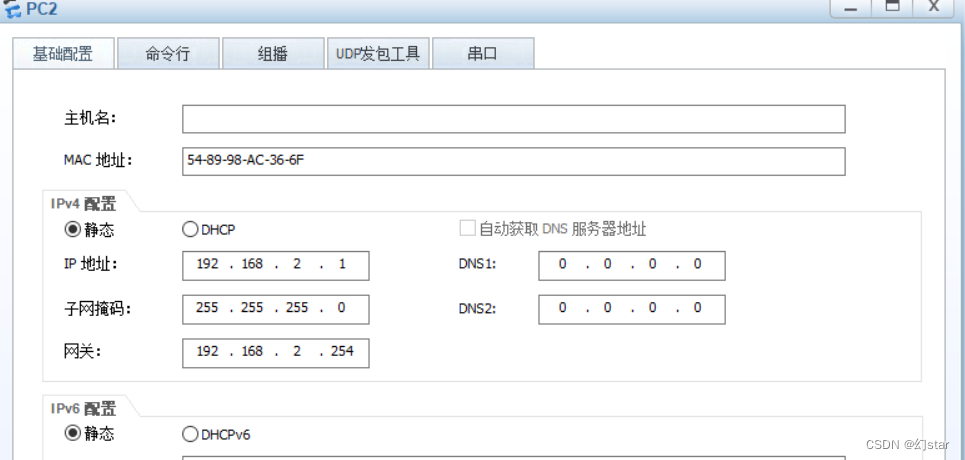
- 配置路由( R1)的接口GE0/0/0的网关:192.168.1.254(与PC1的网关相同)和接口GE0/0/1的网关:192.168.3.1(自己规定)

- 配置R1静态路由
[ R1 ]ip route-static 192.168.2.0 255.255.255.0 192.168.4.1
- 配置路由( R2)的接口GE0/0/1的网关:192.168.2.254(与PC2的网关相同)和接口GE0/0/0的网关:192.168.4.1(自己规定)
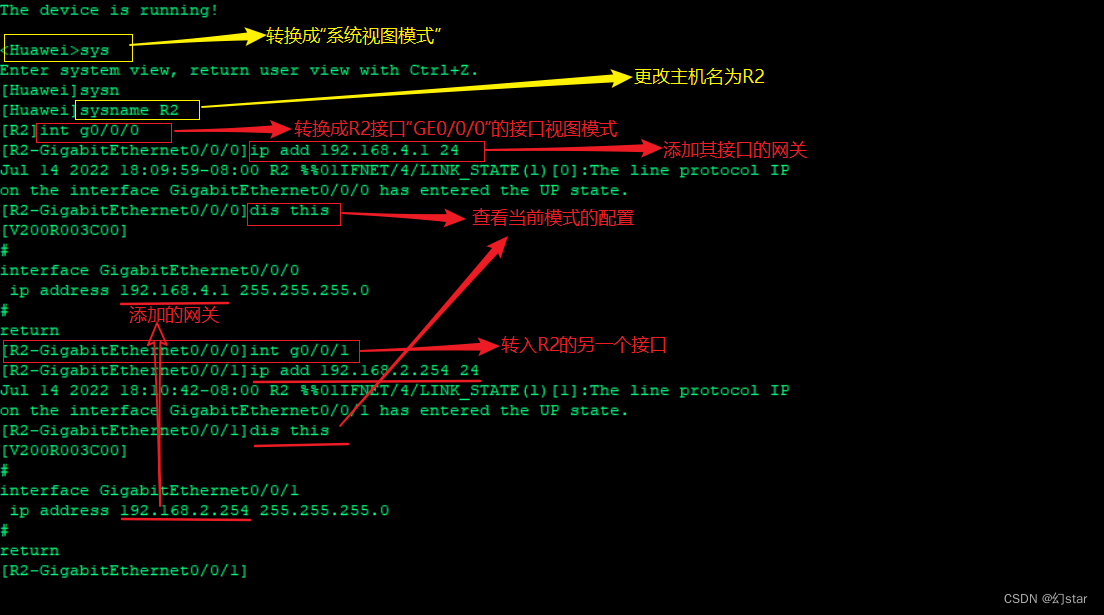
- 配置R2静态路由
[R2]ip route-static 192.168.1.0 255.255.255.0 192.168.3.1
- 路由配置完成后,Test the success(ping 192.168.2.1)
如图所示,则成功
注意:R1接口“GE0/0/0”The gateway andR2接口“GE0/0/0”的网关,Should be on the same network segment,否则无法通信
实验二(三个路由器)
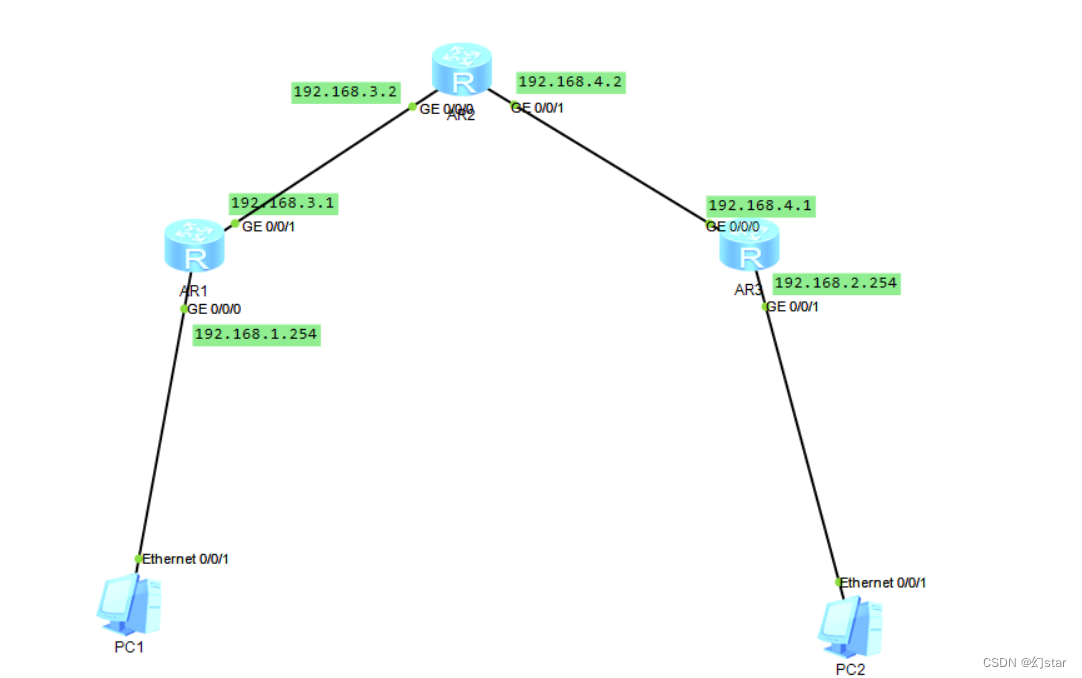
配置PC1和PC2的IP地址/子网掩码/网关
1、 配置路由( R1)的接口GE0/0/0的网关:192.168.1.254(与PC1的网关相同)和接口GE0/0/1的网关:192.168.3.1(自己规定), 配置R1静态路由[ R1 ]ip route-static 0.0.0.0 0.0.0.0 192.168.3.2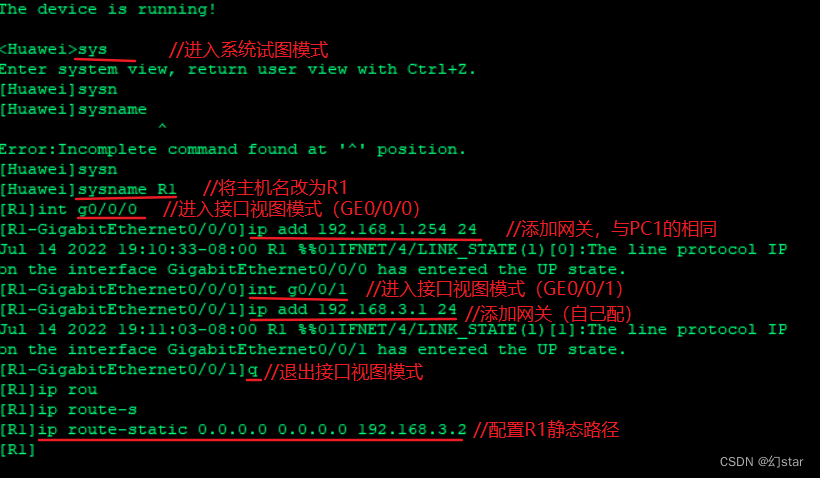
2、 配置路由( R2)的接口GE0/0/0的网关:192.168.3.2和接口GE0/0/1的网关:192.168.4.2(自己规定),配置R2静态路由
[R2]ip route-static 192.168.2.0 255.255.255.0 192.168.4.1
[R2]ip route-static 192.168.1.0 255.255.255.0 192.168.3.1
3、 配置路由(R3)的接口GE0/0/0的网关:192.168.4.1(与R2接口GE0/0/1The gateway in the same network segment)和接口GE0/0/1的网关:192.168.2.254
实验三
The same as the experiment 2 onlyR1接口“GE0/0/2”再配个192.168.5.1,And add a static path:
[R1]ip route-static 0.0.0.0 0.0.0.0 192.168.5.2 preference 70(优先级为70)
R3接口“GE0/0/2”再配个192.168.6.1,And add a static route:
[R3]ip route-static 0.0.0.0 0.0.0.0 192.168.6.2 preference 70(优先级为70)
R4与R2操作相同
操作命令
| 命令 | 注释 |
|---|---|
| < Huawei > undo terminal monitor | 关闭提示信息(简写u t m) |
| [ Huawei ]undo info-center enable | 关闭提示信息 |
| [ Huawei ]sysname R1 | 修改路由器名称 |
| [ R1 ] int g0/0/0 | 进入g0/0/0口 |
| [R1-GigabitEthernet0/0/0]ip add 192.168.1.254 24 | The command configuration address |
| [R1-GigabitEthernet0/0/0]display this | 查看配置信息 |
| [R1-GigabitEthernet0/0/0]undo shutdown | 打开端口 |
| [R1]display ip routing-table | 查看路由表信息 |
| undo 命令 | 删除配置(dis this See the copy and paste the command ) |
| [R1]display ip interface brief | 查看接口的简要信息 |
Destination/Mask 目的网段/子网掩码
Proto 协议类型
Pre 优先级
Cost 开销值
Flags Information such as routing state
NextHop 下一跳地址
Interface 接口信息
路由的优先级
Each routing protocol agreement priority(数值越小,优先级越高),当有多个路由信息时,Choice is the highest priority routing as a best route.
| 路由类型 | 优先级 |
|---|---|
| 直连路由 | 0 |
| OSPF内部路由 | 10 |
| IS-IS路由 | 15 |
| 静态路由 | 60 |
| RIP路由 | 100 |
| OSPF ASE路由 | 150 |
| OSPF NSSA路由 | 150 |
| IBGP路由 | 255 |
| EBGP路由 | 255 |
Static routing the default priority is60
优先级越小 越优先
边栏推荐
- Spark source code - task submission process - 6-sparkContext initialization
- Account and Permission Management
- D39_坐标转换
- 入门文档07 分阶段输出
- Spark源码-任务提交流程之-6-sparkContext初始化
- OpenCV3.0 兼容VS2010与VS2013的问题
- Hugo搭建个人博客
- spark source code - task submission process - 3-ApplicationMaster
- 【机器学习】1单变量线性回归
- Spark源码-任务提交流程之-6.1-sparkContext初始化-创建spark driver端执行环境SparkEnv
猜你喜欢

Remembering my first CCF-A conference paper | After six rejections, my paper is finally accepted, yay!

VRRP原理及命令
The problem of calling ds18b20 through a single bus

运维工程师,快来薅羊毛
静态路由

入门文档12 webserve + 热更新
时间复杂度和空间复杂度
Getting Started Documentation 10 Resource Mapping

Account and Permission Management

入门文档04 一个任务依赖另外一个任务时,需要按顺序执行

随机推荐
VRRP principle and command
spark算子-coalesce算子
CIPU,对云计算产业有什么影响
spark源码-任务提交流程之-2-YarnClusterApplication
7步完成云上监控
Autoware--北科天绘rfans激光雷达使用相机&激光雷达联合标定文件验证点云图像融合效果
D45_摄像机组件Camera
【Day8】磁盘及磁盘的分区有关知识
spark source code - task submission process - 3-ApplicationMaster
VRRP原理及命令
Contextual non-local alignment of full-scale representations
快问快答—腾讯云服务器常见问题解答
[Day5] Soft and hard links File storage, deletion, directory management commands
spark source code-RPC communication mechanism
Getting Started Documentation 10 Resource Mapping
传输层协议(TCP3次握手)
dsf5.0新建页面访问时重定向到首页的问题
Spark源码-任务提交流程之-6-sparkContext初始化
The spark operator - repartition operator
网络不通?服务丢包?看这篇就够了