当前位置:网站首页>Best practices for data relocation: using CDM to relocate offline Mysql to DWS
Best practices for data relocation: using CDM to relocate offline Mysql to DWS
2022-06-25 17:08:00 【Hua Weiyun】
Operation scenario
At present CDM Support local MySQL database , The entire database is migrated to RDS Upper MySQL、PostgreSQL perhaps Microsoft SQL Server In any database . The customer's offline data is moved to Huawei cloud , One of the common scenarios is the customer offline MySQL Data is moved to the online Huawei cloud DWS In the example . This paper aims at CDM Single table migration scenario , Introduce how to conduct offline MySQL Go online DWS Single table data relocation . The overall use process is as follows :
- establish CDM Cluster and bind EIP
- establish MySQL Connect
- establish DWS Connect
- Create a migration job
Prerequisite
- Obtained DWS Database IP Address 、 port 、 Database name 、 user name 、 password , And the user has DWS Database read 、 Write and delete permissions .
- Obtained connection MySQL Database IP Address 、 port 、 Database name 、 user name 、 password , And the user has MySQL Read and write permissions of database .
- User referenced Management driven , Upload the MySQL Database driven .
establish CDM Cluster and bind EIP
- If it's independent CDM service , Reference resources Create clusters establish CDM colony ; If it's for DGC service CDM Components use , Reference resources Create clusters establish CDM colony .
Key configurations are as follows :
- CDM Cluster specifications , Select according to the amount of data to be migrated , General choice medium that will do , Meet most migration scenarios .
- CDM Cluster location VPC、 subnet 、 Security group , Choice and DWS The cluster is on the same network .
2. CDM After the cluster is created , Select... In the cluster operation column “ Binding elasticity IP”,CDM adopt EIP visit MySQL.
chart 1 Cluster list

explain : If the user makes a change to the access channel of the local data source SSL encryption , be CDM Can't go through elasticity IP Connect to data source .
establish MySQL Connect
- stay CDM Cluster management interface , Click... After the cluster “ Job management ”, choice “ Connection management > make new connection ”, Enter the connector type selection interface , Such as chart 2 Shown .
chart 2 Select the connector type

2. choice “MySQL” Back click “ next step ”, To configure MySQL Connection parameters .
chart 3 establish MySQL Connect

single click “ Show advanced properties ” You can view more optional parameters , Please refer to Configure common relational database connections . Keep the default here , Required parameters such as surface 1 Shown .
surface 1 MySQL Connection parameters | ||
Parameter name | explain | Sample values |
name | Enter a connection name that is easy to remember and distinguish . | mysqllink |
database server | MySQL Database IP Address or domain name . | 192.168.1.110 |
port | MySQL Port of the database . | 3306 |
Database name | MySQL Database name . | sqoop |
user name | Have MySQL Database read 、 Users with write and delete permissions . | admin |
password | User's password . | - |
Use Agent | Whether to choose to pass Agent Extract data from the source . | yes |
Agent | single click “ choice ”, choice Connect Agent Created in Agent. | - |
3. single click “ preservation ” Return to the connection management interface .
explain : If an error occurs while saving , Generally due to MySQL Database security settings , It is necessary to set the permission CDM Clustered EIP visit MySQL database .
establish DWS Connect
- stay CDM Cluster management interface , Click... After the cluster “ Job management ”, choice “ Connection management > make new connection ”, Enter the connector type selection interface , Such as chart 4 Shown .
chart 4 Select the connector type

2. Connector type selection “ Data warehouse services (DWS)” Back click “ next step ” To configure DWS Connection parameters , Required parameters such as surface 2 Shown , The optional parameters can be left as default .
surface 2 DWS Connection parameters | ||
Parameter name | explain | Sample values |
name | Enter a connection name that is easy to remember and distinguish . | dwslink |
database server | DWS Database IP Address or domain name . | 192.168.0.3 |
port | DWS Port of the database . | 8000 |
Database name | DWS Database name . | db_demo |
user name | Have DWS Database read 、 Users with write and delete permissions . | dbadmin |
password | User's password . | - |
Use Agent | Whether to choose to pass Agent Extract data from the source . | yes |
Agent | single click “ choice ”, choice Connect Agent Created in Agent. | - |
Import mode | COPY Pattern : Pass the source data through DWS After managing the node, copy to the data node . If you need to pass Internet visit DWS, Only use COPY Pattern . | COPY |
3. single click “ preservation ” Finish creating connection .
Create a migration job
- choice “ surface / File migration > New job ”, Start creating from MySQL Export data to DWS The task of .
chart 5 establish MySQL To DWS Migration tasks

- Job name : User defined for easy memory 、 Distinguished task name .
- Source side job configuration
- Source connection name : choice establish MySQL Connect Medium “mysqllink”.
- Use SQL sentence : no .
- Schema or table space : The schema or tablespace name of the data to be extracted .
- Table name : Name of the table to extract .
- Other optional parameters can be kept as default in general , See details Configure common relational database source side parameters .
- Destination job configuration
- Destination connection name : choice establish DWS Connect Connection in “dwslink”.
- Schema or table space : Select the data to be written DWS database .
- Automatic table creation : Only when both source and destination are relational databases , That's the parameter .
- Table name : Name of the table to be written , You can manually enter a table name that does not exist ,CDM Will be in DWS Automatically create this table in .
- Is it compressed? :DWS Compressed data capability provided , If you choose “ yes ”, A high level of compression will occur ,CDM Provides applicable I/O A lot of reading and writing ,CPU rich ( The calculation is relatively small ) Compressed scenarios for . For more detailed descriptions of compression levels, see Compression level .
- Storage mode : It can be based on specific application scenarios , When creating a table, select row storage or column storage . In general , If the table has many fields ( A wide watch ), When there are not many columns involved in the query , Suitable for column storage . If the number of fields in the table is small , Query most fields , It is better to select row storage .
- Enlarge the length of the character field : When the destination and source data encoding formats are different , The length of the character field for automatic table creation may not be enough , After configuring this option CDM The character field will be expanded during automatic table creation 3 times .
- Clear data before import : Before the task starts , Whether to clear the data in the destination table , Users can choose according to their actual needs .
- single click “ next step ” Enter the field mapping interface ,CDM The source and destination fields are automatically matched , Such as chart 6 Shown .
- If the field mapping order does not match , It can be adjusted by dragging fields .
- single click , Fields can be mapped in batch .
- CDM The expression of has been preset with common strings 、 date 、 Numeric and other types of field content conversion , For details, see Field conversion .
chart 6 Table to table field mapping

2. single click “ next step ” Configure task parameters , Generally, it is OK to keep all defaults .
In this step, the user can configure the following optional functions :
- Job failed retry : If the job fails , You can choose whether to retry automatically , Keep the default here “ Don't try again ”.
- Work groups : Select the group to which the job belongs , The default grouping is “DEFAULT”. stay CDM“ Job management ” Interface , Support job grouping display 、 Batch start jobs by group 、 Export jobs by group .
- Whether to execute regularly : If you need to configure jobs to be executed automatically on a regular basis , Please see the Configure scheduled tasks . Keep the default here “ no ”.
- Extract the concurrent number : Set the number of extraction tasks executed at the same time . The parameters can be appropriately increased , Improve migration efficiency .
- Whether to write dirty data : Table to table migration is prone to dirty data , It is recommended to configure dirty data archiving .
- Whether to delete after the job runs : Keep the default here “ Don't delete ”.
- single click “ Save and run ”, Return to the job management interface , In the job management interface, you can view the job execution progress and results .
- After the job is executed successfully , Click... In the job action column “ Historical record ”, You can view the historical execution record of the job 、 Read and write statistics .
Click... In the history interface “ journal ”, View the log information of the job .
边栏推荐
猜你喜欢

通过深度可分离卷积神经网络对七种表情进行区分

try with resource

Kalman time series prediction

How to talk about salary correctly in software testing interview

足下教育日精进自动提交

「津津乐道播客」#386 原汤话原食:谁还不是个“白字先生”?

Why are there few embedded system designers in the soft test?

2022-06-17 网工进阶(九)IS-IS-原理、NSAP、NET、区域划分、网络类型、开销值
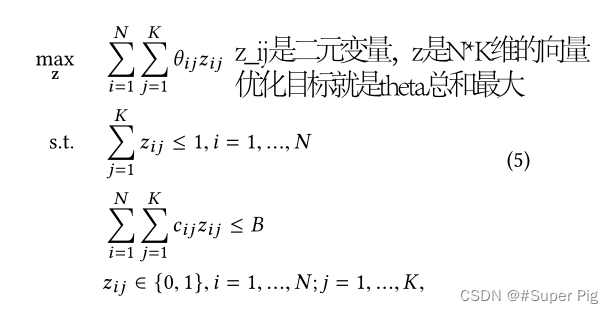
Paper notes: lbcf: a large scale budget constrained causal forest algorithm

Xshell connecting VMware virtual machines
随机推荐
SDN系统方法 | 10. SDN的未来
剑指 Offer II 035. 最小时间差
How does social e-commerce operate and promote?
try with resource
Structure de la mémoire JVM
Optimization of lazyagg query rewriting in parsing data warehouse
剑指 Offer II 014. 字符串中的变位词 滑动窗口
记一次基于PHP学生管理系统的开发
软考中的嵌入式系统设计师为什么考的人少?
Xshell connecting VMware virtual machines
Do you know all the configurations of pychrm?
N皇后问题
Optimization of lazyagg query rewriting in parsing data warehouse
Batch --07--- breakpoint lifting
[100 questions of Blue Bridge Cup intensive training] scratch command mobile Blue Bridge Cup scratch competition special prediction programming question intensive training simulation exercise question
vscode插件自用
Tasklet API usage
批量--07---断点重提
STM32硬件错误HardFault_Handler的处理方法
旧手机变废为宝,充当服务器使用