当前位置:网站首页>Error "failed to fetch" XXX "temporary failure resolvingw: some index files failed to download" solution
Error "failed to fetch" XXX "temporary failure resolvingw: some index files failed to download" solution
2022-07-23 18:53:00 【wild _ wolf】
Solution 1: Restore to original Ubuntu Mirror image
If this error is encountered , The first trick is to switch back to the original image . This involves from /usr/share/doc/apt/examples/sources.list Create a new source list file from the sample source list file in the path .
View the sample source list file , As shown below :
$ cat /usr/share/doc/apt/examples/sources.list
Output is as follows :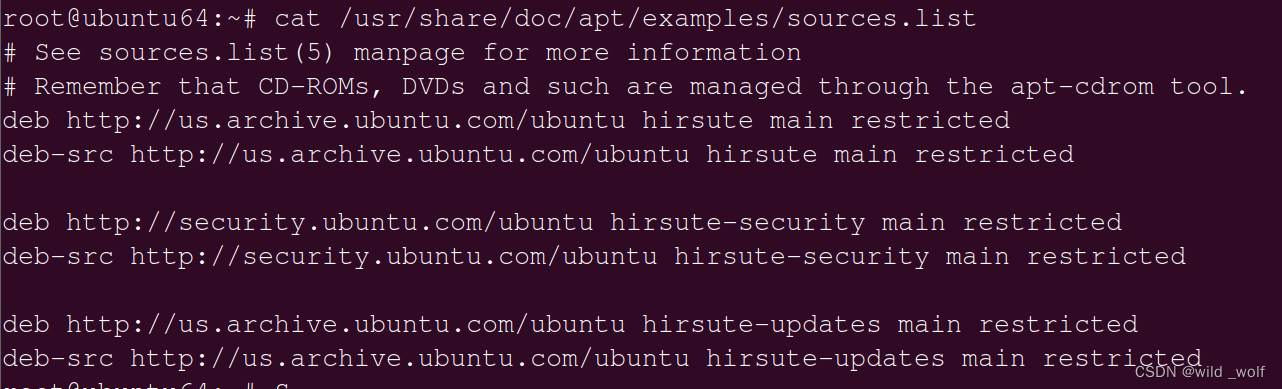
But first of all , According to consistent suggestions , Make a backup copy of the source list , As shown below :
$ sudo mv /etc/apt/sources.list{
    ,.backup}
$ sudo mv /etc/apt/sources.list.d{
    ,.backup}
Next , Follow these steps to create a new source list file from the sample source list file :
$ sudo mkdir /etc/apt/sources.list.d
$ sudo cp /usr/share/doc/apt/examples/sources.list /etc/apt/sources.list
Last , Update the repository as shown .
$ sudo apt update
This will restore all mirrors and enable Canonical Supported by “ Lord ” The repository .
To install the community support package 、 Proprietary software packages and software packages that are not available under a completely free license , Consider enabling the following repositories :
Universe – Free and open source software maintained by the community .
Restricted – Device specific drivers .
Multiverse – Software restricted by copyright or legal issues .
To enable these repositories , Please call the following command .
$ sudo add-apt-repository restricted
$ sudo add-apt-repository multiverse
$ sudo add-apt-repository universe
Then update the source table
$ sudo apt update
Solution 2: from Ubuntu Select the latest image in the official image
Consider switching to the image closest to your geographical location ( Usually happens to be the fastest mirror ). The simple way is to ensure that the image defined in the source list file contains relative to the country of residence / Countries in the region / Region code . for example /etc/apt/sources.list The official image of the United States provided in is :
deb http://us.archive.ubuntu.com/ubuntu focal main restricted
Replace it with the domestic Tsinghua source :
#  The source image is annotated by default to improve  apt update  Speed , If necessary, please cancel the comment
deb http://mirrors.aliyun.com/ubuntu/ yammy main multiverse restricted universe
deb http://mirrors.aliyun.com/ubuntu/ yammy-backports main multiverse restricted universe
deb http://mirrors.aliyun.com/ubuntu/ yammy-proposed main multiverse restricted universe
deb http://mirrors.aliyun.com/ubuntu/ yammy-security main multiverse restricted universe
deb http://mirrors.aliyun.com/ubuntu/ yammy-updates main multiverse restricted universe
deb-src http://mirrors.aliyun.com/ubuntu/ yammy main multiverse restricted universe
#deb-src http://mirrors.aliyun.com/ubuntu/ yammy-backports main multiverse restricted universe
#deb-src http://mirrors.aliyun.com/ubuntu/ yammy-proposed main multiverse restricted universe
#deb-src http://mirrors.aliyun.com/ubuntu/ yammy-security main multiverse restricted universe
#deb-src http://mirrors.aliyun.com/ubuntu/ yammy-updates main multiverse restricted universe
Then update the source table
$ sudo apt update
Solution 3: Copy the contents of the source list from a well functioning system
Last , Another way to solve this error is from another functional Ubuntu The system copies the contents of the source list file and pastes them into the source list file of the system . This is by far the easiest way to fix this error .
After all the above attempts, you can modify the configuration file /etc/resolv.conf,
sudo vim /etc/resolv.conf
Add domain name server 8.8.8.8,
nameserver 8.8.8.8
The above methods should help you solve Ubuntu This annoying mistake on . If it helps you , please Click like or collect Oh .
边栏推荐
- Flutter 运行模式
- Three things programmers want to do most | comics
- Error reporting caused by the use of responsebodyadvice interface and its solution
- Multithreading [comprehensive study of graphics and text]
- Can self-study 3D modeling succeed? Can self-study lead to employment?
- Handwriting bind, call, apply is actually very simple
- Completion report of communication software development and Application
- JUC concurrent programming [detailed explanation and demonstration]
- MySQL [knowing and mastering one article is enough]
- 入行3D建模有前景吗?就业高薪有保障还是副业接单赚钱多
猜你喜欢




![Redis [super superfine introductory tutorial]](/img/a6/02b3e670067292d884bab7425b4ffb.png)


随机推荐
MySql【从了解到掌握 一篇就够】
Is learning next generation modeling a good scene or a good role? Choose the right profession and pay more than half
Jetpack Compose之Navigation组件使用
How to replace the double quotation marks of Times New Roman in word with the double quotation marks in Tahoma
【游戏建模模型制作全流程】3ds Max和ZBrush制作无线电接收器
Storage structure and method of graph (II)
Spark 安装与启动
80 + guests took the stage, users from more than 10 countries attended the meeting, and 70000 + viewers watched the end of "Gwei 2022 Singapore"
Redis【2022最新面试题】
作为3D资深建模师给刚入门学习伙伴的一些建议,用起来
[2020] [paper notes] new terahertz detection - Introduction to terahertz characteristics, various terahertz detectors
ros(27):rosparam简单使用与一种通过launch传递参数不成功与解决
【3D建模制作技巧分享】Zbrush如何将图片转浮雕模型
? The problem of front desk parameter transmission needs to be confirmed
The first layer of OSI model: physical layer, the cornerstone of existence!
Redis [2022 latest interview question]
Integer and = = compare
【游戏建模模型制作全流程】用ZBrush制作游戏士兵角色
【2020】【论文笔记】基于Rydberg原子的——
Modeling at the beginning of learning is very confused, how to learn next generation role modeling?