当前位置:网站首页>Jenkins installation and upgrade
Jenkins installation and upgrade
2022-06-22 18:13:00 【Non famous operation and maintenance】
1. Prepare basic environment and Jenkins Installation package
[[email protected] ~]# echo Jenkins > /etc/hostname
[[email protected] ~]# hostname Jenkins

-- Permanently shut down the firewall and Selinux
[[email protected] ~]#  systemctl disable firewalld
[[email protected] ~]#  systemctl stop firewalld
[[email protected] ~]#  setenforce 0
[[email protected] ~]#  sed -i 's/enforcing/disabled/' /etc/selinux/config
[[email protected] ~]# getenforce
2. install Jenkins Follow Java
[[email protected] ~]# ls
jenkins-2.283-1.1.noarch.rpm

[[email protected] ~]# yum -y install java-11-openjdk-devel

[[email protected] ~]# yum localinstall jenkins-2.283-1.1.noarch.rpm
3. start-up Jenkins
[[email protected] ~]# java -version
openjdk version "1.8.0_322"
OpenJDK Runtime Environment (build 1.8.0_322-b06)
OpenJDK 64-Bit Server VM (build 25.322-b06, mixed mode)

[[email protected] ~]# systemctl start jenkins   # start-up Jenkins

[[email protected] ~]# systemctl enable jenkins   # Configure self startup
4. To configure Windows Domain name resolution ( Test only , Real domain names don't need )
5. see Jenkins Unlock password
[[email protected] ~]# cat /var/lib/jenkins/secrets/initialAdminPassword
2eda0e3095d04446a05ace706c193e5e
Be careful :
If you want to directly use the domain name to access Jenkins, No port 8080 Words , Can install Nginx To configure the reverse proxy, you can directly use the domain name to access Jenkins!
6. Configure login Jenkins password
7. modify Jenkins The default download site is domestic
Tsinghua University open source mirror station :https://mirror.tuna.tsinghua.edu.cn/jenkins/updates/
8.Jenkins Chinese plug-in installation
Localization: Chinese (Simplified) ---> The installation takes effect after restart
Locale ---> After installation Jenkins Configure language in settings
Insert picture description here
After installation, restart Jenkins That's all right. !
9.Jenkins Version update
download Jenkins upgrade war package
Qinghua open source image station :https://mirror.tuna.tsinghua.edu.cn/jenkins/war-stable/ perhaps http://ftp-chi.osuosl.org/pub/jenkins/war-stable/ Download the latest installation war package , If there is a new bag Jenkins There will also be prompts in the background , Just download it directly .( But the latest version , There is instability )
upgrade
[[email protected] ~]# ps -aux | grep jenkins    # lookup Jenkins Running path

jenkins   11910  4.2 28.2 2378336 282124 ?      Ssl  02:55   2:34 /etc/alternatives/java -Djava.awt.headless=true -DJENKINS_HOME=/var/lib/jenkins -jar /usr/lib/jenkins/jenkins.war --logfile=/var/log/jenkins/jenkins.log --webroot=/var/cache/jenkins/war --httpPort=8080 --debug=5 --handlerCountMax=100 --handlerCountMaxIdle=20
root      12689  0.0  0.0 112720   984 pts/0    R+   03:56   0:00 grep --color=auto jenkins

[[email protected] ~]# systemctl stop  jenkins    # stop it jenkins service

[[email protected] ~]# cd /usr/lib/jenkins/   # Get into Jenkins.war Running path

[[email protected] jenkins]# ls
jenkins.war

[[email protected] jenkins]# mv jenkins.war jenkins.war.bak    # Back up the old version of Jenkins.war

[[email protected] jenkins]# mv /root/jenkins.war .   # Copy the new version of Jenkins to update war Package to Jenkins Running path

[[email protected] jenkins]# ls
jenkins.war  jenkins.war.bak

[[email protected] jenkins]# systemctl start jenkins    # start-up Jenkins
边栏推荐
- The principle of locality in big talk
- CONDA - basic configuration command summary
- Activity启动流程梳理
- [face recognition] matlab simulation of face recognition based on googlenet deep learning network
- AHA C language Chapter 6 God, a large string of numbers is approaching (lesson 26)
- 华为云“数智”化运维
- Binary tree practice the second bullet
- redis. clients. jedis. exceptions. JedisDataException ERR invalid password.
- UI automation positioning edge -xpath actual combat
- Nuxt - Universal(SSR / SSG)/ Single Page App(渲染模式)
猜你喜欢

Beijing restorer's half moon: how to rekindle the fireworks in store management

写一本畅销书是怎样的一种体验

math_ Angular function & inverse trigonometric function

测试组的任务职责和测试的基本概念

It may be the most comprehensive Matplotlib visualization tutorial in the whole network

Activity start process sorting
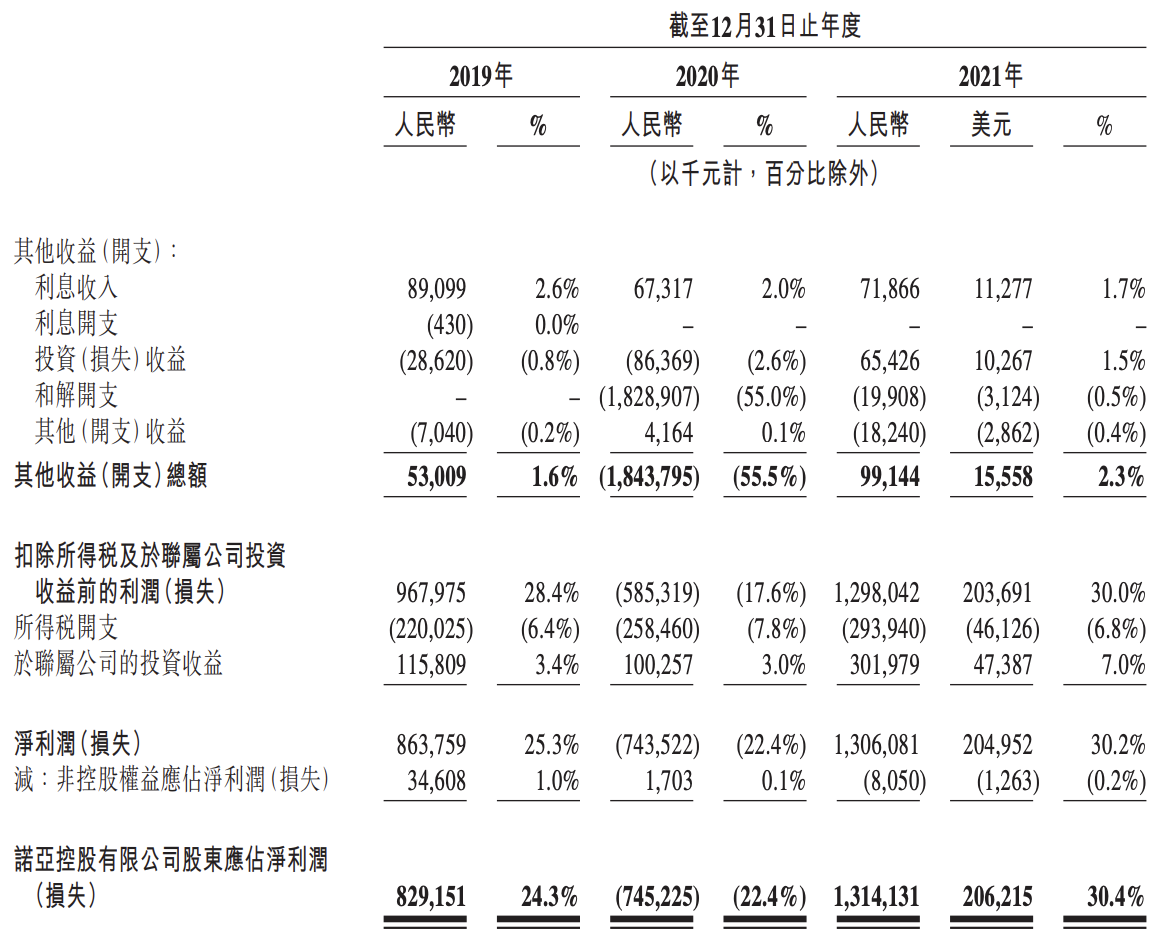
Noah fortune plans to land on the Hong Kong Stock Exchange: the performance fell sharply in the first quarter, and once stepped on the thunder "Chengxing case"
![Azkaban startup error 2022/06/20 21:39:27.726 +0800 error [stdouterrredirect] [azkaban] exception in thread](/img/02/2e402f05022b36dc48ff47232e8535.png)
Azkaban startup error 2022/06/20 21:39:27.726 +0800 error [stdouterrredirect] [azkaban] exception in thread "m

Traitement des valeurs manquantes

GPIO operation method of imx6ull
随机推荐
知乎热问:一个程序员的水平能差到什么程度?
Parallel通过XCM与Moonbeam集成,将PARA以及DeFi用例带入Moonbeam生态
[face recognition] matlab simulation of face recognition based on googlenet deep learning network
抢先报名丨新一代 HTAP 数据库如何在云上重塑?TiDB V6 线上发布会即将揭晓!
Grafana 9 is officially released, which is easier to use and more cool!
Configuration of development environment for JSP learning
请问一下flink mysql-cdc 如何保证server_id全局唯一呢?
Nuxt - Universal (SSR / SSG) / single page app (rendering mode)
SQL syntax detection
Missing value handling
国产手机干翻苹果?原来是靠百元机和猛降价实现的
[fpga+pwm] design and implementation of phase shift trigger circuit for three-phase PWM rectifier based on FPGA
0 basic how to get started software testing, can you succeed in changing careers?
短视频直播源码,EditText输入框的使用
Is the CSC securities account given by qiniu school true? Is it safe to open an account
UI automation positioning edge -xpath actual combat
缺失值處理
Database industry analysis: from the global IT industry trend to the development of domestic databases
Mybaits: common database operations (Neusoft operations)
网络智能运维助力运维效率提升