当前位置:网站首页>Installation and deployment of ganglia
Installation and deployment of ganglia
2022-06-24 23:16:00 【Programmer Jiuan】
Flume Deploy Ganglia And web page permissions
Flume Data flow monitoring Ganglia Installation and deployment
1) install httpd Services and php
[[email protected] flume]$ sudo yum -y install httpd php
2) Install other dependencies
[[email protected] flume]$ sudo yum -y install rrdtool perl-rrdtool rrdtool-devel
[[email protected] flume]$ sudo yum -y install apr-devel
3) install ganglia because CentOs The default source is none Ganglia The source of
So you need to install this yum -y install epel-release
[[email protected] flume]$ sudo yum -y install ganglia-gmetad

[[email protected] flume]$ sudo yum -y install ganglia-web

[[email protected] flume]$ sudo yum install -y ganglia-gmond
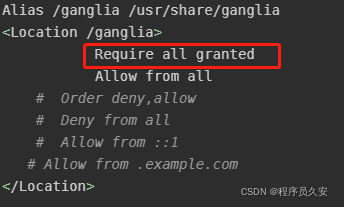
4) Modify the configuration file /etc/httpd/conf.d/ganglia.conf
[[email protected] flume]$ sudo vi /etc/httpd/conf.d/ganglia.conf
Alias /ganglia /usr/share/ganglia
<Location /ganglia>
	       Require all granted
           Allow from all
	# Order deny,allow
	# Deny from all
	# Allow from ::1
   # Allow from .example.com
</Location>
5) Modify the configuration file /etc/ganglia/gmetad.conf
data_source "master" 192.168.148.81
6) Modify the configuration file /etc/ganglia/gmond.conf
 It is amended as follows :
cluster {

	name = "master"
	owner = "unspecified"
	latlong = "unspecified"
	url = "unspecified"
}
udp_send_channel {

#bind_hostname = yes # Highly recommended, soon to be default. # This option tells gmond to use a source
Address
# that resolves to the machine's hostname.
Without
# this, the metrics may appear to come from
any
# interface and the DNS names associated with # those IPs will be used to create the RRDs.
# mcast_join = 239.2.11.71 #  Send data to  master
	host = 192.168.148.81
	port = 8649
	ttl = 1
udp_recv_channel {

# mcast_join = 239.2.11.71 port = 8649
#  Receive data from any connection
	bind = 192.168.148.81
	retry_bind = true
# Size of the UDP buffer. If you are handling lots of metrics you really
# should bump it up to e.g. 10MB or even higher. # buffer = 10485760
}
7) Modify the configuration file /etc/selinux/config
 It is amended as follows :
# This file controls the state of SELinux on the system. # SELINUX= can take one of these three values:
# enforcing - SELinux security policy is enforced.
# permissive - SELinux prints warnings instead of enforcing. # disabled - No SELinux policy is loaded.
SELINUX=disabled
# SELINUXTYPE= can take one of these two values: # targeted - Targeted processes are protected, # mls - Multi Level Security protection.
SELINUXTYPE=targeted
Tips :selinux It needs to be restarted to take effect , If you don't want to restart at this time , It can take effect temporarily
[[email protected] flume]$ sudo setenforce 0
8) start-up ganglia
  [[email protected] flume]$ sudo service httpd start
  [[email protected] flume]$ sudo service gmetad start
  [[email protected] flume]$ sudo service gmond start
9) Open web browsing ganglia page
http://192.168.148.81/ganglia
Tips : If the above operations are completed, there are still insufficient permissions error , Please amend /var/lib/ganglia Directory permissions :
[[email protected] flume]$ sudo chmod -R 777 /var/lib/ganglia

*** If it still doesn't work ***, You can modify the configuration file after modifying /etc/httpd/conf.d/ganglia.conf
 Inside plus Require all granted  I added it in advance
边栏推荐
- Epics record reference 3 -- fields common to all records
- 2022 safety officer-a certificate examination questions and answers
- Non single file component
- EPICS record Reference 3 - - field available for all Records
- [text data mining] Chinese named entity recognition: HMM model +bilstm_ CRF model (pytoch) [research and experimental analysis]
- 07_ Springboot for restful style
- 07_SpingBoot 实现 RESTful 风格
- Laravel message queue
- How to submit the shopee opening and settlement flow?
- 监听 Markdown 文件并热更新 Next.js 页面
猜你喜欢
Paddledtx v1.0 has been released, and its security and flexibility have been comprehensively improved!

Blogs personal blog test point (manual test)
![[Wuhan University] information sharing of the first and second postgraduate entrance examinations](/img/ec/884e656a921e20a5679a2960c9ac4d.jpg)
[Wuhan University] information sharing of the first and second postgraduate entrance examinations

02_SpingBoot 入门案例

2022 simulated 100 questions and simulated examination of high-altitude installation, maintenance and demolition

Spark 离线开发框架设计与实现

Epics record reference 2 -- epics process database concept
07_SpingBoot 实现 RESTful 风格
15 lines of code using mathematical formulas in wangeditor V5
![[ROS play with turtle turtle]](/img/94/4d1063f063d115aeef5cdf099278f8.png)
[ROS play with turtle turtle]


随机推荐
[untitled]
Canvas to add watermark to pictures
花房集团二次IPO:成于花椒,困于花椒
关于某手滑块的一些更新(6-18,js逆向)
Push markdown format information to the nailing robot
How to submit the shopee opening and settlement flow?
01_ Getting started with the spingboot framework
Epics record reference 3 -- fields common to all records
gocolly-手册
Docker-mysql8-master-slave
Getting started with the go Cobra command line tool
MySQL kills 10 people. How many questions can you hold on to?
EPICS记录参考4--所有输入记录都有的字段和所有输出记录都有的字段
Laravel message queue
Financial management [4]
laravel 添加helper文件
Attention, postgraduate candidates! They are the easiest scams to get caught during the preparation period?!
Dig deep into MySQL - resolve the clustered index / secondary index / federated index of InnoDB storage engine
Research Report on market supply and demand and strategy of China's solar charging controller industry
EPICS記錄參考3 -- 所有記錄都有的字段