当前位置:网站首页>[unity3d] collider assembly
[unity3d] collider assembly
2022-06-26 05:02:00 【little_ fat_ sheep】
1 Preface
Unity3D Middle collision body (Collider) The component is used to detect whether collision occurs between moving objects , It can also be used as a trigger . The conditions for collision are :
- 2 Each game object has Collider
- At least one GameObject has Rigidbody
- 2 Game objects keep relative motion ( One Cube Put it in Plane On , There's no collision , Because there is no relative motion )
The boundary of the collider does not necessarily coincide with the boundary of the game object , Users can click Edit Collider Button to edit the boundary of the collider , You can also adjust the collider boundary in the property panel . in addition , The user can check Is Trigger Options , Use as a trigger ( Uncheck to use as collider ), When used as a trigger , There's no collision , Game objects will meet and cross .

1) The callback method
Collider callback method :
//  The collision begins
void OnCollisionEnter(Collision other)
//  During the collision , Once per frame
void OnCollisionStay(Collision other)
//  End of collision
void OnCollisionExit(Collision other)
Trigger callback method :
//  Trigger start
void OnTriggerEnter(Collider other)
//  During triggering , Once per frame
void void OnTriggerStay(Collider other)
//  Trigger end
void OnTriggerExit(Collider other)
explain : The callback methods corresponding to the collider and trigger are MonoBehaviour The method in , Users can override these methods in script components , The callback method corresponding to the collider and trigger can only execute one of them , When used as a trigger , You cannot execute the callback method corresponding to the collider .
2) Callback Arguments
Collision Parameters
//  Collide object's collider components
Collider collider = collision.collider;
//  Collision point information
ContactPoint[] contactPoint = collision.contacts;
Vector3 point = contactPoint[0].point;
Collider Parameters
//  Get the of the collider MeshRenderer Components
MeshRenderer meshRenderer = collider.GetComponent<MeshRenderer>();
2 application
2.1 Collider application
1) Create game objects
The object of the game Transform The component parameters are as follows :
| Name | Type | Position | Rotation | Scale | Color |
| Plane | Plane | (0, 0, 0) | (0, 0, 0) | (1, 1, 1) | #ABA4A4FF |
| Cube | Cube | (0.1, 3, -4.4) | (0, 0, 0) | (1, 1, 1) | #F41E1EFF |
| Sphere | Sphere | (0, 1, -4.5) | (0, 0, 0) | (1, 1, 1) | #F41E1EFF |

Add : to Cube add to Rigidbody Rigid body components .
2) Script components
to Cube Game objects add script components , as follows :
ColliderController.cs
using UnityEngine;

public class ColliderController : MonoBehaviour {

	private void OnCollisionEnter(Collision other) {
		other.collider.GetComponent<MeshRenderer>().material.color = Color.green;
	}

	private void OnCollisionStay(Collision other) {
		GetComponent<MeshRenderer>().material.color = Color.yellow;
	}

	private void OnCollisionExit(Collision other) {
		other.collider.GetComponent<MeshRenderer>().material.color = Color.blue;
	}
}
3) Running effect
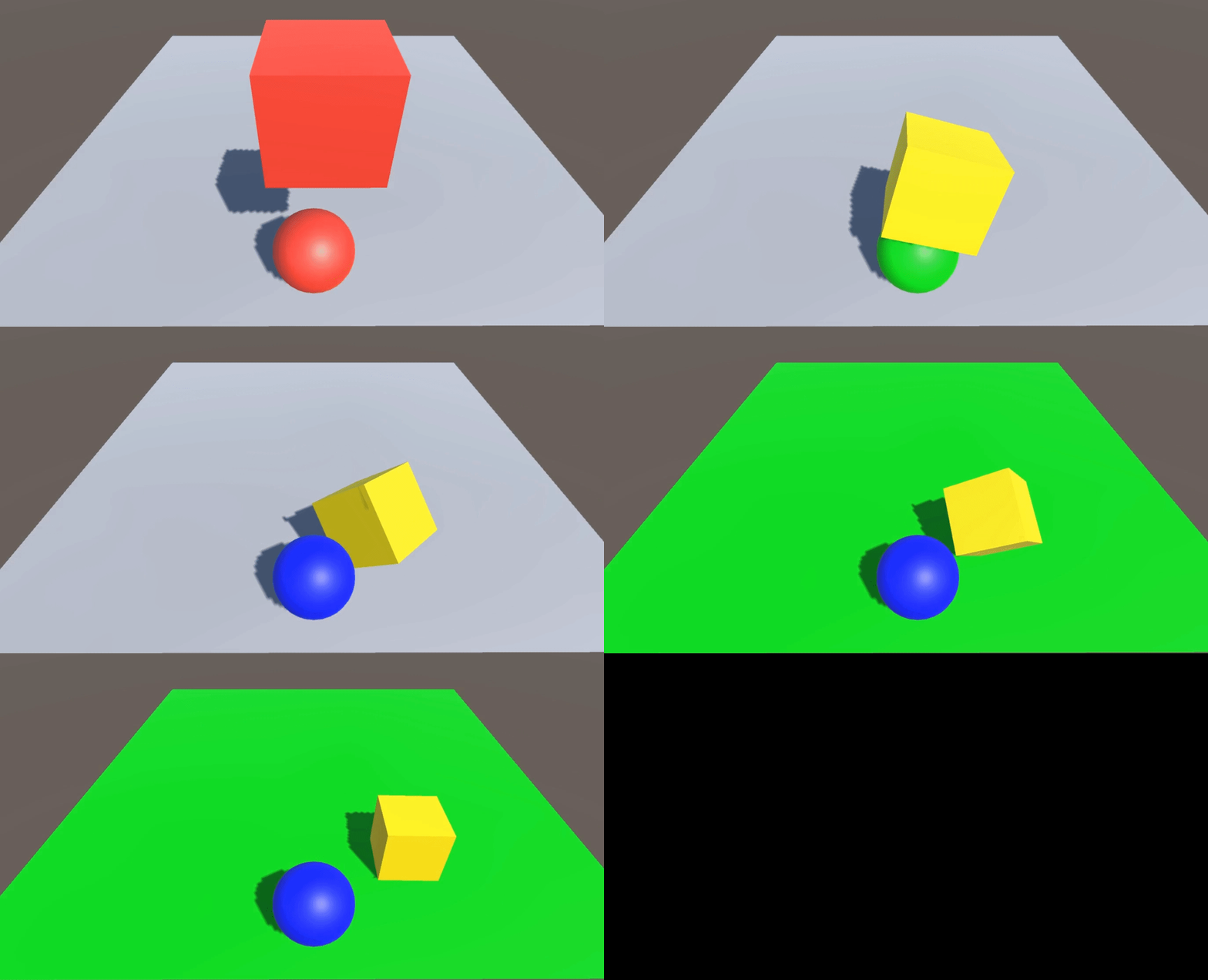
2.2 Trigger applications
1) Create game objects
The object of the game Transform The component parameters are as follows :
| Name | Type | Position | Rotation | Scale | Color |
| Plane | Plane | (0, 0, 0) | (0, 0, 0) | (2, 2, 2) | #ABA4A4FF |
| Cube | Cube | (0, 3, -4.8) | (0, 0, 0) | (1.7, 0.5, 1.7) | #F41E1EFF |
| Sphere | Sphere | (0, 4.5, -4.8) | (0, 0, 0) | (1, 1, 1) | #F41E1EFF |

Add : to Sphere add to Rigidbody Rigid body components ,Collider Component check Is Trigger Options .
2) Script components
to Sphere Game objects add script components , as follows :
TriggerController.cs
using UnityEngine;

public class TriggerController : MonoBehaviour {

	private void OnTriggerEnter(Collider other) {
		other.GetComponent<MeshRenderer>().material.color = Color.green;
	}

	private void OnTriggerStay(Collider other) {
		GetComponent<MeshRenderer>().material.color = Color.yellow;
	}

	private void OnTriggerExit(Collider other) {
		other.GetComponent<MeshRenderer>().material.color = Color.blue;
	}
}
3) Running effect

边栏推荐
- Resample
- #微信小程序# 在小程序里面退出退出小程序(navigator以及API--wx.exitMiniProgram)
- Numpy index and slice
- 【Unity3D】刚体组件Rigidbody
- PSIM software learning ---08 call of C program block
- 记录一次循环引用的问题
- Interpretation of yolov5 training results
- Using Matplotlib to add an external image at the canvas level
- A method of quickly transplanting library function code to register code by single chip microcomputer
- Multipass中文文档-使用实例命令别名
猜你喜欢

Status of processes and communication between processes

LeetCode 19. Delete the penultimate node of the linked list

Zhongshanshan: engineers after being blasted will take off | ONEFLOW u

Zuul 實現動態路由

1.18 learning summary
Genius makers: lone Rangers, technology giants and AI | ten years of the rise of in-depth learning

How MySQL deletes all redundant duplicate data

2022.1.24
Zuul implements dynamic routing

Use fill and fill in Matplotlib_ Between fill the blank area between functions
随机推荐
微服务之间的Token传递之一@Feign的token传递
1.24 learning summary
Yolov5 super parameter setting and data enhancement analysis
NVM installation and use and NPM package installation failure record
Selection of programming language
UWB ultra high precision positioning system architecture
Multipass中文文档-提高挂载性能
2022.1.24
Use to_ Numeric to numeric type
Condition query
Using Matplotlib to add an external image at the canvas level
Datetime data type - min() get the earliest date and date_ Range() creates a date range, timestamp() creates a timestamp, and tz() changes the time zone
Large numbers (C language)
Multipass Chinese document - use multipass service to authorize the client
PowerShell runtime system IO exceptions
Day4 branch and loop jobs
Anti withdrawal test record
[ide (imagebed)]picgo+typora+aliyunoss deployment blog Gallery (2022.6)
Numpy index and slice
2022.1.23