当前位置:网站首页>错误“ Failed to fetch “xxx”Temporary failure resolvingW: Some index files failed to download“解决办法
错误“ Failed to fetch “xxx”Temporary failure resolvingW: Some index files failed to download“解决办法
2022-07-23 16:09:00 【wild _wolf】
解决方案 1:恢复到原始 Ubuntu 镜像
如果遇到此错误,第一个技巧就是切换回原始镜像。这涉及从/usr/share/doc/apt/examples/sources.list路径中的示例源列表文件创建一个新的源列表文件。
查看示例源列表文件,如下所示:
$ cat /usr/share/doc/apt/examples/sources.list
输出如下: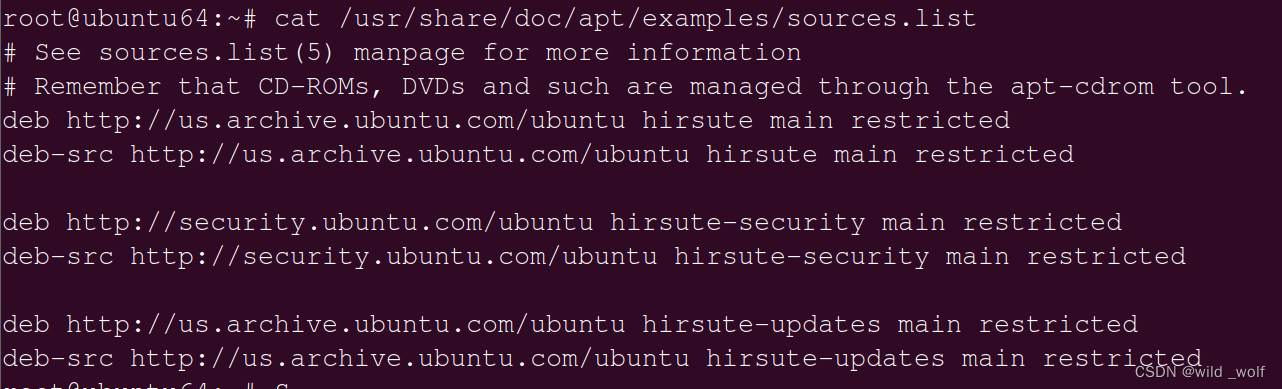
但首先,按照一贯的建议,制作源列表的备份副本,如下所示:
$ sudo mv /etc/apt/sources.list{
    ,.backup}
$ sudo mv /etc/apt/sources.list.d{
    ,.backup}
接下来,按照以下步骤从示例源列表文件创建一个新的源列表文件:
$ sudo mkdir /etc/apt/sources.list.d
$ sudo cp /usr/share/doc/apt/examples/sources.list /etc/apt/sources.list
最后,如图所示更新存储库。
$ sudo apt update
这将恢复所有镜像并启用Canonical支持的“主”存储库。
要安装社区支持的软件包、专有软件包和在完全免费许可下不可用的软件包,可以考虑启用以下存储库:
Universe – 社区维护的免费和开源软件。
Restricted – 设备的专有驱动程序。
Multiverse – 受版权或法律问题限制的软件。
要启用这些存储库,请调用以下命令。
$ sudo add-apt-repository restricted
$ sudo add-apt-repository multiverse
$ sudo add-apt-repository universe
然后更新源表
$ sudo apt update
解决方案 2:从 Ubuntu 官方镜像中选择最近的镜像
可以考虑切换到相对于您的地理位置最近的镜像(通常恰好是最快的镜像)。简单的方法是确保源列表文件中定义的镜像包含相对于居住国家/地区的国家/地区代码。例如/etc/apt/sources.list中提供的美国官方镜像为:
deb http://us.archive.ubuntu.com/ubuntu focal main restricted
将其替换为国内的清华源:
# 默认注释了源码镜像以提高 apt update 速度,如有需要可自行取消注释
deb http://mirrors.aliyun.com/ubuntu/ yammy main multiverse restricted universe
deb http://mirrors.aliyun.com/ubuntu/ yammy-backports main multiverse restricted universe
deb http://mirrors.aliyun.com/ubuntu/ yammy-proposed main multiverse restricted universe
deb http://mirrors.aliyun.com/ubuntu/ yammy-security main multiverse restricted universe
deb http://mirrors.aliyun.com/ubuntu/ yammy-updates main multiverse restricted universe
deb-src http://mirrors.aliyun.com/ubuntu/ yammy main multiverse restricted universe
#deb-src http://mirrors.aliyun.com/ubuntu/ yammy-backports main multiverse restricted universe
#deb-src http://mirrors.aliyun.com/ubuntu/ yammy-proposed main multiverse restricted universe
#deb-src http://mirrors.aliyun.com/ubuntu/ yammy-security main multiverse restricted universe
#deb-src http://mirrors.aliyun.com/ubuntu/ yammy-updates main multiverse restricted universe
然后更新源表
$ sudo apt update
解决方案 3:从运行良好的系统复制源列表内容
最后,解决此错误的另一种方法是从另一个功能正常的 Ubuntu 系统复制源列表文件的内容并将它们粘贴到系统的源列表文件中。这是迄今为止修复此错误的最简单方法。
以上都试了还不行就修改配置文件/etc/resolv.conf,
sudo vim /etc/resolv.conf
添加域名服务器8.8.8.8,
nameserver 8.8.8.8
以上方法应该可以帮助您解决Ubuntu上的这个烦人的错误。如果帮助到了您,请点个赞或者收藏噢。
边栏推荐
- rhcsa笔记七
- Activity Registration: how to quickly start the open source tapdata live data platform on a zero basis?
- Three barriers in the workplace: annual salary of 300000, 500000 and 1million
- CSR, SSR and SSG
- [215] gin framework connects to MySQL database
- JS: image URL to Base64 encoding
- @Entity 里面的 JPA 注解
- Leetcode: Jianzhi offer II 115. reconstruction sequence [graph theory thinking + in degree consideration + topological sorting]
- El input usage
- Do you still have certificates to participate in the open source community?
猜你喜欢


随机推荐
RS232 DB9 serial port device
QT multithread instance and the fifth parameter of connect [easy to understand]
Debug: the formal parameter has const modifier, which should be paid attention to
微服务雪崩问题及解决方案
[easy to understand] relational schema paradigm decomposition tutorial 3NF and BCNF formula! Xiaobai can also understand "suggestions collection"
使用 Three.js 实现'雪糕'地球,让地球也凉爽一夏
Block encryption mode ECB, CBC, PCBC, CFB, OFB, CTR
[215] gin framework connects to MySQL database
MySQL massive write problem optimization scheme MySQL parameter tuning
DDD:如何领用领域驱动设计来避免写流水账代码
Digital signal processing experiment (I)
MySQL经典练习题及答案,常用SQL语句练习50题
go中高并发下的锁是如何工作的(结合源码)
What is the use of tampermonkey?
薪资高压线
Legendary setup GEE engine tutorial configuration micro terminal
Comparison of several operation and maintenance tools
Awk from introduction to earth (16) comprehensive case of awk
防控调整后暑期市场井喷,途家、木鸟、美团暑期活动测评
Redis data loss problem