当前位置:网站首页>Go Web 编程入门:验证器
Go Web 编程入门:验证器
2022-06-27 11:34:00 【华为云】
前言
网络验证可能是一个难题。 有句话在 Web 开发中流传很广的原则:
我们不能相信来自客户端用户表单的任何内容。
所以我们必须在使用这些数据之前验证所有传入数据。实现 REST API 是 Go 应用程序的典型用例。 API 接受的格式错误的数据可能会导致系统其他部分出现严重错误。
最好的情况是您的数据库有一些机制来防止存储格式错误的数据。如果不这样做,这些数据可能会导致您面向客户的应用程序出现错误和意外行为(比如 SQL 注入)。
在这篇文章中,我们将介绍如何在 Go 中验证发送到 REST API 的数据。
手动验证输入
简易的 REST API
这是一个简单的 REST API 示例,使用 gorilla/mux 包构建。它是一个很棒的 HTTP 路由器,特别是对于 REST API。 API 为一个端点提供路径 /user。为简单起见,它只接受所有用户的 HTTP GET 和创建用户的 HTTP Post。此外,它没有持久性数据库,而是用切片将用户存储在内存中。
package mainimport ( "encoding/json" "log" "net/http" "strings" "github.com/gorilla/mux")type User struct { ID int FirstName string LastName string FavouriteVideoGame string Email string}func main() { router := mux.NewRouter() router.HandleFunc("/user", PostUser).Methods(http.MethodPost) router.HandleFunc("/user", GetUsers).Methods(http.MethodGet) log.Fatal(http.ListenAndServe(":8081", router))}var users = []User{}var id = 0func validateEmail(email string) bool { // This is obviously not a good validation strategy for email addresses // pretend a complex regex here return !strings.Contains(email, "@")}func PostUser(w http.ResponseWriter, r *http.Request) { user := User{} json.NewDecoder(r.Body).Decode(&user) // We don't want an API user to set the ID manually // in a production use case this could be an automatically // ID in the database user.ID = id id++ users = append(users, user) w.WriteHeader(http.StatusCreated)}func GetUsers(w http.ResponseWriter, r *http.Request) { w.Header().Add("Content-Type", "application/json") if err := json.NewEncoder(w).Encode(users); err != nil { log.Println(err) w.WriteHeader(http.StatusInternalServerError) return }}现在让我们看看如何手动验证在请求正文中提供给此 API 的 POST 处理程序的输入。
手动验证输入
有时我们要求用户输入一些字段,但他们未能完成该字段。例如在上一节中,当我们需要用户名时。您可以使用 len 函数来获取字段的长度,以确保用户输入了某些内容。
if len(r.Form["username"][0])==0{ // code for empty field }假设我们想在使用 Post 处理程序创建用户时根据需要设置 FirstName、LastName 和 Email。此外,我们希望电子邮件字段是有效的电子邮件地址。一种简单的方法是手动验证字段,如下所示:
if user.FirstName == "" { errs = append(errs, fmt.Errorf("Firstname is required").Error())}if user.LastName == "" { errs = append(errs, fmt.Errorf("LastName is required").Error())}if user.Email == "" || validateEmail(user.Email) { errs = append(errs, fmt.Errorf("A valid Email is required").Error())}完整示例:
package mainimport ( "encoding/json" "fmt" "log" "net/http" "strings" "github.com/gorilla/mux")type User struct { ID int FirstName string LastName string FavouriteVideoGame string Email string}func main() { router := mux.NewRouter() router.HandleFunc("/user", PostUser).Methods(http.MethodPost) router.HandleFunc("/user", GetUsers).Methods(http.MethodGet) log.Fatal(http.ListenAndServe(":8081", router))}var users = []User{}var id = 0func validateEmail(email string) bool { // That's obviously not a good validation strategy for email addresses // pretend a complex regex here return !strings.Contains(email, "@")}func PostUser(w http.ResponseWriter, r *http.Request) { user := User{} json.NewDecoder(r.Body).Decode(&user) errs := []string{} if user.FirstName == "" { errs = append(errs, fmt.Errorf("Firstname is required").Error()) } if user.LastName == "" { errs = append(errs, fmt.Errorf("LastName is required").Error()) } if user.Email == "" || validateEmail(user.Email) { errs = append(errs, fmt.Errorf("A valid Email is required").Error()) } if len(errs) > 0 { w.Header().Add("Content-Type", "application/json") w.WriteHeader(http.StatusBadRequest) if err := json.NewEncoder(w).Encode(errs); err != nil { } return } // We don't want an API user to set the ID manually // in a production use case this could be an automatically // ID in the database user.ID = id id++ users = append(users, user) w.WriteHeader(http.StatusCreated)}func GetUsers(w http.ResponseWriter, r *http.Request) { w.Header().Add("Content-Type", "application/json") if err := json.NewEncoder(w).Encode(users); err != nil { log.Println(err) w.WriteHeader(http.StatusInternalServerError) return }}可以看到这个验证方法非常冗长。我们必须定义一个自定义函数来验证常见的东西,比如电子邮件地址。让我们看看如何改进这一点。
上面只是简单通过 validateEmail 函数验证邮箱中是否含有 @ 字符:
func validateEmail(email string) bool { // That's obviously not a good validation strategy for email addresses // pretend a complex regex here return !strings.Contains(email, "@")}其实更好的方式是通过正则表达式来验证 E-mail 的有效性:
if m, _ := regexp.MatchString(`^([\w\.\_]{2,10})@(\w{1,}).([a-z]{2,4})$`, r.Form.Get("email")); !m { fmt.Println("no") }else{ fmt.Println("yes") }使用结构标签验证输入
在 Go 中验证结构的一种更惯用的方法是使用结构标签。有许多通过结构标签进行结构验证的包。我们将在这里使用 https://github.com/go-playground/validator:该验证器基于标签实现结构和单个字段的值验证。

使用 go get github.com/go-playground/validator/v10 进行安装。
这不仅使我们能够使用结构标签进行验证,而且还提供了许多预定义的验证方法,例如电子邮件地址。
我们将对结构执行此验证,但不探讨如何填充结构。 我们可以假设数据将通过解析 JSON 有效负载、从表单输入显式填充或其他方法来填充。
如果您的数据需要其他验证器,请查看验证器包的文档。您需要的验证器很有可能在软件包提供的 80 多个验证器之下。
package mainimport ( "encoding/json" "log" "net/http" "github.com/go-playground/validator/v10" "github.com/gorilla/mux")type User struct { ID int `validate:"isdefault"` FirstName string `validate:"required"` LastName string `validate:"required"` FavouriteVideoGame string Email string `validate:"required,email"`}func main() { router := mux.NewRouter() router.HandleFunc("/user", PostUser).Methods(http.MethodPost) router.HandleFunc("/user", GetUsers).Methods(http.MethodGet) log.Fatal(http.ListenAndServe(":8081", router))}var users = []User{}var id = 0func PostUser(w http.ResponseWriter, r *http.Request) { user := User{} json.NewDecoder(r.Body).Decode(&user) validate := validator.New() err := validate.Struct(user) if err != nil { validationErrors := err.(validator.ValidationErrors) w.Header().Add("Content-Type", "application/json") w.WriteHeader(http.StatusBadRequest) responseBody := map[string]string{"error": validationErrors.Error()} if err := json.NewEncoder(w).Encode(responseBody); err != nil { } return } // We don't want an API user to set the ID manually // in a production use case this could be an automatically // ID in the database user.ID = id id++ users = append(users, user) w.WriteHeader(http.StatusCreated)}func GetUsers(w http.ResponseWriter, r *http.Request) { w.Header().Add("Content-Type", "application/json") if err := json.NewEncoder(w).Encode(users); err != nil { log.Println(err) w.WriteHeader(http.StatusInternalServerError) return }}上面的 validationError.Error() 返回一个字符串,该字符串总结了结构中每个失败的验证。所以 BadRequest 响应仍然有非常详细的信息说明出了什么问题。
我们将验证更改为使用验证器包,现在根据以下规则进行验证:
ID 字段不应该由用户设置,所以我们验证它有 int 的默认值,即 0
FullName 和 LastName 是必需的
电子邮件字段是必需的,并使用预定义的电子邮件验证器进行验证
使用自定义验证器验证输入
所以现在我们使用验证器包并使用结构标签验证结构。但是我们如何验证一个无法通过库提供的标签验证的结构字段呢?
假设我们想将某些视频游戏列入黑名单。因为我们不希望我们的系统中有喜欢 PUBG 或 Fortnite 等游戏的用户。在这种情况下,我们可以定义一个自定义的 validate 标记值并让 validate 包像这样使用它:
首先我们定义一个验证函数:
func GameBlacklistValidator(f1 validator.FieldLevel) bool { gameBlacklist := []string{"PUBG", "Fortnite"} game := f1.Field().String() for _, g := range gameBlacklist { if game == g { return false } } return true}然后我们用验证器实例注册函数和相应的标签。
... validate := validator.New() validate.RegisterValidation("game-blacklist", GameBlacklistValidator)...现在我们在 User 结构的定义中添加标签。
type User struct { ID int `validate:"isdefault"` FirstName string `validate:"required"` LastName string `validate:"required"` FavouriteVideoGame string `validate:"game-blacklist"` Email string `validate:"required,email"`}推荐验证库
Awesome Go 项目下有用于验证的库。这里推荐如下:
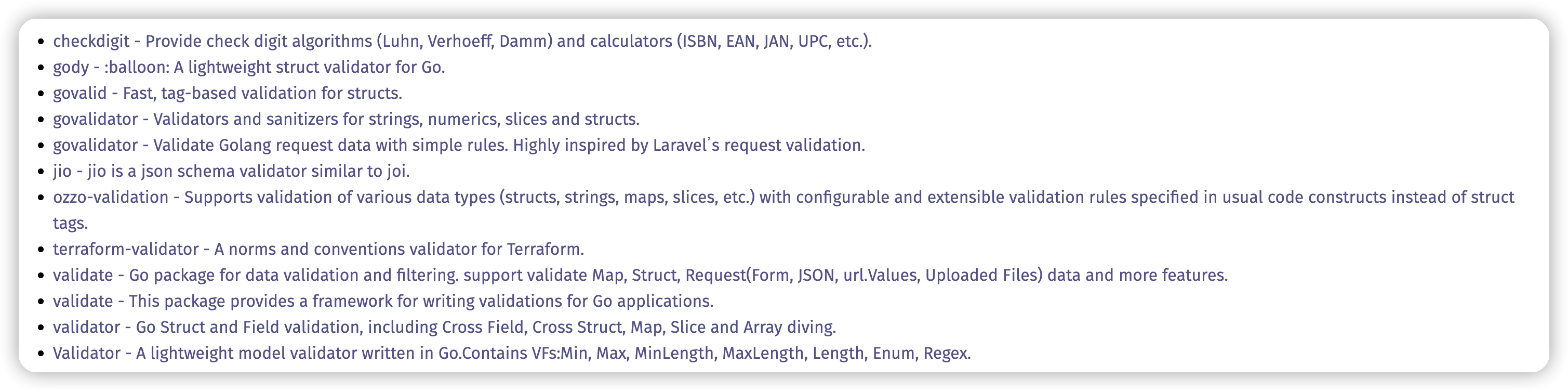
govalidator - Validators and sanitizers for strings, numerics, slices and structs.
terraform-validator - A norms and conventions validator for Terraform.
validate - This package provides a framework for writing validations for Go applications.
根据介绍赶紧为自己的项目挑一个吧~
总结
验证 REST API 输入对于防止应用程序出现格式错误的数据至关重要。您可以编写自己的验证逻辑,但在大多数情况下,最好使用维护良好的验证包,例如上面的推荐。
这使您可以在结构中使用标签来配置验证,并使运行验证的逻辑保持简单。如果您有一个需要不常见验证功能的特殊用例,您仍然可以为验证器包定义自己的扩展。
Awesome Go:https://awesome-go.com/validation/
边栏推荐
- Precautions for use of IO interface interrupt of Jerry [chapter]
- [tcapulusdb knowledge base] tcapulusdb doc acceptance - create business introduction
- Shell script learning notes
- Rxjs mergeMap 的使用场合
- Unity shader learning (II) the first shader
- R language dplyr package arrange function sorts dataframe data, sorts dataframe data through multiple data columns, specifies the first field to be sorted in descending order, and does not specify the
- [tcapulusdb knowledge base] tcapulusdb business data backup introduction
- Nvme2.0 protocol - new features
- Heap heap sort TOPK
- "Internet +" contest topic hot docking | I figure to understand 38 propositions of Baidu
猜你喜欢

杰理之DAC输出方式设置【篇】

器审科普:创新医疗器械系列科普——胸骨板产品

Histrix工作原理

Unity Shader学习(一)认识unity shader基本结构
![[tcaplusdb knowledge base] Introduction to tcaplusdb tcaplusadmin tool](/img/ba/f865c99f3ea9e42c85b7e906f4f076.png)
[tcaplusdb knowledge base] Introduction to tcaplusdb tcaplusadmin tool

dried food! What problems will the intelligent management of retail industry encounter? It is enough to understand this article
![[tcapulusdb knowledge base] Introduction to tmonitor system upgrade](/img/04/b1194ca3340b23a4fb2091d1b2a44d.png)
[tcapulusdb knowledge base] Introduction to tmonitor system upgrade

StarCraft's Bug King ia retired for 2 years to engage in AI, and lamented that it was inferior
星际争霸的虫王IA退役2年搞AI,自叹不如了

Open source model library of flying propeller industry: accelerating the development and application of enterprise AI tasks
随机推荐
15+ urban road element segmentation application, this segmentation model is enough!
最大路径和问题(摘樱桃问题)
R语言fpc包的dbscan函数对数据进行密度聚类分析、plot函数可视化聚类图
从零开始搭建物联网系统
手把手带你入门 API 开发
Redis 分布式锁15问,看看你都掌握了哪些?
【TcaplusDB知识库】TcaplusDB分析型文本导出介绍
57. The core principle of flutter - layout process
MapReduce实战小案例(自定义排序、二次排序、分组、分区)
杰理之一直喂狗会频繁开关中断导致定时器【篇】
What is the TCP 3-time handshake process?
QStyle类用法总结(三)
On ticheck
[tcaplusdb knowledge base] Introduction to tcaplusdb tcaplusadmin tool
【TcaplusDB知识库】TcaplusDB单据受理-事务执行介绍
进程间通信详解
[tcapulusdb knowledge base] Introduction to tcapulusdb analytical text export
Popular science of device review: popular science of innovative medical device series - sternum plate products
【TcaplusDB知识库】TcaplusDB表数据缓写介绍
namespace ‘rlang’ 0.2.0 is being loaded, but >= 0.3.0 is required