当前位置:网站首页>Request and response
Request and response
2022-07-25 02:37:00 【endorphinnnn】
Request and Response summary
request: Get request data
· Browser to background server (Tomcat) send out HTTP request
·HTTP Your request will contain a lot of request data ( Request line + Request header + Request body )
· The background server will be right HTTP Analyze the data in and store the analysis results in an object (request object ) in
· Relevant parameters can be obtained from request Object , And carry out subsequent operations
response: Set response data
· After the business is done , The background will return the result of business processing to the front end, that is, the response data
· The response data will be encapsulated in response In the object
· The server will parse response object , according to ( Response line + Response head + Response body ) Format splicing results
· The browser finally parses the result , Display the content in the browser for users to browse
Request object
Request Inheritance system
ServletRequest–>HttpServletRequest–>RequestFacade
Request Get request data
Get request line data

Get request method :String getMethod()
Get virtual directory ( Project access path ):String getContextPath()
obtain URL( Uniform resource locator ):StringBuffer getRequestURL()
obtain URI( Uniform resource identifiers ):String getRequestURI()
Get request parameters (GET The way ):String getQueryString()
Get request header data

The format is key:value
So get the corresponding value according to the request header name :String getHeader(String name)
Get request body data

Browser sending GET The requested data has no request body
Get byte input stream :ServletInputStream getInputStream()
Get character input stream ( Pure text ):BufferedReader getReader()
BufferedReader Flow is through request Object to get , When the request is complete request The object will be destroyed ,request After the object is destroyed ,BufferedReader The flow will automatically close , So there is no need to manually close the flow here .
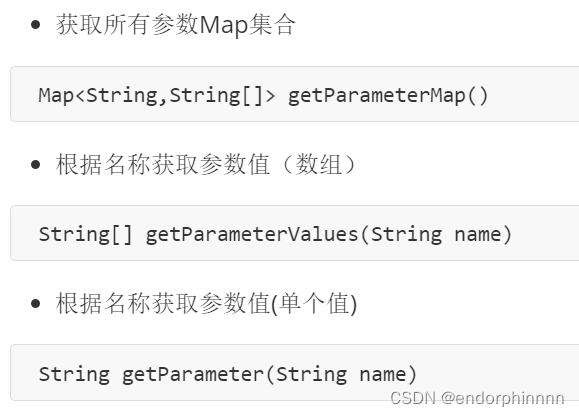
Get request parameters
GET The way :String getQueryString()
POST The way :BufferedReader getReader();
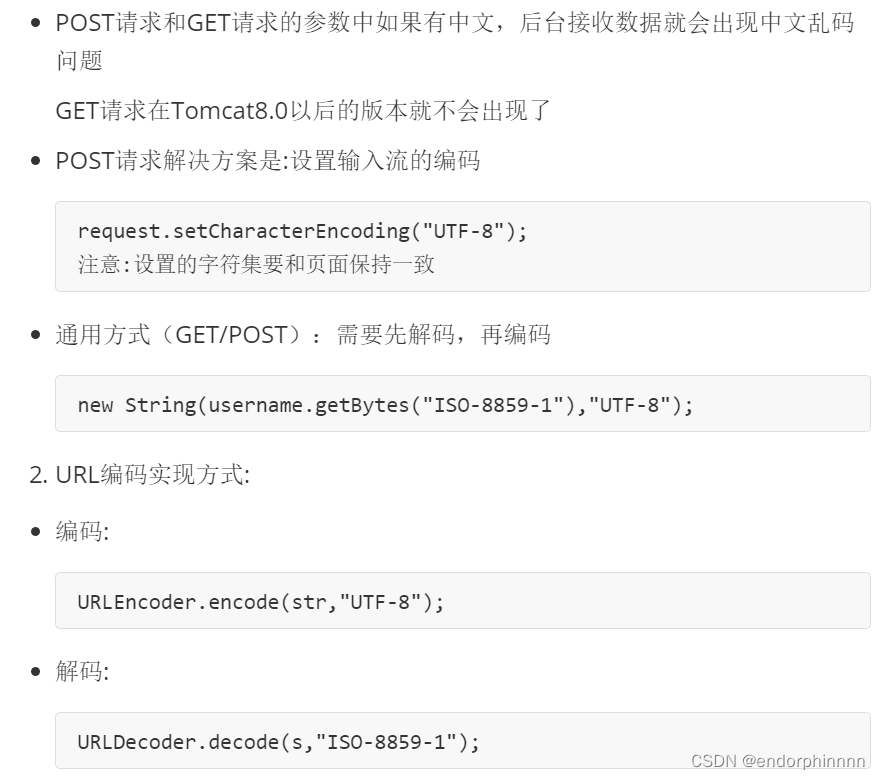
The request parameters are garbled in Chinese :
POST:
- Analyze the causes of Chinese garbled code :
- POST The request parameter is through request Of getReader() To get the data in the stream
- TOMCAT The encoding used when obtaining the stream is ISO-8859-1
- ISO-8859-1 The code does not support Chinese , So it's going to be messy
- Solution :
- The coding format of page setup is UTF-8
- hold TOMCAT The encoding before obtaining the stream data is set to UTF-8
- adopt request.setCharacterEncoding(“UTF-8”) Set encoding ,UTF-8 It can also be written in lowercase
GET:
- GET The way to get the request parameters is request.getQueryString()
- POST The way to get the request parameters is request.getReader()
- request.setCharacterEncoding(“utf-8”) It's settings request Encoding of processing stream
- getQueryString Method does not get data through stream
Request forwarding
req.getRequestDispatcher(“ resources B route ”).forward(req,resp);
Response object
Response head
Set response status code :void setStatus(int sc);
Set the response header key value pair :void setHeader(String name,String value);
Get character output stream :PrintWriter getWriter();
Get byte output stream :ServletOutputStream getOutputStream();
request redirections (redirect)
Implementation of redirection :
resp.setStatus(302);
resp.setHeader(“location”,“ resources B Access path of ”);
simplify :resposne.sendRedirect(“/request-demo/resp2”)
routing problem
- Browsers use : Need to add virtual directory ( Project access path )
- Server use : No need to add virtual directory
If you pass Tomcat The plug-in configures the access path of the project , When redirecting, use getContextPath() Method to dynamically obtain the virtual directory
Response character data
- adopt Response Object to get the character output stream : PrintWriter writer = resp.getWriter();
- Write data through character output stream : writer.write(“aaa”);
After a request response ,response The object will be destroyed , So don't close the flow manually .
Set the data format and code of the response
response.setContentType(“text/html;charset=utf-8”);
writer.write(“ Hello ”);
Response byte data
- adopt Response Object to get byte output stream :ServletOutputStream outputStream = resp.getOutputStream();
- Write data through byte output stream : outputStream.write( Bytes of data );
Return the picture to the browser
//pom rely on
<dependency>
    <groupId>commons-io</groupId>
    <artifactId>commons-io</artifactId>
    <version>2.6</version>
 </dependenct>

-------------------------------------------------
// Tool class methods
//fis: Input stream
//os: Output stream
IOUtils.copy(fis,os);
边栏推荐
- After six years of precipitation, new consumption has found a digital transformation paradigm
- Text reading end judgment
- Can PostgreSQL CDC only connect to the main database? Connection from the library reports an error logical decoden
- Hongmeng harmonyos 3 official announcement: officially released on July 27; Apple slowed down the recruitment and expenditure of some teams in 2023; Russia fined Google 2.6 billion yuan | geek headlin
- Is redis'module'not an internal or external command?
- See you in Suzhou! "Cloud Intelligence Technology Forum - industry special" will be held soon
- Industrial control safety PLC firmware reverse III
- CSRF attack principle scenario
- Automatically create partition tables by time and month in PostgreSQL
- Generator set work arrangement problem code
猜你喜欢

Componentization and modularization

B2B e-commerce trading platform of heavy metal industry: breaking the state of data isolation and improving the benefits of heavy metal industry

Is it necessary to increase the number of milliseconds and save several KB of memory in the program?

Tp5.1 paging (with parameter transfer)

Use unicloud cloud function to decode wechat motion steps in applet

Industrial control safety PLC firmware reverse II

After working for two months in the summer vacation, I understood three routing schemes of keepalived high availability

Let's customize the loader
![[pyGame practice] nostalgic classic - do you remember the name of this chess game for children? (must collect)](/img/b3/075ad2d555118272efede5a9969319.png)
[pyGame practice] nostalgic classic - do you remember the name of this chess game for children? (must collect)

Case analysis of building exhibition service management system with low code development platform
随机推荐
String class
How to upload files to the server
In the post deep learning era, where is the recommendation system going?
YouTube Download and (batch) Download
Tp5.1 paging (with parameter transfer)
"Introduction to interface testing" punch in day06: interface testing platform: are tools and frameworks incompatible?
Gerrit statistics script
Focus on improving women's and children's sense of gain, happiness and security! In the next ten years, Guangzhou Women's and children's undertakings will make such efforts
Automatically create partition tables by time and month in PostgreSQL
Redux best practices "Redux toolkit"
Details of C language compilation preprocessing and comparison of macros and functions
Can PostgreSQL CDC only connect to the main database? Connection from the library reports an error logical decoden
Project management tool Zen
Unable to display spline in UE4 (unreal engine4) terrain editing tool
Work arrangement of generator set
Solution to the occupation of project startup port
Industrial control safety PLC firmware reverse III
6. Object storage
How to judge which star you look like?
Sword finger offer 11. rotate the minimum number of the array