当前位置:网站首页>Script - crawl the customized storage path of the cartoon and download it to the local
Script - crawl the customized storage path of the cartoon and download it to the local
2022-06-26 13:07:00 【Rowing in the waves】
scrapy—— Crawl the self defined storage path of comics on comics.com and download it to the local
- 1. New project and main crawler file
- 2. Create a new one under the project main.py file , Write the code as follows :
- 3. To write items.py The code in the file , as follows :
- 4. To write pipelines.py The code in the file , as follows
- 5. To write Comic.py The code in the file , as follows :
- 6. To write settings.py The code in the file , as follows :
- 7. function main.py file , give the result as follows :
1. New project and main crawler file
scrapy startproject comic
cd comic
scrapy genspider Comic manhua.sfacg.com
Note that the above command is in the cmd Interface operation
2. Create a new one under the project main.py file , Write the code as follows :
from scrapy import cmdline
cmdline.execute("scrapy crawl Comic".split())
The project structure is shown in the figure below :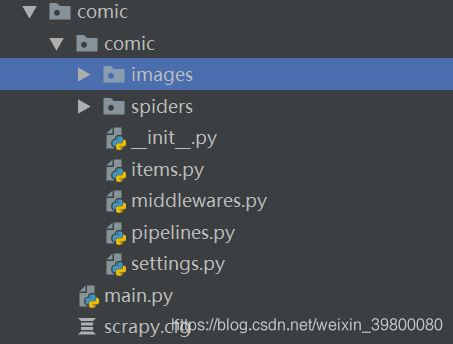
3. To write items.py The code in the file , as follows :
import scrapy

class ComicItem(scrapy.Item):
    # define the fields for your item here like:
    # name = scrapy.Field()
    comic_name=scrapy.Field()# Cartoon title
    chapter_name=scrapy.Field()# Chapter name
    chapter_url=scrapy.Field()# chapter url
    img_urls=scrapy.Field()# Cartoon picture list type
    chapter_js=scrapy.Field()# Chapter corresponding js
4. To write pipelines.py The code in the file , as follows
class MyImageDownloadPipeline(ImagesPipeline):
    def get_media_requests(self,item,info):
        meta={'comic_name':item['comic_name'],'chapter_name':item['chapter_name']}# Parameters required for naming the image folder
        return [Request(url=x,meta=meta) for x in item.get('img_urls',[])]# Here, you must remember to transfer the value of the corresponding formal parameter , Otherwise, the report will be wrong
    def file_path(self, request, response=None, info=None):
        comic_name = request.meta.get('comic_name')# Comic name as top-level Directory
        chapter_name = request.meta.get('chapter_name')# The chapter name is used as a sub directory
        image_name=request.url.split('/')[-1]# Select the suffix at the end of the link to indicate the sequence number of the picture
        # Construct file name
        filename = '{0}/{1}/{2}'.format(comic_name,chapter_name,image_name)
        return filename
The above code completes the inheritance ImagesPipeline class , And rewrite two of them , Complete custom storage path .
5. To write Comic.py The code in the file , as follows :
import scrapy
from ..items import ComicItem
class ComicSpider(scrapy.Spider):
    name = 'Comic'
    allowed_domains = ['manhua.sfacg.com','comic.sfacg.com']
    start_urls = ['https://manhua.sfacg.com/mh/Gongsheng/']
    img_host = 'http://coldpic.sfacg.com'# Picture link domain name
    host='https://manhua.sfacg.com'# Chapter domain name
    def parse(self,response):
        chapter_urls=response.xpath('//div[@class="comic_Serial_list"]//a/@href').extract()# Chapter link list
        for chapter_url in chapter_urls:# Traverse the chapter url
            chapter_url=self.host+chapter_url# Add domain name
            yield scrapy.Request(chapter_url,callback=self.parse_chapter)
    def parse_chapter(self,response):# Analyze the chapter html
        js_url='http:'+response.xpath('//head//script/@src').extract()[0]
        chapter_name=response.xpath('//div[@id="AD_j1"]/span/text()').extract_first().strip()
        yield scrapy.Request(url=js_url,meta={'chapter_name':chapter_name,'chapter_url':response.url},callback=self.parse_js)
    def parse_js(self,response):# analysis js The data returned in it
        texts=response.text.split(';')
        comic_name=texts[0].split('=')[1].strip()[1:-1]# Cartoon title
        img_urls = [self.img_host + text.split('=')[1].strip()[1:-1] for text in texts[7:-1]]# Cartoon chapter picture list
        chapter_name=response.meta.get('chapter_name')# Chapter name
        chapter_url=response.meta.get('chapter_url')# chapter url
        comic_item=ComicItem()
        comic_item['comic_name']=comic_name
        comic_item['chapter_name']=chapter_name
        comic_item['chapter_js']=response.url
        comic_item['img_urls']=img_urls
        comic_item['chapter_url']=chapter_url
        yield comic_item
Because the cartoon chapter detail page picture is through js Dynamically loaded , Get the chapter directly html Does not contain links to cartoon pictures , After observation , It is through the corresponding js Access the link to the corresponding picture . And the js It can be found in the source code of cartoon chapters , All ideas are to get links to all chapters first , Then get the chapter details page source code , It is concluded that js Link to , And then visit js Why url, Get all the pictures of the chapter . among comic_item The contents are as follows
{'chapter_js': 'http://comic.sfacg.com/Utility/1972/ZP/0083_6428.js',
 'chapter_name': ' symbiosis symbiosis 19 word ( 5、 ... and )',
 'chapter_url': 'https://manhua.sfacg.com/mh/Gongsheng/53379/',
 'comic_name': ' symbiosis symbiosis',
 'img_urls':
 			 ['http://coldpic.sfacg.com/Pic/OnlineComic4/Gongsheng/ZP/0083_6428/002_260.jpg',
              'http://coldpic.sfacg.com/Pic/OnlineComic4/Gongsheng/ZP/0083_6428/003_12.jpg',
              'http://coldpic.sfacg.com/Pic/OnlineComic4/Gongsheng/ZP/0083_6428/004_71.jpg',
              'http://coldpic.sfacg.com/Pic/OnlineComic4/Gongsheng/ZP/0083_6428/005_659.jpg',
              'http://coldpic.sfacg.com/Pic/OnlineComic4/Gongsheng/ZP/0083_6428/006_217.jpg',
              'http://coldpic.sfacg.com/Pic/OnlineComic4/Gongsheng/ZP/0083_6428/007_611.jpg',
              'http://coldpic.sfacg.com/Pic/OnlineComic4/Gongsheng/ZP/0083_6428/008_168.jpg',
              'http://coldpic.sfacg.com/Pic/OnlineComic4/Gongsheng/ZP/0083_6428/009_335.jpg',
              'http://coldpic.sfacg.com/Pic/OnlineComic4/Gongsheng/ZP/0083_6428/010_175.jpg',
              'http://coldpic.sfacg.com/Pic/OnlineComic4/Gongsheng/ZP/0083_6428/011_178.jpg',
              'http://coldpic.sfacg.com/Pic/OnlineComic4/Gongsheng/ZP/0083_6428/012_790.jpg']}
6. To write settings.py The code in the file , as follows :
ROBOTSTXT_OBEY = False
DOWNLOAD_DELAY = 3
ITEM_PIPELINES = {
   'comic.pipelines.ComicPipeline': None,
    'comic.pipelines.MyImageDownloadPipeline':300,
}
import os
project_dir=os.path.abspath(os.path.dirname(__file__))
IMAGES_STORE=os.path.join(project_dir,'images')# Cartoons are stored in the root directory of the project imags Under the folder
7. function main.py file , give the result as follows :
 Finally, after the download, you can see that the cartoon has been downloaded locally


边栏推荐
- Go 结构体方法
- Angle de calcul POSTGIS
- el-form-item 包含两个input, 校验这两个input
- HDU 3555 Bomb
- 桥接模式(Bridge)
- UVa11582 [快速幂]Colossal Fibonacci Numbers!
- [esp32-C3][RT-THREAD] 基于ESP32C3运行RT-THREAD bsp最小系统
- Photoshop 2022 23.4.1增加了哪些功能?有知道的吗
- 国标GB28181协议EasyGBS视频平台TCP主动模式拉流异常情况修复
- This function has none of deterministic, no SQL solution
猜你喜欢

深度解析当贝盒子B3、腾讯极光5S、小米盒子4S之间的区别

第十章 设置结构化日志记录(二)

【网络是怎么连接的】第二章(下):一个网络包的接收

自动化测试的局限性你知道吗?

Record a phpcms9.6.3 vulnerability to use the getshell to the intranet domain control

P2393 yyy loves Maths II

倍福TwinCAT3实现CSV、TXT文件读写操作

National standard gb28181 protocol easygbs video platform TCP active mode streaming exception repair

倍福PLC通过MC_ReadParameter读取NC轴的配置参数

Group counting practice experiment 9 -- using cmstudio to design microprogram instructions based on segment model machine (2)
随机推荐
Is it safe for the head teacher to open a stock account and open an account for financial management?
体现技术深度(无法速成)
processing 函数translate(mouseX, mouseY)学习
Vivado 错误代码 [DRC PDCN-2721] 解决
P5733 【深基6.例1】自动修正
倍福EtherCAT Xml描述文件更新和下载
Verilog中的系统任务(显示/打印类)--$display, $write,$strobe,$monitor
倍福PLC基于CX5130实现数据的断电保持
KVM 显卡透传 —— 筑梦之路
[geek challenge 2019] rce me 1
倍福Ethercat模块网络诊断和硬件排查的基本方法
Learning Processing Zoog
第十章 设置结构化日志记录(二)
code force Party Lemonade
PostGIS calculation angle
el-form-item 包含两个input, 校验这两个input
ES6:Map
. Net Maui performance improvement
首批通过!百度智能云曦灵平台获信通院数字人能力评测权威认证
OPLG: 新一代云原生可观测最佳实践