当前位置:网站首页>Zabbix5 series - use temperature and humidity sensor to monitor the temperature and humidity of the machine room (XX)
Zabbix5 series - use temperature and humidity sensor to monitor the temperature and humidity of the machine room (XX)
2022-06-23 01:27:00 【Halyace】
Zabbix5 series - Use the temperature and humidity sensor to monitor the temperature and humidity of the machine room
- One 、 Reference resources
- Two 、 install zabbix-agent2
- 3、 ... and 、 Test the sensor
- Four 、 Create a host
- 5、 ... and 、 Create monitor item
- 6、 ... and 、 Create trigger
- 7、 ... and 、 Check whether the sensor fails
- 8、 ... and 、 Refer to other blog posts to create nails or email alerts
- Nine 、 Refer to other blog access Grafana
- Ten 、 Self made sensor template reference
One 、 Reference resources
- Zabbix5 series
- Zabbix5 special column
- Centos7 install Docker
- Centos8 install Docker
- Debian10 install Docker
- Zabbix5 series -Docker install zabbix5.4 ( One )
- Zabbix5 series - Monitor Huawei 、H3C Switch (snmpv2c/snmpv3/snmptrap) ( Two )
- Zabbix5 series - monitor Windows host ( 3、 ... and )
- Zabbix5 series - monitor Linux host ( Four )
- Zabbix5 series -Linux/Windows disk SMART monitor ( 5、 ... and )
- Zabbix5 series - Monitor HP servers iLO Management ( 6、 ... and )
- Zabbix5 series - Monitor Hikvision camera ( 7、 ... and )
- Zabbix5 series - Use SNMP monitor Linux ( 8、 ... and )
- Zabbix5 series - monitor docker ( Nine )
- Zabbix5 series - monitor mysql(5.7/5.8/mariadb) ( Ten )
- Zabbix5 series - monitor redis ( 11、 ... and )
- Zabbix5 series - monitor nginx ( Twelve )
- Zabbix5 series - Make a topology map ( 13、 ... and )
- Zabbix5 series - Sound alarm 、 Email alert ( fourteen )
- Zabbix5 series - Nail alarm ( 15、 ... and )
- Zabbix5 series - Create autodiscover templates ( sixteen )
- Zabbix5 series - Access Grafana panel ( seventeen )
- Zabbix5 series - Report tool ZbxTable ( eighteen )
- User's Manual : https://www.zabbix.com/documentation/current/zh/manual
- Official template reference : https://git.zabbix.com/projects/ZBX/repos/zabbix/browse/templates?at=refs%2Fheads%2Frelease%2F5.4
- Zabbix Template library : https://share.zabbix.com
- Zabbix Containers : https://hub.docker.com/u/zabbix
- Zabbix Agent Download page : https://www.zabbix.com/cn/download_agents
- MIB Browser download : http://www.ireasoning.com/download.shtml
- Huawei MIB Inquire about : https://support.huawei.com/mibtoolweb/enterpriseMibInfo/zh
- Huawei VRP V200R021C00SPC100 MIB file : https://support.huawei.com/enterprise/zh/software/253350229-ESW2000397776
- H3C Comware MIB file : https://www.h3c.com/cn/d_200905/635750_30003_0.htm
- Huawei icon Baidu cloud disk Extraction code mzhx: https://pan.baidu.com/s/1S6p96p3gNrv78Z2yJxrhaQ
- zabbix Report tool : https://zbxtable.cactifans.com/
- Grafana panel : https://grafana.com/docs/grafana/latest/installation/docker/
- Grafana-cn panel : https://hub.docker.com/r/w958660278/grafana-cn
Two 、 install zabbix-agent2
2.1 Linux install zabbix-agent2
- Zabbix Agent Download page
- Centos7 Zabbix agent 2 v5.4.9 Download address
- Centos8 logrotate rely on Download address
- Centos8 Zabbix agent 2 v5.4.9 Download address
- Debian10 Zabbix agent 2 v5.4.9 Download address
- Debian11 Zabbix agent 2 v5.4.9 Download address
- Ubuntu18.04 Zabbix agent 2 v5.4.9 Download address
- Ubuntu20.04 Zabbix agent 2 v5.4.9 Download address
With Centos7.9 Example installation zabbix-agent2 And monitor the host
#  Enter the temporary directory
cd /tmp
#  download zabbix-agent2
curl -O https://mirrors.aliyun.com/zabbix/zabbix/5.4/rhel/7/x86_64/zabbix-agent2-5.4.9-1.el7.x86_64.rpm
#  install zabbix-agent2
rpm -ivh zabbix-agent2-5.4.9-1.el7.x86_64.rpm
#  Modify the configuration file
# Server=127.0.0.1 Change it to your own Zabbix The server IP
vi /etc/zabbix/zabbix_agent2.conf
#  restart zabbix-agent2 service
systemctl restart zabbix-agent2
#  Boot up automatically zabbix-agent2
systemctl enable zabbix-agent2
#  Firewall release 10050
firewall-cmd --zone=public --add-port=10050/tcp --permanent
#  Overloaded firewall
firewall-cmd --reload
2.2 Windows install zabbix-agent2
- Zabbix Agent Download page
- Windows Zabbix agent 2 v5.4.9 x64 Download address
- Windows Zabbix agent 2 v5.4.9 x86 Download address
2.2.1 Click on Next
2.2.2 Check to receive permission Click on Next
2.2.3 Input Zabbix The server IP You can use network segments such as :192.168.0.0/24 Write down the HostName
2.2.4 Click on Next
2.2.5 Click on Install Start installation 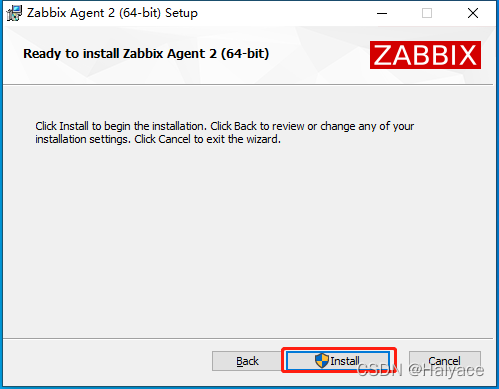
2.2.6 Click on Finish Complete the installation 
3、 ... and 、 Test the sensor
3.1 PDD Buy a garbage sensor , It looks like this 
3.2 Use according to the information sent by the merchant RTU agreement Baud rate 4800 Check none Data bits 8 Stop bit 1 The device address is 1
3.3 Use here Modbus Debug Wizard v1.0.24 To test The tool downloads itself
test result :
The temperature is equal to 0x00F5/10=245/10=24.5 degree
The humidity is equal to 0x01A4/10=420/10=42%

Four 、 Create a host
4.1 Host configuration
Host name : Enter host name
Visible name : Set alias
group : Choose your own host group
Interfaces: Add a client monitor IP The address is host IP Port defaults to 10050
5、 ... and 、 Create monitor item
5.1 Windows The host opens the device manager to view the serial port number 
5.2 Linux The host checks the serial port number and configures permissions 
#  View serial port messages   Confirm serial port name
dmesg | grep tty
#  View serial port permissions   Subordinate to the group  dialout
ls -l /dev/ttyUSB0
#  user zabbix Join user groups  dialout
gpasswd --add zabbix dialout
#  see zabbix User's group
groups zabbix
5.3 Enter the newly created host Create sensor monitoring items 
5.4 Fill in the key value according to the previous port number and test information 
Reference resources :Modbus Parameter description
Reference resources :Modbus Plug in readme
The format is :modbus.get[RTU Connection string , Device address , Function code , Address code , Number , return type , Byte order , The offset ]
RTU Connection string : Reference resources rtu://com4:4800:8n1 rtu://ttyUSB0:4800:8n1
Device address : The equipment Modbus Address
Function code :1- Discrete input (RO) 2- Coil state (RW) 3- Input register (RO) 4- Holding register (RW)
Address code : The address of the data Default 00001
Number : Number of data returned
type : Support bit、int8、uint8、uint16、int16、uint32、int32、float、uint64 、 double
Byte order :be- Big end le- The small end mbe mle
The offset : Number of registers or bits
5.5 Test read Successfully read array [450,242] The front is humidity Then there is the temperature 
5.6 Click the add button Add monitor
5.7 Create a new temperature monitoring item Type select related items Key values are defined by themselves The main item is to select the sensor created before 
5.8 Select floating point number for information type Company ℃ Switch to the process page 
5.9 Add two processes 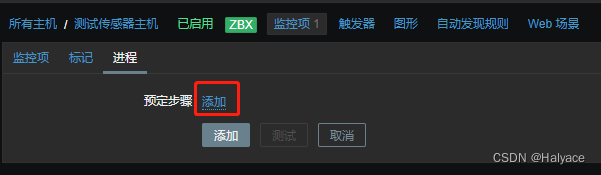
5.10 The first process extracts the second element from the array returned by the sensor If there is an error, set the value to -100; Second process times 0.1 Get the true temperature If there is an error, set the value to -100; Then click the Add button to create a monitoring item 
5.11 Reference resources 5.8-5.10 Create humidity monitoring items 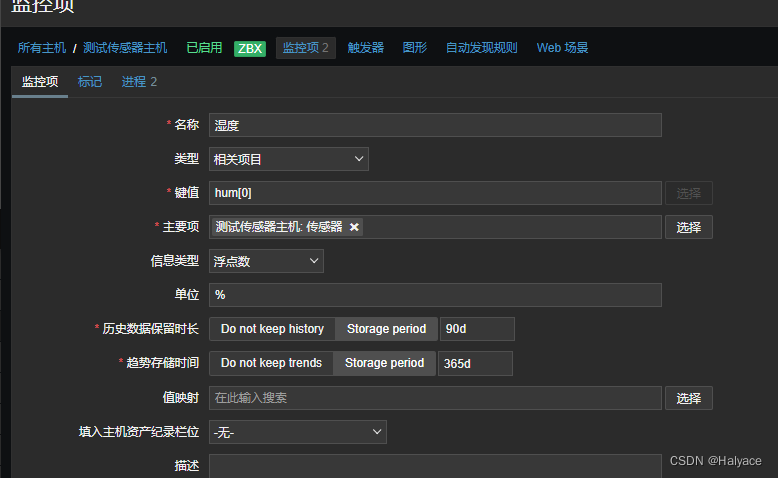

5.12 Check the sensor monitoring item Click on Execute Now Test monitoring items 
5.13 View the read data 
6、 ... and 、 Create trigger
6.1 Switch to the trigger page Click create trigger 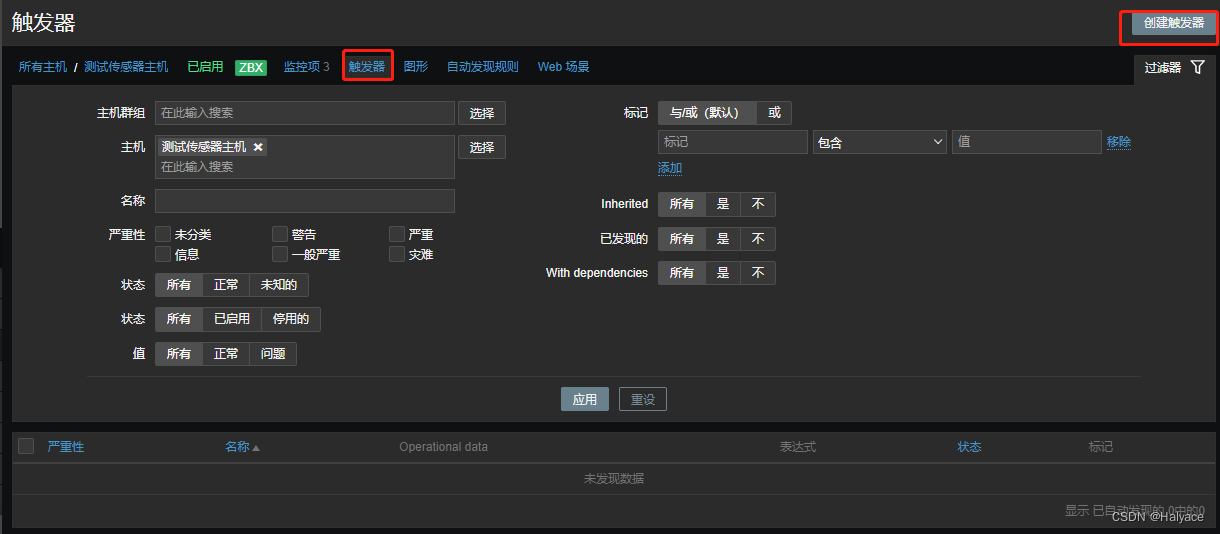
6.2 Set the trigger formula according to the picture 
6.3 Set humidity trigger with reference to temperature
7、 ... and 、 Check whether the sensor fails
7.1 Create availability monitoring items 
7.2 Create triggers to monitor availability 
8、 ... and 、 Refer to other blog posts to create nails or email alerts
Zabbix5 series - Nail alarm (Webhook) ( nineteen )
Zabbix5 series - Sound alarm 、 Email alert ( fourteen )
Zabbix5 series - Nail alarm ( 15、 ... and )
The alarm effects :
Nine 、 Refer to other blog access Grafana
Zabbix5 series - Access Grafana panel ( seventeen )
Show the effect :

Ten 、 Self made sensor template reference
Save as yaml After the file is imported, modify the macro according to the actual situation 
Template file :Temp_Hum_Sensor.yaml
zabbix_export:
  version: '5.4'
  date: '2022-06-01T11:18:51Z'
  groups:
    -
      uuid: 7df96b18c230490a9a0a9e2307226338
      name: Templates
  templates:
    -
      uuid: f367d493b0484099a8a8b7c83fefafc1
      template: 'Temp Hum Sensor'
      name:  Temperature and humidity sensor
      groups:
        -
          name: Templates
      items:
        -
          uuid: 8a73896926a542678ffd8a704a85ae96
          name:  sensor
          key: 'modbus.get[{$MODBUS_ENDPOINT},{$MODBUS_SLAVEID},{$MODBUS_FUNCTION},{$MODBUS_ADDRESS},{$MODBUS_COUNT},{$MODBUS_TYPE},{$MODBUS_ENDIANNESS},{$MODBUS_OFFSET}]'
          delay: 30s
          trends: '0'
          value_type: TEXT
          preprocessing:
            -
              type: CHECK_NOT_SUPPORTED
              parameters:
                - ''
              error_handler: CUSTOM_VALUE
              error_handler_params: '[-1000,-1000]'
        -
          uuid: 46818e12cf764928adc63158ef5c2798
          name:  humidity
          type: DEPENDENT
          key: sensor.hum
          delay: '0'
          value_type: FLOAT
          units: '%'
          preprocessing:
            -
              type: JSONPATH
              parameters:
                - '$[{$INDEX_HUM}]'
              error_handler: CUSTOM_VALUE
              error_handler_params: '-1000'
            -
              type: MULTIPLIER
              parameters:
                - '0.1'
              error_handler: CUSTOM_VALUE
              error_handler_params: '-100'
          master_item:
            key: 'modbus.get[{$MODBUS_ENDPOINT},{$MODBUS_SLAVEID},{$MODBUS_FUNCTION},{$MODBUS_ADDRESS},{$MODBUS_COUNT},{$MODBUS_TYPE},{$MODBUS_ENDIANNESS},{$MODBUS_OFFSET}]'
          tags:
            -
              tag:  Environmental Science
              value:  humidity
          triggers:
            -
              uuid: b1795712933d47db966f56282fdf75b4
              expression: 'last(/Temp Hum Sensor/sensor.hum)=-100'
              recovery_mode: RECOVERY_EXPRESSION
              recovery_expression: 'last(/Temp Hum Sensor/sensor.hum)>-100'
              name: '{$LOCATION}:  The humidity sensor has failed '
              opdata: '{ITEM.LASTVALUE1}'
              priority: DISASTER
            -
              uuid: bf23a82ece3748bb8affd1caaad7ac32
              expression: 'avg(/Temp Hum Sensor/sensor.hum,5m)<{$HUM_CRIT_LOW:""}'
              recovery_mode: RECOVERY_EXPRESSION
              recovery_expression: 'min(/Temp Hum Sensor/sensor.hum,5m)>{$HUM_CRIT_LOW:""}+3'
              name: '{$LOCATION}:  The humidity is too low : <{$HUM_CRIT_LOW:""}%'
              opdata: '{ITEM.LASTVALUE1}'
              priority: AVERAGE
              dependencies:
                -
                  name: '{$LOCATION}:  The humidity sensor has failed '
                  expression: 'last(/Temp Hum Sensor/sensor.hum)=-100'
                  recovery_expression: 'last(/Temp Hum Sensor/sensor.hum)>-100'
            -
              uuid: f5d8d3d3aae04a27a32cd55dc527ae06
              expression: 'avg(/Temp Hum Sensor/sensor.hum,5m)>{$HUM_CRIT:""}'
              recovery_mode: RECOVERY_EXPRESSION
              recovery_expression: 'max(/Temp Hum Sensor/sensor.hum,5m)<{$HUM_CRIT:""}-3'
              name: '{$LOCATION}:  Humidity above threshold : >{$HUM_CRIT:""}%'
              opdata: '{ITEM.LASTVALUE1}'
              priority: HIGH
            -
              uuid: eb097881d9534e9aac2885e182d1afb9
              expression: 'avg(/Temp Hum Sensor/sensor.hum,5m)>{$HUM_WARN:""}'
              recovery_mode: RECOVERY_EXPRESSION
              recovery_expression: 'max(/Temp Hum Sensor/sensor.hum,5m)<{$HUM_WARN:""}-3'
              name: '{$LOCATION}:  Humidity above warning value : >{$HUM_WARN:""}%'
              opdata: '{ITEM.LASTVALUE1}'
              priority: WARNING
              dependencies:
                -
                  name: '{$LOCATION}:  Humidity above threshold : >{$HUM_CRIT:""}%'
                  expression: 'avg(/Temp Hum Sensor/sensor.hum,5m)>{$HUM_CRIT:""}'
                  recovery_expression: 'max(/Temp Hum Sensor/sensor.hum,5m)<{$HUM_CRIT:""}-3'
        -
          uuid: 14de9d958ed74630853bb709189210bc
          name:  temperature
          type: DEPENDENT
          key: sensor.temp
          delay: '0'
          value_type: FLOAT
          units: °C
          preprocessing:
            -
              type: JSONPATH
              parameters:
                - '$[{$INDEX_TEMP}]'
              error_handler: CUSTOM_VALUE
              error_handler_params: '-1000'
            -
              type: MULTIPLIER
              parameters:
                - '0.1'
              error_handler: CUSTOM_VALUE
              error_handler_params: '-100'
          master_item:
            key: 'modbus.get[{$MODBUS_ENDPOINT},{$MODBUS_SLAVEID},{$MODBUS_FUNCTION},{$MODBUS_ADDRESS},{$MODBUS_COUNT},{$MODBUS_TYPE},{$MODBUS_ENDIANNESS},{$MODBUS_OFFSET}]'
          tags:
            -
              tag:  Environmental Science
              value:  temperature
          triggers:
            -
              uuid: 477cf2cb38cb429c88aa3529e729238b
              expression: 'last(/Temp Hum Sensor/sensor.temp)=-100'
              recovery_mode: RECOVERY_EXPRESSION
              recovery_expression: 'last(/Temp Hum Sensor/sensor.temp)>-100'
              name: '{$LOCATION}:  The temperature sensor has failed '
              opdata: '{ITEM.LASTVALUE1}'
              priority: DISASTER
            -
              uuid: c0a2e01b9e9c41c58c3ae84eb8700104
              expression: 'avg(/Temp Hum Sensor/sensor.temp,5m)<{$TEMP_CRIT_LOW:""}'
              recovery_mode: RECOVERY_EXPRESSION
              recovery_expression: 'min(/Temp Hum Sensor/sensor.temp,5m)>{$TEMP_CRIT_LOW:""}+3'
              name: '{$LOCATION}:  The temperature is too low : <{$TEMP_CRIT_LOW:""}℃'
              opdata: '{ITEM.LASTVALUE1}'
              priority: AVERAGE
              dependencies:
                -
                  name: '{$LOCATION}:  The temperature sensor has failed '
                  expression: 'last(/Temp Hum Sensor/sensor.temp)=-100'
                  recovery_expression: 'last(/Temp Hum Sensor/sensor.temp)>-100'
            -
              uuid: 886fdaa74729441887f89a5ebf6a5d32
              expression: 'avg(/Temp Hum Sensor/sensor.temp,5m)>{$TEMP_CRIT:""}'
              recovery_mode: RECOVERY_EXPRESSION
              recovery_expression: 'max(/Temp Hum Sensor/sensor.temp,5m)<{$TEMP_CRIT:""}-3'
              name: '{$LOCATION}:  The temperature is above the critical value : >{$TEMP_CRIT:""}℃'
              opdata: '{ITEM.LASTVALUE1}'
              priority: HIGH
            -
              uuid: ba1e02e7d97f4f9f91a21ce61ef80757
              expression: 'avg(/Temp Hum Sensor/sensor.temp,5m)>{$TEMP_WARN:""}'
              recovery_mode: RECOVERY_EXPRESSION
              recovery_expression: 'max(/Temp Hum Sensor/sensor.temp,5m)<{$TEMP_WARN:""}-3'
              name: '{$LOCATION}:  The temperature is higher than the warning value : >{$TEMP_WARN:""}℃'
              opdata: '{ITEM.LASTVALUE1}'
              priority: WARNING
              dependencies:
                -
                  name: '{$LOCATION}:  The temperature is above the critical value : >{$TEMP_CRIT:""}℃'
                  expression: 'avg(/Temp Hum Sensor/sensor.temp,5m)>{$TEMP_CRIT:""}'
                  recovery_expression: 'max(/Temp Hum Sensor/sensor.temp,5m)<{$TEMP_CRIT:""}-3'
        -
          uuid: fc428f3e82f34203a0ba02074f19be36
          name:  Sensor availability
          type: INTERNAL
          key: 'zabbix[host,agent,available]'
          history: 7d
          valuemap:
            name: zabbix.host.available
          tags:
            -
              tag:  Environmental Science
              value:  Sensor status
          triggers:
            -
              uuid: 385456b1a3bc4fca9fd2ba16ac53bc67
              expression: 'max(/Temp Hum Sensor/zabbix[host,agent,available],{$AGENT.TIMEOUT})=0'
              name: '{$LOCATION}:  The sensor has failed '
              opdata: '{ITEM.LASTVALUE1}'
              priority: DISASTER
              manual_close: 'YES'
      macros:
        -
          macro: '{$AGENT.TIMEOUT}'
          value: 30s
          description:  Timeout time , After this timeout , The sensor is considered unavailable . Only applicable to those available from Zabbix The server / Proxy access proxy ( Passive mode ).
        -
          macro: '{$HUM_CRIT}'
          value: '80'
          description: ' High humidity threshold   Company : %'
        -
          macro: '{$HUM_CRIT_LOW}'
          value: '35'
          description: ' Low humidity threshold   Company : %'
        -
          macro: '{$HUM_WARN}'
          value: '75'
          description: ' High humidity warning value   Company : %'
        -
          macro: '{$INDEX_HUM}'
          value: '0'
          description:  Returns the humidity index of the data array
        -
          macro: '{$INDEX_TEMP}'
          value: '1'
          description:  Return the temperature index of the data array
        -
          macro: '{$LOCATION}'
          value:  Computer room
          description:  Sensor position
        -
          macro: '{$MODBUS_ADDRESS}'
          value: '0'
          description: 'Modbus  Address   Default 00001'
        -
          macro: '{$MODBUS_COUNT}'
          value: '2'
          description: 'Modbus  Return quantity   Default 1'
        -
          macro: '{$MODBUS_ENDIANNESS}'
          value: be
          description: 'Modbus  Byte order :be- High bit decoding 、le- Low bit decoding 、mbe、mle'
        -
          macro: '{$MODBUS_ENDPOINT}'
          value: 'rtu://com4:4800:8n1'
          description: 'Modbus TCP or RTU Connection string '
        -
          macro: '{$MODBUS_FUNCTION}'
          value: '3'
          description: 'Modbus  Function code :1- Read coil status  2- Read discrete input state  3- Read holding register  4- Read input register '
        -
          macro: '{$MODBUS_OFFSET}'
          value: '0'
          description: 'Modbus  Offset '
        -
          macro: '{$MODBUS_SLAVEID}'
          value: '1'
          description: 'Modbus  Address code '
        -
          macro: '{$MODBUS_TYPE}'
          value: int16
          description: 'Modbus  return type :bit、int8、uint8、uint16、int16、uint32、int32、float、uint64、double'
        -
          macro: '{$TEMP_CRIT}'
          value: '35'
          description: ' High temperature threshold   Company : ℃'
        -
          macro: '{$TEMP_CRIT_LOW}'
          value: '18'
          description: ' Low temperature threshold   Company : ℃'
        -
          macro: '{$TEMP_WARN}'
          value: '30'
          description: ' High temperature warning value   Company : ℃'
      valuemaps:
        -
          uuid: 1f9d9355ce8145d99bfc7dfb74ba29c5
          name: zabbix.host.available
          mappings:
            -
              value: '0'
              newvalue:  abnormal
            -
              value: '1'
              newvalue:  normal
            -
              value: '2'
              newvalue:  Unknown
  graphs:
    -
      uuid: 54e87629e451438a9e865089fd31c869
      name:  Temperature and humidity sensor
      width: '600'
      show_triggers: 'NO'
      graph_items:
        -
          sortorder: '1'
          drawtype: BOLD_LINE
          color: FF0000
          item:
            host: 'Temp Hum Sensor'
            key: sensor.temp
        -
          sortorder: '2'
          color: 42A5F5
          item:
            host: 'Temp Hum Sensor'
            key: sensor.hum
边栏推荐
- Up the Strip
- Pat class a 1016 phone bills (time difference)
- 魔王冷饭||#099 魔王说西游;老板的本质;再答中年危机;专业选择
- Modulenotfounderror: no module named 'rospy', PIP could not find the installation package
- [22 summer reconstruction 1] codeworks round 791 (Div. 2)
- Vector 3 (static member)
- cadence SPB17.4 - allegro - 優化指定單條電氣線折線連接角度 - 折線轉圓弧
- Sélecteur de hiérarchie
- [cmake command notes]find_ path
- Prevent others from using the browser to debug
猜你喜欢

3DMAX modeling notes (I): introducing 3DMAX and creating the first model Hello World
![[initial launch] there are too many requests at once, and the database is in danger](/img/c1/807575e1340b8f8fe54197720ef575.png)
[initial launch] there are too many requests at once, and the database is in danger
Voice network multiplayer video recording and synthesis support offline re recording | Nuggets technology solicitation

OSPF experiment in mGRE environment

Philosopher's walk gym divide and conquer + fractal
![[sliding window] leetcode992 Subarrays with K Different Integers](/img/69/1ac0c54d33af0f7a9e3db3e82d076b.png)
[sliding window] leetcode992 Subarrays with K Different Integers

MySQL - SQL execution process
![[Title Fine brushing] 2023 Hesai FPGA](/img/e8/d9d8c549a4fee529b69ebfc9a9d6ef.png)
[Title Fine brushing] 2023 Hesai FPGA

Autumn move script a

Cadence spb17.4 - Allegro - optimize and specify the polyline connection angle of a single electrical line - polyline to arc

随机推荐
MySQL-Seconds_ behind_ Master accuracy error
[hdu] P7079 Pty loves lines
OSPF comprehensive experiment
Psychological analysis of the safest spot Silver
cadence SPB17.4 - 中文UI设置
基于深度学习的视觉目标检测技术综述
C# SerializableDictionary序列化/反序列化
Lexical Sign Sequence
BGP federal comprehensive experiment
Is it safe for Hongyuan futures to open an account? Can Hongyuan futures company reduce the handling fee?
JMeter associated login 302 type interface
C serializabledictionary serialization / deserialization
office2016+visio2016
B tree and b+ tree
[hdu] P6964 I love counting
LeetCode 206. Reverse linked list (iteration + recursion)
E-R图
three. JS simulated driving tour art exhibition hall - creating super camera controller
Overview of visual object detection technology based on deep learning
SAP ui5 application development tutorial 102 - detailed explanation of the print function of SAP ui5 applications